
eclipse maven创建web项目
创建SSM整合项目
一.使用Eclipse中的maven插件创建web项目
1:
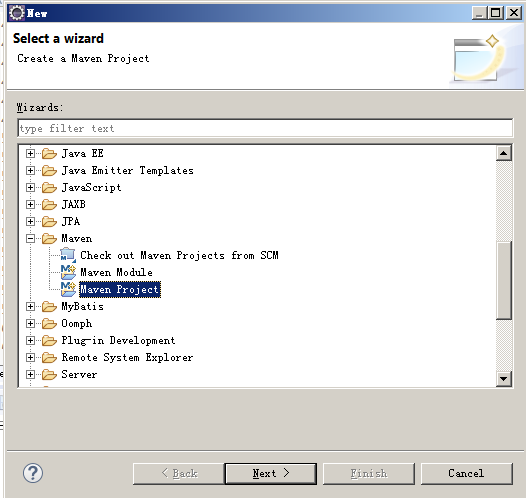
2:

3:

4:
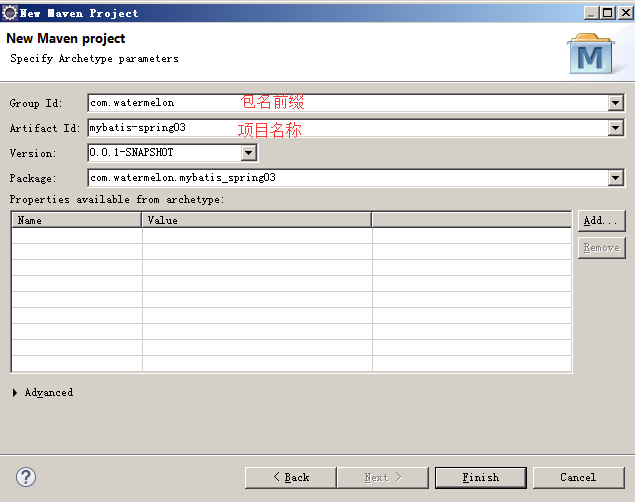
5:maven web项目创建成功。(去掉index.jsp文件重新创建jsp文件,报错消失)

6.
7.
8.Eclipse创建一个动态web项目,将其中的web.xml配置文件拷贝到maven项目中,注意修改项目名称。
二、添加xml配置
1.web.xml配置
<?xml version="1.0" encoding="UTF-8"?>

<web-app xmlns:xsi="http://www.w3.org/2001/XMLSchema-instance" xmlns="http://xmlns.jcp.org/xml/ns/javaee" xsi:schemaLocation="http://xmlns.jcp.org/xml/ns/javaee http://xmlns.jcp.org/xml/ns/javaee/web-app_3_1.xsd" id="WebApp_ID" version="3.1">

  <display-name>mybatis-spring02</display-name>

  <welcome-file-list>

    <welcome-file>index.html</welcome-file>

    <welcome-file>index.htm</welcome-file>

    <welcome-file>index.jsp</welcome-file>

    <welcome-file>default.html</welcome-file>

    <welcome-file>default.htm</welcome-file>

    <welcome-file>default.jsp</welcome-file>

  </welcome-file-list>

  <!-- web容器启动时根据contextConfigLocation配置的路径读取Spring的配置文件,然后启动Spring -->

  <context-param>

      <param-name>contextConfigLocation</param-name>

      <param-value>classpath:applicationContext.xml</param-value>

  </context-param>

  <listener>

      <listener-class>

          org.springframework.web.context.ContextLoaderListener

      </listener-class>

  </listener>

  <!-- 配置Springmvc所有的请求都要通过DispatcherServlet -->

  <servlet>

      <servlet-name>springmvc</servlet-name>

      <servlet-class>

          org.springframework.web.servlet.DispatcherServlet

      </servlet-class>

      <init-param>

          <param-name>contextConfigLocation</param-name>

          <param-value>classpath:springmvc-servlet.xml</param-value>

      </init-param>

      <load-on-startup>1</load-on-startup>

  </servlet>

  <servlet-mapping>

      <servlet-name>springmvc</servlet-name>

      <url-pattern>/</url-pattern>

  </servlet-mapping>

  <!-- 编码utf-8 -->

  <filter>

      <filter-name>SpringEncodingFilter</filter-name>

      <filter-class>

          org.springframework.web.filter.CharacterEncodingFilter

      </filter-class>

      <init-param>

          <param-name>encoding</param-name>

          <param-value>UTF-8</param-value>

      </init-param>

      <init-param>

          <param-name>forceEncoding</param-name>

          <param-value>true</param-value>

      </init-param>

  </filter>

  <filter-mapping>

      <filter-name>SpringEncodingFilter</filter-name>

      <url-pattern>/*</url-pattern>

  </filter-mapping>

</web-app>
2.springmvc-servlet.xml
<?xml version="1.0" encoding="UTF-8"?>

<beans xmlns="http://www.springframework.org/schema/beans"

    xmlns:xsi="http://www.w3.org/2001/XMLSchema-instance"

    xmlns:context="http://www.springframework.org/schema/context"

    xmlns:mvc="http://www.springframework.org/schema/mvc"

    xmlns:tx="http://www.springframework.org/schema/tx"

    xsi:schemaLocation="http://www.springframework.org/schema/mvc http://www.springframework.org/schema/mvc/spring-mvc-4.3.xsd

        http://www.springframework.org/schema/beans http://www.springframework.org/schema/beans/spring-beans.xsd

        http://www.springframework.org/schema/context http://www.springframework.org/schema/context/spring-context-4.3.xsd

        http://www.springframework.org/schema/tx http://www.springframework.org/schema/tx/spring-tx-4.3.xsd">

    <!-- 启用Controller注解支持 -->

    <mvc:annotation-driven></mvc:annotation-driven>

    <!-- 配置一个简单的静态资源映射规则 -->

    <mvc:resources location="static/" mapping="/static/**"></mvc:resources>

    <!-- 扫描Controller包下面的类 -->

    <context:component-scan base-package="com.watermelon.*.controller"></context:component-scan>

    <!-- InternalResourceViewResolver将视图名映射为URL文件 -->

    <bean class="org.springframework.web.servlet.view.InternalResourceViewResolver">

        <property name="viewClass" value="org.springframework.web.servlet.view.JstlView"></property>

        <property name="prefix" value="/WEB-INF/jsp/"></property>

        <property name="suffix" value=".jsp"></property>

    </bean>

</beans>
3.mybatis-config.xml
<?xml version="1.0" encoding="UTF-8" ?>

<!DOCTYPE configuration

    PUBLIC "-//mybatis.org//DTD Config 3.0//EN"

    "http://mybatis.org/dtd/mybatis-3-config.dtd">

<configuration>

    <settings>

        <setting name="logImpl" value="LOG4J"/>

        <setting name="cacheEnabled" value="true"/>

        <setting name="mapUnderscoreToCamelCase" value="true"/>

        <setting name="aggressiveLazyLoading" value="false"/>

    </settings>

</configuration>
4.log4j.properties
### Global logging configuration

log4j.rootLogger=ERROR, stdout

### Uncomment for MyBatis logging

log4j.logger.com.watermelon.web.mapper=TRACE

### Console output...

log4j.appender.stdout=org.apache.log4j.ConsoleAppender

log4j.appender.stdout.layout=org.apache.log4j.PatternLayout

log4j.appender.stdout.layout.ConversionPattern=%5p [%t] - %m%n
5.applicationContext.xml
<?xml version="1.0" encoding="UTF-8"?>

<beans xmlns="http://www.springframework.org/schema/beans"

    xmlns:xsi="http://www.w3.org/2001/XMLSchema-instance"

    xmlns:aop="http://www.springframework.org/schema/aop"

    xmlns:tx="http://www.springframework.org/schema/tx"

    xmlns:context="http://www.springframework.org/schema/context"

    xmlns:mybatis-spring="http://mybatis.org/schema/mybatis-spring"

    xsi:schemaLocation="http://www/springframework.org/schema/context http://www/springframework.org/schema/context/spring-context.xsd

        http://mybatis.org/schema/mybatis-spring http://mybatis.org/schema/mybatis-spring-1.2.xsd

        http://www.springframework.org/schema/beans http://www.springframework.org/schema/beans/spring-beans.xsd

        http://www.springframework.org/schema/context http://www.springframework.org/schema/context/spring-context-4.3.xsd

        http://www.springframework.org/schema/aop http://www.springframework.org/schema/aop/spring-aop-4.3.xsd

        http://www.springframework.org/schema/tx http://www.springframework.org/schema/tx/spring-tx-4.3.xsd">

     <!--spring  -->

     <context:component-scan base-package="com.watermelon.web.service.impl"/>

    <bean class="org.mybatis.spring.mapper.MapperScannerConfigurer">

        <property name="addToConfig" value="true"/>

        <property name="basePackage" value="com.watermelon.web.mapper"/>

    </bean>

     <!-- spring自动扫描 包下面的带注解的类,并注册到Sping的bean容器中 service.impl

    <context:component-scan base-package="com.watermelon.web.service.impl"></context:component-scan>-->

    <!-- mybatis-spring:scan 会扫描com.watermelon.dao包下面的所有接口当作Spring的bean配置

    <mybatis-spring:scan base-package="com.watermelon.web.mapper"/>-->

    <bean id="dataSource" class="org.apache.ibatis.datasource.pooled.PooledDataSource">

        <property name="driver" value="com.mysql.jdbc.Driver"/>

        <property name="url" value="jdbc:mysql://localhost:3306/simple"/>

        <property name="username" value="root"/>

        <property name="password" value="123456"/>

    </bean>

    <bean id="sqlSessionFactory" class="org.mybatis.spring.SqlSessionFactoryBean">

        <property name="configLocation" value="classpath:mybatis-config.xml"/>

        <property name="dataSource" ref="dataSource"/>

        <property name="mapperLocations">

            <array>

                <value>classpath:com/watermelon/web/mapper/*.xml</value>

            </array>

        </property>

        <property name="typeAliasesPackage" value="com.watermelon.web.model"/>

    </bean>

  <!-- Spring  aop事务 -->

    <aop:aspectj-autoproxy/>

    <aop:config>

        <aop:pointcut id="appService" expression="execution(* com.watermelon.*.service..*Service*.*(..))"/>

        <aop:advisor advice-ref="txAdvice" pointcut-ref="appService"/>

    </aop:config>

    <tx:advice id="txAdvice" transaction-manager="transactionManager">

        <tx:attributes>

            <tx:method name="select*" read-only="true"/>

            <tx:method name="find*" read-only="true"/>

            <tx:method name="get*" read-only="true"/>

            <tx:method name="*"/>

        </tx:attributes>

    </tx:advice>

    <bean id="transactionManager" class="org.springframework.jdbc.datasource.DataSourceTransactionManager">

        <property name="dataSource" ref="dataSource"/>

    </bean>

</beans>
项目结构:

eclipse maven创建web项目的更多相关文章
- Eclipse maven创建web项目报错Could not resolve archetype
1.下载http://repo1.maven.org/maven2/archetype-catalog.xml 通过eclipse下载和网页下载我这里都比较慢,最后用的迅雷下载 2.将本地xml文件配 ...
- (转)Maven学习总结(七)——eclipse中使用Maven创建Web项目
孤傲苍狼只为成功找方法,不为失败找借口! Maven学习总结(七)——eclipse中使用Maven创建Web项目 一.创建Web项目 1.1 选择建立Maven Project 选择File -&g ...
- Maven学习总结(7)——eclipse中使用Maven创建Web项目
Maven学习总结(七)--eclipse中使用Maven创建Web项目 一.创建Web项目 1.1 选择建立Maven Project 选择File -> New ->Project,如 ...
- Eclipse+Maven创建webapp项目<一>(转)
还在为jar下载而烦恼吗?还在为jar依赖关系而烦恼吗?还在为jar冲突而烦恼吗?强大的maven项目管理工具来拯救你们呢?自动下载jar,自动下载jar依赖包.你什么都不用做,只需要在中央仓库中co ...
- Eclipse+Maven创建webapp项目
Eclipse+Maven创建webapp项目<一> 1.开启eclipse,右键new-->other,如下图找到maven project 2.选择maven project,显 ...
- Eclipse+Maven创建webapp项目<一>
Eclipse+Maven创建webapp项目<一> 1.开启eclipse,右键new——>other,如下图找到maven project 2.选择maven project,显 ...
- Eclipse+Maven创建webapp项目<一><二><三>
转-http://www.cnblogs.com/candle806/p/3439469.html Eclipse+Maven创建webapp项目<一> 1.开启eclipse,右键new ...
- Eclipse+Maven创建webapp项目<一> (转)
Eclipse+Maven创建webapp项目<一> 1.开启eclipse,右键new——>other,如下图找到maven project 2.选择maven project,显 ...
- maven 创建web项目的标准目录结构
maven 创建web项目的标准目录结构 CreateTime--2018年4月18日21:05:37 Author:Marydon 1.标准目录介绍(开发目录) 2.在eclipse下,目录展示 ...
随机推荐
- DataBase安装及简单配置
下载以及安装 打开mysql官网下载页面:http://dev.mysql.com/downloads/mysql/ 用管理员身份打开cmd命令行工具,cd到解压文件的bin目录 输入mysqld i ...
- Vue如何使用vue-area-linkage实现地址三级联动效果
很多时候我们需要使用地址三级联动,即省市区三级联动.网上有很多插件,在此介绍Vue的一款地区联动插件:vue-area-linkage,下面介绍如何使用这个插件实现地址联动效果: 1. ...
- Floyd算法实现总结
问题描述 给出图,求任意两点的最短距离 算法思路 定义n+1个矩阵矩阵A,和记录路径的矩阵path 依次求A0~An的值,最后的An即为最短路径矩阵 // int A[8][7][7],path[7] ...
- 【转】Java读写文件大全
使用Java操作文本文件的方法详解 最初java是不支持对文本文件的处理的,为了弥补这个缺憾而引入了Reader和Writer两个类,这两个类都是抽象类,Writer中 write(ch ...
- bzoj4553 [Tjoi2016&Heoi2016]序列 树状数组(区间最大值)+cqd
[Tjoi2016&Heoi2016]序列 Time Limit: 20 Sec Memory Limit: 128 MBSubmit: 1006 Solved: 464[Submit][ ...
- 【Tomcat】tomcat启动后查看运行时JVM参数
Tomcat优化配置参考http://www.cnblogs.com/qlqwjy/p/8007490.html 1.启动服务后访问localhost,点击Server Status
- POJ 3518 (后缀自动机)
POJ 3518 Boring Problem : 给一个串S,询问串S有多个子串出现至少两次且位置不重叠. Solution : 对S串建立后缀自动机,再建立后缀树,dfs一遍统计处每个结点的子树中 ...
- Git Cheat Sheet 中文版
Git Cheat Sheet 中文版 索引 配置 配置文件 创建 本地修改 搜索 提交历史 分支与标签 更新与发布 合并与重置 撤销 Git Flow 配置 列出当前配置: $ git config ...
- ***mysql 用一个表的一列,去更新另一表的一列
需求: 老板给了一个EXCEL数据,是本人提供的一个模板,含ID,现在相当于要导入这新增的一列数据到数据库中的某一个表. 方法一:用navicat,在excel中复制一列,再粘贴到navicat中的一 ...
- 07-js数组
<!DOCTYPE html> <html> <head> <meta charset="UTF-8"> <title> ...