
css3圆角矩形、盒子阴影
css3圆角矩形

        div{

            width: 200px;

            height: 200px;

            border: #f00 solid 1px;

            margin-bottom: 10px;

        }
1、设置 border-radius: 20px;
        div:first-of-type{

            border-radius: 20px;

        }

2、设置 border-radius: 20px 40px;
        div:nth-of-type(2){

            border-radius: 20px 40px;

        }
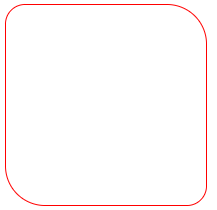
3、设置 border-radius: 20px 40px;
        div:nth-of-type(3){

            border-radius: 20px 40px 60px;/*上-左右-下*/

        }
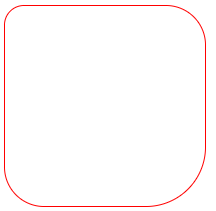
4、设置 border-radius: 20px 40px 60px 80px;
        div:nth-of-type(4){

            border-radius: 20px 40px 60px 80px;/*上-右-下-左*/

        }

5、设置扇形
        div:nth-of-type(5){

            border-radius: 0px 0px 200px;

        }

6、设置圆形
        div:nth-of-type(6){

            border-radius: 100px;

        }
        div:nth-of-type(7){

            border-radius: 50%;

        }
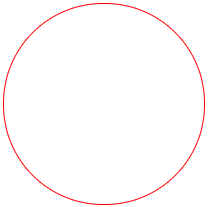 推荐使用border-radius: 50%;
盒子阴影
语法:
box-shadow:水平阴影、垂直阴影、羽化值、阴影大小、阴影颜色、阴影类别【内阴影、外阴影】
        #con{

            width: 200px;

            height: 200px;

            border: #000 solid 1px;

            border-radius: 10px;

            box-shadow: 3px 3px 3px 3px #666;/*水平阴影、垂直阴影、羽化值、阴影大小、阴影颜色*/

        }

box-shadow: 3px 3px 3px 3px #666 inset;/*水平阴影、垂直阴影、羽化值、阴影大小、阴影颜色、内阴影*/
案例:
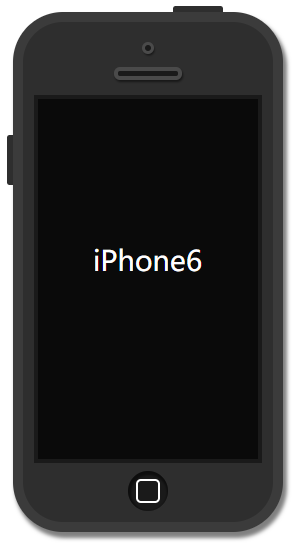
    <div id="phone">

        <div id="camera"></div>

        <div id="headphone"></div>

        <div id="screen">

            <p>iPhone6</p>

        </div>

        <div id="btn"></div>

    </div>
css代码:
        #phone{

            width: 250px;

            height: 500px;

            background: #2e2e2e;

            margin: 60px auto;

            border: #3b3b3b solid 10px;

            border-radius: 50px;

            box-shadow: 3px 5px 5px 1px rgba(0, 0, 0, 0.5);

            position: relative;

        }

        #phone::before{

            content: '';

            width: 50px;

            height: 6px;

            background-color: #2e2e2e;

            display: block;

            position: absolute;

            top: -16px;

            left: 150px;

            border-radius: 3px 3px 0px 0px;

        }

        #phone::after{

            content: '';

            width: 6px;

            height: 50px;

            background-color: #2e2e2e;

            display: block;

            position: absolute;

            top: 113px;

            left: -16px;

            border-radius: 3px 0px 0px 3px;

        }

        #camera{

            width: 6px;

            height: 6px;

            border: #4a4a4a solid 3px;

            margin: 20px auto 0px;

            background-color: #1a1a1a;

            border-radius: 50%;

            box-shadow: 1px 2px 2px rgba( 0, 0, 0, 0.5);

        }

        #headphone{

            width: 60px;

            height: 5px;

            border: #4a4a4a solid 4px;

            margin: 13px auto;

            background-color: #1a1a1a;

            border-radius: 10px;

            box-shadow: 1px 2px 2px rgba( 0, 0, 0, 0.5);

        }

        #screen{

            width: 220px;

            height: 360px;

            margin: 15px auto 0px;

            background-color: #0a0a0a;

            border: #1a1a1a solid 4px;

        }

        #screen p{

            color: #fff;

            text-align: center;

            line-height: 266px;

            font-size: 28px;

        }

        #btn{

            width: 40px;

            height: 40px;

            background-color: #1a1a1a;

            margin: 8px auto 0px;

            border-radius: 50%;

            box-shadow: 1px 2px 2px 2px rgba(0, 0, 0, 0.5) inset;

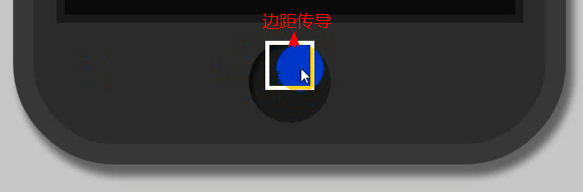
            overflow: hidden;/*阻止边界传导*/

        }

        #btn::before{

            content: '';

            width: 20px;

            height: 20px;

            border: #fff solid 2px;

            display: block;

            margin: 8px auto;

            border-radius: 5px;

        }
|
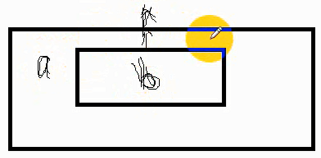
如果子盒子(内部盒子)有上边距,父盒子是空的,子盒子的上边距会传导到父盒子,整合盒子往下来。 不想让它传导,在父盒子样式上加overflow: hidden; |
css3圆角矩形、盒子阴影的更多相关文章
- 第50天学习打卡(CSS 圆角边框 盒子阴影 定位)
4.4圆角边框 圆角边框: <!DOCTYPE html> <html lang="en"> <head> <meta char ...
- 纯代码利用CSS3 圆角边框和盒子阴影 制作 iphone 手机效果
原文:纯代码利用CSS3 圆角边框和盒子阴影 制作 iphone 手机效果 大家好,我是小强老师. 今天我们看下CSS3最为简单的两个属性. css3给我们带来了很多视觉的感受和变化,以前的图片做的事 ...
- css3新增(圆角边框(border-radius),盒子阴影(box-shadow),文字阴影(text-shadow),背景缩放(background-size))
1.圆角边框 border-radius border-radius 属性用于设置元素的外边框圆角 语法:border-radius:length; 参数值可以是数值 或者 百分比 的形式 正方形, ...
- CSS第四天总结 更多的属性 圆角 边框图片 段落属性 颜色渐变 盒子阴影
圆角边框: border-radius 一个值时表示四个角用的圆半径,4个值时分别是左上角.右上角.左下角.右下角,单位可以是px和百分比,百分比是半径相对于边框长度的比例 在CSS3中我们终于 ...
- CSS3 02. 边框、边框圆角、边框阴影、边框图片、渐变、线性渐变、径向渐变、背景、过渡transition、2D转换
边框圆角 border-radius 每个角可以设置两个值,x值.y值 border-top-left-radius:水平半径 垂直半径 border-radius:水平半径/垂直半径 border- ...
- 详解使用CSS3绘制矩形、圆角矩形、圆形、椭圆形、三角形、弧
1.矩形 绘制矩形应该是最简单的了,直接设置div的宽和高,填充颜色,效果就出来了. 2.圆角矩形 绘制圆角矩形也很简单,在1的基础上,在使用css3的border-radius,即可. 3.圆 根据 ...
- JD . 圆角矩形、权重层级、浮动撑开盒子及元素的默认间距、清除浮动、隐藏盒子、盒子的撑开与撑破、子盒子垂直居中|不占位置
---恢复内容开始--- 圆角矩形 border-radius:50% 40% 30% 33px: 像素.百分比.小数( 0.5 ) 左上.右上.右下.左下 权重: 标签 1 : 类选择器 ...
- 从零开始学习前端开发 — 16、CSS3圆角与阴影
一.css3圆角: border-radius:数值+单位; 1.设置一个值:border-radius:20px; 四个方向圆角都为20px(水平半径和垂直半径相等) 2.设置两个值 border- ...
- CSS3 --添加阴影(盒子阴影、文本阴影的使用)
CSS3 - 给div或者文字添加阴影(盒子阴影.文本阴影的使用)CSS3定义了两种阴影:盒子阴影和文本阴影.其中盒子阴影需要IE9及其更新版本,而文本阴影需要IE10及其更新版本.下面分别介绍两种 ...
随机推荐
- javascript实现数据结构: 稀疏矩阵之三元组线性表表示
稀疏矩阵(Sparse Matrix):对于稀疏矩阵,目前还没有一个确切的定义.设矩阵A是一个n*m的矩阵中有s个非零元素,设 δ=s/(n*m),称δ为稀疏因子, 如果某一矩阵的稀疏因子δ满足δ≦ ...
- Infor SyteLine创建一个数据维护窗口
上次有在SyteLine解决一个问题<匹配与显示中文说明> http://www.cnblogs.com/insus/p/3396541.html .这些数据需要数据库管理员在数据库才能维 ...
- 一键生成http服务器
如果你想用最简单的方法在内网共享目录,可以考虑为要共享的目录生成一个http服务器,这样就可以在内网任一台设备打开浏览器就可以浏览了.简单举几个例,有了这个http服务器就可以: 在手机浏览器里观看电 ...
- 一个简单的例子理解Kubernetes的三种IP地址类型
很多Kubernetes的初学者对Kubernetes里面三种不同的IP地址和工作机制理解得不是很清楚. 本文我们通过一个最简单的例子来学习. 用如下命令行创建一个基于nginx的deployment ...
- C语言 条件编译(if )
#include <stdio.h> #define NUM -1 int main(int argc, const char * argv[]) { #if NUM > 0 pri ...
- next_permutation,POJ(1256)
题目链接:http://poj.org/problem?id=1256 解题报告: 1.sort函数是按照ASC11码排序,而这里是按照 'A'<'a'<'B'<'b'<... ...
- 深度优先搜索(dfs),城堡问题
题目链接:http://poj.org/problem?id=1164 1.深搜,每个点都访问一次,没有标记的话,就做深搜,同时标记. #include <iostream> #inclu ...
- 【[SCOI2010]生成字符串】
\(n=m\)时候经典的卡特兰 那\(n!=m\)呢,还是按照卡特兰的方式来推 首先总情况数就是\(\binom{n+m}{n}\),在\(n+m\)个里选择\(n\)个\(1\) 显然有不合法的情况 ...
- [JSOI2010]部落划分
嘟嘟嘟 一道不错的题,解法不少. 最易于理解的是最小生成树的做法: 首先每两个点之间都连一条长度为这两个点的距离的边,形成完全图. 然后跑最小生成树,直到剩k个联通块,这时候合并成k - 1个联通块的 ...
- PAT (Basic Level) Practise (中文)-1040. 有几个PAT(25)
1040. 有几个PAT(25) http://www.patest.cn/contests/pat-b-practise/1040 字符串APPAPT中包含了两个单词“PAT”,其中第一个P ...