
Prometheus Operator 监控Kubernetes
Prometheus Operator 监控Kubernetes
1. Prometheus的基本架构
Prometheus是一个开源的完整监控解决方案,涵盖数据采集、查询、告警、展示整个监控流程,下图是Prometheus的架构图:
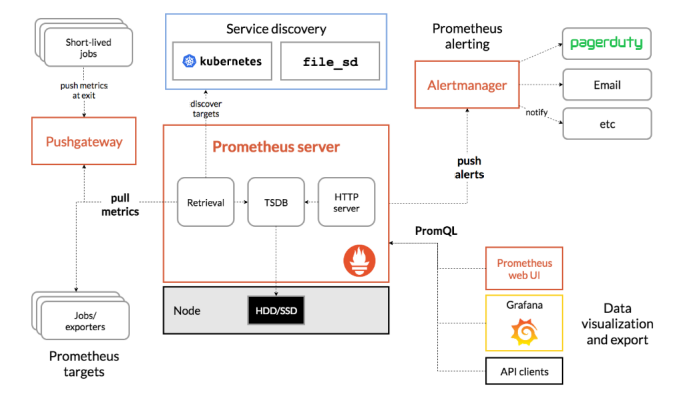
官方文档:https://prometheus.io/docs/introduction/overview/
2. 组件说明
Prometheus生态系统由多个组件组成。其中许多组件都是可选的
- Promethus server
必须安装,本质是一个时序数据库,主要负责数据pull、存储、分析,提供 PromQL 查询语言的支持;
- Push Gateway
非必选项,支持临时性Job主动推送指标的中间网关
- exporters
部署在客户端的agent,如 node_exporte, mysql_exporter等
提供被监控组件信息的 HTTP 接口被叫做 exporter ,目前互联网公司常用的组件大部分都有 exporter 可以直接使用,比如 Varnish、Haproxy、Nginx、MySQL、Linux 系统信息 (包括磁盘、内存、CPU、网络等等);如:https://prometheus.io/docs/instrumenting/exporters/
- alertmanager
用来进行报警,Promethus server 经过分析, 把出发的警报发送给 alertmanager 组件,alertmanager 组件通过自身的规则,来发送通知,(邮件,或者webhook)
3. Prometheus-Operator
Prometheus-Operator的架构图:
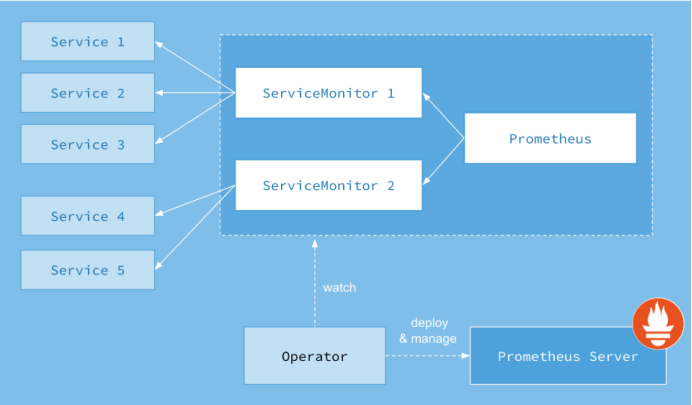
上图是Prometheus-Operator官方提供的架构图,其中Operator是最核心的部分,作为一个控制器,他会去创建Prometheus、ServiceMonitor、AlertManager以及PrometheusRule4个CRD资源对象,然后会一直监控并维持这4个资源对象的状态。
其中创建的prometheus这种资源对象就是作为Prometheus Server存在,而ServiceMonitor就是exporter的各种抽象,exporter前面我们已经学习了,是用来提供专门提供metrics数据接口的工具,Prometheus就是通过ServiceMonitor提供的metrics数据接口去 pull 数据的,当然alertmanager这种资源对象就是对应的AlertManager的抽象,而PrometheusRule是用来被Prometheus实例使用的报警规则文件。
这样我们要在集群中监控什么数据,就变成了直接去操作 Kubernetes 集群的资源对象了,是不是方便很多了。上图中的 Service 和 ServiceMonitor 都是 Kubernetes 的资源,一个 ServiceMonitor 可以通过 labelSelector 的方式去匹配一类 Service,Prometheus 也可以通过 labelSelector 去匹配多个ServiceMonitor。
4. Prometheus-Operator部署
官方chart地址:https://github.com/helm/charts/tree/master/stable/prometheus-operator
搜索最新包下载到本地
# 搜索
helm search prometheus-operator

NAME                            CHART VERSION   APP VERSION     DESCRIPTION

stable/prometheus-operator      6.4.0           0.31.0          Provides easy monitoring definitions for Kubernetes servi...
# 拉取到本地
helm fetch prometheus-operator
安装
# 新建一个monitoring的namespaces
Kubectl create ns monitoring
# 安装
helm install -f ./prometheus-operator/values.yaml --name prometheus-operator --namespace=monitoring ./prometheus-operator
# 更新
helm upgrade -f prometheus-operator/values.yaml prometheus-operator ./prometheus-operator
卸载prometheus-operator
helm delete prometheus-operator --purge
# 删除crd
kubectl delete customresourcedefinitions prometheuses.monitoring.coreos.com prometheusrules.monitoring.coreos.com servicemonitors.monitoring.coreos.com

kubectl delete customresourcedefinitions alertmanagers.monitoring.coreos.com

kubectl delete customresourcedefinitions podmonitors.monitoring.coreos.com
修改配置文档values.yaml
4.1. 邮件告警
  config:

    global:

      resolve_timeout: 5m

      smtp_smarthost: 'smtp.qq.com:465'

      smtp_from: '1xxx@qq.com'

      smtp_auth_username: '1xxx@qq.com'

      smtp_auth_password: 'xreqcqffrxtnieff'

      smtp_hello: '163.com'

      smtp_require_tls: false

    route:

      group_by: ['job','severity']

      group_wait: 30s

      group_interval: 1m

      repeat_interval: 12h

      receiver: default

      routes:

      - receiver: webhook

        match:

          alertname: TargetDown

    receivers:

    - name: default

      email_configs:

      - to: 'hejianlai@pcidata.cn'

        send_resolved: true

    - name: webhook

      email_configs:

      - to: 'xxx@xxx.cn'

        send_resolved: true
这里有个坑请参考:https://www.cnblogs.com/Dev0ps/p/11320177.html
4.2. prometheus持久化存储
  storage:

      volumeClaimTemplate:

        spec:

          storageClassName: nfs-client

          accessModes: ["ReadWriteOnce"]

          resources:

            requests:

              storage: 50Gi
4.3. Grafana持久化
路径:prometheus-operator/charts/grafana/values.yaml
persistence:

  enabled: true

  storageClassName: "nfs-client"

  accessModes:

    - ReadWriteOnce

  size: 10Gi
4.4. 自动发现Service
     - job_name: 'kubernetes-service-endpoints'

       kubernetes_sd_configs:

         - role: endpoints

       relabel_configs:

       - source_labels: [__meta_kubernetes_service_annotation_prometheus_io_scrape]

         action: keep

         regex: true

       - source_labels: [__meta_kubernetes_service_annotation_prometheus_io_scheme]

         action: replace

         target_label: __scheme__

         regex: (https?)

       - source_labels: [__meta_kubernetes_service_annotation_prometheus_io_path]

         action: replace

         target_label: __metrics_path__

         regex: (.+)

       - source_labels: [__address__, __meta_kubernetes_service_annotation_prometheus_io_port]

         action: replace

         target_label: __address__

         regex: ([^:]+)(?::\d+)?;(\d+)

         replacement: $1:$2

       - action: labelmap

         regex: __meta_kubernetes_service_label_(.+)

       - source_labels: [__meta_kubernetes_namespace]

         action: replace

         target_label: kubernetes_namespace

       - source_labels: [__meta_kubernetes_service_name]

         action: replace

         target_label: kubernetes_name

     - job_name: 'kubernetes-pod'

       kubernetes_sd_configs:

         - role: pod

       relabel_configs:

       - source_labels: [__meta_kubernetes_pod_annotation_prometheus_io_scrape]

         action: keep

         regex: true

       - source_labels: [__meta_kubernetes_pod_annotation_prometheus_io_path]

         action: replace

         target_label: __metrics_path__

         regex: (.+)

       - source_labels: [__address__, __meta_kubernetes_pod_annotation_prometheus_io_port]

         action: replace

         regex: ([^:]+)(?::\d+)?;(\d+)

         replacement: $1:$2

         target_label: __address__

       - action: labelmap

         regex: __meta_kubernetes_pod_label_(.+)

       - source_labels: [__meta_kubernetes_namespace]

         action: replace

         target_label: kubernetes_namespace

       - source_labels: [__meta_kubernetes_pod_name]

         action: replace

         target_label: kubernetes_pod_name

     - job_name: istio-mesh

       scrape_interval: 15s

       scrape_timeout: 10s

       metrics_path: /metrics

       scheme: http

       kubernetes_sd_configs:

       - api_server: null

         role: endpoints

         namespaces:

           names:

           - istio-system

       relabel_configs:

       - source_labels: [__meta_kubernetes_service_name, __meta_kubernetes_endpoint_port_name]

         separator: ;

         regex: istio-telemetry;prometheus

         replacement: $1

         action: keep

     - job_name: envoy-stats

       scrape_interval: 15s

       scrape_timeout: 10s

       metrics_path: /stats/prometheus

       scheme: http

       kubernetes_sd_configs:

       - api_server: null

         role: pod

         namespaces:

           names: []

       relabel_configs:

       - source_labels: [__meta_kubernetes_pod_container_port_name]

         separator: ;

         regex: .*-envoy-prom

         replacement: $1

         action: keep

       - source_labels: [__address__, __meta_kubernetes_pod_annotation_prometheus_io_port]

         separator: ;

         regex: ([^:]+)(?::\d+)?;(\d+)

         target_label: __address__

         replacement: $1:15090

         action: replace

       - separator: ;

         regex: __meta_kubernetes_pod_label_(.+)

         replacement: $1

         action: labelmap

       - source_labels: [__meta_kubernetes_namespace]

         separator: ;

         regex: (.*)

         target_label: namespace

         replacement: $1

         action: replace

       - source_labels: [__meta_kubernetes_pod_name]

         separator: ;

         regex: (.*)

         target_label: pod_name

         replacement: $1

         action: replace

       metric_relabel_configs:

       - source_labels: [cluster_name]

         separator: ;

         regex: (outbound|inbound|prometheus_stats).*

         replacement: $1

         action: drop

       - source_labels: [tcp_prefix]

         separator: ;

         regex: (outbound|inbound|prometheus_stats).*

         replacement: $1

         action: drop

       - source_labels: [listener_address]

         separator: ;

         regex: (.+)

         replacement: $1

         action: drop

       - source_labels: [http_conn_manager_listener_prefix]

         separator: ;

         regex: (.+)

         replacement: $1

         action: drop

       - source_labels: [http_conn_manager_prefix]

         separator: ;

         regex: (.+)

         replacement: $1

         action: drop

       - source_labels: [__name__]

         separator: ;

         regex: envoy_tls.*

         replacement: $1

         action: drop

       - source_labels: [__name__]

         separator: ;

         regex: envoy_tcp_downstream.*

         replacement: $1

         action: drop

       - source_labels: [__name__]

         separator: ;

         regex: envoy_http_(stats|admin).*

         replacement: $1

         action: drop

       - source_labels: [__name__]

         separator: ;

         regex: envoy_cluster_(lb|retry|bind|internal|max|original).*

         replacement: $1

         action: drop

     - job_name: istio-policy

       scrape_interval: 15s

       scrape_timeout: 10s

       metrics_path: /metrics

       scheme: http

       kubernetes_sd_configs:

       - api_server: null

         role: endpoints

         namespaces:

           names:

           - istio-system

       relabel_configs:

       - source_labels: [__meta_kubernetes_service_name, __meta_kubernetes_endpoint_port_name]

         separator: ;

         regex: istio-policy;http-monitoring

         replacement: $1

         action: keep

     - job_name: istio-telemetry

       scrape_interval: 15s

       scrape_timeout: 10s

       metrics_path: /metrics

       scheme: http

       kubernetes_sd_configs:

       - api_server: null

         role: endpoints

         namespaces:

           names:

           - istio-system

       relabel_configs:

       - source_labels: [__meta_kubernetes_service_name, __meta_kubernetes_endpoint_port_name]

         separator: ;

         regex: istio-telemetry;http-monitoring

         replacement: $1

         action: keep

     - job_name: pilot

       scrape_interval: 15s

       scrape_timeout: 10s

       metrics_path: /metrics

       scheme: http

       kubernetes_sd_configs:

       - api_server: null

         role: endpoints

         namespaces:

           names:

           - istio-system

       relabel_configs:

       - source_labels: [__meta_kubernetes_service_name, __meta_kubernetes_endpoint_port_name]

         separator: ;

         regex: istio-pilot;http-monitoring

         replacement: $1

         action: keep

     - job_name: galley

       scrape_interval: 15s

       scrape_timeout: 10s

       metrics_path: /metrics

       scheme: http

       kubernetes_sd_configs:

       - api_server: null

         role: endpoints

         namespaces:

           names:

           - istio-system

       relabel_configs:

       - source_labels: [__meta_kubernetes_service_name, __meta_kubernetes_endpoint_port_name]

         separator: ;

         regex: istio-galley;http-monitoring

         replacement: $1

         action: keep

     - job_name: citadel

       scrape_interval: 15s

       scrape_timeout: 10s

       metrics_path: /metrics

       scheme: http

       kubernetes_sd_configs:

       - api_server: null

         role: endpoints

         namespaces:

           names:

           - istio-system

       relabel_configs:

       - source_labels: [__meta_kubernetes_service_name, __meta_kubernetes_endpoint_port_name]

         separator: ;

         regex: istio-citadel;http-monitoring

         replacement: $1

         action: keep

     - job_name: kubernetes-pods-istio-secure

       scrape_interval: 15s

       scrape_timeout: 10s

       metrics_path: /metrics

       scheme: https

       kubernetes_sd_configs:

       - api_server: null

         role: pod

         namespaces:

           names: []

       tls_config:

         ca_file: /etc/istio-certs/root-cert.pem

         cert_file: /etc/istio-certs/cert-chain.pem

         key_file: /etc/istio-certs/key.pem

         insecure_skip_verify: true

       relabel_configs:

       - source_labels: [__meta_kubernetes_pod_annotation_prometheus_io_scrape]

         separator: ;

         regex: "true"

         replacement: $1

         action: keep

       - source_labels: [__meta_kubernetes_pod_annotation_sidecar_istio_io_status, __meta_kubernetes_pod_annotation_istio_mtls]

         separator: ;

         regex: (([^;]+);([^;]*))|(([^;]*);(true))

         replacement: $1

         action: keep

       - source_labels: [__meta_kubernetes_pod_annotation_prometheus_io_scheme]

         separator: ;

         regex: (http)

         replacement: $1

         action: drop

       - source_labels: [__meta_kubernetes_pod_annotation_prometheus_io_path]

         separator: ;

         regex: (.+)

         target_label: __metrics_path__

         replacement: $1

         action: replace

       - source_labels: [__address__]

         separator: ;

         regex: ([^:]+):(\d+)

         replacement: $1

         action: keep

       - source_labels: [__address__, __meta_kubernetes_pod_annotation_prometheus_io_port]

         separator: ;

         regex: ([^:]+)(?::\d+)?;(\d+)

         target_label: __address__

         replacement: $1:$2

         action: replace

       - separator: ;

         regex: __meta_kubernetes_pod_label_(.+)

         replacement: $1

         action: labelmap

       - source_labels: [__meta_kubernetes_namespace]

         separator: ;

         regex: (.*)

         target_label: namespace

         replacement: $1

         action: replace

       - source_labels: [__meta_kubernetes_pod_name]

         separator: ;

         regex: (.*)

         target_label: pod_name

         replacement: $1

         action: replace
4.5. etcd
对于 etcd 集群一般情况下,为了安全都会开启 https 证书认证的方式,所以要想让 Prometheus 访问到 etcd 集群的监控数据,就需要提供相应的证书校验。
由于我们这里演示环境使用的是 Kubeadm 搭建的集群,我们可以使用 kubectl 工具去获取 etcd 启动的时候使用的证书路径:
[root@cn-hongkong ~]# kubectl get pod etcd-cn-hongkong.i-j6caps6av1mtyxyofmrw -n kube-system -o yaml
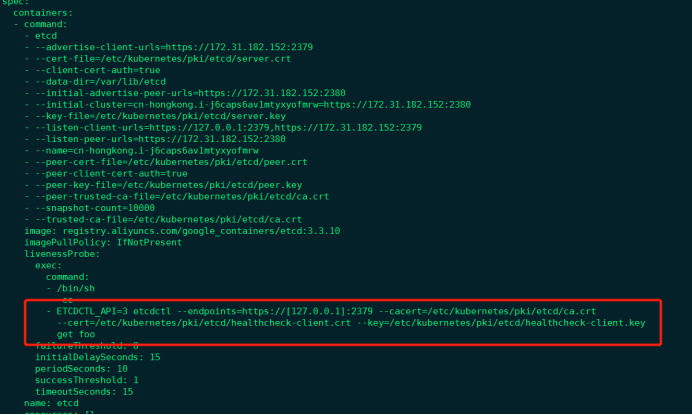
我们可以看到 etcd 使用的证书都对应在节点的 /etc/kubernetes/pki/etcd 这个路径下面,所以首先我们将需要使用到的证书通过 secret 对象保存到集群中去:(在 etcd 运行的节点)
1) 手动获取etcd信息
curl --cacert /etc/kubernetes/pki/etcd/ca.crt --cert /etc/kubernetes/pki/etcd/healthcheck-client.crt --key /etc/kubernetes/pki/etcd/healthcheck-client.key https://172.31.182.152:2379/metrics
2) 使用prometheus抓取
kubectl -n monitoring create secret generic etcd-certs --from-file=/etc/kubernetes/pki/etcd/healthcheck-client.crt --from-file=/etc/kubernetes/pki/etcd/healthcheck-client.key --from-file=/etc/kubernetes/pki/etcd/ca.crt
3) 添加values.yaml文件中kubeEtcd配置
## Component scraping etcd

##

kubeEtcd:

  enabled: true

  ## If your etcd is not deployed as a pod, specify IPs it can be found on

  ##

  endpoints: []

  ## Etcd service. If using kubeEtcd.endpoints only the port and targetPort are used

  ##

  service:

    port: 2379

    targetPort: 2379

    selector:

      component: etcd

  ## Configure secure access to the etcd cluster by loading a secret into prometheus and

  ## specifying security configuration below. For example, with a secret named etcd-client-cert

  ##

  serviceMonitor:

    scheme: https

    insecureSkipVerify: true

    serverName: localhost

    caFile: /etc/prometheus/secrets/etcd-certs/ca.crt

    certFile: /etc/prometheus/secrets/etcd-certs/healthcheck-client.crt

    keyFile: /etc/prometheus/secrets/etcd-certs/healthcheck-client.key
4) 将上面创建的etcd-certs对象配置到prometheus中(特别重要)
    ## Secrets is a list of Secrets in the same namespace as the Prometheus object, which shall be mounted into the Prometheus Pods.

    ## The Secrets are mounted into /etc/prometheus/secrets/. Secrets changes after initial creation of a Prometheus object are not

    ## reflected in the running Pods. To change the secrets mounted into the Prometheus Pods, the object must be deleted and recreated

    ## with the new list of secrets.

    ##

    secrets:

    - etcd-certs
安装后证书就会出现在prometheus目录下

4.6抓取自定义Server
我们需要建一个ServiceMonitor,namespaceSelector:的any:true表示匹配 所有命名空间下面的具有 app= sscp-transaction这个 label 标签的 Service。
apiVersion: monitoring.coreos.com/v1

kind: ServiceMonitor

metadata:

  labels:

    app: sscp-transaction

    release: prometheus-operator

  name: springboot

  namespace: monitoring

spec:

  endpoints:

  - interval: 15s

    path: /actuator/prometheus

    port: health

    scheme: http

  namespaceSelector:

    any: true

#    matchNames:

#    - sscp-dev

  selector:

    matchLabels:

      app: sscp-transaction

#      release: sscp
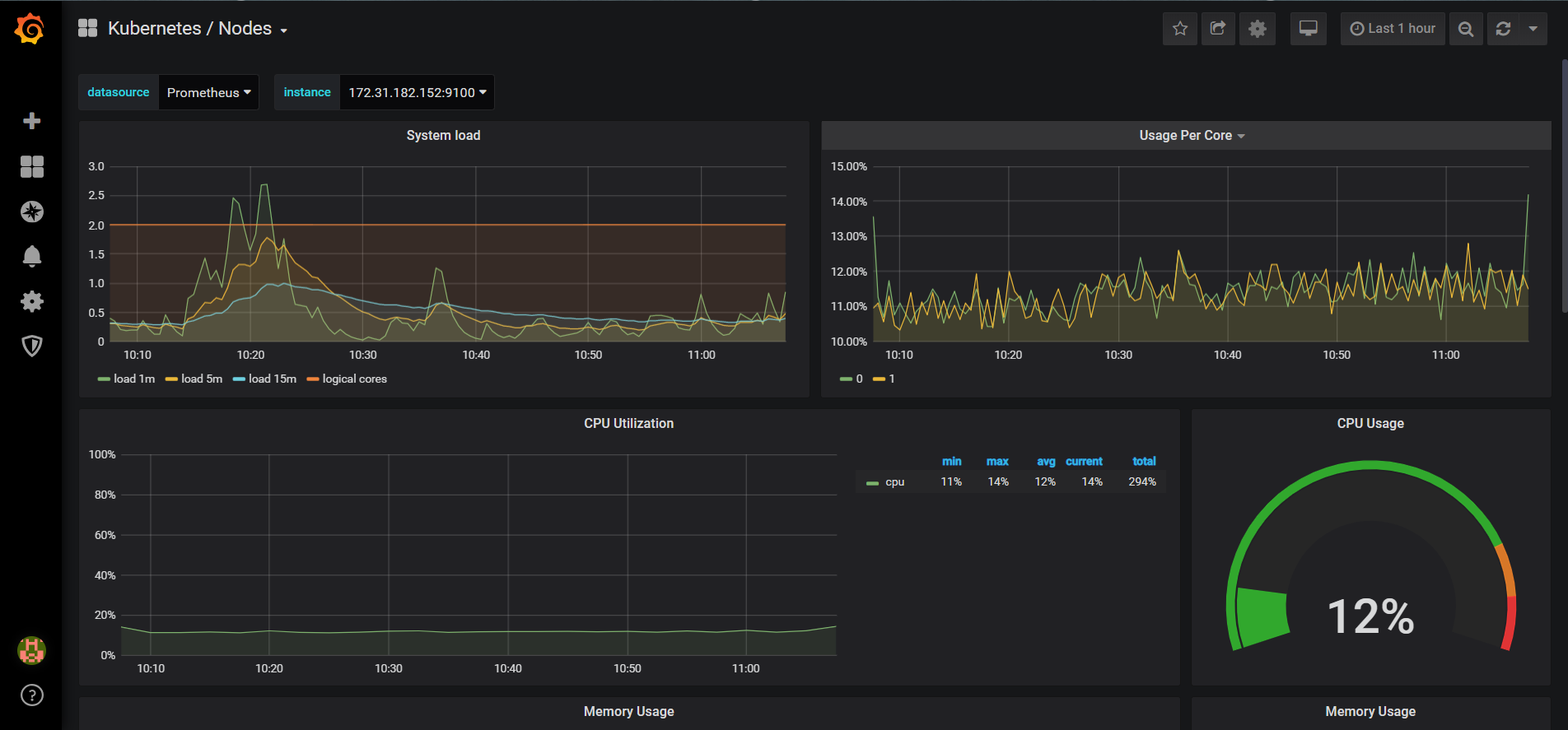
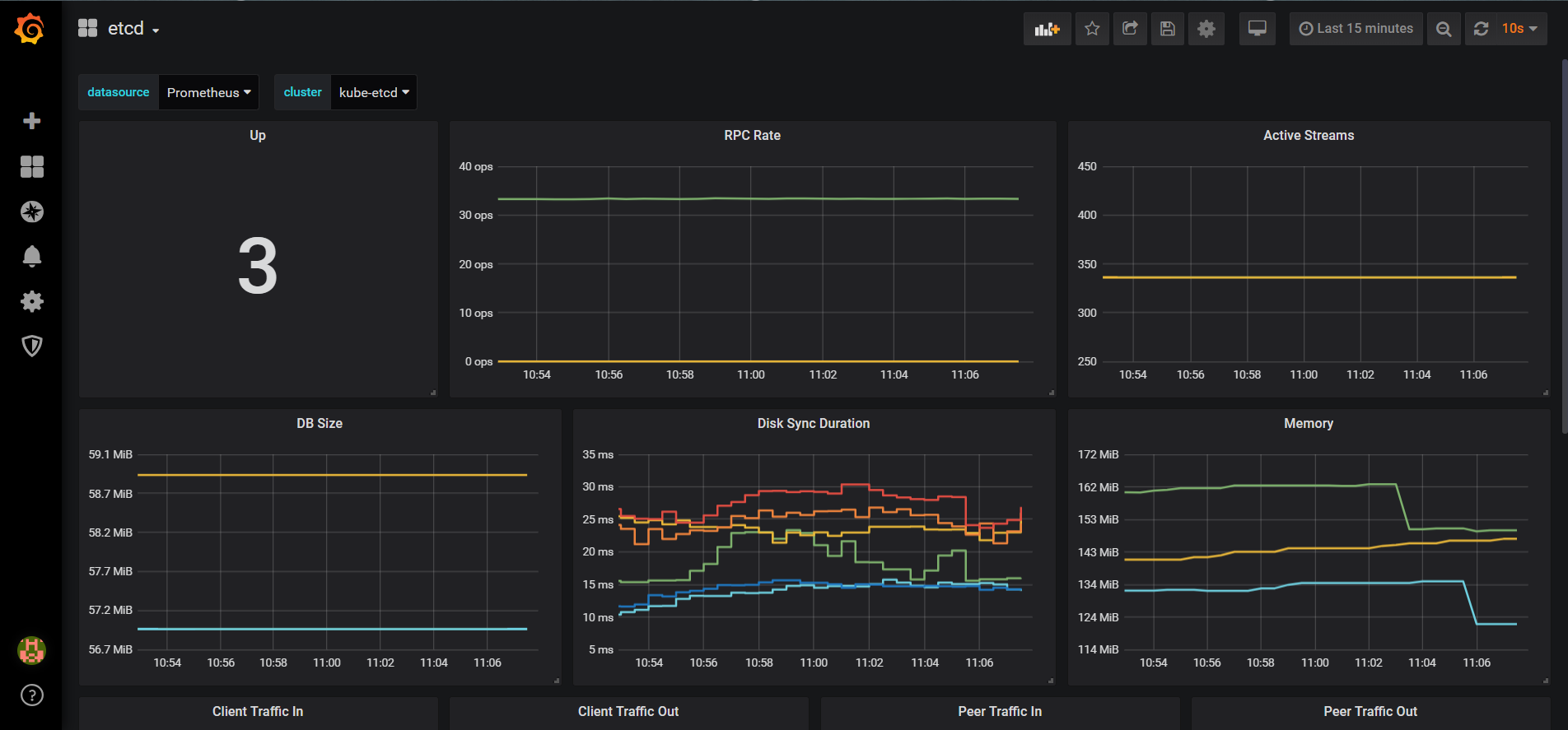
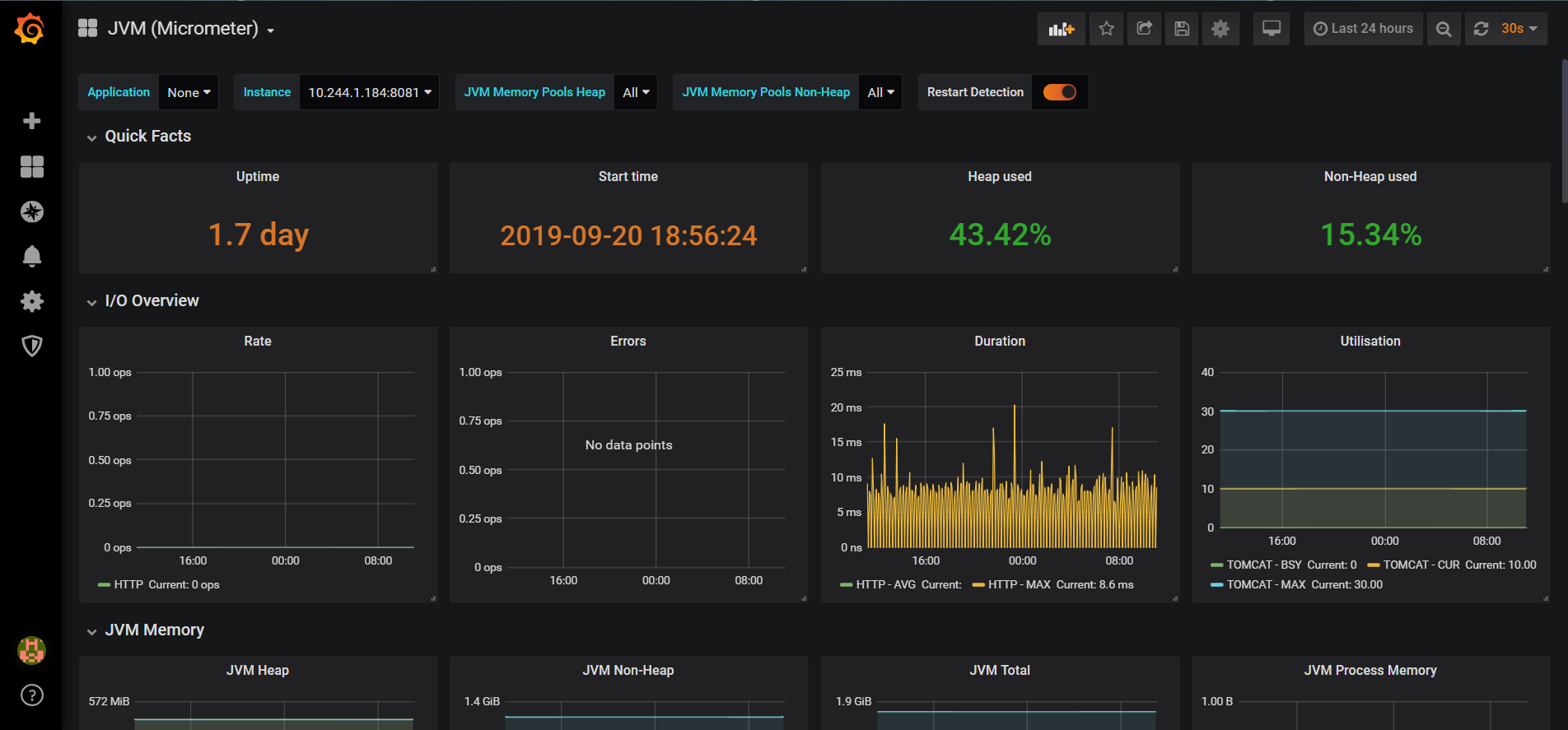
效果图:
Prometheus Operator 监控Kubernetes的更多相关文章
- 使用Prometheus Operator 监控Kubernetes(15)
一.Prometheus概述: Prometheus是一个开源系统监测和警报工具箱. Prometheus Operator 是 CoreOS 开发的基于 Prometheus 的 Kubernete ...
- [转帖]Prometheus+Grafana监控Kubernetes
原博客的位置: https://blog.csdn.net/shenhonglei1234/article/details/80503353 感谢原作者 这里记录一下自己试验过程中遇到的问题: . 自 ...
- Prometheus+Grafana监控Kubernetes
涉及文件下载地址:链接:https://pan.baidu.com/s/18XHK7ex_J0rzTtfW-QA2eA 密码:0qn6 文件中需要下载的镜像需要自己提前下载好,eg:prom/node ...
- prometheus operator(Kubernetes 集群监控)
一.Prometheus Operator 介绍 Prometheus Operator 是 CoreOS 开发的基于 Prometheus 的 Kubernetes 监控方案,也可能是目前功能最全面 ...
- Rancher2.x 一键式部署 Prometheus + Grafana 监控 Kubernetes 集群
目录 1.Prometheus & Grafana 介绍 2.环境.软件准备 3.Rancher 2.x 应用商店 4.一键式部署 Prometheus 5.验证 Prometheus + G ...
- k8s Helm安装Prometheus Operator
Ubuntu 18 Kubernetes集群的安装和部署 以及Helm的安装完成了k8s的集群和helm的安装,今天我们来看看Prometheus的监控怎么搞.Prometheus Operator ...
- Kubernetes 监控方案之 Prometheus Operator(十九)
目录 一.Prometheus 介绍 1.1.Prometheus 架构 1.2.Prometheus Operator 架构 二.Helm 安装部署 2.1.Helm 客户端安装 2.2.Tille ...
- Kubernetes 监控:Prometheus Operator
安装 前面的章节中我们学习了用自定义的方式来对 Kubernetes 集群进行监控,基本上也能够完成监控报警的需求了.但实际上对上 Kubernetes 来说,还有更简单方式来监控报警,那就是 Pro ...
- Kubernetes 监控:Prometheus Operator + Thanos ---实践篇
具体参考网址:https://www.cnblogs.com/sanduzxcvbnm/p/16291296.html 本章用到的yaml文件地址:https://files.cnblogs.com/ ...
随机推荐
- WebSocket和HTTP协议的区别
HTTP: 1,无状态协议. 2,短连接.(Ajax轮询方式或Long poll方式实现“持久连接”状态) 2,被动型. 客户端请求->服务器端响应.服务端不能主动联系客户端,只能有客户端发 ...
- 40道经典java多线程面试题
40道经典java多线程面试题 题目来源 看完了java并发编程的艺术,自认为多线程"大成",然后找了一些面试题,也发现了一些不足. 一下问题来源于网上的博客,答案均为本人个人见解 ...
- 测试常用的sql语句
1.查询:select * from table_name where 条件语句; SELECT * from sms_runwater WHERE message LIKE "%自有支付% ...
- poj3415_Common Substrings
题意 给定两个字符串,求长度大于等于k的公共子串数. 分析 将两个字符串中间加个特殊字符拼接,跑后缀数组. 将题目转化为对每一个后缀求\(\sum_{j=1}^{i-1}lcp(i,j)\),且后缀\ ...
- Oracle数据库之四 简单查询
四.简单查询 简单查询的主要特征就是将一张数据表之中的全部数据行进行显示,而后可以利用 SELECT 子句来控制所需要的输出列. 4.1.基础语法 范例:查询 emp 表中的数据(全部数据查询) ...
- .net core 单元测试之 JustMock第二篇
JustMock标记方法 上篇文章在举例子的时候使用了returns的标记方法,JustMock还有很多标记方法: CallOriginal 跟Behaviors里的CallOriginal差不多意思 ...
- HBase的安装和使用
文章作者:foochane 原文链接:https://foochane.cn/article/2019062801.html 1 Hbase基本介绍 Hbase是一个分布式数据库,可以提供数据的实时 ...
- Codeforces 1004D
题意略. 思路: 有两个点要注意一下: 1.这个菱形矩阵是8对称的,也即可以是沿45°对角线对称. 2.菱形矩阵上的数字表明了这个点到中心0点的距离,这对于确定位置有帮助. 这个题目简直刷新人生观,这 ...
- [Python] Django框架入门2——深入模型
说明: 本文主要深入了解模型(models.py),涉及ORM简介.模型定义.模型成员.模型查询.自连接等.需要一定基础,可以先走一走基本入门流程. 附录一使用mysql数据库,附录二Django开发 ...
- spring boot环境配置
Eclipse+Maven创建webapp项目<一> 1.开启eclipse,右键new——>other,如下图找到maven project 2.选择maven project,显 ...