
Winform的控件以及DataGridView的一般使用
先上学习测试的一些截图
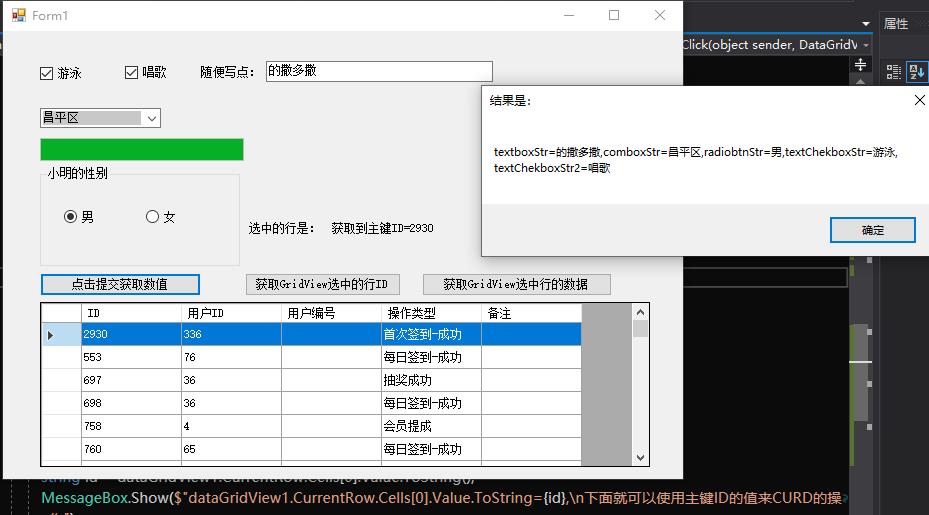
1:获取多个控件上面的值(checkbox,combobox,textbox,radiobutton)
2:获取到选择行的主键ID的value,方便我们进一步CURD
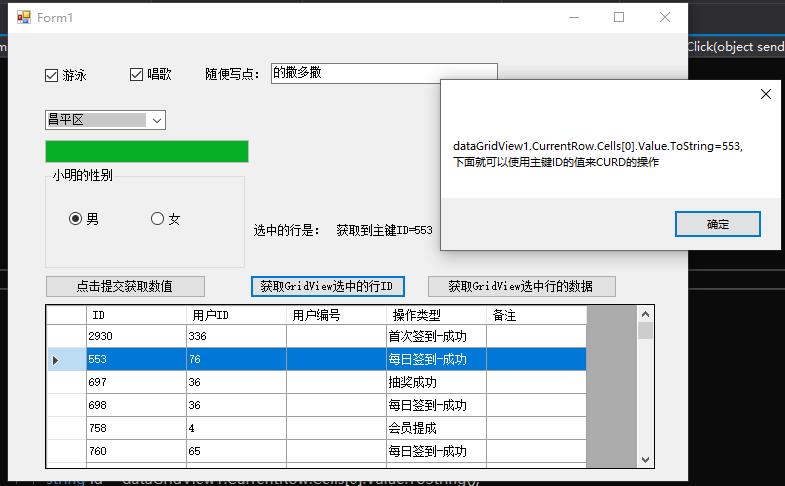
3:获取选择一行的数据以及一行是多少列

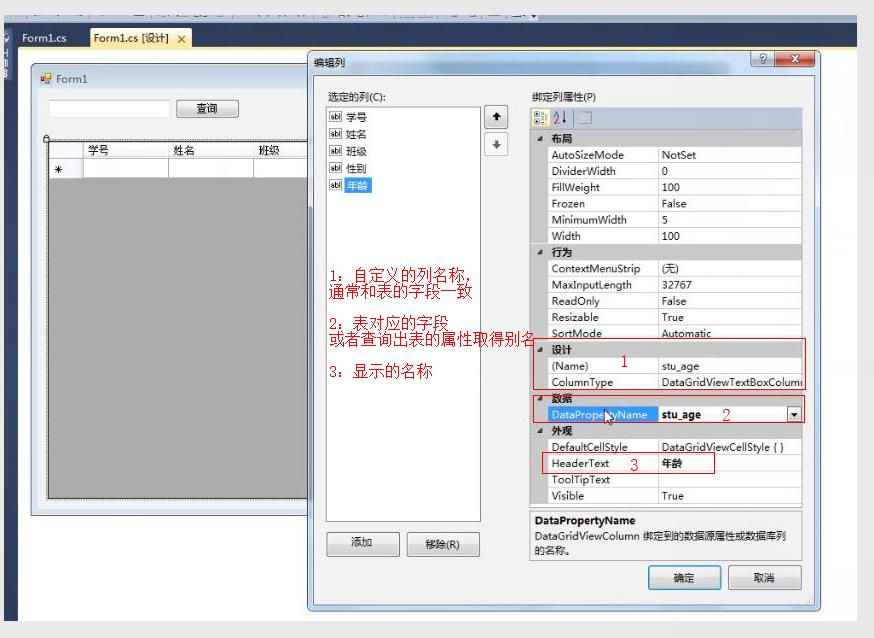
4:绑定显示自定义的列头名称
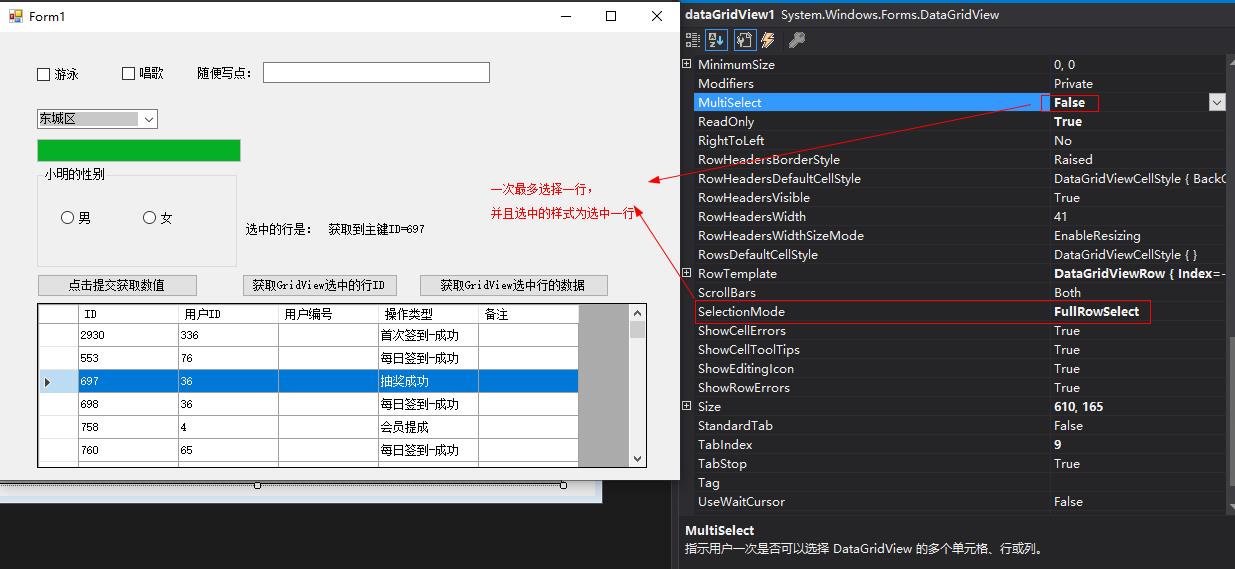
5:选中一行的属性设置操作
6:全部代码
 using System;

 using System.Text;

 using System.Windows.Forms;

 namespace WindowsFormsDemo

 {

     using System.Configuration;

     using System.Data;

     using System.Data.SqlClient;

     public partial class Form1 : Form

     {

         private static readonly string connectionstr = ConfigurationManager.ConnectionStrings["hydb"].ConnectionString;

         public Form1()

         {

             InitializeComponent();

         }

         private void Form1_Load(object sender, EventArgs e)

         {

             // TODO: 这行代码将数据加载到表“huayaDBDataSet.K_City”中。您可以根据需要移动或删除它。

             this.k_CityTableAdapter.Fill(this.huayaDBDataSet.K_City);

             BingDataGridview();

         }

         private void BingDataGridview()

         {

             using (SqlConnection conn = new SqlConnection(connectionstr))

             {

                 conn.Open();

                 using (SqlDataAdapter ad = new SqlDataAdapter("select ID,userID,userno ,Optext,Remark from F_OperateLog", conn))

                 {

                     using (DataSet set = new DataSet())

                     {

                         ad.Fill(set);

                         this.dataGridView1.DataSource = set.Tables[].DefaultView;//绑定数据

                         dataGridView1.MultiSelect = false;//单选

                         dataGridView1.Rows[].Selected=true;//默认第二行为选中的状态

                     }

                 }

             }

         }

         private void dataGridView1_CellClick(object sender, DataGridViewCellEventArgs e)

         {

             string id = dataGridView1.CurrentRow.Cells[].Value.ToString();

             if (!string.IsNullOrEmpty(id))

             {

                 // MessageBox.Show($"获取到主键ID={id}");

                 labshowid.Text = $"获取到主键ID={id}";

             }

         }

         /// <summary>

         /// 获取选中行的key ID

         /// </summary>

         /// <param name="sender"></param>

         /// <param name="e"></param>

         private void BtnSelectID_Click(object sender, EventArgs e)

         {

             string id = dataGridView1.CurrentRow.Cells[].Value.ToString();

             MessageBox.Show($"dataGridView1.CurrentRow.Cells[0].Value.ToString={id},\n下面就可以使用主键ID的值来CURD的操作");

         }

         /// <summary>

         /// 获取选中行的所有数据

         /// </summary>

         /// <param name="sender"></param>

         /// <param name="e"></param>

         private void BtnSelectRowData_Click(object sender, EventArgs e)

         {

             int rowIndex = dataGridView1.CurrentRow.Index;//选中当前行的索引

             int cellCount = dataGridView1.GetCellCount(DataGridViewElementStates.Selected);//获取一行的列有多少个

             StringBuilder sb = new StringBuilder();

             for (int i = ; i < cellCount; i++)

             {

                 sb.Append(dataGridView1.CurrentRow.Cells[i].Value.ToString() + ",");

             }

             MessageBox.Show(sb.ToString().TrimEnd(',')+ ",\n\ncellCount=" + cellCount+ ",rowIndex=" + rowIndex);

         }

         private void BtnProStart_Click(object sender, EventArgs e)

         {

             for (int i = ; i < ; i++)

             {

                 this.progressBar1.Value = (int)(((i + ) / 100.0) * );

                 Application.DoEvents();

                 int miao = new Random().Next(, );

                 System.Threading.Thread.Sleep(miao * );

             }

             MessageBox.Show("数据加载成功!", "请稍后", MessageBoxButtons.YesNo, MessageBoxIcon.Asterisk);

         }

         private void BtnSubmit_Click(object sender, EventArgs e)

         {

             string textboxStr = this.texboxStr.Text;

             string comboxStr = this.comboBox1.Text;

             string radiobtnStr = this.radioButton1.Checked == true ? "男" : "女";

             string textChekboxStr = string.IsNullOrEmpty(this.checkBox1.Text) == true ? "" : this.checkBox1.Text;

             string textChekboxStr2 = string.IsNullOrEmpty(this.checkBox2.Text) == true ? "" : this.checkBox2.Text;

             string msg = $"textboxStr={textboxStr},comboxStr={comboxStr},radiobtnStr={radiobtnStr},textChekboxStr={ textChekboxStr},textChekboxStr2={textChekboxStr2}";

             MessageBox.Show(msg, "结果是:");

         }

     }

 }
Winform的控件以及DataGridView的一般使用的更多相关文章
- winform 分页控件
http://www.cnblogs.com/liuyunsheng/p/4853387.html http://www.cnblogs.com/wuhuacong/archive/2011/07/0 ...
- winform基础控件总结
转自:http://www.cnblogs.com/top5/archive/2010/04/29/1724039.html 基础 - 常用控件 C# WinForm开发系列 - CheckBox/B ...
- [原创][开源]SunnyUI.Net, C# .Net WinForm开源控件库、工具类库、扩展类库、多页面开发框架
SunnyUI.Net, 基于 C# .Net WinForm 开源控件库.工具类库.扩展类库.多页面开发框架 Blog: https://www.cnblogs.com/yhuse Gitee: h ...
- 在DevExpress程序中使用Winform分页控件直接录入数据并保存
一般情况下,我们都倾向于使用一个组织比较好的独立界面来录入或者展示相关的数据,这样处理比较规范,也方便显示比较复杂的数据.不过在一些情况下,我们也可能需要直接在GridView表格上直接录入或者修改数 ...
- winform窗体控件(全)
回顾跟补充下除了昨天那常用6个其他的winform窗体控件作用 1:Button:按钮 (1)AutoSize:如果是True的情况下,内容将会撑开:False的话会另起一行 (2)Enabled: ...
- winform基本控件----按钮
这次来引用一个我们上课时候老师给的一个实验内容,来说一下winform程序设计中的按钮控件的使用.下面是我们老师给的实验内容. 实验目的: 掌握Winform的开发环境. 掌握窗体的创建和基本方法. ...
- WinForm给控件加入hint文字
本文代码主要是参考别人的,仅为个人记录,方面后续使用~ 效果图: 主要代码在一个Win32Utility类中,代码如下: public static class Win32Utility { [Dll ...
- C# WinForm实现控件拖动实例介绍
主要是设计控件的MouseDown.MouseLeave.MouseMove事件.一步步来吧:1.定义一个枚举类型,描述光标状态 private enum EnumMousePointPosition ...
- Winform DevExpress控件库(一) DevExpress控件库的安装与新建第一个DevExpress项目
前言:因为这段时间要接触到DevExpress控件库,而我本身甚至对winform的控件都了解甚少,所以处在学习中,写下博客主要是为了方便后期的回顾,当然也可以给一些新人第一次接触时做为学习的参考,以 ...
随机推荐
- 用 Python 自动监测 GitHub 项目更新
前言 文的文字及图片来源于网络,仅供学习.交流使用,不具有任何商业用途,版权归原作者所有,如有问题请及时联系我们以作处理. 作者: GitPython PS:如有需要Python学习资料的小伙伴可以加 ...
- 如何给HTML页面的文本设置字符和单词间距
设置字符和单词间距介绍 属性名 单位 描述 letter-spacing px 设置字符间距 word-spacing px 设置单词间距 letter-spacing设置字符间距 letter-sp ...
- 【转载】如何在Android中避免创建不必要的对象
在编程开发中,内存的占用是我们经常要面对的现实,通常的内存调优的方向就是尽量减少内存的占用.这其中避免创建不必要的对象是一项重要的方面. Android设备不像PC那样有着足够大的内存,而且单个App ...
- 微信小程序初体验遇到的坑
今天,2017年1月9日凌晨,微信小程序如约上线.2007年1月9日,整整10年前的今天,苹果的iPhone手机正式问世! 经不起新技术的诱惑了,想试着开发一下看看.刚开始遇到很多坑,在这里记录一下, ...
- 9.JavaCC官方入门指南-例4
例4:计算器--添加减法运算 1. calculator1.jj 为了使得计算器具备更多功能,我们需要更多的操作符,比如减法.乘法和除法.接下来我们添加减法运算. 在词法分析器的描述部分,我们 ...
- Oracle 导入dmp 故障存储文件
创建表空间及用户CREATE TABLESPACE OracleDBFDATAFILE 'D:\app\zhoulx\oradata\bdc\OracleDBF.DBF' SIZE 100M AUTO ...
- day69_10_14 drf接口框架。
一.drf框架简介 drf全程是:django-rest framework. 其中涉及的知识点有. 1.接口:什么是接口.restful接口规范 2.CBV生命周期源码 - 基于restful规范下 ...
- PKCS pfx cer x509
PKCS pfx cer x509 参考 PKCS 15 个标准 PKCS The Public-Key Cryptography Standards (PKCS)是由美国RSA数据安全公司及其合作伙 ...
- 用pip命令把python包安装到指定目录
sudo pip install transforms3d --target=/usr/local/lib/python2.7/site-packages pip install transforms ...
- Python thread (线程)
线程 (thread) 操作系统最小的调度单位,是一串指令的集合 程序一开始就有一个主线程,新启动的线程和主线程之间互不影响,主线程启动子线程之后就相互独立(子线程也可以启动线程),无论子线程是否执行 ...