
maven profile实现多环境打包
快速解决:
项目目录
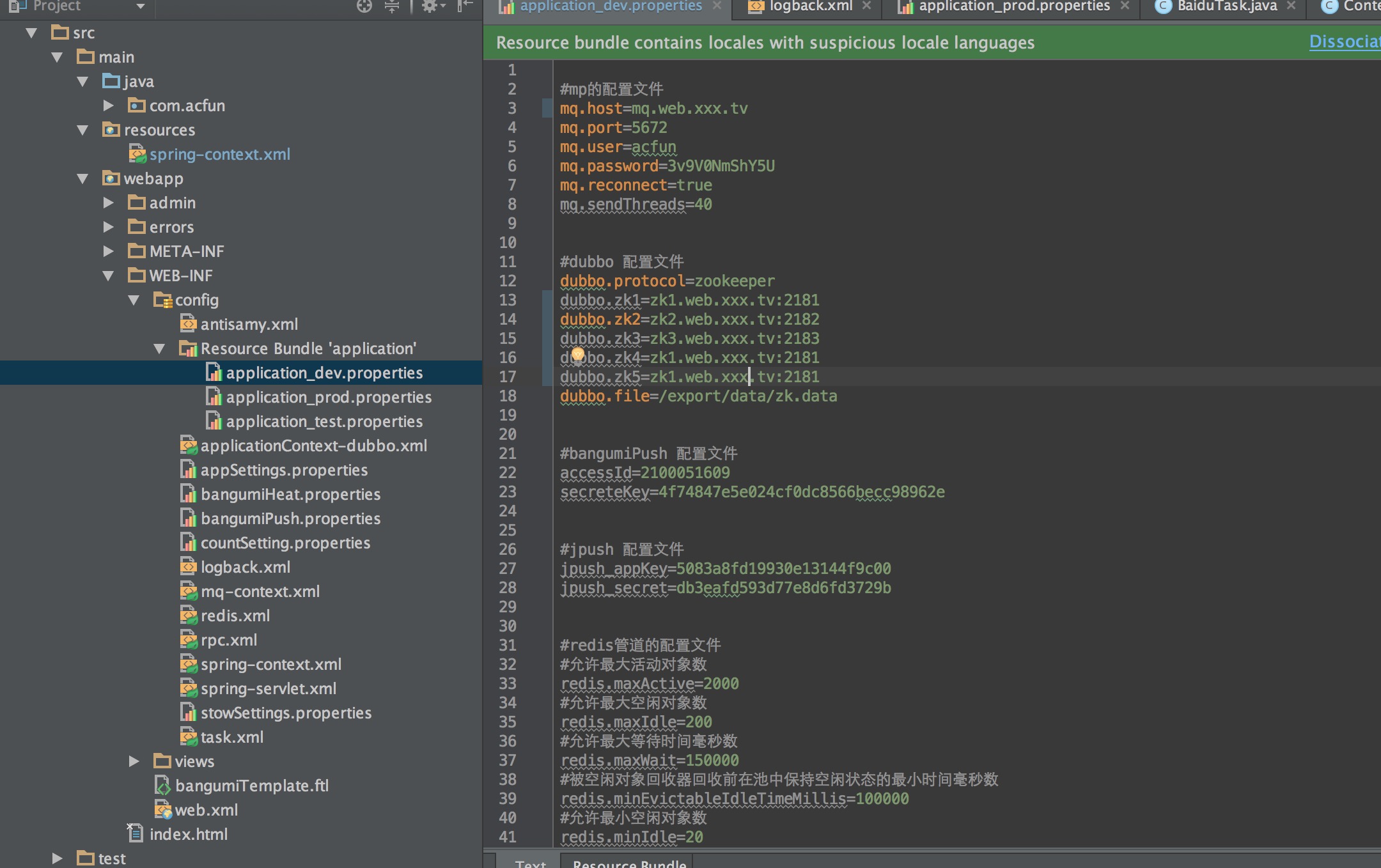
1.pom文件中添加profile
<profiles>    <profile>        <!-- 本地开发环境 -->        <id>dev</id>        <properties>            <profiles.active>dev</profiles.active>        </properties>        <activation>            <activeByDefault>true</activeByDefault>        </activation>    </profile>    <profile>        <!-- 测试环境 -->        <id>test</id>        <properties>            <profiles.active>test</profiles.active>        </properties>

    </profile>    <profile>        <!-- 生产环境 -->        <id>prod</id>        <properties>            <profiles.active>prod</profiles.active>        </properties>    </profile></profiles>
2. pom中指定 filter文件夹 和 maven-war-plugin指定替换文件夹
<build> <resources> <resource> <directory>src/main/resources</directory> <includes> <include>spring-content.xml</include> </includes> <filtering>true</filtering> </resource> </resources> <plugins> <plugin> <groupId>org.apache.maven.plugins</groupId> <artifactId>maven-war-plugin</artifactId> <version>2.4</version> <configuration> <archiveClasses>true</archiveClasses> <warName>${project.artifactId}</warName> <warSourceDirectory>${basedir}/src/main/webapp</warSourceDirectory> <webXml>${basedir}/src/main/webapp/WEB-INF/web.xml</webXml> <webappDirectory>${project.build.directory}/${project.artifactId} </webappDirectory> <webResources> <resource> <!-- 由于我是把配置文件都在/WEB-INF/config/文件夹--> <!-- 所以把src/main/resources 被filter替换的文件替换dao WEB-INF/config/下--> <directory>src/main/resources</directory> <targetPath>WEB-INF/config</targetPath> <filtering>true</filtering> </resource> </webResources> </configuration> </plugin> <plugin> <groupId>org.eclipse.jetty</groupId> <artifactId>jetty-maven-plugin</artifactId> <version>9.3.0.M2</version> <configuration> <scanIntervalSeconds>6</scanIntervalSeconds> <httpConnector> <port>5004</port> </httpConnector> <webAppConfig> <contextPath>/xxxx</contextPath> <!--<defaultsDescriptor>${basedir}/src/main/resources/webdefault.xml</defaultsDescriptor>--> </webAppConfig> </configuration> </plugin> </plugins></build>
3. 对比 WEB-INF/config下aplicationContent.xml(将被后面替换)和 src/main/resources 下aplicationContent.xml
<bean id="configProperties" class="org.springframework.beans.factory.config.PropertiesFactoryBean"> <property name="locations"> <list> <value>/WEB-INF/config/application_dev.properties</value> </list> </property></bean>
VS
<bean id="configProperties" class="org.springframework.beans.factory.config.PropertiesFactoryBean"> <property name="locations"> <list> <!--${profiles.active} 此处占位符 会被mvn替换从pom中profile.active的环境变量 第三步中 maven-war-plugin配置替换文件 完成多环境切换--> <value>/WEB-INF/config/application_${profiles.active}.properties</value> </list> </property></bean>
4.maven 编译打包 mvn clean package -Dmaven.test.skip=true -Ptest
指定-Dmaven.test.skip=true表示跳过测试 -Ptest 激活Profile id=test的环境参数
实现效果

config下 原本application_dev.properties 编译完成 替换为application_test.properties
从而实现了加载多环境配置.
概念简介
构建项目时可能会遇到在测试(如单元测试)、开发、模拟、生产等不同环境下需要不同配置.
如果需要修改的项目很多而且复杂的话,则应该使用 Apache Maven 的 Profile 和 Filtering 功能来解决。
Filtering 功能
Filtering 是 Maven Resources Plugin 的一个功能,它会使用系统属性或者项目属性的值替换资源文件(*.properties,*.xml)当中 ${…} 符号的值。比如你系统属性有一项 “user.name=foobar”,那么资源文件当中的 ${user.name} 符号会在 Maven 编译时自动被替换为 “foobar”。
Profile 功能
Profile 的作用是允许你在项目文件(pom.xml)里定义若干个 profile 段,然后在编译时选择其中的一个用于覆盖项目文件原先的定义。接着上一个例子,如果我们需要为开发环境和生产环境定义不同的 user.name 属性值,则我们在项目目录里创建两个属性文件:
profile-development.properties,内容
user.name=foobar
profile-production.properties,内容
user.name=tom
然后在项目文件(pom.xml)里增加 profile 段,如下:
<build> <filters> <filter>src/main/filters/filter-${env}.properties</filter> </filters> <resources> <resource> <directory>src/main/resources</directory> <filtering>true</filtering> </resource> </resources></build><profiles> <profile> <id>develop</id> <properties> <env>develop</env> </properties> </profile> <profile> <id>test</id> <properties> <env>test</env> </properties> </profile> <profile> <id>product</id> <properties> <env>product</env> </properties> </profile></profiles>
pasting
在编译项目时,可以使用 -P 参
数指定需要使用的 profile 的 id,比如下面命令将会使用 development profile:
$mvn clean compile -Pdevelopment
如果想使用 production profile 则执行如下命令:
$mvn clean compile -Pproduction
假如不指定 -P 参数的话,则会使用 activeByDefault=true 的一项(即 development)。
至此,通过 filtering 和 profile 功能实现了为开发环境和生产环境使用不同配置值的目的。当然 profile 还可以允许你添加更多的定义,比如为某一个 profile 添加不同的资源文件。在一些大中型项目里,不同的环境可能仅仅修改配置值并不足够,可能还需要某个配置文件整个替换,那么就应该在 profiles/profile/build/resources 段里指定了。详细的可以参阅附录链接。
http://archboy.org/2012/05/21/apache-maven-profile-filtering-multiple-build-environments/
maven profile实现多环境打包的更多相关文章
- 【转】maven profile实现多环境打包
作为一名程序员,在开发的过程中,经常需要面对不同的运行环境(开发环境.测试环境.生产环境.内网环境.外网环境等等),在不同的环境中,相关的配置一般不一样,比如数据源配置.日志文件配置.以及一些软件运行 ...
- 使用maven profile实现多环境可移植构建(转自CSDN)
使用maven profile实现多环境可移植构建 标签: maven profilemaven自动构建maven自动部署maven可移植构建持续集成 2014-04-25 23:37 26905人阅 ...
- CAS (13) —— CAS 使用Maven Profile支持多环境编译
CAS (13) -- CAS 使用Maven Profile支持多环境编译 摘要 CAS 使用Maven Profile支持多环境编译 版本 tomcat版本: tomcat-8.0.29 jdk版 ...
- maven profile实现多环境配置
每次项目部署上线都需要手动去修改配置文件(比如数据库配置,或者一个自定义的配置)然后才能打包,很麻烦,网上找到 maven profile可以完成这个工作,记录如下: 环境:eclipse + spr ...
- Maven根据不同的环境打包不同的配置
前言: 在开发过程中,我们的软件会面对不同的运行环境,比如开发环境.测试环境.生产环境,而我们的软件在不同的环境中,有的配置可能会不一样,比如数据源配置.日志文件配置等等. 那么就需要借助maven提 ...
- 使用Maven Profile实现多环境构建
在开发过程中,我们的软件会面对不同的运行环境,比如开发环境.测试环境.生产环境,而我们的软件在不同的环境中,有的配置可能会不一样,比如数据源配置.日志文件配置.以及一些软件运行过程中的基本配置,那每次 ...
- 使用maven profile实现多环境可移植构建
mvn clean package -Pproduction即构建出生产环境需要的war包 mvn tomcat:redeploy -Ptest 即发布到测试环境 在开发过程中,我们的软件会面对不同的 ...
- maven 使用-P指定环境打包,linux移动配置文件失败,windows成功!
问题描述: windows机器使用-P指定环境打包,最后组装文件组装成功,配置文件成功移动,linux下却只移动了jar包. windows: linux: ...
- 使用maven profile实现多环境配置相关打包
项目开发需要有多个环境,一般为开发,测试,预发,正式4个环境,通过maven可以实现按不同环境进行打包部署,命令为: mvn package -P dev 在eclipse中可以右击选项run con ...
随机推荐
- Linux 系统命令及其使用详解(大全)
(来源: 中国系统分析员) cat cd chmod chown cp cut 1.名称:cat 使用权限:所有使用者 使用方式:cat [-AbeEnstTuv] [--help] [--versi ...
- Jquery 获取日期date()对象
获取JavaScript 的时间使用内置的Date函数完成 var mydate = new Date(); mydate.getYear(); //获取当前年份(2位) mydate.getFull ...
- (转载)无缝滚动图片的js和jquery两种写法
<!DOCTYPE html PUBLIC "-//W3C//DTD XHTML 1.0 Transitional//EN" "http://www.w3.org/ ...
- C# 程序性能提升篇-2、类型(字段类型、class和struct)的错误定义所影响性能浅析
前景提要: 编写程序时,也许你不经意间,就不知不觉的定义了错误的类型,从而发生了额外的性能消耗,从而降低了效率,不要说就发生那么一次两次,如果说是程序中发生了循环.网络程序(不断请求处理的)等这些时候 ...
- xcode 工具 alcatraz---备用
简介 Alcatraz 是一个帮你管理 Xcode 插件.模版以及颜色配置的工具.它可以直接集成到 Xcode 的图形界面中,让你感觉就像在使用 Xcode 自带的功能一样. 安装和删除 使用如下的命 ...
- cadence遇到的问题(持续更新)
1.画了DB9的封装,共十一个焊盘,其中两个是机械焊盘,在绘制PCB板时,想要将其接地,但无法连接,如图所示 因为是机械焊盘,所以无法用更改logic的方法进行网络更改,现在只发现一个办法,就是更改封 ...
- Unity图片处理类,包括压缩、截屏和滤镜
先上代码: 1 using System.Threading; using UnityEngine; using System.IO; using System.Collections; public ...
- 使用CSS3改变选中元素背景色
CSS3代码如下: /* SELECTION ----------------- */ ::-moz-selection { background: #f00533; color: white; te ...
- 3.2. Grid Search: Searching for estimator parameters
3.2. Grid Search: Searching for estimator parameters Parameters that are not directly learnt within ...
- IE8一枝独秀的JS兼容BUG
// 例如淡入淡出的封装类文件 function ImagesEff(div,time){ this.arr=[];//装载所有div this.time=time; this.recordOld=n ...