
exe程序嵌入Winform窗体
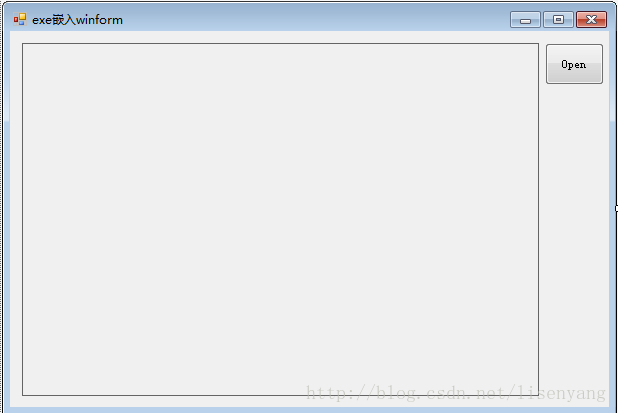
1.新建winform程序,添加一个Panel控件和一个button控件,winform窗体命名为:Mainform;
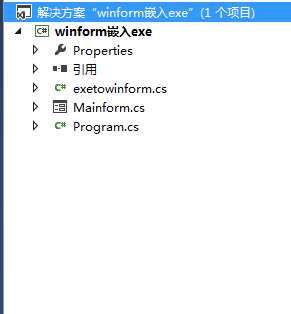
2.新建一个类文件,方便引用,命名为:exetowinform;
3.Mainform中cs代码如下:
  exetowinform fr = null;

        private void button1_Click(object sender, EventArgs e)

        {

            OpenFileDialog Oppf = new OpenFileDialog();

            Oppf.ShowDialog();

            if (Oppf.FileName != "")

            {

                panel1.Controls.Clear();

                fr = new exetowinform(panel1, "");

                fr.Start(Oppf.FileName);

            }

        }
4.exetowinform类文件代码如下:
 public class exetowinform

    {

        EventHandler appIdleEvent = null;

        Control ParentCon = null;

        string strGUID = "";

        public exetowinform(Control C, string Titlestr)

        {

            appIdleEvent = new EventHandler(Application_Idle);

            ParentCon = C;

            strGUID = Titlestr;

        }

        /// <summary>

        /// 将属性<code>AppFilename</code>指向的应用程序打开并嵌入此容器

        /// </summary>

        public IntPtr Start(string FileNameStr)

        {

            if (m_AppProcess != null)

            {

                Stop();

            }

            try

            {

                ProcessStartInfo info = new ProcessStartInfo(FileNameStr);

                info.UseShellExecute = true;

                info.WindowStyle = ProcessWindowStyle.Minimized;

                m_AppProcess = System.Diagnostics.Process.Start(info);

                m_AppProcess.WaitForInputIdle();

                Application.Idle += appIdleEvent;

            }

            catch

            {

                if (m_AppProcess != null)

                {

                    if (!m_AppProcess.HasExited)

                        m_AppProcess.Kill();

                    m_AppProcess = null;

                }

            }

            return m_AppProcess.Handle;

        }

        /// <summary>

        /// 确保应用程序嵌入此容器

        /// </summary>

        /// <param name="sender"></param>

        /// <param name="e"></param>

        void Application_Idle(object sender, EventArgs e)

        {

            if (this.m_AppProcess == null || this.m_AppProcess.HasExited)

            {

                this.m_AppProcess = null;

                Application.Idle -= appIdleEvent;

                return;

            }

            while (m_AppProcess.MainWindowHandle == IntPtr.Zero)

            {

                Thread.Sleep();

                m_AppProcess.Refresh();

            }

            Application.Idle -= appIdleEvent;

            EmbedProcess(m_AppProcess, ParentCon);

        }

        /// <summary>

        /// 应用程序结束运行时要清除这里的标识

        /// </summary>

        /// <param name="sender"></param>

        /// <param name="e"></param>

        void m_AppProcess_Exited(object sender, EventArgs e)

        {

            m_AppProcess = null;

        }

        /// <summary>

        /// 将属性<code>AppFilename</code>指向的应用程序关闭

        /// </summary>

        public void Stop()

        {

            if (m_AppProcess != null)// && m_AppProcess.MainWindowHandle != IntPtr.Zero)

            {

                try

                {

                    if (!m_AppProcess.HasExited)

                        m_AppProcess.Kill();

                }

                catch (Exception)

                {

                }

                m_AppProcess = null;

            }

        }

        #region 属性

        /// <summary>

        /// application process

        /// </summary>

        Process m_AppProcess = null;

        /// <summary>

        /// 标识内嵌程序是否已经启动

        /// </summary>

        public bool IsStarted { get { return (this.m_AppProcess != null); } }

        #endregion 属性

        #region Win32 API

        [DllImport("user32.dll", EntryPoint = "GetWindowThreadProcessId", SetLastError = true,

             CharSet = CharSet.Unicode, ExactSpelling = true,

             CallingConvention = CallingConvention.StdCall)]

        private static extern long GetWindowThreadProcessId(long hWnd, long lpdwProcessId);

        [DllImport("user32.dll", SetLastError = true)]

        private static extern IntPtr FindWindow(string lpClassName, string lpWindowName);

        [DllImport("user32.dll", SetLastError = true)]

        private static extern long SetParent(IntPtr hWndChild, IntPtr hWndNewParent);

        [DllImport("user32.dll", EntryPoint = "GetWindowLongA", SetLastError = true)]

        private static extern long GetWindowLong(IntPtr hwnd, int nIndex);

        public static IntPtr SetWindowLong(HandleRef hWnd, int nIndex, int dwNewLong)

        {

            if (IntPtr.Size == )

            {

                return SetWindowLongPtr32(hWnd, nIndex, dwNewLong);

            }

            return SetWindowLongPtr64(hWnd, nIndex, dwNewLong);

        }

        [DllImport("user32.dll", EntryPoint = "SetWindowLong", CharSet = CharSet.Auto)]

        public static extern IntPtr SetWindowLongPtr32(HandleRef hWnd, int nIndex, int dwNewLong);

        [DllImport("user32.dll", EntryPoint = "SetWindowLongPtr", CharSet = CharSet.Auto)]

        public static extern IntPtr SetWindowLongPtr64(HandleRef hWnd, int nIndex, int dwNewLong);

        [DllImport("user32.dll", SetLastError = true)]

        private static extern long SetWindowPos(IntPtr hwnd, long hWndInsertAfter, long x, long y, long cx, long cy, long wFlags);

        [DllImport("user32.dll", SetLastError = true)]

        private static extern bool MoveWindow(IntPtr hwnd, int x, int y, int cx, int cy, bool repaint);

        [DllImport("user32.dll", EntryPoint = "PostMessageA", SetLastError = true)]

        private static extern bool PostMessage(IntPtr hwnd, uint Msg, uint wParam, uint lParam);

        [DllImport("user32.dll", SetLastError = true)]

        private static extern IntPtr GetParent(IntPtr hwnd);

        [DllImport("user32.dll", EntryPoint = "ShowWindow", SetLastError = true)]

        static extern bool ShowWindow(IntPtr hWnd, int nCmdShow);

        private const int SWP_NOOWNERZORDER = 0x200;

        private const int SWP_NOREDRAW = 0x8;

        private const int SWP_NOZORDER = 0x4;

        private const int SWP_SHOWWINDOW = 0x0040;

        private const int WS_EX_MDICHILD = 0x40;

        private const int SWP_FRAMECHANGED = 0x20;

        private const int SWP_NOACTIVATE = 0x10;

        private const int SWP_ASYNCWINDOWPOS = 0x4000;

        private const int SWP_NOMOVE = 0x2;

        private const int SWP_NOSIZE = 0x1;

        private const int GWL_STYLE = (-);

        private const int WS_VISIBLE = 0x10000000;

        private const int WM_CLOSE = 0x10;

        private const int WS_CHILD = 0x40000000;

        private const int SW_HIDE = ; //{隐藏, 并且任务栏也没有最小化图标}

        private const int SW_SHOWNORMAL = ; //{用最近的大小和位置显示, 激活}

        private const int SW_NORMAL = ; //{同 SW_SHOWNORMAL}

        private const int SW_SHOWMINIMIZED = ; //{最小化, 激活}

        private const int SW_SHOWMAXIMIZED = ; //{最大化, 激活}

        private const int SW_MAXIMIZE = ; //{同 SW_SHOWMAXIMIZED}

        private const int SW_SHOWNOACTIVATE = ; //{用最近的大小和位置显示, 不激活}

        private const int SW_SHOW = ; //{同 SW_SHOWNORMAL}

        private const int SW_MINIMIZE = ; //{最小化, 不激活}

        private const int SW_SHOWMINNOACTIVE = ; //{同 SW_MINIMIZE}

        private const int SW_SHOWNA = ; //{同 SW_SHOWNOACTIVATE}

        private const int SW_RESTORE = ; //{同 SW_SHOWNORMAL}

        private const int SW_SHOWDEFAULT = ; //{同 SW_SHOWNORMAL}

        private const int SW_MAX = ; //{同 SW_SHOWNORMAL}

        #endregion Win32 API

        /// <summary>

        /// 将指定的程序嵌入指定的控件

        /// </summary>

        private void EmbedProcess(Process app, Control control)

        {

            // Get the main handle

            if (app == null || app.MainWindowHandle == IntPtr.Zero || control == null) return;

            try

            {

                // Put it into this form

                SetParent(app.MainWindowHandle, control.Handle);

            }

            catch (Exception)

            { }

            try

            {

                // Remove border and whatnot

                SetWindowLong(new HandleRef(this, app.MainWindowHandle), GWL_STYLE, WS_VISIBLE);

                SendMessage(app.MainWindowHandle, WM_SETTEXT, IntPtr.Zero, strGUID);

            }

            catch (Exception)

            { }

            try

            {

                // Move the window to overlay it on this window

                MoveWindow(app.MainWindowHandle, , , control.Width, control.Height, true);

            }

            catch (Exception)

            { }

        }

        [DllImport("User32.dll", EntryPoint = "SendMessage")]

        private static extern int SendMessage(IntPtr hWnd, int Msg, IntPtr wParam, string lParam);

        const int WM_SETTEXT = 0x000C;

    }
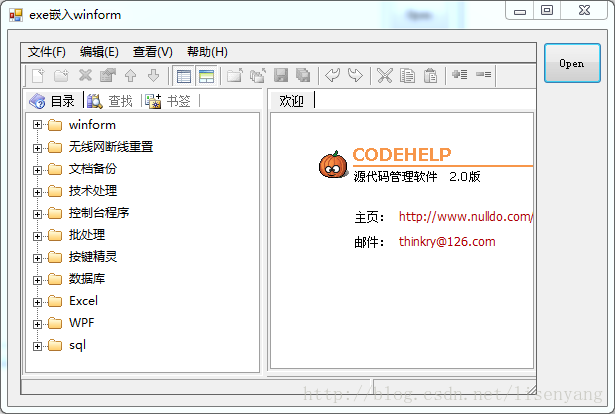
5.最后结果如图:
文章转载自http://blog.csdn.net/lisenyang/article/details/18303971
遇到的问题
我要打开一个exe文件,文件打开了,但是并没有嵌入到我的窗体中。
解决方法
经过一番尝试,发现通过程序Process.MainWindowHandle得到的句柄和通过FindWindow(null, "程序名称")得到的句柄不一致。
然后得出方案;
IntPtr hWnd = FindWindow(null, "文件名");

IntPtr appWnd = app.MainWindowHandle;

ShowWindow(appWnd, );
隐藏掉process得到的程序窗口,然后执行
 try

            {

                // Put it into this form

                SetParent(hWnd, control.Handle);

            }

            catch (Exception)

            { }

            try

            {

                // Remove border and whatnot

                SetWindowLong(new HandleRef(this, hWnd), GWL_STYLE, WS_VISIBLE);

               // SendMessage(app.MainWindowHandle, WM_SETTEXT, IntPtr.Zero, strGUID);

            }

            catch (Exception)

            { }

            try

            {

                // Move the window to overlay it on this window

                MoveWindow(hWnd, , , control.Width, control.Height, true);

            }

            catch (Exception)

            { }
好了,到这问题基本上就解决了。
exe程序嵌入Winform窗体的更多相关文章
- C# winform 将其他程序嵌入Form窗体
嵌入类 public class ExeImpaction { public void FrmClosing() { try { if (!process.HasExited) process.Kil ...
- C# 将外部exe程序 嵌入到自己的窗体界面
将别人开发的exe程序,放到自己的窗体里面来运行. 1.基本功能实现 首先,在自己的窗体后面加上代码: [DllImport("User32.dll", EntryPoint = ...
- C# 使用Win32 API将1个EXE程序嵌入另1个程序中
已经干到天快亮了,就不废话直接贴点儿代码吧 ; ; /// <summary> /// 查找窗口 ///第一个参数是窗口的标题,第二个参数可直接用 null ///通过窗口的标题查找对应的 ...
- 把第三方的exe程序嵌入C#界面上
public partial class eTerm_Form : WinFormsUI.Docking.DockContent{public eTerm_Form(){InitializeCompo ...
- WinForm 窗体属性 窗体美化
WinForm是·Net开发平台中对Windows Form的一种称谓. Windows窗体的一些重要特点如下: 功能强大:Windows窗体可用于设计窗体和可视控件,以创建丰富的基于Windows的 ...
- winform窗体继承泛型类时,设计器无法使用解决办法
当我们使用winform程序时,winform窗体程序和控件程序都是可以通过设计器进行控件拖拽的,但如果我们继承了一个带有泛型的form基类.那么设计器是无法使用的. 目前我没有找到根本解决的办法,但 ...
- C#将exe运行程序嵌入到自己的winform窗体中
以下例子是将Word打开,然后将它嵌入到winform窗体中,效果如下图:C将exe运行程序嵌入到自己的winform窗体中 - kingmax_res - iSport注意:该方法只适用于com的e ...
- 外部exe窗体嵌入winform
using System; using System.Collections.Generic; using System.ComponentModel; using System.Drawing; u ...
- C#WinForm窗体内Panel容器中嵌入子窗体、程序主窗体设计例子
C#WinForm父级窗体内Panel容器中嵌入子窗体.程序主窗体设计例子 在项目开发中经常遇到父级窗体嵌入子窗体所以写了一个例子程序,顺便大概划分了下界面模块和配色,不足之处还望指点 主窗体窗体采用 ...
随机推荐
- 在ubuntu14中搭建邮箱服务器
1.前提准备 1.1在服务器上安装ubuntu14 1.2为ubuntu14配置静态ip 使用命令 sudo vim /etc/network/interfaces打开配置文件 修改内容如下: 使用命 ...
- ES6 开发常用新特性以及简述ES7
一.关于变量 ES6新增:块级作用域变量 1.let定义块级作用域变量 没有变量的提升,必须先声明后使用 let声明的变量,不能与前面的let,var,conset声明的变量重名 { { consol ...
- java.sql.SQLException: Parameter index out of range (1 > number of parameters, which is 0).
java.sql.SQLException: Parameter index out of range (1 > number of parameters, which is 0). at co ...
- 更改Linux语言环境
查看本地语言环境 locale 中文环境: export LC_ALL=zh_CN.UTF- 英文环境:export LC_ALL=en_US.UTF-8 具体设置其他环境百度...
- Qt_阴影效果
一.控件阴影效果 为子部件添加阴影比较简单,使用如下方式: QGraphicsDropShadowEffect *shadow_effect = new QGraphicsDropShadowEffe ...
- php composer 使用 以及 psr0和psr4的真正区别
composer 使用 项目和库之间唯一的区别是,你的项目是一个没有名字的包 包名不区分大小写,但惯例是使用小写字母,并用连字符作为单词的分隔 入门比较好资源: 官网适合读一遍 https://do ...
- Latex常用数学符号(转)
http://blog.sina.com.cn/s/blog_642075770100u0np.html Latex常用数学符号(转) 1.指数和下标可以用^和_后加相应字符来实现.比如: 2.平方根 ...
- hash与平衡二叉树的区别
哈希表的定义:哈希表是一种根据关键码去寻找值的数据映射结构,该结构通过把关键码映射的位置去寻找存放值的地方 https://blog.csdn.net/duan19920101/article/det ...
- 阿里云免费申请https证书
申请地址 https://common-buy.aliyun.com/?spm=a2c4e.11153940.blogcont65199.22.30f968210RsUSx&commodi ...
- redis系列--主从复制以及redis复制演进
一.前言 在之前的文章已经详细介绍了redis入门基础已经持久化相关内容包括redis4.0所提供的混合持久化. 通过持久化功能,Redis保证了即使在服务器宕机情况下数据的丢失非常少.但是如果这台服 ...