
[Cocos2d-x For WP8]Progress 进度条
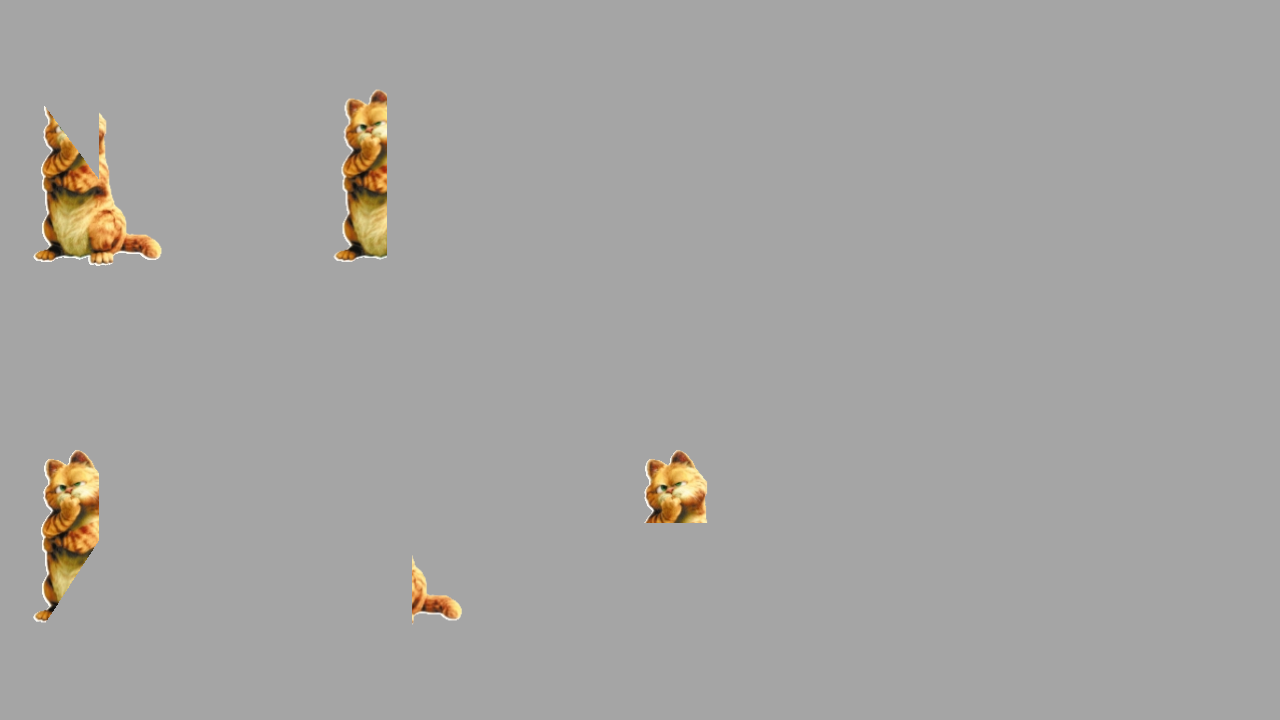
Cocos2d-x可以有多种进度条的展示方式,进度条的种类是根据进度条运动的方向来区分,包括顺时针,逆时针,从左到右,从右到左,从下到上和从上到下6种方式,这和WP8的进度条是由很大的区别的。那么Cocos2d-x的进度条是需要用图片来进行展示,然后从不同的方向来渐渐把图片显示出来实现进度条的效果。
第一步需要创建一个CCProgressTo对象和CCProgressTimer对象,我们可以通过CCProgressTo::create(2, 100)方法创建CCProgressTo定义了进度条的时间和图片的百分比,第一个参数是时间是一个CCTime对象,第二个参数是结果显示图片的百分比。通过CCProgressTimer::progressWithFile("cat.png")方法创建CCProgressTimer定义了进度条的图片文件。
CCProgressTo *to1 = CCProgressTo::create(2, 100);
CCProgressTimer *left = CCProgressTimer::progressWithFile("cat.png");
第二步通过CCProgressTimer指针设置进度条的类型。
调用setType设置类型,
kCCProgressTimerTypeRadialCW 顺时针生成
kCCProgressTimerTypeRadialCCW 逆时针生成
kCCProgressTimerTypeHorizontalBarLR 从左到右生成
kCCProgressTimerTypeHorizontalBarRL 从右到左生成
kCCProgressTimerTypeVerticalBarBT 从下到上生成
kCCProgressTimerTypeVerticalBarTB 从上到下生成
left->setType( kCCProgressTimerTypeRadialCW );
第三步添加到场景,设置位置和重复的频率
addChild(left);
left->setPosition(CCPointMake(100, size.height*3/4));
left->runAction( CCRepeatForever::create(to1));
示例代码:
         //逆时针转动

        CCProgressTo *to1 = CCProgressTo::create(, );

        CCProgressTimer *left = CCProgressTimer::progressWithFile("cat.png");

        left->setType( kCCProgressTimerTypeRadialCW );

        addChild(left);

        left->setPosition(CCPointMake(, size.height*/));

        left->runAction( CCRepeatForever::create(to1));

        //顺时针转动

        CCProgressTo *to2 = CCProgressTo::create(, );

        CCProgressTimer *right = CCProgressTimer::progressWithFile("cat.png");

        right->setType( kCCProgressTimerTypeRadialCCW );

        addChild(right);

        right->setPosition(CCPointMake(, size.height/));

        right->runAction( CCRepeatForever::create(to2));

        //从左到右

        CCProgressTo *toHorizontalBar1 = CCProgressTo::create(, );

        CCProgressTimer *leftHorizontalBar = CCProgressTimer::progressWithFile("cat.png");

        leftHorizontalBar->setType( kCCProgressTimerTypeHorizontalBarLR );

        addChild(leftHorizontalBar);

        leftHorizontalBar->setPosition(CCPointMake(, size.height*/));

        leftHorizontalBar->runAction( CCRepeatForever::create(toHorizontalBar1));

        //从右到左

        CCProgressTo *toHorizontalBar2 = CCProgressTo::create(, );

        CCProgressTimer *rightHorizontalBar = CCProgressTimer::progressWithFile("cat.png");

        rightHorizontalBar->setType( kCCProgressTimerTypeHorizontalBarRL );

        addChild(rightHorizontalBar);

        rightHorizontalBar->setPosition(CCPointMake(, size.height/));

        rightHorizontalBar->runAction( CCRepeatForever::create(toHorizontalBar2));

        //从底部到顶部

        CCProgressTo *toVerticalBar1 = CCProgressTo::create(, );

        CCProgressTimer *leftVerticalBar = CCProgressTimer::progressWithFile("cat.png");

        leftVerticalBar->setType( kCCProgressTimerTypeVerticalBarBT );

        addChild(leftVerticalBar);

        leftVerticalBar->setPosition(CCPointMake(, size.height*/));

        leftVerticalBar->runAction( CCRepeatForever::create(to1));

        //从顶部到底部

        CCProgressTo *toVerticalBar2 = CCProgressTo::create(, );

        CCProgressTimer *rightVerticalBar = CCProgressTimer::progressWithFile("cat.png");

        rightVerticalBar->setType( kCCProgressTimerTypeVerticalBarTB );

        addChild(rightVerticalBar);

        rightVerticalBar->setPosition(CCPointMake(, size.height/));

        rightVerticalBar->runAction( CCRepeatForever::create(toVerticalBar2));
运行的效果:

[Cocos2d-x For WP8]Progress 进度条的更多相关文章
- 微信小程序组件解读和分析:六、progress进度条
progress进度条组件说明: 进度条,就是表示事情当前完成到什么地步了,可以让用户视觉上感知事情的执行.progress进度条是微信小程序的组件,和HTML5的进度条progress类似. pro ...
- 微信小程序 progress 进度条 内部圆角及内部条渐变色
微信小程序progress进度条内部圆角及渐变色 <view class="progress-box"> <progress percent="80&q ...
- android中progress进度条的使用
activity.xml: <LinearLayout xmlns:android="http://schemas.android.com/apk/res/android" ...
- progress 进度条
进度条. 属性名 类型 默认值 说明 percent Float 无 百分比0~100 show-info Boolean false 在进度条右侧显示百分比 stroke-width Numb ...
- progress进度条的样式修改
由于公司在做的公众号上需要进度条,我就想着用progress标签,可是progress标签很难修改样式,因而在网上查询了一番. 现在总结一下. progress是H5新标签,主要用于显示进度条.由于他 ...
- bootstrap3的 progress 进度条
: 2.3版 3.0版 .bar .progress-bar .bar-* .progress-bar-* 2.代码: <!DOCTYPE html PUBLIC & ...
- 使用div实现progress进度条
在百度上搜了很多方法去修改HTML5 progress的样式,然而并没有实现. 所以自己用div实现了一个. 简单粗暴(*^-^*) 可以在CSS里改样式,可以JS里改进度. <div cla ...
- html。PROGRESS进度条使用测试
效果图 : 代码: ----------------------------------- //本文来自:https://www.cnblogs.com/java2sap/p/11199126.htm ...
- 详解HTML5中的进度条progress元素简介及兼容性处理
一.progress元素基本了解 1.基本知识 progress元素属于HTML5家族,指进度条.IE10+以及其他靠谱浏览器都支持. 注释:Internet Explorer 9 以及更早的版本不支 ...
随机推荐
- JSP基本面试的试题
JSP基本面试的试题 1.jsp有哪些内置对象作用分别是什么 答:JSP共有以下9种基本内置组件(可与ASP的6种内部组件相对应): request 用户端请求,此请求会包含来自GET/PO ...
- Linux运维相关目录
- How can I pretty-print JSON in python?
python -m json.tool my_json.json 转自: http://stackoverflow.com/questions/352098/how-can-i-pretty-prin ...
- wireshark http抓包命令行详解
This article is a quick and easy HowTo detailing the use of Wireshark or another network sniffing pr ...
- ubuntu 15 安装Qt
Linux 下安装 QT5.4.0 http://blog.163.com/xd8171@126/blog/static/620810432015027111314471/ Linux qt ...
- 解决ecshop登陆自动退出的莫名现象
最近在做ecshop的二次开发,程序发布后测试出现一个莫名的问题.点击几次页面后出现session丢失,需要重复登陆:本地怎么测试也都无法重现问题.一开始以为是修改程序的问题,可是怎么找都找不着问题所 ...
- [SVN(ubuntu)] ubuntu使用svn
转载自:http://lee2013.iteye.com/blog/1058047 SVN作为日常开发中不可缺少的工具,Ubuntu下的SVN安装十分简单,sudo apt-get install s ...
- css3学习总结8--CSS3 3D转换
3D 转换 1. rotateX() 2. rotateY() otateX() 方法 通过 rotateX() 方法,元素围绕其 X 轴以给定的度数进行旋转. 示例: div { transform ...
- ubuntu 彻底删除卸载
1911 sudo apt-get install zabbix-agent 1916 sudo apt-get autoremove zabbix_agent root@(none):~# apt- ...
- 《Java并发编程实战》学习笔记 任务执行和取消关闭
查看豆瓣读书 第六章 任务执行 大多数并发应用程序是围绕执行任务进行管理的.设计任务时,要为任务设计一个清晰的任务边界,并配合一个明确的任务执行策略.任务最好是独立的,因为这会提高并发度.大多数服务器 ...