
[Grid Layout] Describe a grid layout using named grid lines
We can use named grid lines to describe our grid layout. Let’s see how to apply this to our grid-template-columns and grid-template-rows, and how to refer to these from our grid items.
Syntax like:
            grid-template-columns:

            [left-sidebar-start] 1fr

            [main-content-start] 2fr

            [right-sidebar-start] 1fr;
We can name those whatever we want to.
You can also give multi names for one line:
            grid-template-columns:

            [left-sidebar-start] 1fr

            [left-sidebar-end main-content-start] 2fr

            [main-content-end right-sidebar-start] 1fr

            [right-sidebar-end];
And we also named the last columns name as 'right-sidebar-end'.
Later we can contorl the position like this:
            grid-template-rows:

                [body-start] 6fr

                [body-end footer-start] 2fr

                [footer-end];
The same for the rows:
            grid-template-rows:

                [body-start] 6fr

                [body-end footer-start] 2fr

                [footer-end];
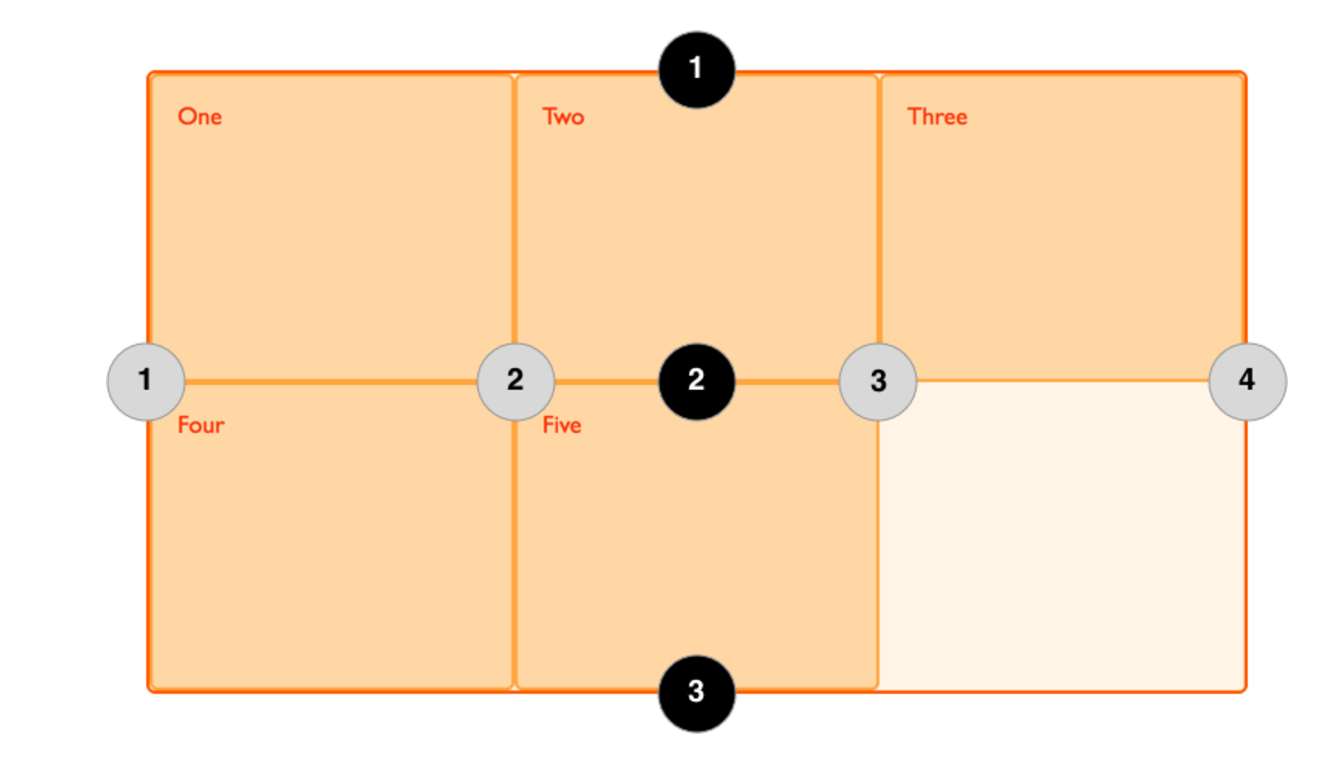
So for four column lines:

 --> left-sidebar-start

 --> left-sidebar-end, main-content-start

 --> main-content-end, right-sidebar-start

 --> right-sidebar-end

For three row lines:

 --> body-start

 --> body-end, footer-start

 --> footer-end
For more information, check the article
[Grid Layout] Describe a grid layout using named grid lines的更多相关文章
- Auto Layout Guide----(一)-----Understanding Auto Layout
Understanding Auto Layout 理解自动布局 Auto Layout dynamically calculates the size and position of all the ...
- 问题-[Delphi]在对GRID设置单击为编辑时,其他GRID可以,但有一个GRID不行?
问题现象:在对GRID设置单击为编辑时,其他GRID可以,但有一个GRID不行?问题原因:在这个GRID中的单击事件可能不存在,可以测试一下有没有单击事件.解决方法:需要在GRID的上一个类中,放开单 ...
- [Grid Layout] Describe a grid layout using grid-template-areas
We can describe the nature of a grid in an ‘ASCII-art’ way with grid-template-areas. Let’s see how t ...
- 理解css中Grid布局,在项目中如何实现grid页面布局
简介 CSS中Grid是一种二维网格式布局方式.我们常规使用table.float.position.inline-block等布局,但它们遗漏了很多功能,例如垂直居中.后来css3中flexbox的 ...
- Layout Inflation :Unconditional layout, inflation from view adapter
Layout inflation在Android上下文环境下转换XML文件成View结构对象的时候需要用到. LayoutInflater这个对象在Android的SDK中很常见,但是你绝对没想到竟然 ...
- ext:grid分页,列宽度自动填满grid宽度
var cm = new Ext.grid.ColumnModel([{ header : '编号', dataIndex : 'id' }, { header ...
- Ext grid单元格编辑时获取获取Ext.grid.column.Column
item2.width = 80; //item2.flex = 1; item2.align = 'center'; item2.menuDisabled = true; //禁止显示列头部右侧菜单 ...
- Grid属性太多记不住?【Grid栅格布局可视化编辑器】直观易懂高效,拖拉拽,有手就行!
手把手教你通过拖拉拽可视化的方式带你练习[Grid栅格布局]的各个属性,直观易懂!再也不愁记不住繁多的Grid属性了.整个过程在众触应用平台进行,不用手写一行CSS代码. grid-auto-flow ...
- CSS: Grid Layout Module
Grid Layout The CSS Grid Layout Module offers a grid-based layout system, with rows and columns, mak ...
随机推荐
- BZOJ2142: 礼物(拓展lucas)
Description 一年一度的圣诞节快要来到了.每年的圣诞节小E都会收到许多礼物,当然他也会送出许多礼物.不同的人物在小E 心目中的重要性不同,在小E心中分量越重的人,收到的礼物会越多.小E从商店 ...
- LocationOnScreen-控件在手机屏幕中的位置坐标
我们可以通过如下的方法获得某个控件在屏幕中的绝对坐标 代码如下: private int[] mHistoryDisplayButtonLocation; private int mHistoryDi ...
- Qt产生随机数(两种方法)
第一种方法 #include <QTime> QTime time; time= QTime::currentTime(); qsrand(time.msec()+time.second( ...
- Android检测网络状态,判断当前网络是否可用
用户手机当前网络可用:WIFI.2G/3G网络,用户打开与不打开网络,和是否可以用是两码事.可以使用指的是:用户打开网络了并且可以连上互联网进行上网. 检测当前网络是否可用,代码如下: /** * 检 ...
- Android SlideAndDragListView,一个可排序可滑动item的ListView
SlideAndDragListView简介 SlideAndDragListView,可排序.可滑动item显示”菜单”的ListView. SlideAndDragListView(SDLV)继承 ...
- UVA 11796 - Dog Distance 向量的应用
http://uva.onlinejudge.org/index.php?option=com_onlinejudge&Itemid=8&page=show_problem&p ...
- report_timing
report_timing -max_path 2 会报告两条路径,但不一定是最差的路径 report_timing -nworst 2 -max_path 2 会报告两条最差的路径
- Windows下合并tar分卷
如有例如以下几个tar分卷:logs.tar.gza1.logs.tar.gza2.logs.tar.gza3.在Windows下怎样进行合并呢? 按"win+r"键在弹出的输入框 ...
- C语言中 / 得到的结果
- Android应用性能优化系列视图篇——隐藏在资源图片中的内存杀手
图片加载性能优化永远是Android领域中一个无法绕过的话题,经过数年的发展,涌现了很多成熟的图片加载开源库,比如Fresco.Picasso.UIL等等,使得图片加载不再是一个头疼的问题,并且大幅降 ...