
apache ftp server的简单入门(properties验证)
Apache FTPServer:(开源)
Apache FTPServer是一个100%纯Java的FTP服务器。 它的设计是基于现有的开放式协议的完整和便携式FTP服务器引擎解决方案。FTPServer可独立运行作为Windows服务或Unix/ Linux后台程序或是被嵌入在Java应用程序中。
注意:具体介绍参考官网 https://mina.apache.org/downloads-ftpserver.html
FTPServer 安装:
- 第一步:下载Apache FTPServer
https://mina.apache.org/downloads-ftpserver.html 自己选择相应版本信息
- 第二步:解压Apache FTPServer
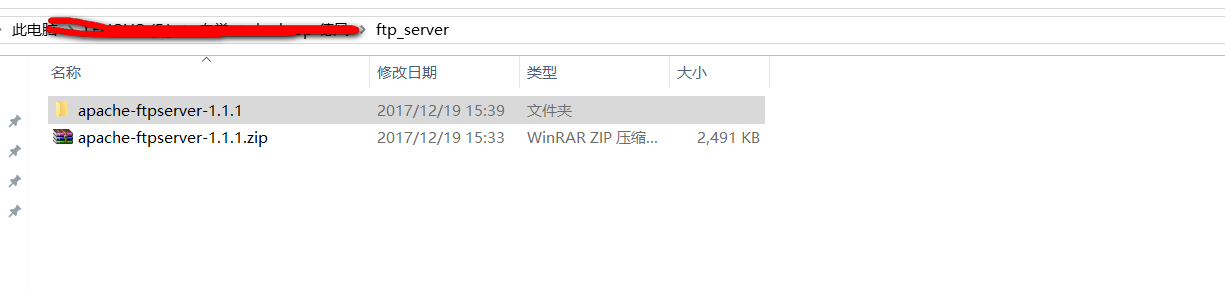
- 第三步:修改配置文件
1》 users.properties的配置
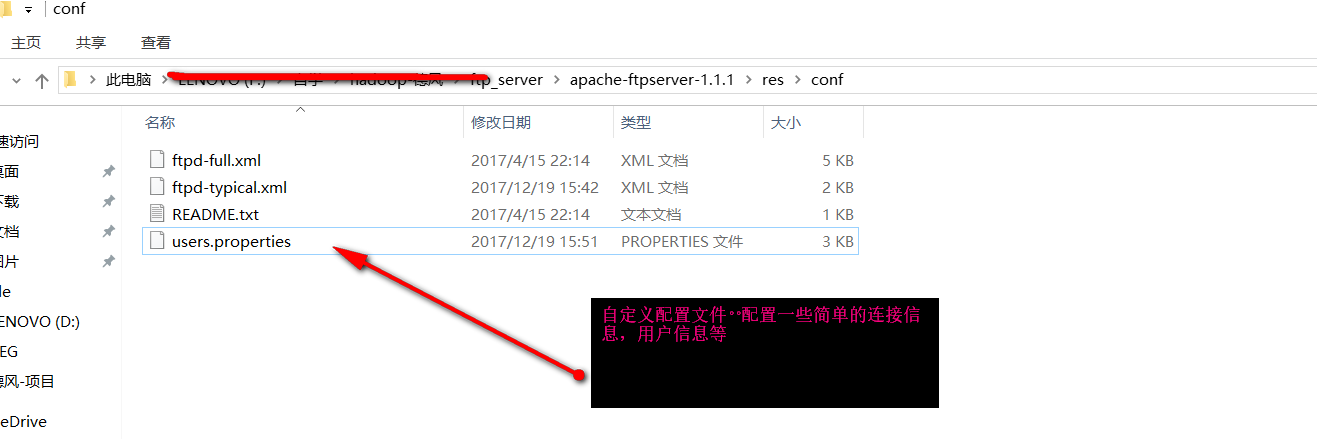
我的users.properties文件配置如下:
# Licensed to the Apache Software Foundation (ASF) under one

# or more contributor license agreements.  See the NOTICE file

# distributed with this work for additional information

# regarding copyright ownership.  The ASF licenses this file

# to you under the Apache License, Version 2.0 (the

# "License"); you may not use this file except in compliance

# with the License.  You may obtain a copy of the License at

#

#  http://www.apache.org/licenses/LICENSE-2.0

#

# Unless required by applicable law or agreed to in writing,

# software distributed under the License is distributed on an

# "AS IS" BASIS, WITHOUT WARRANTIES OR CONDITIONS OF ANY

# KIND, either express or implied.  See the License for the

# specific language governing permissions and limitations

# under the License.

# Password is "admin"

ftpserver.user.admin.userpassword=admin

ftpserver.user.admin.homedirectory=./res/home

ftpserver.user.admin.enableflag=true

ftpserver.user.admin.writepermission=true

ftpserver.user.admin.maxloginnumber=

ftpserver.user.admin.maxloginperip=

ftpserver.user.admin.idletime=

ftpserver.user.admin.uploadrate=

ftpserver.user.admin.downloadrate=

#匿名登录配置  我暂时注释

#ftpserver.user.anonymous.userpassword=

#ftpserver.user.anonymous.homedirectory=./res/home

#ftpserver.user.anonymous.enableflag=true

#ftpserver.user.anonymous.writepermission=false

#ftpserver.user.anonymous.maxloginnumber=

#ftpserver.user.anonymous.maxloginperip=

#ftpserver.user.anonymous.idletime=

#ftpserver.user.anonymous.uploadrate=

#ftpserver.user.anonymous.downloadrate=

#新用户的一些配置信息

#密码 配置新的用户

ftpserver.user.huhy.userpassword=

#主目录

ftpserver.user.huhy.homedirectory=./res/home

#当前用户可用

ftpserver.user.huhy.enableflag=true

#具有上传权限

ftpserver.user.huhy.writepermission=true

#最大登陆用户数为20

ftpserver.user.huhy.maxloginnumber=

#同IP登陆用户数为2

ftpserver.user.huhy.maxloginperip=

#空闲时间为300秒

ftpserver.user.huhy.idletime=

#上传速率限制为480000字节每秒

ftpserver.user.huhy.uploadrate=

#下载速率限制为480000字节每秒

ftpserver.user.huhy.downloadrate=
2> 修改配置文件 ftpd-typical.xml
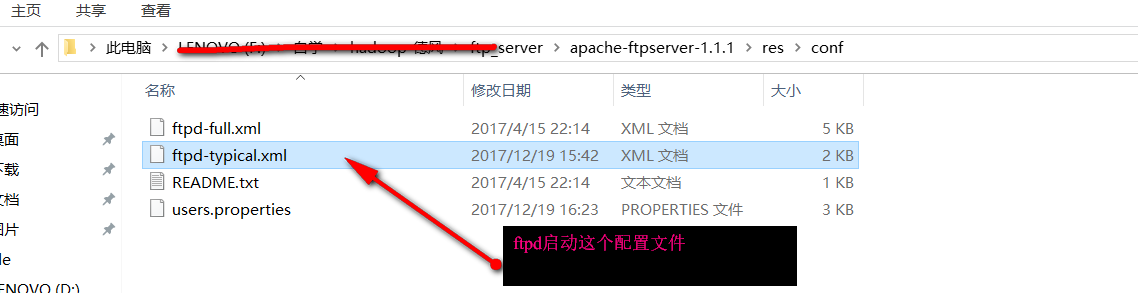
<?xml version="1.0" encoding="UTF-8"?>

    <!--

        Licensed to the Apache Software Foundation (ASF) under one or more

        contributor license agreements. See the NOTICE file distributed with

        this work for additional information regarding copyright ownership.

        The ASF licenses this file to you under the Apache License, Version

        2.0 (the "License"); you may not use this file except in compliance

        with the License. You may obtain a copy of the License at

        http://www.apache.org/licenses/LICENSE-2.0 Unless required by

        applicable law or agreed to in writing, software distributed under the

        License is distributed on an "AS IS" BASIS, WITHOUT WARRANTIES OR

        CONDITIONS OF ANY KIND, either express or implied. See the License for

        the specific language governing permissions and limitations under the

        License.

    -->

<server xmlns="http://mina.apache.org/ftpserver/spring/v1"

    xmlns:xsi="http://www.w3.org/2001/XMLSchema-instance"

    xsi:schemaLocation="

       http://mina.apache.org/ftpserver/spring/v1 http://mina.apache.org/ftpserver/ftpserver-1.0.xsd

       "

    id="myServer">

    <listeners>

        <nio-listener name="default" port="">

            <ssl>

                <keystore file="./res/ftpserver.jks" password="password" />

            </ssl>

        </nio-listener>

    </listeners>

    <file-user-manager file="./res/conf/users.properties" encrypt-passwords="clear"/>

</server>
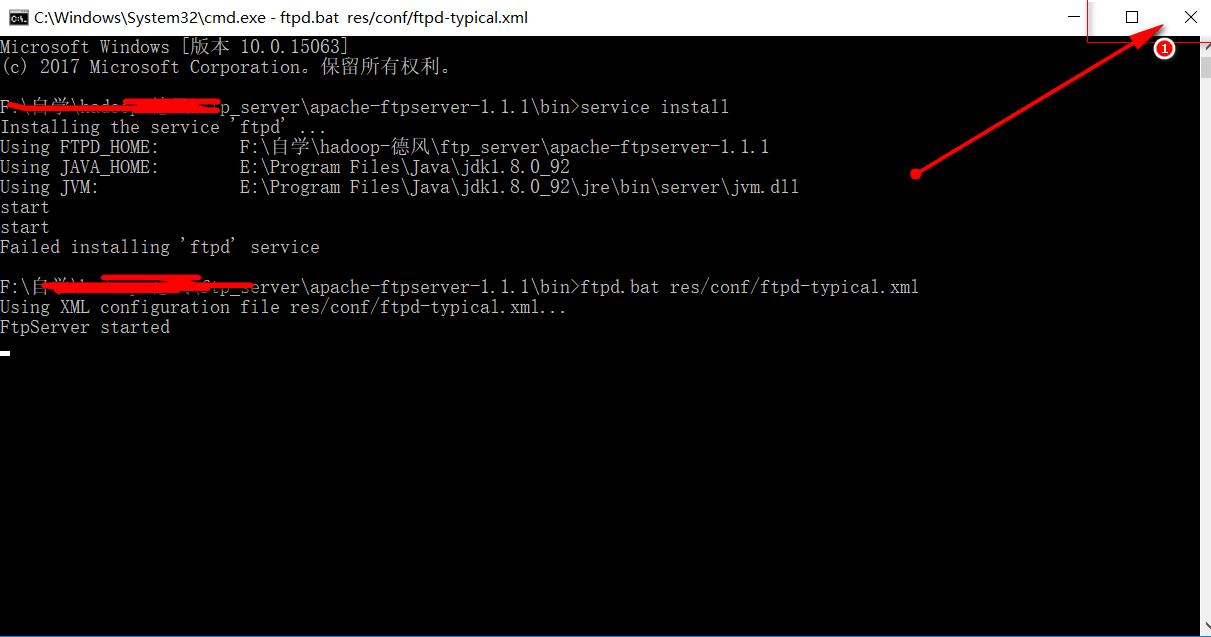
- 第四步:启动FTPServer
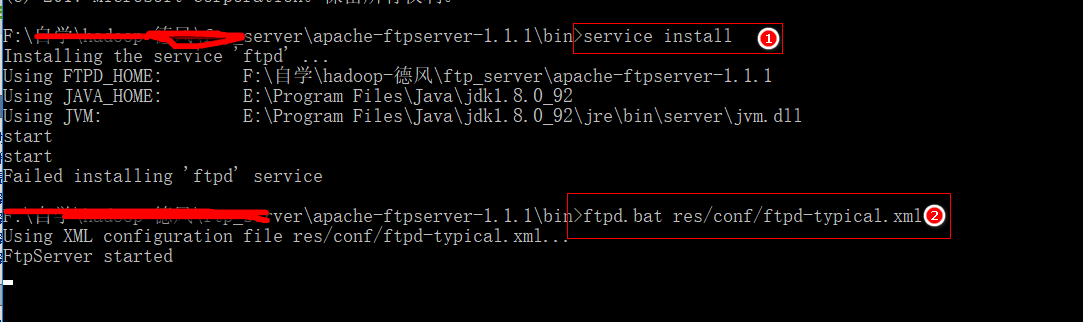
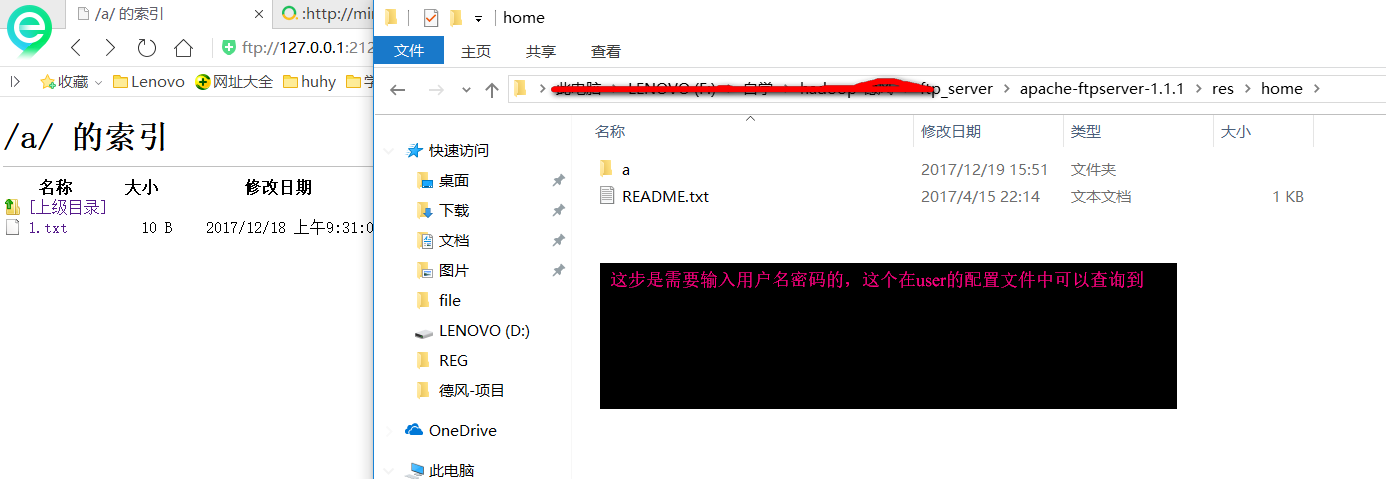
- 第五步:访问FTP
- 第六步:FTPServer的启动与关闭 关闭doc窗口就行
apache ftp server的简单入门(properties验证)的更多相关文章
- apache ftp server的简单入门(数据库验证)
apache的简单校验分为两种,一直是前面提到的properties的校验,具体参考:apache ftp server的简单入门(properties验证) 今天来说一种数据库的校验,这种方式在项目 ...
- apache ftp server的简单入门(java应用内嵌ftp server)
Apache Ftp Server:(强调) Apache Ftp Server 是100%纯Java的FTP服务器软件,它采用MINA网络框架开发具有非常好的性能.Apache FtpServer ...
- apache ftp server的外网访问问题
apache ftp server的外网访问简单配置点如下:
- apache ftp server 设置
<server xmlns="http://mina.apache.org/ftpserver/spring/v1" xmlns:xsi="http://www.w ...
- 网络编程4 网络编程之FTP上传简单示例&socketserver介绍&验证合法性连接
今日大纲: 1.FTP上传简单示例(详细代码) 2.socketserver简单示例&源码介绍 3.验证合法性连接//[秘钥加密(urandom,sendall)(注意:中文的!不能用)] 内 ...
- 用http.get()简单实现网络验证防止客户不给尾款_电脑计算机编程入门教程自学
首发于:用http.get()简单实现网络验证防止客户不给尾款_电脑计算机编程入门教程自学 http://jianma123.com/viewthread.aardio?threadid=428 给软 ...
- Identity Server 4 从入门到落地(六)—— 简单的单页面客户端
前面的部分: Identity Server 4 从入门到落地(一)-- 从IdentityServer4.Admin开始 Identity Server 4 从入门到落地(二)-- 理解授权码模式 ...
- IIS FTP Server Anonymous Writeable Reinforcement, WEBDAV Anonymous Writeable Reinforcement(undone)
目录 . 引言 . IIS 6.0 FTP匿名登录.匿名可写加固 . IIS 7.0 FTP匿名登录.匿名可写加固 . IIS >= 7.5 FTP匿名登录.匿名可写加固 . IIS 6.0 A ...
- 运维自动化之SALTSTACK简单入门
运维自动化之SaltStack简单入门 饱食终日而无所事事,是颓也,废也.但看昨日,费九牛二虎之力除一BUG便流连于新番之中,不知东方之既黑,实乃颓颓然而荒废矣.故今日来缀一文以忏昨日之悔. Salt ...
随机推荐
- Numpy 数组的切片操作
实例+解释如下(表格):关键是要明白python中数组的下标体系.一套从左往右,一套从右往左. 1 import numpy as np 2 import sys 3 4 def main(): 5 ...
- C# 终极基类Object介绍
一.简介 Object这个类型,相信everyone都不陌生,这个是CLR定义的最基础的类型,俗称"上帝类".CLR(运行时)要求所有类型,不管是系统定义的类型还是自定义的类型,都 ...
- Spring Security构建Rest服务-1100-单机Session管理
Session失效时间: springboot配置session失效时间,只需要在application.properties里配置 #session超时时间,低于60秒按60秒server.sess ...
- certificate verify fails (https://gems.ruby-china.org错误
首先:执行这一步报错的背景是: 更换gems源, 通常执行 gem sources --add https://gems.ruby-china.org/ --remove https://rubyge ...
- jenkins 踩坑路 之 jenkins ssh 脚本
背景: 由于公司业务调整,整个业务要从阿里云迁移到aws,自然 jenkins 也是要进行迁移的.jenkins 迁移过程中遇到的问题在此记录下,希望能给遇到类似问题的朋友些许帮助.也便于我后期遇到此 ...
- redis-springboot-redistemplate更改序列化方式
redisTemplate 默认的序列化方式为 jdkSerializeable, StringRedisTemplate的默认序列化方式为StringRedisSerializer 可以通过手动配置 ...
- activiti 临时笔记mark
public class TenMinuteTutorial { public static void main(String[] args) { // Create Activiti process ...
- unity之定制脚本模板
1.unity的脚本模板 新版本unity中的C#脚本有三类,第一类是我们平时开发用的C# Script:第二类是Testing,用来做单元测试:第三类是Playables,用作Time ...
- Ionic项目中如何使用Native Camera
本文介绍如何在ionic项目中使用设备的camera. Ionic版本:v3.2.0 / 2017-05-10 / MIT Licensed / Release Notes ============= ...
- C# 谁改了我的代码
本文告诉大家一个特殊的做法,可以修改一个字符串常量 我们来写一个简单的程序,把一个常量字符串输出 private const string str = "lindexi"; sta ...