
ASP.NET Core 2 学习笔记(二)生命周期
要了解程序的运行原理,就要先知道程序的进入点及生命周期。以往ASP.NET MVC的启动方式,是继承 HttpApplication 作为网站开始的进入点,而ASP.NET Core 改变了网站的启动方式,变得比较像是 Console Application。
本篇将介绍ASP.NET Core 的程序生命周期 (Application Lifetime) 及捕捉 Application 停止启动事件。
程序进入点
.NET Core 把 Web 及 Console 项目都处理成一样的启动方式,默认以 Program.cs 的 Program.Main 作为程序入口,再从程序入口把 ASP.NET Core 网站实例化。个人觉得比ASP.NET MVC 继承 HttpApplication 的方式简洁许多。
通过 .NET Core CLI 创建的 Program.cs 內容大致如下:
Program.cs
using System;

using System.Collections.Generic;

using System.IO;

using System.Linq;

using System.Threading.Tasks;

using Microsoft.AspNetCore;

using Microsoft.AspNetCore.Hosting;

using Microsoft.Extensions.Configuration;

using Microsoft.Extensions.Logging;

namespace MyWebsite

{

    public class Program

    {

        public static void Main(string[] args)

        {

            BuildWebHost(args).Run();

        }

        public static IWebHost BuildWebHost(string[] args) =>

            WebHost.CreateDefaultBuilder(args)

                .UseStartup<Startup>()

                .Build();

    }

}
Program.Main 通过 BuildWebHost 方法取得 WebHost 后,再运行 WebHost;WebHost 就是 ASP.NET Core 的网站实例。
- WebHost.CreateDefaultBuilder
通过此方法建立 WebHost Builder。WebHost Builder 是用來生成 WebHost 的对象。
可以在 WebHost 生成之前设置一些前置动作,当 WebHost 建立完成时,就可以使用已准备好的物件等。 - UseStartup
设置该 Builder 生成的 WebHost 启动后,要执行的类。 - Build
当前置准备都设置完成后,就可以调用 WebHost Builder 方法实例化 WebHost,并得到该实例。 - Run
启动 WebHost。
Startup.cs
当网站启动后,WebHost会实例化 UseStartup 设置的Startup类,并且调用以下两个方法:
- ConfigureServices
- Configure
通过 .NET Core CLI生成的Startup.cs 内容大致如下:
Startup.cs
using System;

using System.Collections.Generic;

using System.Linq;

using System.Threading.Tasks;

using Microsoft.AspNetCore.Builder;

using Microsoft.AspNetCore.Hosting;

using Microsoft.AspNetCore.Http;

using Microsoft.Extensions.DependencyInjection;

namespace MyWebsite

{

    public class Startup

    {

        // This method gets called by the runtime. Use this method to add services to the container.

        // For more information on how to configure your application, visit https://go.microsoft.com/fwlink/?LinkID=398940

        public void ConfigureServices(IServiceCollection services)

        {

        }

        // This method gets called by the runtime. Use this method to configure the HTTP request pipeline.

        public void Configure(IApplicationBuilder app, IHostingEnvironment env)

        {

            if (env.IsDevelopment())

            {

                app.UseDeveloperExceptionPage();

            }

            app.Run(async (context) =>

            {

                await context.Response.WriteAsync("Hello World!");

            });

        }

    }

}
- ConfigureServices
ConfigureServices 是用来将服务注册到 DI 容器用的。这个方法可不实现,并不是必要的方法。 - Configure
这个是必要的方法,一定要实现。但Configure方法的参数并不固定,参数的实例都是从 WebHost 注入进来,可依需求增减需要的参数。 - IApplicationBuilder 是最重要的参数也是必要的参数,Request 进出的 Pipeline 都是通过 ApplicationBuilder 来设置。
对 WebHost 来说 Startup.cs 并不是必要存在的功能。
可以试着把 Startup.cs 中的两个方法,都改成在 WebHost Builder 设置,变成启动的前置准备。如下:
Program.cs
using System;

using System.Collections.Generic;

using System.IO;

using System.Linq;

using System.Threading.Tasks;

using Microsoft.AspNetCore;

using Microsoft.AspNetCore.Hosting;

using Microsoft.Extensions.Configuration;

using Microsoft.Extensions.Logging;

using Microsoft.AspNetCore.Builder;

using Microsoft.AspNetCore.Http;

using Microsoft.Extensions.DependencyInjection;

namespace MyWebsite

{

    public class Program

    {

        public static void Main(string[] args)

        {

            BuildWebHost(args).Run();

        }

        public static IWebHost BuildWebHost(string[] args) =>

            WebHost.CreateDefaultBuilder(args)

                .ConfigureServices(services =>

                {

                    // ...

                })

                .Configure(app =>

                {

                    app.Run(async (context) =>

                    {

                        await context.Response.WriteAsync("Hello World!");

                    });

                })

                .Build();

    }

}
把 ConfigureServices 及 Configure 都改到 WebHost Builder 注册,网站的执行结果是一样的。
两者之间最大的不同就是调用的时间点不同。
- 在 WebHost Builder 注册,是在 WebHost 实例化之前就调用。
- 在 Startup.cs 注册,是在 WebHost 实例化之后调用。
但
Configure无法使用除了IApplicationBuilder以外的参数。
因为在 WebHost 实例化前,自己都还没被实例化,怎么可能会有有对象能注入给Configure。
Application Lifetime
除了程序进入点外,WebHost的启动和停止也是网站事件很重要一环,ASP.NET Core不像ASP.NET MVC用继承的方式捕捉启动及停止事件,而是透过Startup.Configure注入IApplicationLifetime来补捉Application启动停止事件。
IApplicationLifetime有三个注册监听事件及终止网站事件可以触发。如下:
public interface IApplicationLifetime

{

  CancellationToken ApplicationStarted { get; }

  CancellationToken ApplicationStopping { get; }

  CancellationToken ApplicationStopped { get; }

  void StopApplication();

}
- ApplicationStarted
当WebHost启动完成后,会执行的启动完成事件。 - ApplicationStopping
当WebHost触发停止时,会执行的准备停止事件。 - ApplicationStopped
当WebHost停止事件完成时,会执行的停止完成事件。 - StopApplication
可以通过此方法主动触发终止网站。
示例
通过Console输出执行的过程,示例如下:
Program.cs
using System;

using System.Collections.Generic;

using System.IO;

using System.Linq;

using System.Threading.Tasks;

using Microsoft.AspNetCore;

using Microsoft.AspNetCore.Hosting;

using Microsoft.Extensions.Configuration;

using Microsoft.Extensions.Logging;

using Microsoft.AspNetCore.Builder;

using Microsoft.AspNetCore.Http;

using Microsoft.Extensions.DependencyInjection;

namespace MyWebsite

{

    public class Program

    {

        public static void Main(string[] args)

        {

            Output("Application - Start");

            var webHost = BuildWebHost(args);

            Output("Run WebHost");

            webHost.Run();

            Output("Application - End");

        }

        public static IWebHost BuildWebHost(string[] args)

        {

            Output("Create WebHost Builder");

            var webHostBuilder = WebHost.CreateDefaultBuilder(args)

                .ConfigureServices(services =>

                {

                    Output("webHostBuilder.ConfigureServices - Called");

                })

                .Configure(app =>

                {

                    Output("webHostBuilder.Configure - Called");

                })

                .UseStartup<Startup>();

            Output("Build WebHost");

            var webHost = webHostBuilder.Build();

            return webHost;

        }

        public static void Output(string message)

        {

            Console.WriteLine($"[{DateTime.Now.ToString("yyyy/MM/dd HH:mm:ss")}] {message}");

        }

    }

}
Startup.cs
using System;

using System.Collections.Generic;

using System.Linq;

using System.Threading;

using System.Threading.Tasks;

using Microsoft.AspNetCore.Builder;

using Microsoft.AspNetCore.Hosting;

using Microsoft.AspNetCore.Http;

using Microsoft.Extensions.DependencyInjection;

namespace MyWebsite

{

    public class Startup

    {

        public Startup()

        {

            Program.Output("Startup Constructor - Called");

        }

        // This method gets called by the runtime. Use this method to add services to the container.

        // For more information on how to configure your application, visit https://go.microsoft.com/fwlink/?LinkID=398940

        public void ConfigureServices(IServiceCollection services)

        {

            Program.Output("Startup.ConfigureServices - Called");

        }

        // This method gets called by the runtime. Use this method to configure the HTTP request pipeline.

        public void Configure(IApplicationBuilder app, IApplicationLifetime appLifetime)

        {

            appLifetime.ApplicationStarted.Register(() =>

            {

                Program.Output("ApplicationLifetime - Started");

            });

            appLifetime.ApplicationStopping.Register(() =>

            {

                Program.Output("ApplicationLifetime - Stopping");

            });

            appLifetime.ApplicationStopped.Register(() =>

            {

                Thread.Sleep(5 * 1000);

                Program.Output("ApplicationLifetime - Stopped");

            });

            app.Run(async (context) =>

            {

                await context.Response.WriteAsync("Hello World!");

            });

            // For trigger stop WebHost

            var thread = new Thread(new ThreadStart(() =>

            {

                Thread.Sleep(5 * 1000);

                Program.Output("Trigger stop WebHost");

                appLifetime.StopApplication();

            }));

            thread.Start();

            Program.Output("Startup.Configure - Called");

        }

    }

}
执行结果
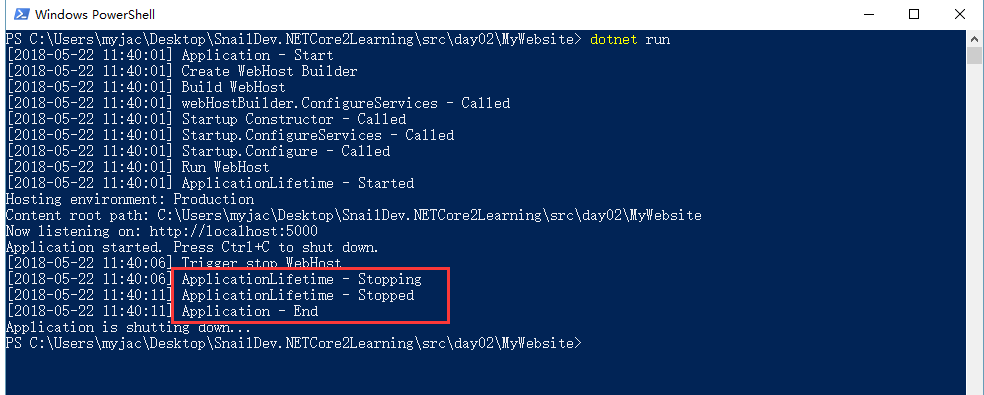
输出内容少了webHostBuilder.Configure - Called,因为Configure只能有一个,后注册的Configure会把之前注册的覆盖掉。
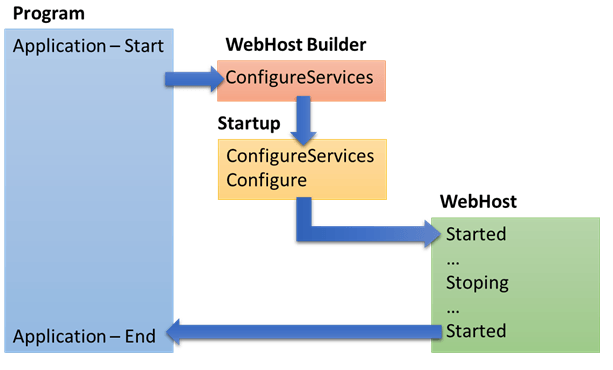
程序执行流程如下:
参考
Application startup in ASP.NET Core
Hosting in ASP.NET Core
老司机发车啦:https://github.com/SnailDev/SnailDev.NETCore2Learning
ASP.NET Core 2 学习笔记(二)生命周期的更多相关文章
- VUE 学习笔记 二 生命周期
1.除了数据属性,Vue 实例还暴露了一些有用的实例属性与方法.它们都有前缀 $,以便与用户定义的属性区分开来 var data = { a: 1 } var vm = new Vue({ el: ' ...
- ASP.NET Core 2 学习笔记(十二)REST-Like API
Restful几乎已算是API设计的标准,通过HTTP Method区分新增(Create).查询(Read).修改(Update)和删除(Delete),简称CRUD四种数据存取方式,简约又直接的风 ...
- Asp.Net Core WebApi学习笔记(四)-- Middleware
Asp.Net Core WebApi学习笔记(四)-- Middleware 本文记录了Asp.Net管道模型和Asp.Net Core的Middleware模型的对比,并在上一篇的基础上增加Mid ...
- ASP.NET Core 2 学习笔记(十三)Swagger
Swagger也算是行之有年的API文件生成器,只要在API上使用C#的<summary />文件注解标签,就可以产生精美的线上文件,并且对RESTful API有良好的支持.不仅支持生成 ...
- sql server 关于表中只增标识问题 C# 实现自动化打开和关闭可执行文件(或 关闭停止与系统交互的可执行文件) ajaxfileupload插件上传图片功能,用MVC和aspx做后台各写了一个案例 将小写阿拉伯数字转换成大写的汉字, C# WinForm 中英文实现, 国际化实现的简单方法 ASP.NET Core 2 学习笔记(六)ASP.NET Core 2 学习笔记(三)
sql server 关于表中只增标识问题 由于我们系统时间用的过长,数据量大,设计是采用自增ID 我们插入数据的时候把ID也写进去,我们可以采用 关闭和开启自增标识 没有关闭的时候 ,提示一下错 ...
- ASP.NET Core 2 学习笔记(七)路由
ASP.NET Core通过路由(Routing)设定,将定义的URL规则找到相对应行为:当使用者Request的URL满足特定规则条件时,则自动对应到相符合的行为处理.从ASP.NET就已经存在的架 ...
- ASP.NET Core 2 学习笔记(十)视图
ASP.NET Core MVC中的Views是负责网页显示,将数据一并渲染至UI包含HTML.CSS等.并能痛过Razor语法在*.cshtml中写渲染画面的程序逻辑.本篇将介绍ASP.NET Co ...
- ASP.NET Core 2 学习笔记(一)开始
原文:ASP.NET Core 2 学习笔记(一)开始 来势汹汹的.NET Core似乎要取代.NET Framework,ASP.NET也随之发布.NET Core版本.虽然名称沿用ASP.NET, ...
- Angular 5.x 学习笔记(2) - 生命周期钩子 - 暂时搁浅
Angular 5.x Lifecycle Hooks Learn Note Angular 5.x 生命周期钩子学习笔记 标签(空格分隔): Angular Note on cnblogs.com ...
- MVC学习笔记---MVC生命周期
Asp.net应用程序管道处理用户请求时特别强调"时机",对Asp.net生命周期的了解多少直接影响我们写页面和控件的效率.因此在2007年和2008年我在这个话题上各写了一篇文章 ...
随机推荐
- 在Objc项目中调用Swift
之前的文字中记录了在Swift项目中调用OC的相关代码,比较简单直接 传送门 但是在OC中调用swift代码则不是那么的和谐,网络上很多文章业已经有点陈旧.记录步骤如下: 1.创建OC项目 (1)启动 ...
- 删除排序数组中的重复数字 II · Remove Duplicates from Sorted Array II
重复一次 [抄题]: 给定一个排序数组,在原数组中删除重复出现的数字,使得每个元素只出现一次,并且返回新的数组的长度. 不要使用额外的数组空间,必须在原地没有额外空间的条件下完成. [思维问题]: [ ...
- Windows下Python IDLE设置
Windows下安装Python 2.7.5,发现IDLE是个不错的IDE,可以编辑.运行, 希望与.py文件关联起来,作为编辑器使用,经过尝试,找到了一个方法. 打开注册表,找到\KEY_CLA ...
- 【原创】VB超强游戏外挂帮助类,封装了很多方法
''' <summary> ''' a very nice file that can be used on other projects ''' </summary> ''' ...
- [SoapUI] Compare JSON Response(比较jsonobject)
http://jsonassert.skyscreamer.org/ 从这个网站下载jsonassert-1.5.0.jar ,也可以下载到源代码 JSONObject data = getRESTD ...
- 想到的regular方法果然已经被sklearn实现了就是L1和L2组合rugular
- linux 操作系统rz sz 快速上传和下载文件
## Centos 安装 rz sz yum install lrzsz ### Ubuntu 安装 apt-get install lrzsz
- TF Boys (TensorFlow Boys ) 养成记(二): TensorFlow 数据读取
TensorFlow 的 How-Tos,讲解了这么几点: 1. 变量:创建,初始化,保存,加载,共享: 2. TensorFlow 的可视化学习,(r0.12版本后,加入了Embedding Vis ...
- Java代码实现依赖注入
http://zhangjunhd.blog.51cto.com/113473/126545 这里将模仿Spring实现一种基于xml配置文件的依赖注入机制.文件中将实现3中注入,一是单值注入,包括i ...
- 《完全版线段树》——notonlysuccess
转载自:NotOnlySuccess的博客 [完全版]线段树 很早前写的那篇线段树专辑至今一直是本博客阅读点击量最大的一片文章,当时觉得挺自豪的,还去pku打广告,但是现在我自己都不太好意思去看那篇文 ...