
Spring与Struts2整合时action自动注入的问题
当Struts和Spring框架进行整合时,原本由action实例化对象的过程移交给spring来做(这个过程依赖一个叫struts2-spring-plugin的jar包,这个包主要的功能就是实现刚才那句话,但是MyEclipse自动生成Spring框架时并没有这个jar包,所以需要手动下载后导入)。
把这个包打开会发现有一个叫struts-plugin.xml的配置文件
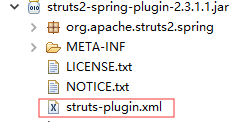
struts-plugin.xml
 1 <struts>

 2     <bean type="com.opensymphony.xwork2.ObjectFactory" name="spring" class="org.apache.struts2.spring.StrutsSpringObjectFactory" />

 3

 4     <!--  Make the Spring object factory the automatic default -->

 5     <constant name="struts.objectFactory" value="spring" />

 6

 7     <constant name="struts.class.reloading.watchList" value="" />

 8     <constant name="struts.class.reloading.acceptClasses" value="" />

 9     <constant name="struts.class.reloading.reloadConfig" value="false" />

10

11     <package name="spring-default">

12         <interceptors>

13             <interceptor name="autowiring" class="com.opensymphony.xwork2.spring.interceptor.ActionAutowiringInterceptor"/>

14         </interceptors>

15     </package>

16 </struts>
这个配置文件中加了<constant name="struts.objectFactory" value="spring" />,所以就不需要在struts.xml中再次添加了。
ApplicationContext.xml
1 ...

2     <bean id="userAction" class="action.UserAction" scope="prototype">

3         <property name="userDAO" ref="userDAO" />

4     </bean>

5 ...
这里需要注意一下,再Spring配置文件中一定要加上scope这个属性,取值为’prototype’。首先得知道Spring框架生成userAction是单例的,而Structs2框架是多例的,也就是说struts2每请求一个action就会实例化一个action对象,但是Spring只会实例化一次(也就是第一次的数据),这就会导致当多次请求时会出现数据错误的情况。而当我们把scope值设为’prototype’之后,Spring就会跟struts2一样,多少次请求就实例化多少个action对象,互不影响,数据也不会出错。
struts.xml
1 ...

2         <action name="login" class="userAction" method="login">

3             <result name="admin">/main.jsp</result>

4             <result name="reader">/reader.jsp</result>

5             <result name="error">/error.jsp</result>

6             <result name="input">/userLogin.jsp</result>

7       </action>

8 ...
struts.xml中action标签中的class就可以直接写ApplicationContext.xml中bean的id值了,由Spring容器来实例化,但还是由Struts2来管理,因为ApplicationContext.xml中设置了scope属性,也不用考虑数据出错的情况。
Spring与Struts2整合时action自动注入的问题的更多相关文章
- spring和hibernate整合时无法自动建表
在使用spring整合hibernate时候代码如下: <property name="dataSource" ref="dataSource" /> ...
- spring和hibernate整合时设置自动生成数据库的表
<bean id="sessionFactory" class="org.springframework.orm.hibernate3.LocalSessionFa ...
- spring与struts2整合出现错误HTTP Status 500 - Unable to instantiate Action
在进行spring和struts2整合的时候因为大意遇到了一个问题,费了半天神终于找到了问题所在,故分享出来望广大博友引以为戒!! 我们都知道在spring和struts2整合时,spring接管了a ...
- Spring与Struts2整合VS Spring与Spring MVC整合
Spring与Struts2整合,struts.xml在src目录下 1.在web.xml配置监听器 web.xml <!-- 配置Spring的用于初始化ApplicationContext的 ...
- spring boot 中@Autowired注解无法自动注入的错误
版权声明:本文为博主原创文章,遵循CC 4.0 BY-SA版权协议,转载请附上原文出处链接和本声明. 本文链接:https://blog.csdn.net/huihuilovei/article/de ...
- spring和mybatis整合时Access denied for user '***'@'localhost' (using password: YES)错误的解决方案
参考文章:博客园文章 参考解决办法: 将数据库配置文件格式 key=value 改为 jdbc.key=value 以下为问题分析 使用Spring + Mybatis + Mysql整合时,测试报错 ...
- Spring Ioc源码分析系列--自动注入循环依赖的处理
Spring Ioc源码分析系列--自动注入循环依赖的处理 前言 前面的文章Spring Ioc源码分析系列--Bean实例化过程(二)在讲解到Spring创建bean出现循环依赖的时候并没有深入去分 ...
- Spring与Struts2整合
Spring与Struts2为什么要整合呢? 把Action实例交给Spring来管理!! 1.单独测试Struts是否添加成功(jar包和配置文件),先单独测试,不要整合之后再测试,容易出问题 we ...
- Spring容器是如何实现 Bean 自动注入(xml)
入口web.xml web.xml 配置文件 <!-- Spring Config --> <listener> <listener-class>org.sprin ...
随机推荐
- <数据结构>由SearchTree的遍历序列确定树
目录 XDOJ315. 拓展先序遍历-->二叉树 问题与解答 题后反思:数组树的不足 XDOJ318.先序+中序-->二叉树 问题与解答 题后反思:左右子树赋零 XDOJ320.层序+中序 ...
- Java Web程序设计笔记 • 【第3章 JSP内置对象】
全部章节 >>>> 本章目录 3.1 JSP 内置对象简介 3.1.1 JSP 内置对象概述 3.1.2 JSP 表单处理 3.1.2 request对象 3.1.2 开发 ...
- Exchange ProxyLogon漏洞分析
Exchange ProxyLogon漏洞分析 前言 续前文继续学习Exchange漏洞 Proxyshell 影响范围 Exchange Server 2019 < 15.02.0792.01 ...
- maven dependency全局排除
http://www.voidcn.com/article/p-zychsdnd-bqg.html 个人比较喜欢log4j.properties这种配置文件,而springboot默认使用logbac ...
- Log4j2进阶使用(更多高级特性)
1.高级进阶说明 本文介绍Log4j2高级进阶使用, 基于Log4j2进阶使用(按大小时间备份日志), 介绍更多的高级特性, 本文基于上文给出的完整log4j2.xml, 修改对应的配置项, 演示高级 ...
- 初识python 之 爬虫:爬取中国天气网数据
用到模块: 获取网页并解析:import requests,html5lib from bs4 import BeautifulSoup 使用pyecharts的Bar可视化工具"绘制图表& ...
- Calendar日期往后一天,一月等
import java.util.Date ; Date date=new Date();//取时间 System.out.println(date.toString()); ...
- sqlmap之--os-shell命令执行原理
最近也是在看sqlmap,感觉--os-shell这个命令确实很厉害,但我并不知道它的原理,所以来研究一下 环境 环境就是我本地搭的一个有sql注入漏洞的一个小demo 演示 这是我们的demo环境 ...
- Redis内存分析工具之redis-rdb-tools的安装与使用
操作系统:Centos7 1.redis-rdb-tools工具是用python语言编写的,所以首先需要安装python: 安装: (1)用 wget 下载 python 2.7 并解压( 如果 ...
- VUE3 之 全局组件与局部组件
1. 概述 老话说的好:忍耐是一种策略,同时也是一种性格磨炼. 言归正传,今天我们来聊聊 VUE 的全局组件与局部组件. 2. 全局组件 2.1 不使用组件的写法 <body> < ...