
Netcore webapi action swagger response返回参数使用匿名类型
问题:action中返回匿名对象时,swagger只能按强类型生成返回值描述
解决办法:使用roslyn在内存中动态执行代码,使用json.net反序列化匿名对象,向swagger返回动态匿名对象
效果:


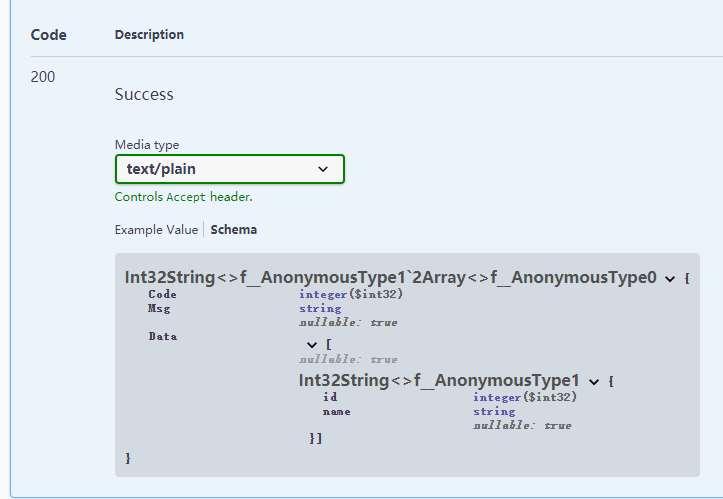

Swaager在描述控制器的方法时,可以使用以下方法
<response code="400">如果id为空</response>
或
[ProducesResponseType(typeof(ResponseT<User>),
200)]
Openapi json如下

生成效果如下图

上述方法必须存在强类型user
代码
@@@code

[AttributeUsage(AttributeTargets.Class | AttributeTargets.Method, AllowMultiple = true, Inherited = true)]

public class AnonymousTypeProducesResponseTypeAttribute : Microsoft.AspNetCore.Mvc.ProducesResponseTypeAttribute

{

public AnonymousTypeProducesResponseTypeAttribute(string typeJson, int statusCode) : base(getAnonymousType(typeJson), statusCode)

{

}

/// <summary>

///

/// </summary>

/// <param name="typeJson">匿名类型描述串

/// </param>

/// <example>new {id=1,name=""}</example>

/// <param name="statusCode"></param>

static System.Type getAnonymousType(string typeJson)

{

var code = @"

public class Result {

public System.Type GetType2(){

var t = Newtonsoft.Json.JsonConvert.DeserializeAnonymousType(""{}"", #T#);

return t.GetType();

}

}

".Replace("#T#", typeJson.Replace("'", @""""));


 List<PortableExecutableReference> refList = new List<PortableExecutableReference>();

refList.Add(MetadataReference.CreateFromFile(typeof(object).Assembly.Location));

refList.Add(MetadataReference.CreateFromFile(typeof(Newtonsoft.Json.JsonConvert).Assembly.Location));

refList.Add(MetadataReference.CreateFromFile(typeof(System.Runtime.AssemblyTargetedPatchBandAttribute).Assembly.Location));

refList.Add(MetadataReference.CreateFromFile(System.IO.Path.Combine(System.IO.Path.GetDirectoryName(typeof(object).Assembly.Location), "netstandard.dll")));


 var tree = CSharpSyntaxTree.ParseText(code);

var compilation = CSharpCompilation.Create("test")

.WithOptions(new CSharpCompilationOptions(OutputKind.DynamicallyLinkedLibrary))

.AddReferences(refList.ToArray()).AddSyntaxTrees(tree);

using (var stream = new MemoryStream())

{

var emitResult = compilation.Emit(stream);

if (emitResult.Success)

{

stream.Seek(0, SeekOrigin.Begin);

var assembly = Assembly.Load(stream.ToArray());

var typeResult = assembly.GetType("Result");

var m = Activator.CreateInstance(typeResult);

var Type = m.GetType();

return typeResult.GetMethod("GetType2").Invoke(m, null) as Type;

}

}


 return null;

}

}

@@#
使用
@@@code

[HttpGet("Dept/Get")]

[AnonymousTypeProducesResponseType(@"new {Code=0,Msg='',Data=new []{new {id=0,name=''}}}", 200)]

public object DeptGet()

{

return new

{

Code = 0,

Msg = string.Empty,

Data = _context. Group.Select(r => new

{

id = r. ID,

name = r. Name

}).ToList()

};

}

@@#
另一种借助元组实现的方法
花了大量时间获取属性名没有结果,泛型传递时的方法获取 不到TupleElementNamesAttribute,只能走动态方法获取 返回值 ,再利用TupleElementNamesAttribute获取 名称
@@@code

public class ResponseT<T>

{

//有效 [JsonProperty("haaa")]

public int Code { get; set; }

// 无效 [JsonConverter(typeof(Q.DevExtreme.Tpl.Json.IPAddressConverter))]

public string Msg { get; set; }

public T Data { get; set; }


 public T[] GetData()

{

//泛型,丢失名称信息,没有TupleElementNamesAttribute属性

		return new[] { Data };

}

public (int a, string b) GetData2()

{

//可以使用下列方法获得名称

//Type t = typeof(C);

//MethodInfo method = t.GetMethod(nameof(C.M));

//var attr = method.ReturnParameter.GetCustomAttribute<TupleElementNamesAttribute>();


 //string[] names = attr.TransformNames;


 return (1, "2");

}

}

@@#
使用
@@@code

[ProducesResponseType(typeof(ResponseT<(int id,string name)>), 400)]

@@E
Netcore webapi action swagger response返回参数使用匿名类型的更多相关文章
- 使用ActionFilterAttribute 记录 WebApi Action 请求和返回结果记录
使用ActionFilterAttribute 记录 WebApi Action 请求和返回结果记录 C#进阶系列——WebApi 异常处理解决方案 [ASP.NET Web API教程]4.3 AS ...
- Web API系列(四) 使用ActionFilterAttribute 记录 WebApi Action 请求和返回结果记录
转自:https://www.cnblogs.com/hnsongbiao/p/7039666.html 需要demo在github中下载: https://github.com/shan333cha ...
- Asp.NetCore WebApi 引入Swagger
一.创建一个Asp.NetCore WebApi 项目 二.引入NuGet包 SwashBuckle.AspNetCore 三.在项目属性配置中设置 四.修改项目的启动文件Startup.cs 1). ...
- .NetCore WebApi利用Swagger文档实现选择文件上传
介绍 实现这个功能主要还是依赖过滤器 在Swagger中利用 IOperationFilter 操作来实现文件上传 与之前处理结合Idr4授权一样的处理方式,不同的是授权处理的是Security,而文 ...
- .NetCore WebApi——基于JWT的简单身份认证与授权(Swagger)
上接:.NetCore WebApi——Swagger简单配置 任何项目都有权限这一关键部分.比如我们有许多接口.有的接口允许任何人访问,另有一些接口需要认证身份之后才可以访问:以保证重要数据不会泄露 ...
- .NetCore WebApi——Swagger简单配置
在前后端分离的大环境下,API接口文档成为了前后端交流的一个重点.Swagger让开发人员摆脱了写接口文档的痛苦. 官方网址:https://swagger.io/ 在.Net Core WebApi ...
- .NetCore WebApi —— Swagger版本控制
目录: .NetCore WebApi——Swagger简单配置 .NetCore WebApi——基于JWT的简单身份认证与授权(Swagger) .NetCore WebApi —— Swagge ...
- VS2012 Unit Test(Void, Action, Func) —— 对无返回值、使用Action或Func作为参数、多重载的方法进行单元测试
[提示] 1. 阅读文本前希望您具备如下知识:了解单元测试,了解Dynamic,熟悉泛型(协变与逆变)和Lambda,熟悉.NET Framework提供的 Action与Func委托.2.如果您对单 ...
- 对无返回值、使用Action或Func作为参数、多重载的方法进行单元测试
VS2012 Unit Test(Void, Action, Func) —— 对无返回值.使用Action或Func作为参数.多重载的方法进行单元测试 [提示] 1. 阅读文本前希望您具备如下知识: ...
随机推荐
- Spring注解@PropertySource加载配置文件和SpringBoot注解@Value、@ConfigurationProperties进行属性映射
SpringBoot的配置文件 位置:resources目录下 配置文件的作用: (1).SpringBoot是基于约定的,所以很多配置都有默认值,但如果想使用自己的配置替换默认配置的话,就可以使用a ...
- eclipse修改默认的代码注释
在使用Eclipse编写Java代码时,自动生成的注释信息都是默认是使用的当前登录系统用户名,实际上是可以修改的. 选择Window → Preference → Java → Code Style ...
- Pygame基础(1)
Pygame是Python的一个很常用的游戏框架,今天我来讲一讲Pygame的基础知识 Pygame的官网:https://www.pygame.org/news Pygame的下载 打开cmd输入p ...
- Win32Api -- 关闭当前应用
本文介绍Windows系统下使用Win32API获取当前应用并关闭的方法. 思路 使用EnumWindows接口枚举当前窗口; 过滤掉不可用.隐藏.最小化的窗口: 过滤掉子窗口: 通过标题.类名过滤掉 ...
- .NET测试断言工具Shouldly
.NET测试断言工具Shouldly .NET测试 Shouldly在GitHub的开源地址:https://github.com/shouldly/shouldly Shouldly的官方文档:ht ...
- 博客数据库要连接Elasticsearch,使用MySQL还是MongoDB更合理
若进行博客等文本类数据的读写以及专业搜索引擎的连接的解决方案对比,可以肯定的下结论:MongoDB的解决方案中要远远好于MySQL的解决方案. 一.从开发工序角度 MySQL的文章读写方式 方式一:文 ...
- 如何掌握 C 语言的一大利器——指针?
一览:初学 C 语言时,大家肯定都被指针这个概念折磨过,一会指向这里.一会指向那里,最后把自己给指晕了.本文从一些基本的概念开始介绍指针的基本使用. 内存 考虑到初学 C 语言时,大家可能对计算机的组 ...
- 剑指 Offer 09. 用两个栈实现队列 +java中栈和队列的使用
剑指 Offer 09. 用两个栈实现队列 题目链接 class CQueue { private Stack<Integer> sta1; private Stack<Intege ...
- CSDN博客转MD格式
基于大神作品修改原文,使用了一下发现有一些小问题,爬取的博客标题如果含有字符是Windows不支持的命名格式,会卡在界面,进行了一下优化,加了一些字符过滤处理,但是tomd模块对html的处理还是不是 ...
- mysql查询缓存简单使用
MySQL是一个关系型数据库管理系统,由瑞典MySQL AB 公司开发,属于 Oracle 旗下产品.MySQL 是最流行的关系型数据库管理系统之一,在 WEB 应用方面,MySQL是最好的 RDBM ...