
python中将xmind转成excel
需求:最近公司项目使用tapd进行管理,现在遇到的一个难题就是,使用固定的模板编写测试用例,使用excel导入tapd进行测试用例管理,觉得太过麻烦,本人一直喜欢使用导图来写测试用例,故产生了这个工具,将导入转成固定格式的excel,然后导入即可,附上了工具使用说明
xmind格式说明
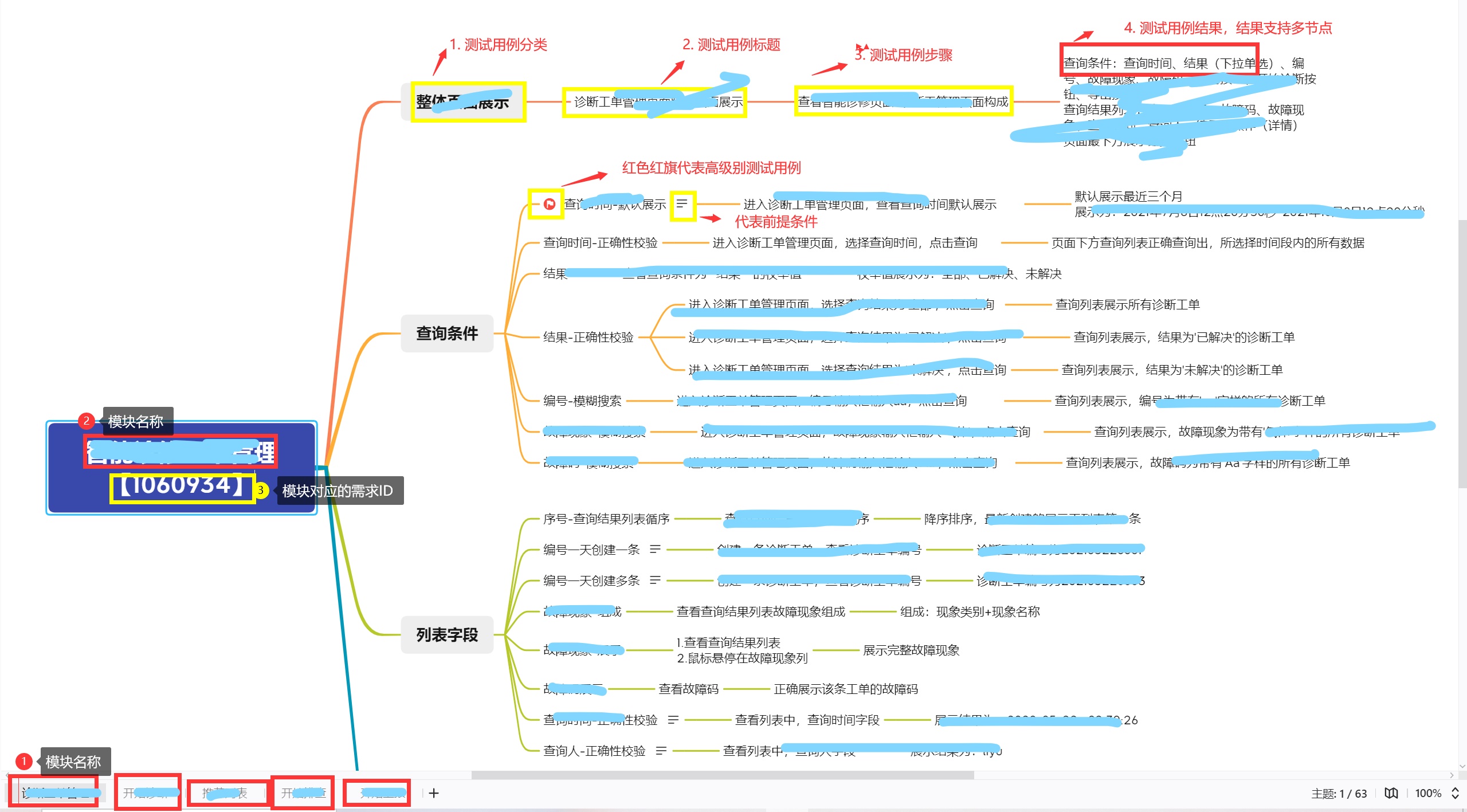
xmind命名规则 xmind命名规则

转成excel的结构
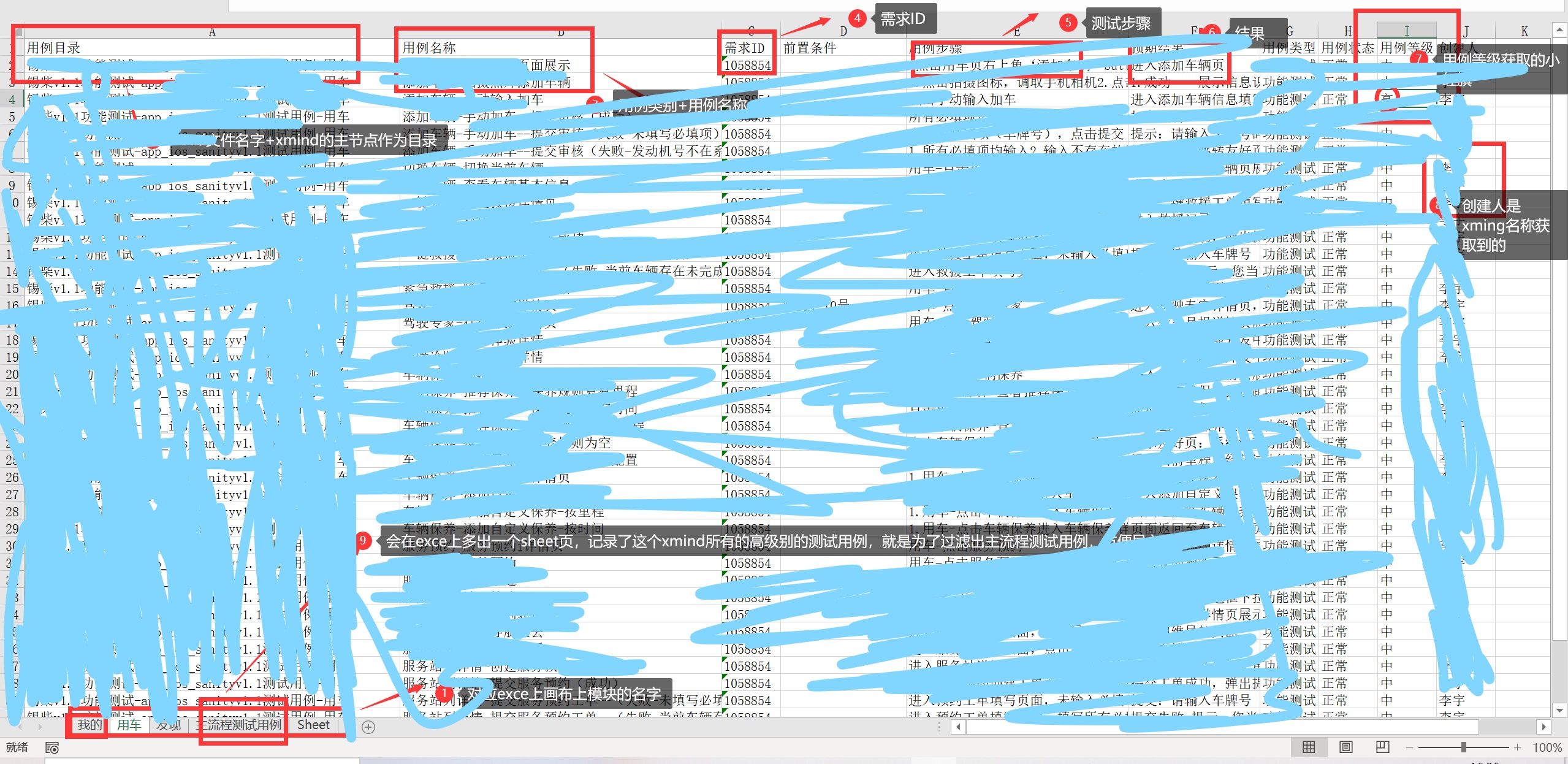
转换工具使用
- 压缩包解压到本地-点击Run_xmindToExcelTool.exe
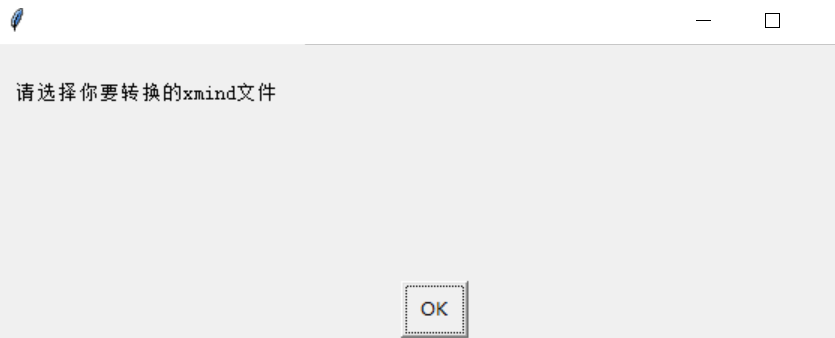
- 双击exe,弹出文件选择框-选择需要转换的xmind文件
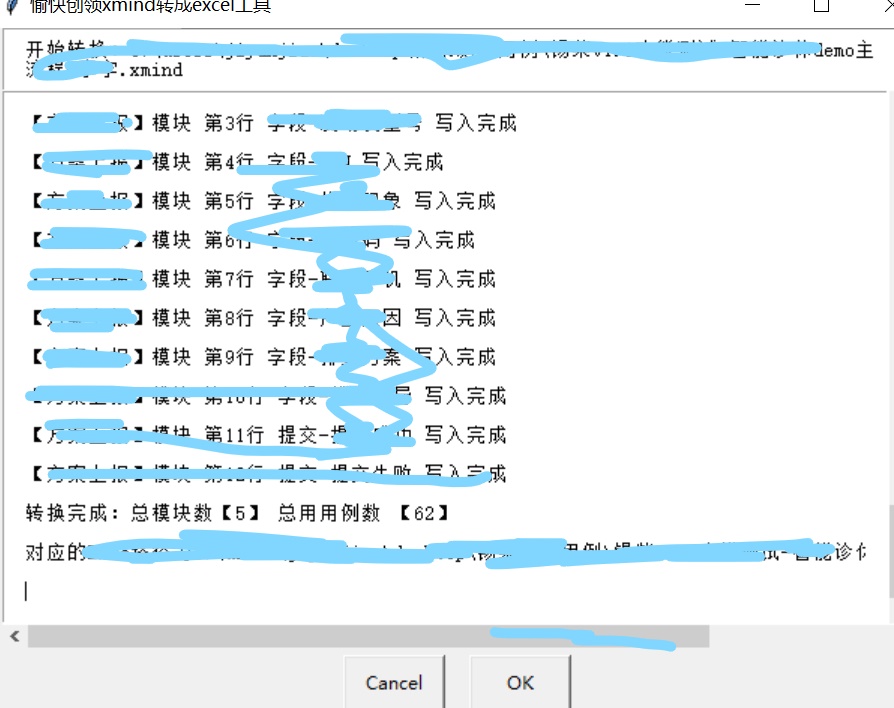
- 转换完成,给出统计数据,模块数以及导入的用例数
- 生成的excel文件和所选择的xmin的文件在一个目录下
工具如图
附上原码
from libs.openpyxl import Workbook

from libs.xmindparser import xmind_to_dict

from libs import re

from fileutil import FileUtil

import os

import frozen_dir

file = FileUtil()

# project_path = os.path.abspath(os.path.dirname(__file__))

# log_path = project_path + "\\Logs\\log"+'.log'

project_path = frozen_dir.app_path()

if not file.is_exists(project_path + "\Logs"):

    file.mik_dirs(project_path + "\Logs")

log_path = project_path + "\Logs\log"+'.log'

class Excel:

    # 操作excel类

    def __init__(self, excel_name):

        self.excel_name = excel_name

        self.wb = Workbook()

        self.ws = self.wb.active

    def write_excel(self, row, table_tile):

        # 写入表头

        for col in range(0, len(table_tile)):

            c = col + 1

            self.ws.cell(row=row, column=c, value=table_tile[col])

        self.wb.save(self.excel_name)

    def addExcel(self, sheet_name, num):

        self.wb.create_sheet(sheet_name, num)

        self.ws = self.wb[sheet_name]

# 写入excel的行计数器

case_line = 1

mo_num = 0

tole_case_num = 0

# 单个主流程用例

# level_high_case_sign = []

# 所有主流程用例

level_high_case_total = []

# 写入主流程的行计数器

level_line = 2

class Xmind:

    # 读取xmind写入excel

    def __init__(self, xmind_file):

        self.root = xmind_file.split('.xmind')[0]

        self.excel_name = xmind_file.split('.xmind')[0] + '.xlsx'

        self.out = xmind_to_dict(xmind_file)

        self.level_high_case_title = ["用例目录", "用例名称", "需求ID", "前置条件", "用例步骤", "预期结果", "用例类型", "用例状态", "用例等级", "创建人"]

        # 一级xmind标签名称

        self.title = ''

        # 二级标签列表

        self.story = ''

        # 二级标签数量

        self.story_num = 0

        # 需求id

        self.story_id = ''

        # 前提条件

        self.premise_condition = ''

        # 用例等级

        self.level = ''

        self.excel = Excel(self.excel_name)

    def write_to_sheets(self):

        try:

            for i in range(len(self.out)):

                self.excel.addExcel(self.out[i]['title'], i)

                global case_line

                case_line = 1

                # 写入excel表头

                table_tile = ["用例目录", "用例名称", "需求ID", "前置条件", "用例步骤", "预期结果", "用例类型", "用例状态", "用例等级", "创建人"]

                self.excel.write_excel(1, table_tile)

                # 一级xmind标签名称

                self.title = self.out[i]['topic']['title']

                # 二级标签列表

                self.story = self.out[i]['topic']['topics']

                # 二级标签数量

                self.story_num = len(self.story)

                self.find_xmind(self.title, self.story, self.story_num)

                global mo_num

                mo_num += 1

            # logger.info("转换完成:总模数【{}】 总用用例数 【{}】".format(mo_num, tole_case_num))

            # logger.info("对应的Exce路径为{}".format(self.excel_name))

            # 将主流程的测试用例单独写入一个sheet页中

            # print(level_high_case_total)

            if len(level_high_case_total) != 0:

                self.excel.addExcel("主流程测试用例", mo_num)

                self.excel.write_excel(1, self.level_high_case_title)

                for i in range(len(level_high_case_total)):

                    global level_line

                    self.excel.write_excel(level_line, level_high_case_total[i])

                    level_line += 1

            else:

                pass

            file.write_file(log_path, "转换完成:总模块数【{}】 总用用例数 【{}】\r\n".format(mo_num, tole_case_num))

            file.write_file(log_path, "对应的Exce路径为{}\r\n".format(self.excel_name))

        except:

            file.write_file(log_path, "请关闭Excel后重新执行\r\n")

    def xmind_num(self, value):

        """获取xmind标题个数"""

        try:

            return len(value['topics'])

        except KeyError:

            return 0

    def xmind_title(self, value) -> object:

        """获取xmind标题内容"""

        return value['title']

    def find_xmind(self, title, story, story_num):

        # 将xmind数据写入excel中

        if '【' in title:

            title = title.split('【')[0]

            regex_str = ".*[\[【](.+?)[\]】].*"

            story_id_reg = re.match(regex_str, self.title)

            if story_id_reg:

                self.story_id = story_id_reg.group(1)

        # 用例数

        for i in range(0, story_num):

            story_name = story[i]['title']

            if '【' in story_name:

                case_name = story_name.split('【')[0]

                regex_str = ".*[\[【](.+?)[\]】].*"

                story_id_reg = re.match(regex_str, story_name)

                if story_id_reg:

                    self.story_id = story_id_reg.group(1)

            else:

                case_name = story_name

            case_sub_list = story[i]['topics']

            sub_num = len(case_sub_list)

            # 子标签

            for s in range(0, sub_num):

                level_high_case_sign = []

                case_list = []

                result_sum = []

                # 测试用例步骤

                step = case_sub_list[s]['topics'][0]['title']

                # 测试用例标题

                sum_title = case_sub_list[s]['title']

                # 判断当前用例是否有前提条件

                if 'note' in case_sub_list[s]:

                    self.premise_condition = case_sub_list[s]['note']

                else:

                    self.premise_condition = ''

                result_num = len(case_sub_list[s]['topics'][0]['topics'])

                dirs = self.root.split('\\')

                l = len(dirs)

                # 这个区分总理目录 拼接目录 用例名称以-相连接,拼接到excel的目录结构

                if '-' in dirs[l-1]:

                    dir_str = []

                    for i in range(0, len(dirs[l-1].split('-'))):

                        if i == len(dirs[l - 1].split('-')) - 2:

                            dir_str.append(dirs[l - 1].split('-')[i])

                            break

                        dir_str.append(dirs[l-1].split('-')[i] + '-')

                    dir = ''.join(dir_str)

                else:

                    dir = dirs[l-1]

                # 添加用例目录

                case_list.append(dir+'-'+title)

                # 添加用例名称

                case_list.append(case_name + '-' + sum_title)

                # 添加需求ID

                case_list.append(self.story_id)

                # 添加前置条件

                case_list.append(self.premise_condition)

                # 添加用例步骤

                case_list.append(step)

                global case_line

                case_line += 1

                # 结果树

                for r in range(0, result_num):

                    result = case_sub_list[s]['topics'][0]['topics'][r]['title']

                    result_sum.append(result+'\t\n')

                    r += 1

                # 添加预期结果

                case_list.append(''.join(result_sum))

                # 添加用例类型

                case_list.append("功能测试")

                # 用例状态

                case_list.append("正常")

                # 读取测试用例等级

                if 'makers' in case_sub_list[s] and 'flag-red' in case_sub_list[s]['makers'][0]:

                    self.level = "高"

                    # 测试用例等级高级别的,会重新写入另一个sheet页,为了方便excel导入tapd主流程部分用例

                    level_high_case_sign.append(dir+'主流程'+'-'+title)

                    level_high_case_sign.append(case_name + '-' + sum_title)

                    level_high_case_sign.append(self.story_id)

                    level_high_case_sign.append(self.premise_condition)

                    level_high_case_sign.append(step)

                    level_high_case_sign.append(''.join(result_sum))

                    level_high_case_sign.append('功能测试')

                    level_high_case_sign.append('正常')

                    level_high_case_sign.append(self.level)

                    # 添加创建人

                    if '-' in self.root:

                        creater = self.root.split('-')[len(self.root.split('-'))-1]

                    else:

                        creater = "测试人员"

                    level_high_case_sign.append(creater)

                else:

                    self.level = '中'

                # print(level_high_case_sign)

                # 添加用例等级

                case_list.append(self.level)

                # 添加创建人

                if '-' in self.root:

                    creater = self.root.split('-')[len(self.root.split('-'))-1]

                else:

                    creater = "测试人员"

                case_list.append(creater)

                if len(level_high_case_sign) != 0:

                    global level_high_case_total

                    level_high_case_total.append(level_high_case_sign)

                else:

                    pass

                # logger.info("【{}】模块 第{}行 {} 写入完成".format(title, case_line-1, case_name + '-' + sum_title))

                file.write_file(log_path, "【{}】模块 第{}行 {} 写入完成\r\n".format(title, case_line-1, case_name + '-' + sum_title))

                self.excel.write_excel(case_line, case_list)

                s += 1

                global tole_case_num

                tole_case_num += 1

            i += 1
## 原创文章转载请注明出处谢谢https://www.cnblogs.com/jiyanjiao-702521/p/15500044.html
python中将xmind转成excel的更多相关文章
- Python 文本(txt) 转换成 EXCEL(xls)
#!/bin/env python # -*- encoding: utf-8 -*- #------------------------------------------------------- ...
- python txt装换成excel
工作中,我们需要经常吧一些导出的数据文件,例如sql查出来的结果装换成excel,用文件发送.这次为大家带上python装换excel的脚本 记得先安装wlwt模块,适用版本,python2-3 #c ...
- 史上最简单的在 Yii2.0 中将数据导出成 Excel
在 vendor/yiisoft/yii2/helpers/ 创建一个 Excel.php <?php namespace yii\helpers; class Excel{ ...
- Python中将列表转化成矩阵表示
list1 = [] a = [1,3,4] b = [2,5,6] list1.append(a) list1.append(b) arr = np.array(list1) # 打印arr pri ...
- 使用Python将xmind脑图转成excel用例(一)
最近接到一个领导需求,将xmind脑图直接转成可以导入的excel用例,并且转换成gui可执行的exe文件,方便他人使用. 因为对Python比较熟悉,所以就想使用Python来实现这个功能,先理一下 ...
- Python实现XMind测试用例快速转Excel用例
转载请注明出处️ 作者:测试蔡坨坨 原文链接:caituotuo.top/c2d10f21.html 你好,我是测试蔡坨坨. 今天分享一个Python编写的小工具,实现XMind测试用例转Excel用 ...
- 在Excel中将数字设置成文本格式的技巧
在Excel中将数字设置成文本格式的技巧 一个简单的方法,利用[数据]菜单的[分列]功能来将数字设置为文本格式.具体操作步骤为: 1.选中所有需要处理的数字单元格. 2.选择[数据]菜单[分列]功能. ...
- Python Json分别存入Mysql、MongoDB数据库,使用Xlwings库转成Excel表格
将电影数据 data.json 数据通过xlwings库转换成excel表格,存入mysql,mongodb数据库中.python基础语法.xlwings库.mysql库.pymongo库.mongo ...
- Python 3 实现数字转换成Excel列名(10进制到26进制的转换函数)
背景: 最近在看一些Python爬虫的相关知识,讲爬取的一些数据写入到Excel表中,当时当列的数目不确定的情况下,如何通过遍历的方式讲爬取的数据写入到Excel中. 开发环境: Python 3 ...
随机推荐
- 动态查看及加载PHP扩展
在编译并完成 php.ini 的配置之后,我们就成功的安装了一个 PHP 的扩展.不过, PHP 也为我们提供了两个在动态运行期间可以查看扩展状态以及加载未在 php.ini 中进行配置的扩展的函数. ...
- Git报错-refusing to merge unrelated histories
执行git pull 时报错: 出现这个问题的最主要原因还是在于本地仓库和远程仓库实际上是独立的两个仓库.假如我之前是直接clone的方式在本地建立起远程github仓库的克隆本地仓库就不会有这问题了 ...
- JDBC封装的工具类
1. JDBC封装的工具类 public class JDBCUtil { private static Properties p = new Properties(); private static ...
- 「含源码」关于NXP IMX8 Mini的图形开发指南(GPU)案例分享!
前言 Graphical Demo框架提供了对平台相关依赖的抽象.Graphical应用的通用封装,如模型加载.纹理加载.着色器编译等,以及其它一些通用的应用逻辑处理的封装,使得使用框架的开发人员(以 ...
- Liunx下Mysql,MongoDB性能优化的配置
场景 这几天在赶十一上线的项目,但是突然发现接口性能不好,高并发支持不住.又不想改代码,就在数据库层面进行优化. Mysql 分区:项目中有对40万条的数据进行时间查询的要求,就算对DateTime建 ...
- IO流基本概念
IO流主要分为两类 节点流:直接能够进行数据写入或读取的I0流.可以单独执行读写操作,但是功能比较单一,只能进行一些基本 的操作.例如:FileInputStream FileInputStream ...
- 获取classpath(src/main/resources)的绝对路径
先贴上代码 private static String basePath = Thread.currentThread().getContextClassLoader().getResource(&q ...
- 单体应用 适合采用 dapr 构建吗?
缘起今天在微信群里有同学问 "纯.net 项目,有必要上dapr吗?" 当时不假思索的说不是微服务没必要,其他群友也说没必要.下午细想了一下,觉得这个和微服务没有关系,如果我的应用 ...
- 题解 CF1103E Radix sum
题目传送门 题目大意 给出一个\(n\)个数的序列\(a_{1,2,..,n}\),可以选\(n\)次,每次可以选与上次选的相同的数,问对于\(\forall p\in[0,n-1]\)满足选出来的数 ...
- Pytorch——torch.nn.Sequential()详解
参考:官方文档 源码 官方文档 nn.Sequential A sequential container. Modules will be added to it in the order th ...