
CentOS-Docker搭建远程监控服务器指标
注:远程监控服务器指标,可查看、CPU、内存、网络信息等,搭建依赖Docker环境,可参考:yum安装Docker环境
服务端:Grafana(可视化展示) + Prometheus(数据源,配置客户端信息)
CentOS客户端导出机器指标:node_exporter
Windows客户端导出机器指标:wmi_exporter
使用grafana-dashboards说明
CentOS仪表盘:https://grafana.com/grafana/dashboards/8919
Windows仪表盘:https://grafana.com/grafana/dashboards/2129
下载相关镜像
$ docker pull prom/prometheus
$ docker pull prom/node-exporter
$ docker pull grafana/grafana
创建相关配置
配置数据源文件(样例仅监控本机,如需监控其他机器修改-targets即可,如: ['localhost:9100','192.168.1.100:9100','192.168.1.200:9182'])
$ vim /home/prometheus.yml
global:
scrape_interval: 15s # By default, scrape targets every 15 seconds.# Attach these labels to any time series or alerts when communicating with
# external systems (federation, remote storage, Alertmanager).
external_labels:
monitor: 'server-monitor'# A scrape configuration containing exactly one endpoint to scrape:
# Here it's Prometheus itself.
scrape_configs:
# The job name is added as a label `job=<job_name>` to any timeseries scraped from this config.
- job_name: 'prometheus'# Override the global default and scrape targets from this job every 5 seconds.
scrape_interval: 5sstatic_configs:
- targets: ['localhost:9090']
labels:
instance: prometheus
- targets: ['localhost:9100']
labels:
#nodename: test
instance: local
运行镜像
1.客户端导出机器指标(本实例监控本机)
$ docker run --restart=unless-stopped -d --name=node-exporter -p 9100:9100 -v /etc/localtime:/etc/localtime prom/node-exporter
2.可视化展示grafana服务
$ docker run --restart=unless-stopped -d --name=grafana -p 3000:3000 grafana/grafana
3.数据源prometheus服务
$ docker run --restart=unless-stopped -d --name=prometheus -p 9090:9090 -v /home/prometheus.yml:/etc/prometheus/prometheus.yml prom/prometheus
配置grafana服务
1.访问:http://ip:3000 默认用户名/密码:admin/admin

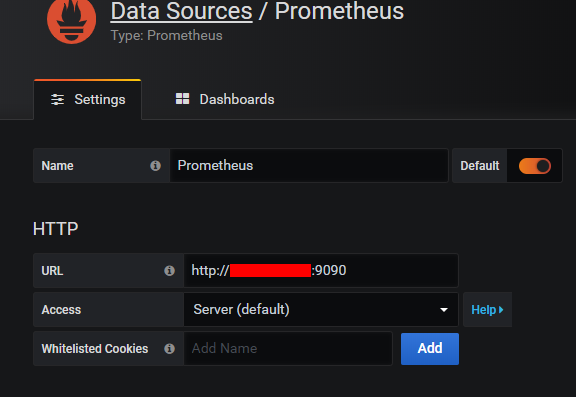
2.配置数据源-prometheus,填写http地址后保存(Save & Test)

3.导入仪表盘

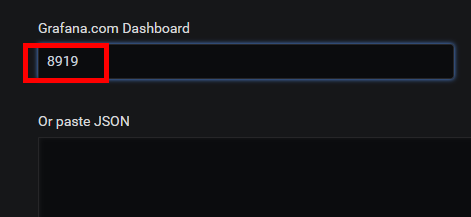
4.填写仪表盘id(Centos:8919,Windows:2129)
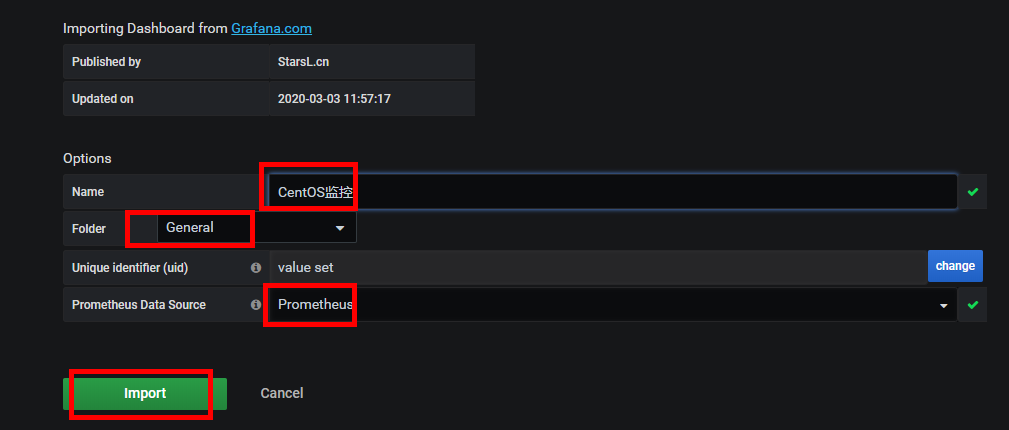
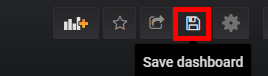
5.仪表盘预览,点击保存即可
CentOS监控最终展示效果

Windows监控最终展示效果

CentOS-Docker搭建远程监控服务器指标的更多相关文章
- centos + docker搭建深度学习环境以及一些问题解决
必须要说容器是一个很牛逼的思想!注意,是思想!也许docker有种种问题,但是不管docker能否茁壮地发展下去,未来这种方式的环境搭建一定会变得越来越流行! 网上有很多这方面的教程,但大多数都不太好 ...
- Docker实现CentOS容器SSH远程登录
Docker实现CentOS容器SSH远程登录 https://blog.csdn.net/A632189007/article/details/78625378 这里根据Dockerfile方式构建 ...
- 服务器搭建远程docker深度学习环境
服务器搭建远程docker深度学习环境 本文大部分内容参考知乎文章 Docker+PyCharm快速搭建机器学习开发环境 搭建过程中出现ssh连接问题可以查看最后的注意事项 Docker Docker ...
- 使用Docker搭建CentOS 7 + Apache 2.4+ PHP7
从Docker Hub上Pull最新的CentOS 7镜像并新建容器 # sudo docker pull centos docker run -p 8082:80 --name centos_c - ...
- ubuntu 或centos 使用Docker搭建anaconda+python基本环境
ubuntu 16 使用Docker安装anacondaubuntu docker 安装centos docker 安装搜索可用镜像 docker search anaconda 拉取你中意的镜像 d ...
- 基于Docker搭建大数据集群(一)Docker环境部署
本篇文章是基于Docker搭建大数据集群系列的开篇之作 主要内容 docker搭建 docker部署CentOS 容器免密钥通信 容器保存成镜像 docker镜像发布 环境 Linux 7.6 一.D ...
- Docker入门详解——安装docker并利用docker搭建lnmp
首先我们需先安装docker环境,这个比较简单,以centos7为例 docker在centos7上安装需要系统内核版本3.10+,可以通过uname -r查看内核版本号,如果版本不符请自行查阅资料更 ...
- Docker搭建Zentao(禅道)
禅道搭建方式有很多种,可参考官方文档搭建,这里介绍的是参考官方文档以docker方式搭建. 禅道内部默认会自动安装mysql数据库. 一.下载地址 禅道开源版: http://dl.cnezsof ...
- [转帖]基于docker 搭建Prometheus+Grafana
基于docker 搭建Prometheus+Grafana https://www.cnblogs.com/xiao987334176/p/9930517.html need good study 一 ...
随机推荐
- Tomcat修改jdk版本
tomcat修改jdk版本 修改tomcat bin目录下的catalina.sh和setclasspath.sh文件,添加以下内容 export JAVA_HOME=/home/nodemanage ...
- 拉勾、Boss直聘、内推、100offer
BOSS直聘 拉勾.Boss直聘.内推.100offer
- linux系统的负载详解
系统的平均负载 如何理解平均负载 单位时间内,系统处于可运行状态和不可中断状态的平均进程数,也就是平均活跃进程数. 平均负载多少合理 核心数 平均负载 含义 4 2 有50%的cpu是空闲状态,见 ...
- Lua中的基本函数库--(转自忧郁的加菲猫)
基本函数库为Lua内置的函数库,不需要额外装载assert (v [, message])功能:相当于C的断言,参数:v:当表达式v为nil或false将触发错误,message:发生错误时返回的信息 ...
- 在安装python 第三方库时遇到【WARNING: Retrying (Retry(total=4, connect=None, read=None, redirect=None, st】问题
在命令执行窗输入: pip install Pyinstaller -i http://pypi.douban.com/simple --trusted-host pypi.douban.com (其 ...
- Idea项目上传到gitlab(以新建项目为例)
1.首先,需要你自己登录GitLab,并新建一个项目的链接,如下图所示: 图一: 图二: 图三(idea上传时用到此链接): 2.在idea上新建一个demo项目,创建一个Git仓库: 3.点击创建后 ...
- GO学习-(25) Go操作Redis实战
Go操作Redis实战 安装Redis客户端 Go语言中使用第三方库https://github.com/go-redis/redis连接Redis数据库并进行操作.使用以下命令下载并安装: go ...
- 人脸标记检测:ICCV2019论文解析
人脸标记检测:ICCV2019论文解析 Learning Robust Facial Landmark Detection via Hierarchical Structured Ensemble 论 ...
- Nucleus 实时操作系统中断(上)
Nucleus 实时操作系统中断(上) Interrupts in the Nucleus SE RTOS 所有现代微处理器和微控制器都有某种中断设施.这种能力对于提供许多应用程序所需的响应能力是必不 ...
- 【.NET 与树莓派】温度/湿度传感器——SHT30
SHT3XX 系列的传感,常见的有三种:SHT 30.SHT 31.SHT 35.其中,比较便宜性价比较愉快的是 SHT 30. DHT 11 模块也是检测温度.湿度的,但SHT 11 使用的不是我们 ...