
spring boot: thymeleaf模板引擎使用
spring boot: thymeleaf模板引擎使用
在pom.xml加入thymeleaf模板依赖
<!-- 添加thymeleaf的依赖 -->

  <dependency>

      <groupId>org.springframework.boot</groupId>

      <artifactId>spring-boot-starter-thymeleaf</artifactId>

  </dependency>
在applicationContext.properties中增加thymeleaf配置
########################################################

###THYMELEAF (ThymeleafAutoConfiguration)

########################################################

spring.thymeleaf.prefix=classpath:/templates/

spring.thymeleaf.suffix=.html

#spring.thymeleaf.mode=HTML5

spring.thymeleaf.encoding=UTF-8

# ;charset=<encoding> is added

spring.thymeleaf.content-type=text/html

# set to false for hot refresh

spring.thymeleaf.cache=false
#<!-- 关闭thymeleaf缓存 开发时使用 否则没有实时画面-->

spring.thymeleaf.cache=false

## 检查模板是否存在,然后再呈现

spring.thymeleaf.check-template-location=true

#Content-Type值

spring.thymeleaf.content-type=text/html

#启用MVC Thymeleaf视图分辨率

spring.thymeleaf.enabled=true

## 应该从解决方案中排除的视图名称的逗号分隔列表

##spring.thymeleaf.excluded-view-names=

#模板编码

spring.thymeleaf.mode=LEGACYHTML5

# 在构建URL时预先查看名称的前缀

spring.thymeleaf.prefix=classpath:/templates/

# 构建URL时附加查看名称的后缀.

spring.thymeleaf.suffix=.html

# 链中模板解析器的顺序

#spring.thymeleaf.template-resolver-order= o

# 可以解析的视图名称的逗号分隔列表

#spring.thymeleaf.view-names=

#thymeleaf end
来看下我的实例:
pom.xml参考
<parent>

  	<groupId>org.springframework.boot</groupId>

  	<artifactId>spring-boot-starter-parent</artifactId>

  	<version>1.5.9.RELEASE</version>

  </parent>

  <properties>

    <project.build.sourceEncoding>UTF-8</project.build.sourceEncoding>

    <java.version>1.8</java.version>

  </properties>

  <dependencies>

  <!-- spring mvc,aop,restful,fastjson -->

  <dependency>

  	<groupId>org.springframework.boot</groupId>

  	<artifactId>spring-boot-starter-web</artifactId>

  </dependency>

  <!-- jstl -->

  <dependency>

  	<groupId>javax.servlet</groupId>

  	<artifactId>jstl</artifactId>

  </dependency>

  <!-- tomcat的支持 -->

  <!-- dependency>

  	<groupId>org.springframework.boot</groupId>

  	<artifactId>spring-boot-starter-tomcat</artifactId>

  	<scope>provided</scope>

  </dependency>

  <dependency>

  	<groupId>org.apache.tomcat.embed</groupId>

  	<artifactId>tomcat-embed-jasper</artifactId>

  	<scope>provided</scope>

  </dependency-->

  <dependency>

    <groupId>junit</groupId>

    <artifactId>junit</artifactId>

    <version>3.8.1</version>

    <scope>test</scope>

  </dependency>

  <!-- mysql支持 -->

  <dependency>

  	<groupId>mysql</groupId>

  	<artifactId>mysql-connector-java</artifactId>

  </dependency>

 <!-- 添加spring-data-jpa依赖 -->

 <!-- 引入了 spring-data-jpa就不需要引入spring-boot-starter-jdbc -->

 <dependency>

 	<groupId>org.springframework.boot</groupId>

 	<artifactId>spring-boot-starter-data-jpa</artifactId>

 </dependency>

  <!-- 添加thymeleaf的依赖 -->

  <dependency>

      <groupId>org.springframework.boot</groupId>

      <artifactId>spring-boot-starter-thymeleaf</artifactId>

  </dependency>

    <!-- fastjson -->

    <dependency>

			<groupId>com.alibaba</groupId>

			<artifactId>fastjson</artifactId>

			<version>1.2.15</version>

		</dependency>

    <!-- 热部署 -->

    <dependency>

    	<groupId>org.springframework.boot</groupId>

    	<artifactId>spring-boot-devtools</artifactId>

    	<optional>true</optional>

    	<scope>true</scope>

    </dependency>

  </dependencies>

  <build>

  	<plugins>

  		<!-- 热部署  -->

  		<plugin>

  			<groupId>org.springframework.boot</groupId>

  			<artifactId>spring-boot-maven-plugin</artifactId>

  			<configuration>

  				<!--fork :  如果没有该项配置,呢个devtools不会起作用,即应用不会restart -->

  				<fork>true</fork>

  			</configuration>

  		</plugin>

  	</plugins>

  </build>
App.java参考
package com.muyang.boot22;

import org.springframework.boot.SpringApplication;

import org.springframework.boot.autoconfigure.SpringBootApplication;

import org.springframework.boot.autoconfigure.web.HttpMessageConverters;

import org.springframework.context.annotation.Bean;

import org.springframework.context.annotation.ComponentScan;

import org.springframework.http.converter.HttpMessageConverter;

import com.alibaba.fastjson.serializer.SerializerFeature;

import com.alibaba.fastjson.support.config.FastJsonConfig;

import com.alibaba.fastjson.support.spring.FastJsonHttpMessageConverter;

/**

 * Hello world!

 *

 */

@SpringBootApplication

public class App

{

	//fastJson配置

	@Bean

	public HttpMessageConverters fastJsonHttpMessageConverters()

	{

		FastJsonHttpMessageConverter fastConverter = new FastJsonHttpMessageConverter();

		FastJsonConfig fastJsonConfig = new FastJsonConfig();

		fastJsonConfig.setSerializerFeatures(SerializerFeature.PrettyFormat);

		fastConverter.setFastJsonConfig(fastJsonConfig);

		HttpMessageConverter<?> converter = fastConverter;

		return new HttpMessageConverters(converter);

	}

    public static void main( String[] args )

    {

        //System.out.println( "Hello World!" );

    	SpringApplication.run(App.class, args);

    }

}
applicationContext.properties
#####################################

###default-view

#####################################

#spring.mvc.view.prefix=/WEB-INF/jsp/

#spring.mvc.view.suffix=.jsp

################################

### spring port

################################

server.port = 8081

server.context-path=/springboot

################################

### zh/cn

###############################

spring.http.encoding.force=true

spring.http.encoding.charset=UTF-8

spring.http.encoding.enabled=true

server.tomcat.uri-encoding=UTF-8

########################################################

###THYMELEAF (ThymeleafAutoConfiguration)

########################################################

spring.thymeleaf.prefix=classpath:/templates/

spring.thymeleaf.suffix=.html

#spring.thymeleaf.mode=HTML5

spring.thymeleaf.encoding=UTF-8

# ;charset=<encoding> is added

spring.thymeleaf.content-type=text/html

# set to false for hot refresh

spring.thymeleaf.cache=false

#######################################

####mysql

#######################################

spring.datasource.url=jdbc:mysql://localhost:3306/spring

spring.datasource.username=root

spring.datasource.password=

spring.datasource.driver-class-name=com.mysql.jdbc.Driver

spring.datasource.max-idle=10

spring.datasource.max-wait=10000

spring.datasource.min-idle=5

spring.datasource.initial-size=5
HelloController.java
package com.muyang.boot22.controller;

import java.io.IOException;

import java.util.Map;

import javax.servlet.http.HttpServletResponse;

import org.springframework.stereotype.Controller;

import org.springframework.web.bind.annotation.GetMapping;

import org.springframework.web.bind.annotation.RequestMapping;

@Controller

@RequestMapping(value = "/")

public class HelloController

{

	/*@RequestMapping("/hello")

	public String index(Map<String, Object>map)

	{

		map.put("name", "张三");

		return "hello";

		//int i = 1024/0;

	}*/

	@RequestMapping(value="/hello")

	public String thyhello(Map<String, Object> map)

	{

		map.put("name", "张三");

		map.put("age", "56");

		map.put("gender", "man");

		return "hello";

	}

	@RequestMapping(value = "/home")

     public String homePage(Map<String, Object> map)throws IOException{

		return "home";

     }

	//跳转

	 @GetMapping(value = "/index")

     public void homePage(HttpServletResponse response)throws IOException{

         response.sendRedirect("home.html");

//         return "index";

     }

}
hello.html
<!DOCTYPE html>

<html>

<head>thymeleaf - views</head>

<body>

      <h1>

	 	Hello,thymeleaf

	 	<br />

	 	This is my first thymeleaf demo.

	 	<hr />

	 	 	name: <span th:text="${name}"></span>

	 	age: <span th:text="${age}"></span>

	 	gender: <span th:text="${gender}"></span>

	 	</h1>

	 	ssssssssssss

</body>

</html>
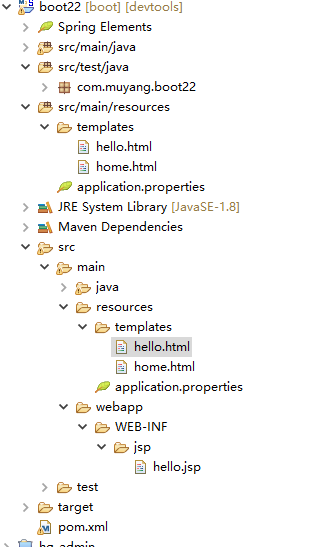
访问地址:
http://localhost:8081/springboot/hello
http://localhost:8081/springboot/home.html
http://localhost:8081/springboot/index
spring boot: thymeleaf模板引擎使用的更多相关文章
- Spring Boot Thymeleaf 模板引擎的使用
Spring Boot 中可以支持很多模板引擎,Thymeleaf 是 Spring Boot 官方推荐使用的模板引擎,虽然在社区 Thymeleaf 的性能被许多人所吐糟,但这仍然不影响大量的开发人 ...
- spring boot: freemarket模板引擎
spring boot: freemarket模板引擎 freemarket模板引擎,可以和thymeleaf模板引擎共存 pom.xml引入 <!-- Freemarket --> &l ...
- Spring Boot整合模板引擎thymeleaf
项目结构 引入依赖pom.xml <!-- 引入 thymeleaf 模板依赖 --> <dependency> <groupId>org.springframew ...
- SpringBoot系列:Spring Boot使用模板引擎Thymeleaf
一.Java模板引擎 模板引擎(这里特指用于Web开发的模板引擎)是为了使用户界面与业务数据(内容)分离而产生的,它可以生成特定格式的文档,用于网站的模板引擎就会生成一个标准的HTML文档. 在jav ...
- SpringBoot系列:Spring Boot使用模板引擎FreeMarker
一.Java模板引擎 模板引擎(这里特指用于Web开发的模板引擎)是为了使用户界面与业务数据(内容)分离而产生的,它可以生成特定格式的文档,用于网站的模板引擎就会生成一个标准的HTML文档. 在jav ...
- SpringBoot系列:Spring Boot使用模板引擎JSP
一.Java模板引擎 模板引擎(这里特指用于Web开发的模板引擎)是为了使用户界面与业务数据(内容)分离而产生的,它可以生成特定格式的文档,用于网站的模板引擎就会生成一个标准的HTML文档. 在jav ...
- spring boot:thymeleaf模板中insert/include/replace三种引用fragment方式的区别(spring boot 2.3.3)
一,thymeleaf模板中insert/include/replace三种引用fragment方式的区别 insert: 把整个fragment(包括fragment的节点tag)插入到当前节点内部 ...
- Spring Boot整合模板引擎freemarker
jsp本质是servlet,渲染都在服务器,freemarker模板引擎也是在服务器端渲染. 项目结构 引入依赖pom.xml <!-- 引入 freemarker 模板依赖 --> &l ...
- Spring Boot整合模板引擎jsp
jsp也算是一种模板引擎吧.整合jsp前,先说一下运行SpringBoot项目的几种方式 1. 运行SpringBoot项目的几种方式 1.1 使用内嵌Tomcat运行项目 在IDE中右键运行启动类, ...
随机推荐
- Class类的特性(上)
Class类的特性(上) ES6 的类,完全可以看作ES5构造函数的另一种写法. class Point { // ... } typeof Point // "function" ...
- 把kafka数据从hbase迁移到hdfs,并按天加载到hive表(hbase与hadoop为不同集群)
需求:由于我们用的阿里云Hbase,按存储收费,现在需要把kafka的数据直接同步到自己搭建的hadoop集群上,(kafka和hadoop集群在同一个局域网),然后对接到hive表中去,表按每天做分 ...
- LWIP裸机环境下实现TCP与UDP通讯(转)
源: LWIP裸机环境下实现TCP与UDP通讯
- MySQL分区(Partition)功能
引用地址:http://blog.csdn.net/tjcyjd/article/details/11194489 自5.1开始对分区(Partition)有支持 = 水平分区(根据列属性按行分)=举 ...
- 20145327 《网络对抗技术》 Web基础
20145327 <网络对抗技术> Web基础 apache 输入apachectl start开启Apach 输入netstat -aptn查看端口占用:apach2占用端口80 测试a ...
- jquery插件--问题类(新增&&删除)简易版
HTML: <!doctype html> <head> <meta charset="utf-8" /> <script src=&qu ...
- duilib中edit获得鼠标焦点后右边框被覆盖
转载:http://www.cnblogs.com/minggong/p/6457734.html 用duilib做了一个窗口,窗口内有一个供用户输入使用的是edit控件. XML中是这样写的: &l ...
- C++ 项目中直接使用JsonCpp源码文件
之前在网上看到使用JsonCpp都是以库的形式使用(编译源码为静态库或者动态库),这样引用很方便,但有时候报错调试看不到错误的地方,所以就想直接把源文件添加到项目中,方便调试 这是用到源码文件: 创建 ...
- CEF之CefSettings设置日志等级
CefSettings结构体允许定义全局的CEF配置,经常用到的配置项如下: single_process 设置为true时,Browser和Renderer使用一个进程.此项也可以通过命令行参数“s ...
- linux下获取本机的获取内网和外网地址
1.获取内网地址(私有地址) ifconfig -a 2.获取外网地址(公网地址) curl members.3322.org/dyndns/getip