
EOS测试链智能合约部署调用
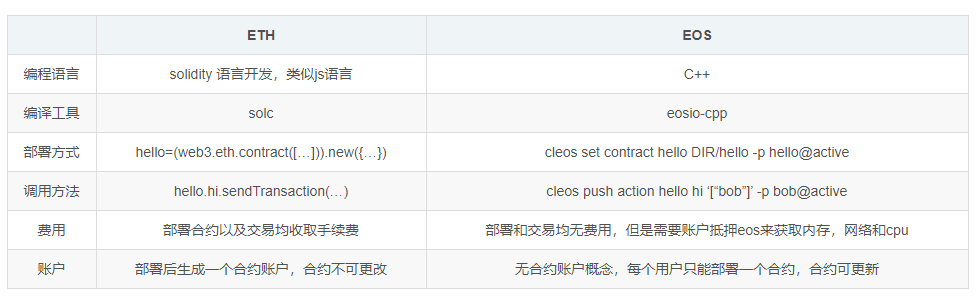
ETH与EOS两者智能合约进行简单的对比。
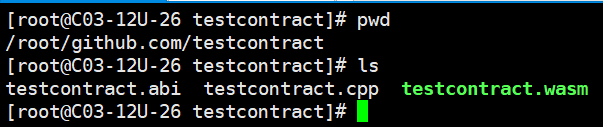
1、编译智能合约(合约编译成.wasm与.abi格式后即可部署到区块链)
[root@C03-12U-26 testcontract]# cat testcontract.cpp

#include <eosiolib/eosio.hpp>

class [[eosio::contract]] testcontract : public eosio::contract

{

public:

    testcontract( eosio::name receiver, eosio::name code, eosio::datastream<const char*> ds )

        : eosio::contract(receiver, code, ds),  _students(receiver, code.value)

    {}

    //添加学生

    [[eosio::action]]

    void add(eosio::name user, std::string studentName,std::string studentGender,uint32_t studentAge,uint32_t studentHeight)

    {

        require_auth(user);

        eosio::print("Add student ", studentName);

        _students.emplace(get_self(), [&](auto& p) {

            p.id = _students.available_primary_key();

            p.studentName = studentName;

            p.studentGender = studentGender;

            p.studentAge = studentAge;

            p.studentHeight = studentHeight;

        });

    }

    //根据主键删除学生

    [[eosio::action]]

    void del(eosio::name user, uint64_t id)

    {

        require_auth(user);

        eosio::print("Del student", id);

        auto itr = _students.find(id);

        if (itr != _students.end()) {

            _students.erase(itr);

        }

    }

    //根据主键修改学生

    [[eosio::action]]

    void update(eosio::name user, uint64_t id,std::string studentName,std::string studentGender,uint32_t studentAge,uint32_t studentHeight)

    {

        require_auth(user);

        eosio::print("update student", studentName);

        auto itr = _students.find(id);

        if (itr != _students.end())

        {

            _students.modify(itr, user, [&]( auto& p ) {

                p.studentName = studentName;

                p.studentGender = studentGender;

                p.studentAge = studentAge;

                p.studentHeight = studentHeight;

            });

        }

    }

    //清空表,待定

    [[eosio::action]]

    void clear(eosio::name user)

    {

        require_auth(user);

        std::vector<uint64_t> keysForDeletion;

        for(auto& item : _students) {

            keysForDeletion.push_back(item.id);

        }

        for (uint64_t key : keysForDeletion) {

            eosio::print("remove from _students ", key);

            auto itr = _students.find(key);

            if (itr != _students.end()) {

                _students.erase(itr);

            }

        }

    }

    //private: -- not private so the cleos get table call can see the table data.

    // create the multi index tables to store the data

    struct [[eosio::table]] students

    {

        uint64_t      id; // primary key

        std::string   studentName;

        std::string   studentGender;

        uint32_t    studentAge;

        uint32_t    studentHeight;

        uint64_t primary_key() const { return id; }

        uint64_t by_age() const {return studentAge; }

    };

    //数据表根据age排序

    typedef eosio::multi_index<"students"_n, students, eosio::indexed_by<"studentage"_n, eosio::const_mem_fun<students, uint64_t, &students::by_age>>> studentstable;

    //students数据库表

    studentstable _students;

};

EOSIO_DISPATCH( testcontract, (add)(del)(update)(clear))
2、部署智能合约
解锁账号钱包
cleos -u https://jungle2.cryptolions.io:443 wallet unlock -n zmcheng-wallet
部署合约
cleos -u https://jungle2.cryptolions.io:443 set contract zmcheng12345 /root/github.com/testcontract -p zmcheng12345@active
Reading WASM from /root/github.com/testcontract/testcontract.wasm...
Publishing contract...
executed transaction: 785f421fe911a142b7cc4b15131cf3f4947847531ed8c52150aa148fe405ea0d 7536 bytes 1560 us
# eosio <= eosio::setcode {"account":"zmcheng12345","vmtype":0,"vmversion":0,"code":"0061736d0100000001d0012060000060037f7e7e0...
# eosio <= eosio::setabi {"account":"zmcheng12345","abi":"0e656f73696f3a3a6162692f312e3100050361646400050475736572046e616d650...
warning: transaction executed locally, but may not be confirmed by the network yet
调用合约(增删改查)
[root@C03-12U-26 testcontract]# cleos -u https://jungle2.cryptolions.io:443 push action zmcheng12345 add '["zmcheng12345","zmcheng","male",25,170]' -p zmcheng12345@active

executed transaction: a64271659aea1ce07fd05a4ff1bb0188c441de04263f3a18b819cbee205d2bbd  128 bytes  273 us

#  zmcheng12345 <= zmcheng12345::add            {"user":"zmcheng12345","studentName":"zmcheng","studentGender":"male","studentAge":25,"studentHeight...

>> Add student zmcheng

warning: transaction executed locally, but may not be confirmed by the network yet         ]

[root@C03-12U-26 testcontract]# cleos -u https://jungle2.cryptolions.io:443 get table zmcheng12345 zmcheng12345 students

{

  "rows": [{

      "id": 0,

      "studentName": "zmcheng",

      "studentGender": "male",

      "studentAge": 25,

      "studentHeight": 170

    },{

      "id": 1,

      "studentName": "www",

      "studentGender": "male",

      "studentAge": 26,

      "studentHeight": 170

    }

  ],

  "more": false

}

[root@C03-12U-26 testcontract]# cleos -u https://jungle2.cryptolions.io:443 push action zmcheng12345 update '["zmcheng12345",1,"www","male",12,123]' -p zmcheng12345@active

executed transaction: 765c35452964de54771c3fe505daad272a8a53ec61954a2cc43350f7f84e86e3  128 bytes  213 us

#  zmcheng12345 <= zmcheng12345::update         {"user":"zmcheng12345","id":1,"studentName":"www","studentGender":"male","studentAge":12,"studentHei...

>> update studentwww

warning: transaction executed locally, but may not be confirmed by the network yet         ]

[root@C03-12U-26 testcontract]# cleos -u https://jungle2.cryptolions.io:443 get table zmcheng12345 zmcheng12345 students

{

  "rows": [{

      "id": 0,

      "studentName": "zmcheng",

      "studentGender": "male",

      "studentAge": 25,

      "studentHeight": 170

    },{

      "id": 1,

      "studentName": "www",

      "studentGender": "male",

      "studentAge": 12,

      "studentHeight": 123

    }

  ],

  "more": false

}

[root@C03-12U-26 testcontract]#

[root@C03-12U-26 testcontract]# cleos -u https://jungle2.cryptolions.io:443 push action zmcheng12345 del '["zmcheng12345",1]' -p zmcheng12345@active

executed transaction: 1a64a42ebccac0f9b7061c42a0fa8daaebe7b1a18db1cb058fe479608ee9170a  112 bytes  255 us

#  zmcheng12345 <= zmcheng12345::del            {"user":"zmcheng12345","id":1}

>> Del student1

warning: transaction executed locally, but may not be confirmed by the network yet         ]

[root@C03-12U-26 testcontract]# cleos -u https://jungle2.cryptolions.io:443 get table zmcheng12345 zmcheng12345 students

{

  "rows": [{

      "id": 0,

      "studentName": "zmcheng",

      "studentGender": "male",

      "studentAge": 25,

      "studentHeight": 170

    }

  ],

  "more": false

}
EOS测试链智能合约部署调用的更多相关文章
- Solidity truffle,部署合约到Ropsten测试链或主链,调用合约(转)
Solidity truffle,部署合约到Ropsten测试链或主链,调用合约 转 https://blog.csdn.net/houyanhua1/article/details/89010896 ...
- EOS智能合约开发(四):智能合约部署及调试(附编程示例)
EOS智能合约开发(一):EOS环境搭建和创建节点 EOS智能合约开发(二):EOS创建和管理钱包 EOS智能合约开发(三):EOS创建和管理账号 部署智能合约的示例代码如下: $ cleos set ...
- 使用 Browser-solidity 在 Go-Ethereum1.7.2 上进行简单的智能合约部署
目录 目录 1.基本概念 1.1.什么是智能合约? 1.2.什么是Solidity? 1.2.1.Solidity的语言特性 1.3.什么是 Browser-solidity? 2.Browser-s ...
- EOS之hello智能合约解析
传送门: 柏链项目学院 EOS的智能合约与以太坊区别很大, EOS 的智能合约基于 WebAssembly(WASM) 技术执行用户生成的应用程序和代码.WASM是一项新兴的网络标准,得到了谷歌, ...
- Eos的Wasm智能合约的局限性
官方只支持用C++写智能合约 用C++写智能合约门槛过高,会把许多开发者挡在门外,C++的复杂性也会让智能合约的设计变得困难. Wasm智能合约的效率并不是最优 由于C++最终也是编译成wasm字节码 ...
- Remix+Geth 实现智能合约部署和调用详解
Remix编写智能合约 编写代码 在线调试 实现部署 调用接口 Geth实现私有链部署合约和调用接口 部署合约 调用合约 获得合约实例 通过实例调用合约接口 Remix编写智能合约 编写代码 Remi ...
- 用Java为Hyperledger Fabric(超级账本)开发区块链智能合约链代码之部署与运行示例代码
部署并运行 Java 链代码示例 您已经定义并启动了本地区块链网络,而且已构建 Java shim 客户端 JAR 并安装到本地 Maven 存储库中,现在已准备好在之前下载的 Hyperledger ...
- 区块链入门(5)Truffle 项目实战,Solidity IDE, 智能合约部署
在上一张我们学习了Truffle项目的创建,部署等相关内容,今天我们就来实战一下. 今天我们要做3件事: 1) 学习搭建一个Solidity IDE(Remix). 2) 使用这个Solidity I ...
- 用Java为Hyperledger Fabric(超级账本)编写区块链智能合约链代码
编写第一个 Java 链代码程序 在上一节中,您已经熟悉了如何构建.运行.部署和调用链代码,但尚未编写任何 Java 代码. 在本节中,将会使用 Eclipse IDE.一个用于 Eclipse 的 ...
随机推荐
- maven 修改镜像为阿里淘宝源
修改maven根目录下的conf文件夹中的setting.xml文件,(或者当前用户目录 的 .m2 目录下的 setting.xml 文件) 内容如下: <mirrors> <mi ...
- Python学习日记(三十) Socket模块使用
Socket(套接字) 套接字是一个抽象层,应用程序可以通过它发送或接收数据,可对其进行像文件一样的打开.读写和关闭等操作.套接字允许应用程序将I/O插入到网络中,并与网络中的其他应用程序进行通信.网 ...
- php框架路由美化后提示No input file specified
此问题出现在.htaccess上 Apache按如下代码修改即可: RewriteEngine on RewriteCond %{REQUEST_FILENAME} !-d RewriteCond % ...
- ElasticSearch(十二):Spring Data ElasticSearch 的使用(二)
在前一篇博文中,创建了Spring Data Elasticsearch工程,并且进行了简单的测试,此处对Spring Data Elasticsearch进行增删改查的操作. 1.增加 在之前工程的 ...
- C++中string的实现原理
C++中string的实现原理 背景 当我刚开始学习C++,对C还是有一部分的了解,所以以C的思维去学C++,导致我很长一段时间的学习都处于一个懵逼的状态,C++的各种特性,标准库,模板还有版本的迭代 ...
- 面试必备技能:HashMap哪些技术点会被经常问到?
1.为什么用数组+链表? 数组是用来确定桶的位置,利用元素的key的hash值对数组长度取模得到. 链表是用来解决hash冲突问题,当出现hash值一样的情形,就在数组上的对应位置形成一条链表.ps: ...
- 【云栖社区001-数据结构】如何实现一个高效的单向链表逆序输出(Java版)
如题 动手之前,发现自己很擅长用C语言来写链表. 不过,既然自己做的是Java开发,那么还是用Java实现这个算法吧:毕竟,以后的若干年里都差不多要跟Java打交道了. 于是,先将Java版的链表自学 ...
- Permission denied (publickey,gssapi-keyex,gssapi-with-mic).错误的解决
SSH登录提示 Permission denied (publickey,gssapi-keyex,gssapi-with-mic). 修改被登录的SSH服务器ssh配置,/etc/ssh/sshd_ ...
- 2、HDFS交互式Shell
管理模式 bin/hdfs dfsadmin ## run a hdfs admin client bin/hdfs dfsadmin -report ##报告信息 bin/hdfs dfsadmin ...
- Boosting and AdaBoost
Boosting是一种从一些弱分类器中创建一个强分类器的集成技术(提升算法). 它先由训练数据构建一个模型,然后创建第二个模型来尝试纠正第一个模型的错误.不断添加模型,直到训练集完美预测或已经添加到数 ...