
allure与junit结合生成漂亮的demo
1.allure安装
环境配置可参考https://blog.csdn.net/huggh/article/details/90905845,且博客中也分享了官网的案例https://github.com/allure-examples
2.案例demo
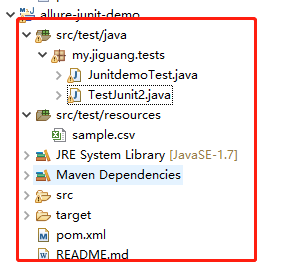
创建的maven项目,结构如下
allure注解基本用法
/*  @Step:测试步骤动作,放在具体业务逻辑方法中,可以放在关键步骤中,在报告中显示;\r\n" +

            "* @Attachments:附件信息,在截图或者其他方法上加上该注解即可(注意图片和文字区别),https://github.com/allure-framework/allure1/wiki/Attachments\r\n" +

            "* @Features:将case分类到某个feature中,报告中behaviore中显示,可以理解为testsuite,用于组织管理测试用例https://github.com/allure-framework/allure1/wiki/Features-and-Stories\r\n" +

            "* @Store:属于feature之下的结构,报告中features中显示,可以理解为testcase,说明此用例是某个feature中的某个story下的用例https://github.com/allure-framework/allure1/wiki/Features-and-Stories\r\n" +

            "* @Title: 测试用例的标题,报告中stories信息中展示\r\n" +

            "* @Description: 测试用例的描述,报告中stories信息中展示\r\n" +

            "* @Issue: 跟测试用例相关的bug Id(这是一个链接,可以配置bug管理系统的URL,直接跳转到bug管理系统中)https://github.com/allure-framework/allure1/wiki/Issues。pom文件中添加配置patterm,见下方\r\n" +

            "* @TestCaseId:测试用例的id(这是一个连接,可以配置用例管理系统的URL,直接跳转到用例管理系统中)https://github.com/allure-framework/allure1/wiki/Test-Case-ID,pom文件中添加配置patterm,见下方\r\n" +

            "* ……\r\n" +

            */
TestJunit2.java文件
package my.jiguang.tests;

import static org.hamcrest.CoreMatchers.is;

import static org.hamcrest.MatcherAssert.assertThat;

import java.io.IOException;

import java.net.URISyntaxException;

import java.net.URL;

import java.nio.file.Files;

import java.nio.file.Paths;

import static org.junit.Assert.assertEquals;

import static org.junit.Assert.fail;

import org.junit.BeforeClass;

import org.junit.Test;

import org.openqa.selenium.OutputType;

import org.openqa.selenium.TakesScreenshot;

import org.openqa.selenium.WebDriver;

import org.openqa.selenium.chrome.ChromeDriver;

import io.github.bonigarcia.wdm.ChromeDriverManager;

import io.qameta.allure.Attachment;

import io.qameta.allure.Description;

import io.qameta.allure.Epic;

import io.qameta.allure.Feature;

import io.qameta.allure.Issue;

import io.qameta.allure.Step;

@Epic("极光浏览器打开操作")

@Feature("对极光首页进行截图")

public class JunitdemoTest {

    static WebDriver driver;

    @BeforeClass

    public static  void setUp() throws Exception {

        ChromeDriverManager.getInstance().setup();

        driver=new ChromeDriver();

    }

    @Test

    @Issue("open-1")

    @Description("打开浏览器,获取项目的title,对比结果")

    public void openhome() {

        driver.get("https://www.jiguang.cn/");

        String title=driver.getTitle();

        System.out.println(title);

        assertEquals("首页 - 极光",title);

        makeScreenShot();

        driver.close();

    }

      @Attachment

       @Step("进行截图")

       public byte[] makeScreenShot() {

            return ((TakesScreenshot) driver).getScreenshotAs(OutputType.BYTES);

       }

      @Attachment

        public String makeAttach() {

            return "yeah, 2 is 2";

        }

        @Test

        public void simpleTestWithAttachments() throws Exception {

            assertThat(2, is(2));

            makeAttach();

        }

        @Description("Test shows CSV attachment")

        @Test

        public void csvAttachmentTest() throws Exception {

            saveCsvAttachment();

        }

        @Issue("123")

        @Attachment(value = "Sample csv attachment", type = "text/csv")

        public byte[] saveCsvAttachment() throws URISyntaxException, IOException {

            URL resource = getClass().getClassLoader().getResource("sample.csv");

            if (resource == null) {

                fail("不能打开资源文件 'sample.csv'");

            }

            return Files.readAllBytes(Paths.get(resource.toURI()));

        }

}
JunitDemo.class文件
package my.jiguang.tests;

import static org.hamcrest.CoreMatchers.is;

import static org.hamcrest.MatcherAssert.assertThat;

import java.io.IOException;

import java.net.URISyntaxException;

import java.net.URL;

import java.nio.file.Files;

import java.nio.file.Paths;

import static org.junit.Assert.assertEquals;

import static org.junit.Assert.fail;

import org.junit.BeforeClass;

import org.junit.Test;

import org.openqa.selenium.OutputType;

import org.openqa.selenium.TakesScreenshot;

import org.openqa.selenium.WebDriver;

import org.openqa.selenium.chrome.ChromeDriver;

import io.github.bonigarcia.wdm.ChromeDriverManager;

import io.qameta.allure.Attachment;

import io.qameta.allure.Description;

import io.qameta.allure.Epic;

import io.qameta.allure.Feature;

import io.qameta.allure.Issue;

import io.qameta.allure.Step;

@Epic("极光浏览器打开操作")

@Feature("对极光首页进行截图")

public class JunitdemoTest {

    static WebDriver driver;

    @BeforeClass

    public static  void setUp() throws Exception {

        ChromeDriverManager.getInstance().setup();

        driver=new ChromeDriver();

    }

    @Test

    @Issue("open-1")

    @Description("打开浏览器,获取项目的title,对比结果")

    public void openhome() {

        driver.get("https://www.jiguang.cn/");

        String title=driver.getTitle();

        System.out.println(title);

        assertEquals("首页 - 极光",title);

        makeScreenShot();

        driver.close();

    }

      @Attachment

       @Step("进行截图")

       public byte[] makeScreenShot() {

            return ((TakesScreenshot) driver).getScreenshotAs(OutputType.BYTES);

       }

      @Attachment

        public String makeAttach() {

            return "yeah, 2 is 2";

        }

        @Test

        public void simpleTestWithAttachments() throws Exception {

            assertThat(2, is(2));

            makeAttach();

        }

        @Description("Test shows CSV attachment")

        @Test

        public void csvAttachmentTest() throws Exception {

            saveCsvAttachment();

        }

        @Issue("123")

        @Attachment(value = "Sample csv attachment", type = "text/csv")

        public byte[] saveCsvAttachment() throws URISyntaxException, IOException {

            URL resource = getClass().getClassLoader().getResource("sample.csv");

            if (resource == null) {

                fail("不能打开资源文件 'sample.csv'");

            }

            return Files.readAllBytes(Paths.get(resource.toURI()));

        }

}
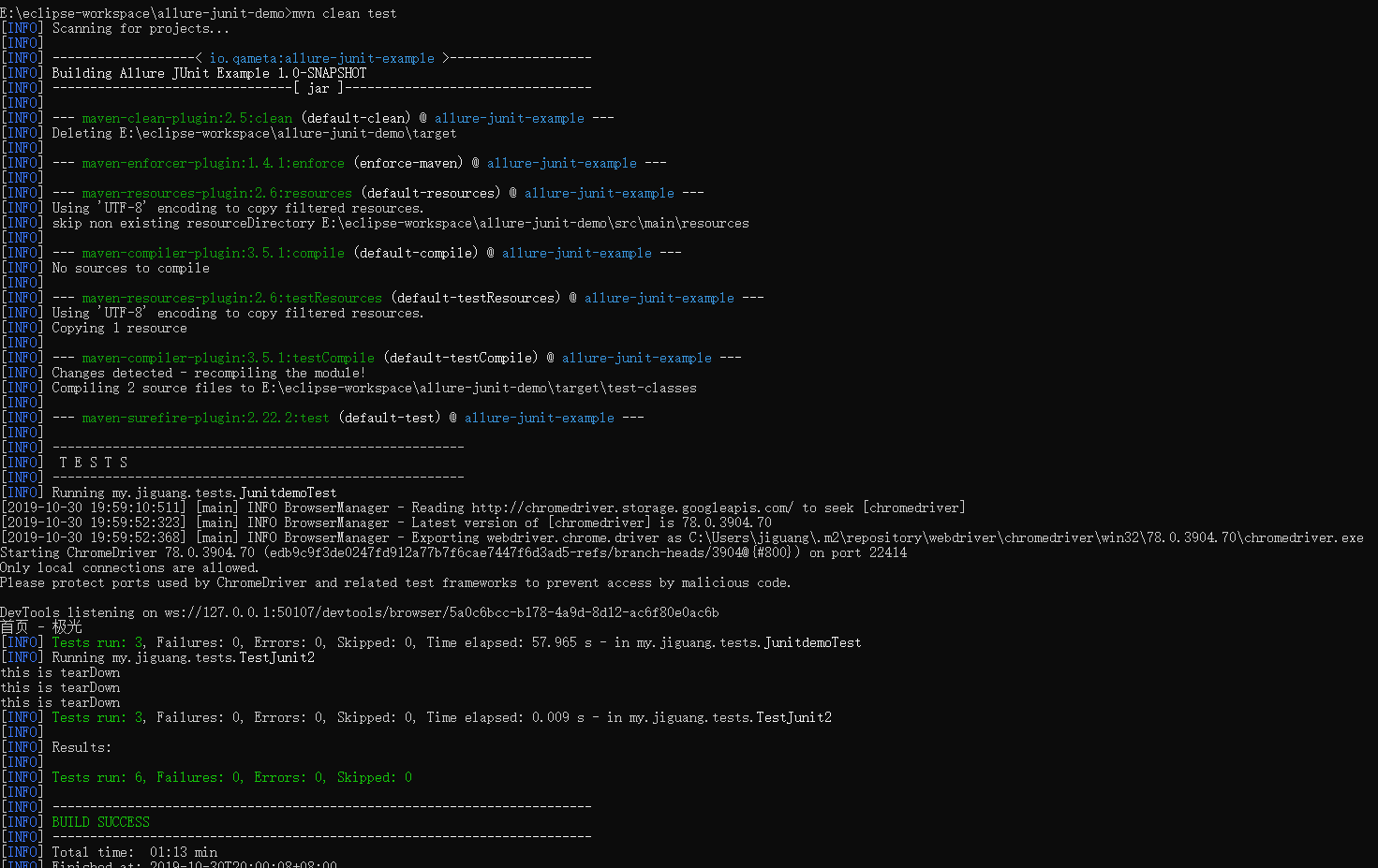
使用 mvn clean test 进行编译,两个类文件编译成功
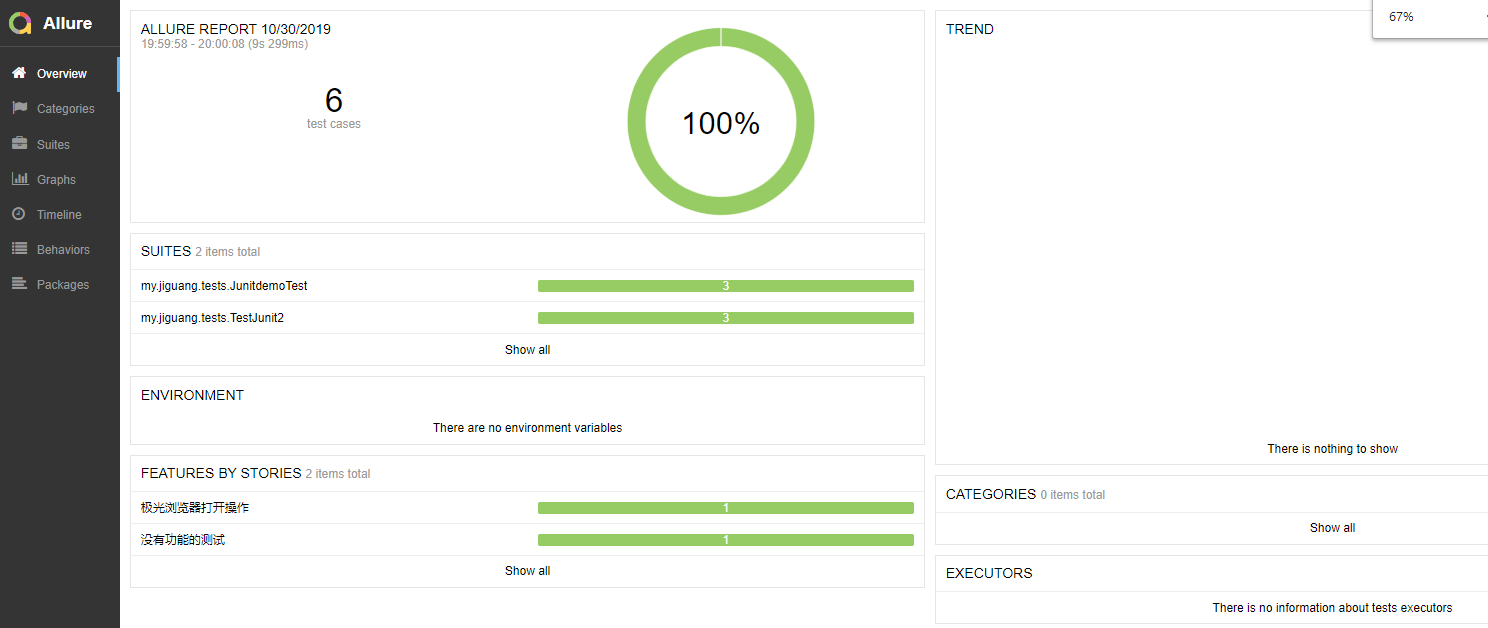
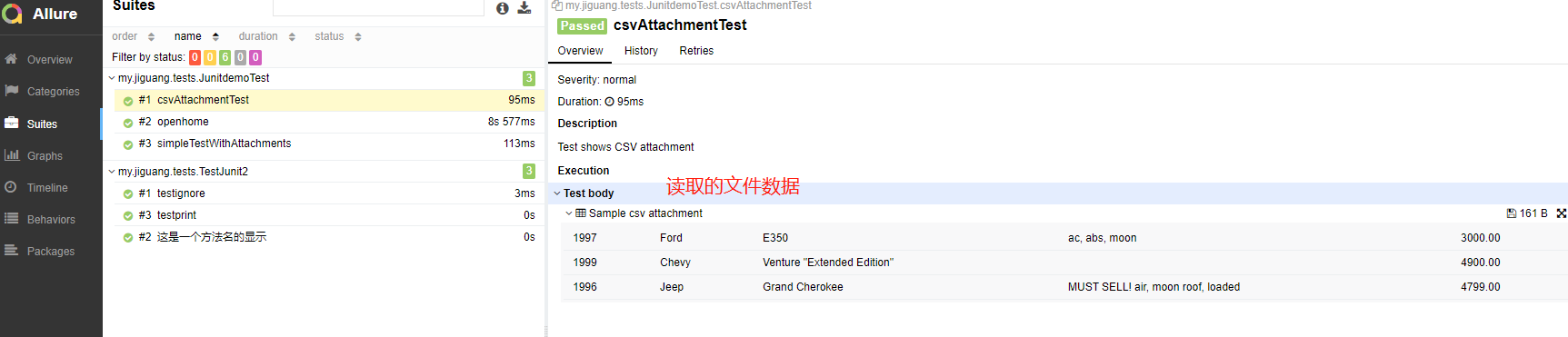
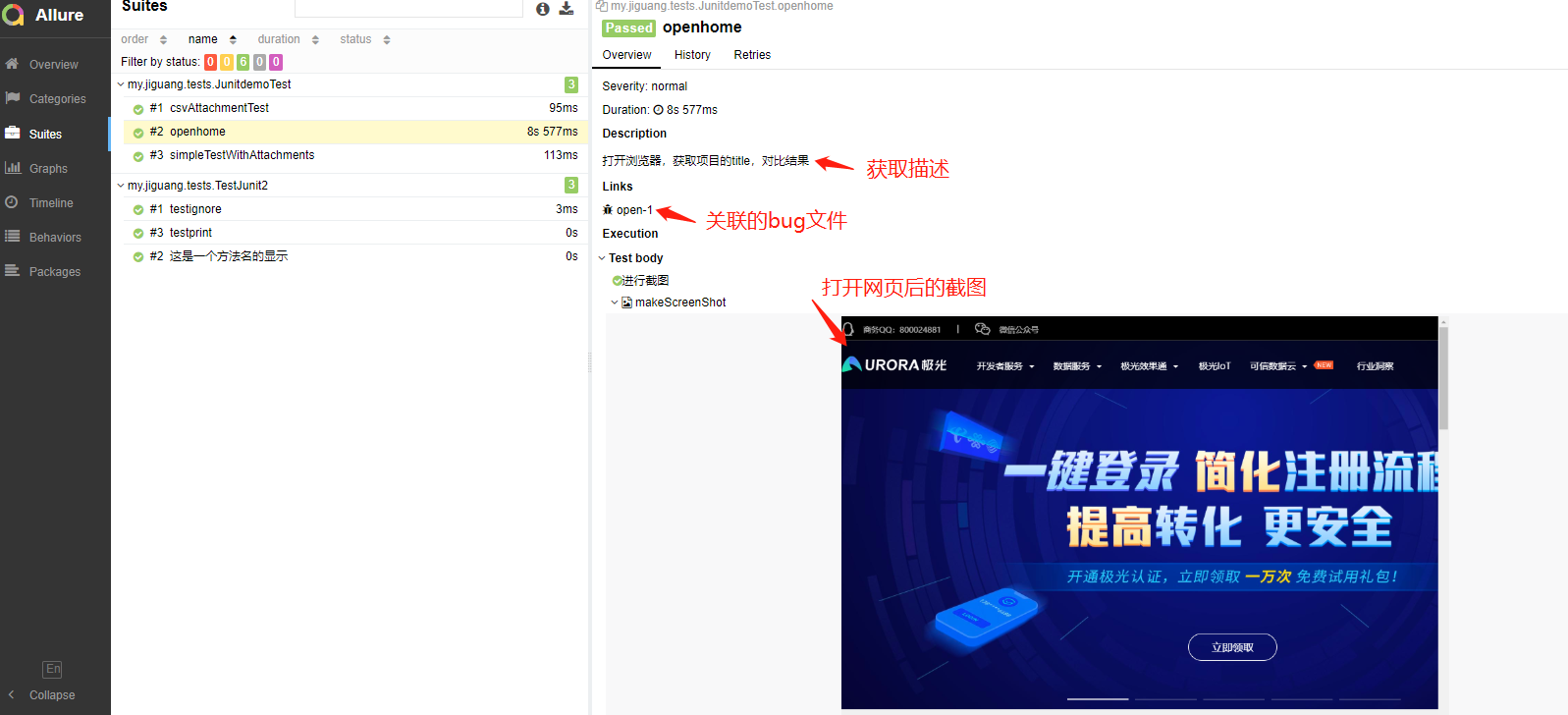
使用:allure serve target/allure-results,生成报告,自动打开数据报告

以下部分页面结果预览:
allure与junit结合生成漂亮的demo的更多相关文章
- 【Python】使用Pytest集成Allure生成漂亮的图形测试报告
前言 大概两个月前写过一篇<[测试设计]使用jenkins 插件Allure生成漂亮的自动化测试报告>的博客,但是其实Allure首先是一个可以独立运行的测试报告生成框架,然后才有了Jen ...
- C#自动生成漂亮的水晶效果头像
C#自动生成漂亮的水晶效果头像 与其他的微博系统相同,在“多可内网微博系统”的用户也可上传自己的头像,并支持头像裁剪. 但“多可内网微博系统”的头像可以更漂亮,因为系统实现了水晶效果的头像.C#程序实 ...
- JMeter:生成漂亮的多维度的HTML报告
JMeter:生成漂亮的多维度的HTML报告我们做性能测试的时候会经常使用一些性能测试工具,我个人比较喜欢Jmeter这个工具,但是JMeter这个工具在生成测试报告方面一直有所欠缺.但是JMeter ...
- .NET生成漂亮桌面背景
.NET生成漂亮桌面背景 一天,我朋友指着某某付费软件对我说,这个东西不错,每天生成一张桌面背景,还能学英语(放置名人名言和翻译)!我说,这东西搞不好我也能做,然后朋友说,"如果你搞出来了, ...
- c#每天生成漂亮桌面背景、英文名言、翻译
阅读目录 一.1. 下载bing.com壁纸查询API 二.2. 解析返回的壁纸JSON信息 三.3. 下载完成的壁纸图片 阅读目录 .NET生成漂亮桌面背景 .NET生成漂亮桌面背景 总结 回到目录 ...
- 如何使用Swagger-UI在线生成漂亮的接口文档
一.简单介绍 Swagger是一个实现了OpenAPI(OpenAPI Specification)规范的工具集.OpenAPI是Linux基金会的一个项目,试图通过定义一种用来描述API格式或API ...
- 【测试设计】使用jenkins 插件Allure生成漂亮的自动化测试报告
前言 以前做自动化测试的时候一直用的HTMLTestRunner来生成测试报告,后来也尝试过用Python的PyH模块自己构建测试报告,在后来看到了RobotFramework的测试报告,感觉之前用的 ...
- pytest + allure + jenkins 生成漂亮的测试报告
pytest我在上一篇文章初始pytest中已有介绍,是一个很理想的Python测试框架.Allure是一款非常轻量级并且非常灵活的开源测试报告生成框架. 它支持绝大多数测试框架, 例如TestNG. ...
- 使用Allure+testNG自动生成漂亮强大的测试用例报告
最近领导让我找一个可以每次打包自动生成测试用例的东西,jenkins或者idea都可以, 最后找到了这个allure,也踩了很多坑,废话不多说!,总结一下: 1 使用原生allure 添加依赖: &l ...
随机推荐
- python 使用 requests 做 http 请求
1. get import requests # 最简单的get请求 r = requests.get(url) print(r.status_code) print(r.json()) # url ...
- 利用反射与dom4j读取javabean生成对应XML
项目中需要自定义生成一个xml,要把Javabean中的属性拼接一个xml,例如要生成以下xml <?xml version="1.0" encoding="gb2 ...
- 导入Excel——解析Excel——优化
package com.it.excel.excelLearn; import java.io.FileInputStream; import java.io.IOException; import ...
- Codeforces Round #603 (Div. 2) A. Sweet Problem(数学)
链接: https://codeforces.com/contest/1263/problem/A 题意: You have three piles of candies: red, green an ...
- 【luogu 5395】 【模板】第二类斯特林数·行
code: #include <bits/stdc++.h> #define ll long long #define setIO(s) freopen(s".in", ...
- AsyncAPI and CloudEvents
一篇比较AsyncAPI与CloudEvents的文章,很不错,原文连接:https://www.asyncapi.com/blog/asyncapi-cloud-events/ I’ve been ...
- Ubuntu 下安装 Qt Designer
1. apt-get install qt5-designer 2.终端下输入designer,显示: designer: could not exec '/usr/lib/x86_64-linux- ...
- 洛谷 P4149 [IOI2011]Race-树分治(点分治,不容斥版)+读入挂-树上求一条路径,权值和等于 K,且边的数量最小
P4149 [IOI2011]Race 题目描述 给一棵树,每条边有权.求一条简单路径,权值和等于 KK,且边的数量最小. 输入格式 第一行包含两个整数 n, Kn,K. 接下来 n - 1n−1 行 ...
- OpenFOAM——前台阶
本算例来自<ANSYS Fluid Dynamics Verification Manual>中的VMFL037:Turbulent Flow Over a Forward Facing ...
- mysql 层级结构查询
描述:最近遇到了一个问题,在mysql中如何完成节点下的所有节点或节点上的所有父节点的查询? 在Oracle中我们知道有一个Hierarchical Queries可以通过CONNECT BY来查询, ...