
oracle (DBaaS) 服务介绍
转 https://oracle-base.com/articles/vm/oracle-cloud-database-as-a-service-dbaas-create-service?utm_source=tuicool&utm_medium=referral
Oracle Cloud : Database as a Service (DBaaS) - Create Service
This article provides a run through of creating a new DBaaS service on the Oracle Cloud.
- Create SSH Key
- Create Service
- Connecting to the VM using SSH
- Oracle Compute Cloud Service - Network (Firewall)
- Connecting to the database using Oracle Net
- Notes
Related articles.
- Database as a Service (DBaaS) on Oracle Cloud
- Oracle Cloud : Database as a Service (DBaaS) - Patch Service
- Oracle Databases in the Cloud
- A Cure for Virtual Insanity: A Vendor-Neutral Introduction to Virtualization Without the Hype
- Oracle Database Consolidation Comparison
Create SSH Key
Before you start, you are going to need a key pair for authentication to your service.
$ ssh-keygen -b 2048 -t rsa -f myOracleCloudKey

$ chmod 600 myOracleCloudKey*
Enter and confirm the passphrase when prompted. You will be asked to upload the public key during the service creation.
If you have any problems, or need instructions for using PuTTYgen on Windows, check out the documentation here.
Create Service
Log into your Oracle Cloud "My Services" dashboard. Scroll down to the "Oracle Database Cloud Service" section and click either the title, or the "Open Service Console" link.
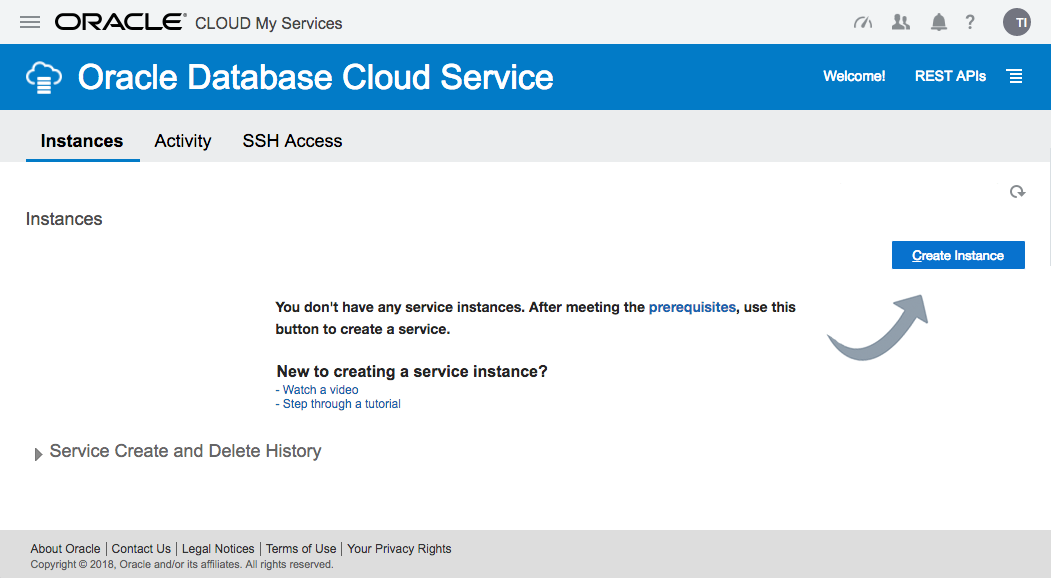
On the "Oracle Database Cloud Service" page, click the "Create Service" button.
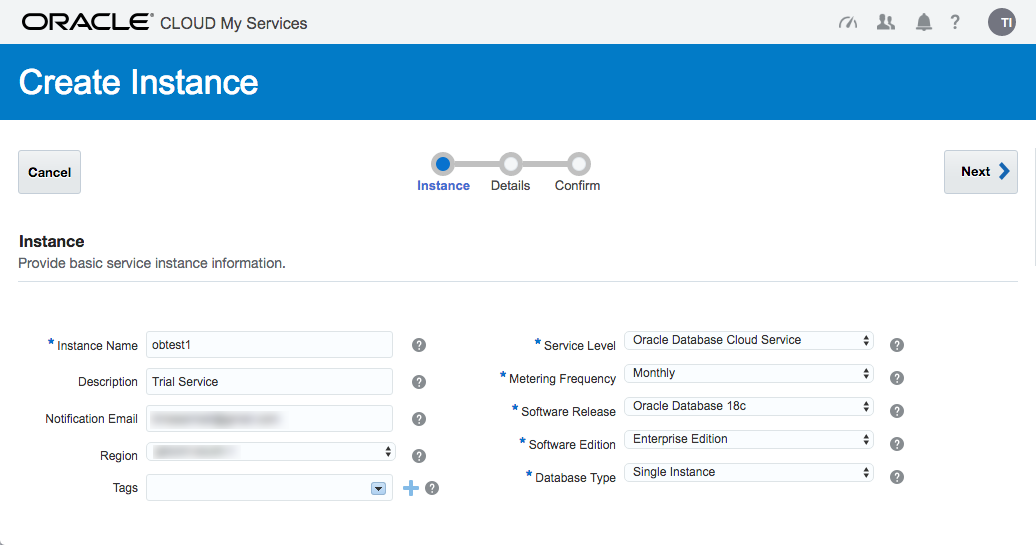
The next page allows you to enter the following details about the service.
- Subscription Type : "Oracle Database Cloud Service" or "Oracle Database Cloud Service - Virtual Image". Pick the first.
- SSH Public Key : Upload the key you created earlier.
- Software Release : 11gR2, 12cR1, 12cR2
- Software Edition : Standard Edition, Enterprise Edition, Enterprise Edition - High Performance, Enterprise Edition - Extreme Performance. Check the definitions of the options included in the Enterprise Edition variants.
- Billing Frequency : Hourly, Monthly
Once you are happy with your choices, click the "Next" button.
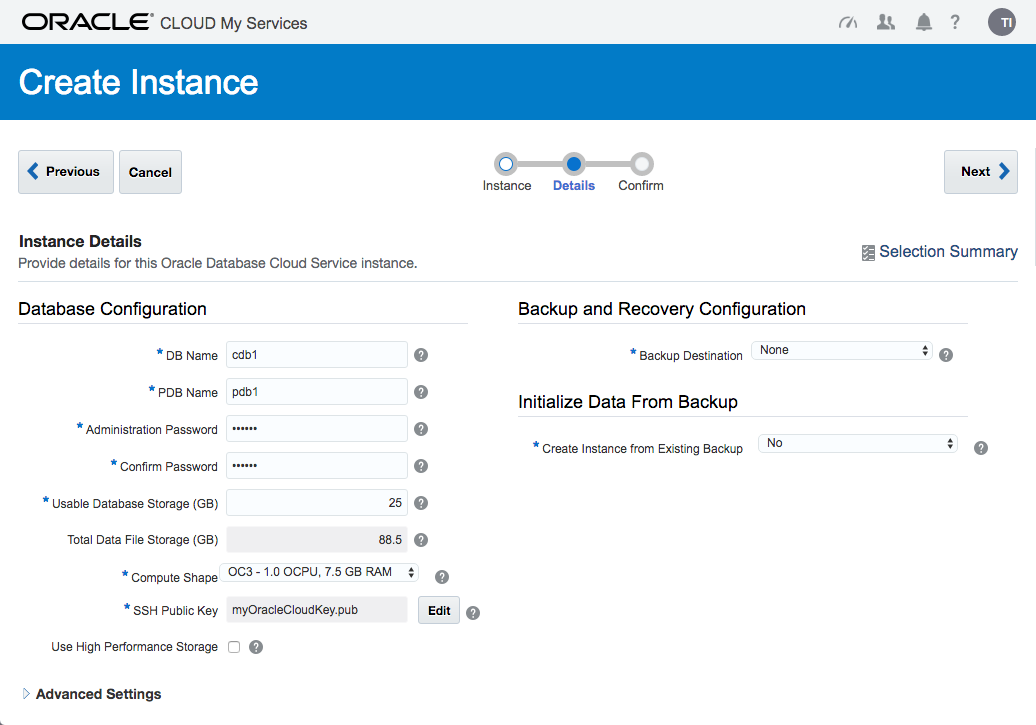
Enter the service details. The shape determines the number of virtual CPUs and memory associated with the service, so pick a shape that is relevant to your performance needs. Enter the database configuration details. Pick the backup configuration appropriate to your system. When you are happy with the configuration, click the "Next" button.
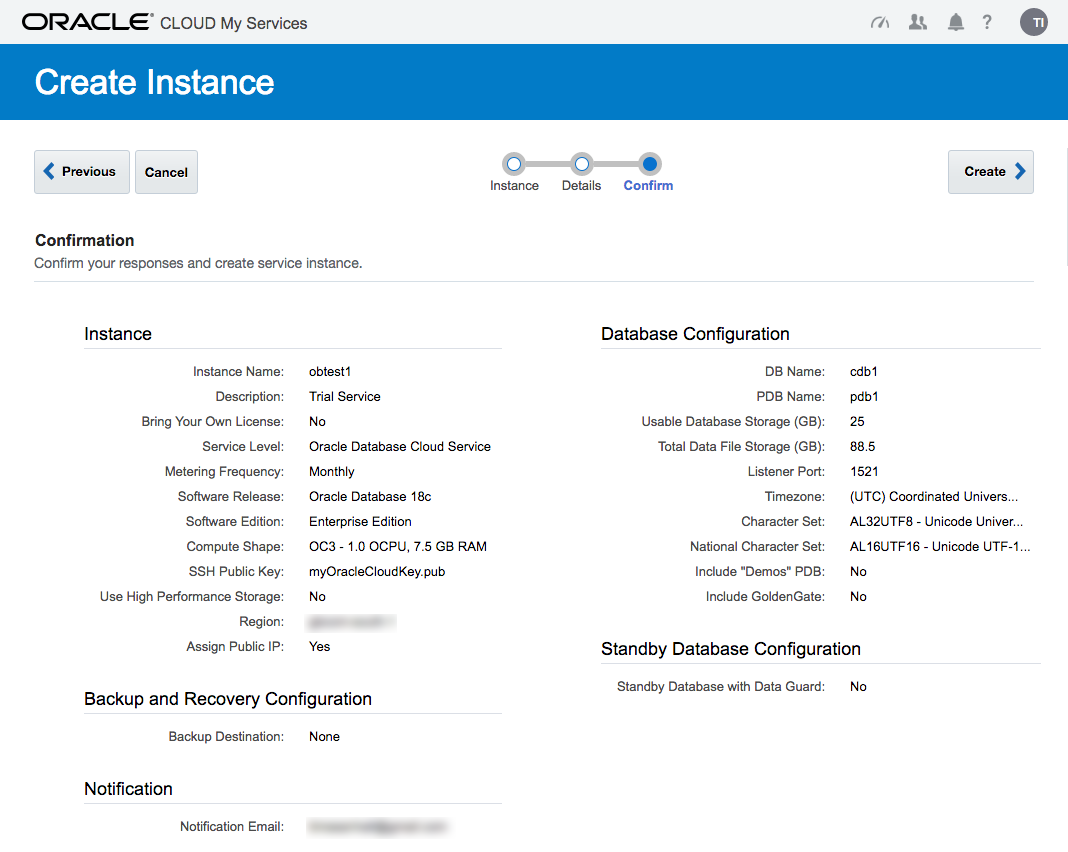
If you are happy with the service setting listed on the "Confirmation" screen, click the "Create" button.
Wait while the new service is created. The progress is shown under the status.
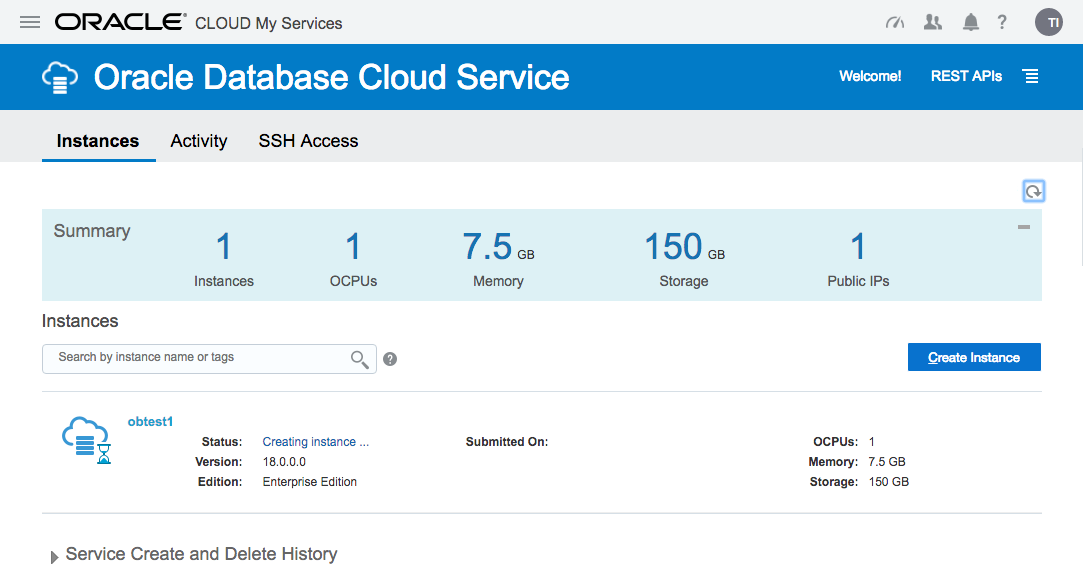
Once complete, the status disappears.
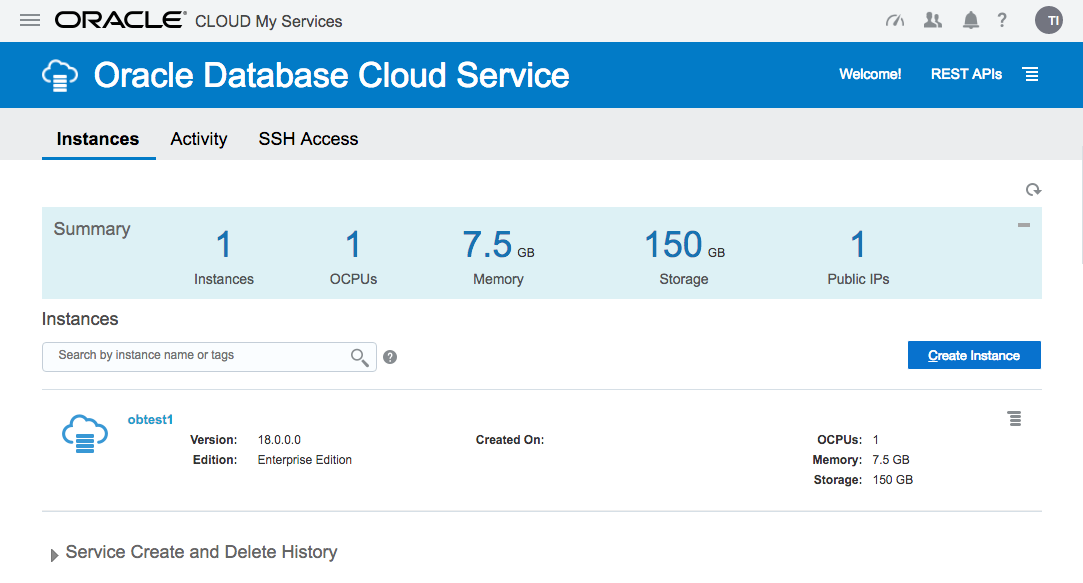
The service hamburger allows you to navigate to a number of management tools. You will need to amend the firewall rules to access these.
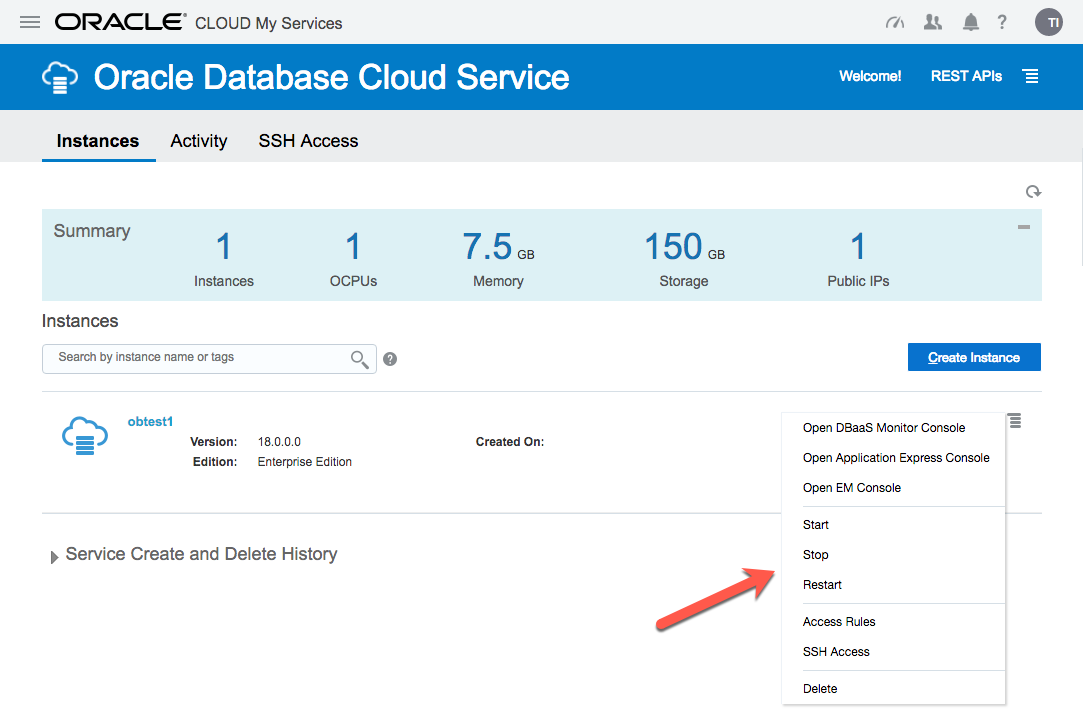
Click on the service name to drill down into the service. The detail page gives basic information about the service, including the public IP address and the database connection string.
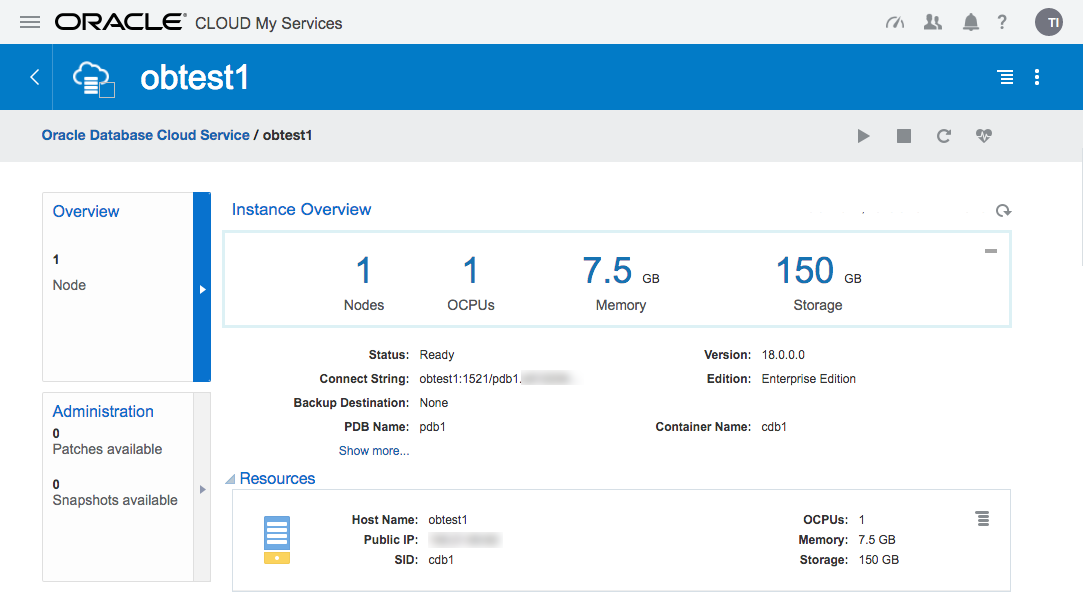
The hamburger gives you basic management operations (Start, Stop, Restart, Scale Up/Down) for the service.
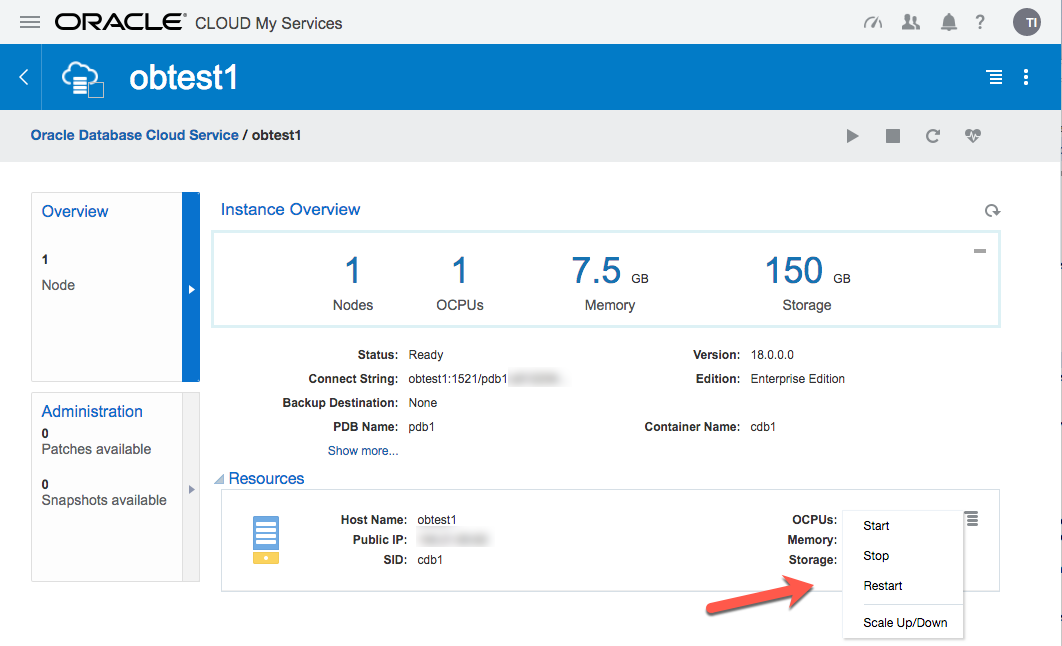
If there are any patches available for your database, they will be displayed in the "Administration" section.
Connecting to the VM using SSH
Most of the time you will probably be connecting to the "oracle" operating system user. You do this by specifying your private key and connect to the "oracle" user on the public IP address from your service detail page.
$ ssh -i ./myOracleCloudKey oracle@123.123.123.123

[oracle@obtest1 ~]$
Once connected, you can do all the usual stuff.
[oracle@obtest1 ~]$ sqlplus / as sysdba

SQL*Plus: Release 12.2.0.1.0 Production on Tue Nov 8 09:44:42 2016

Copyright (c) 1982, 2016, Oracle.  All rights reserved.

Connected to:

Oracle Database 12c Enterprise Edition Release 12.2.0.1.0 - 64bit Production

SQL> ALTER SESSION SET CONTAINER = pdb1;

Session altered.

SQL> CREATE USER test IDENTIFIED BY test;

User created.

SQL> GRANT CREATE SESSION TO test;

Grant succeeded.

SQL>
If you need to perform any tasks as root, you must connect to the "opc" user and run them using "sudo".
$ ssh -i ./myOracleCloudKey opc@123.123.123.123

-bash-4.1$ sudo vi /etc/hosts
Oracle Compute Cloud Service - Network (Firewall)
The DBaaS services are run under the Oracle Compute Cloud (IaaS). This has it's own firewall configuration, allowing you to limit access to your services. By default, all endpoints except SSH are disabled. There are a number of predefined "Security Rules" to open up the assorted endpoints, but they typically open the endpoints to public, which is rather risky. Instead, you should define custom rules, opening access to ports from specific machines.
- Navigate to the main "Oracle Database Cloud Service".
- Click on the hamburger next to the service of interest.
- Click the "Access Rules" option on the popup menu.
- Click the "Create Rule" button.
- Enter a "Rule Name".
- Select "" as the "Source" and enter your IP address in resulting box.
- Select "DB" as the "Destination".
- Enter "1521" as the "Destination Port(s)".
- Leave "TCP" as the "Protocol".
- Click the "Create" button.
You should now be able to connect to the database from the specified IP address.
You will need to do a similar process for the other tools you want to connect to, like APEX, DB Express etc.
Connecting to the database using Oracle Net
The "sqlnet.ora" file on the server contains the following entries, so any connections to the server are encrypted using Native Network Encryption by default.
SQLNET.ENCRYPTION_SERVER = required

SQLNET.CRYPTO_CHECKSUM_TYPES_SERVER = (SHA1)

SQLNET.CRYPTO_CHECKSUM_SERVER = required

ENCRYPTION_WALLET_LOCATION = (SOURCE=(METHOD=FILE)(METHOD_DATA=(DIRECTORY=/u01/app/oracle/admin/cdb1/tde_wallet)))

SQLNET.ENCRYPTION_TYPES_SERVER = (AES256, AES192, AES128)

NAMES.DIRECTORY_PATH = (TNSNAMES, EZCONNECT)

SQLNET.WALLET_OVERRIDE = FALSE

SQLNET.EXPIRE_TIME = 10

SSL_VERSION = 1.0

WALLET_LOCATION = (SOURCE=(METHOD=FILE)(METHOD_DATA=(DIRECTORY=/u01/app/oracle/admin/cdb1/db_wallet)))
SQL*Net access is disabled by default, but you can enable it as described above. Once enabled, create a local "tnsnames.ora" entry as follows. The connection details are available from your service detail screen.
pdb1_oc=

  (DESCRIPTION=

    (ADDRESS=

      (PROTOCOL=TCP)

      (HOST=123.123.123.123)

      (PORT=1521)

    )

    (CONNECT_DATA=

      (SERVICE_NAME=pdb1.my-identity.oraclecloud.internal)

    )

  )
Now you can connect to the database.
C:\>sqlplus test/test@pdb1_oc

SQL*Plus: Release 11.2.0.3.0 Production on Wed Aug 26 14:40:23 2015

Copyright (c) 1982, 2011, Oracle.  All rights reserved.

Connected to:

Oracle Database 12c Enterprise Edition Release 12.2.0.1.0 - 64bit Production

test@cdb1>
Alternatively, connect using the EZconnect URL.
C:\>sqlplus test/test@123.123.123.123:1521/pdb1.my-identity.oraclecloud.internal

SQL*Plus: Release 11.2.0.3.0 Production on Wed Aug 26 14:42:31 2015

Copyright (c) 1982, 2011, Oracle.  All rights reserved.

Connected to:

Oracle Database 12c Enterprise Edition Release 12.2.0.1.0 - 64bit Production

SQL>
Notes
- Assuming your public IP address were 123.123.123.123 and you've opened the relevant services on the firewall, the following URLs are available.
DBaaS Monitor: https://123.123.123.123/dbaas_monitor/
Username: dbaas_monitor
Password: (set during installation) APEX: https://123.123.123.123/ords/pdb1
Workspace: INTERNAL
Username : ADMIN
Password : (set during installation) Glassfish: https://123.123.123.123:4848/common/index.jsf
Username : admin
Password : (set during installation) DB Express : https://123.123.123.123:5500/em - The database created by the "Oracle Database Cloud Service" option does not have multiplexed redo logs, so you will need to sort this manually.
- The "Oracle Database Cloud Service - Virtual Image" option says there is a software installation present, but this is not the case. Instead, there is a tarball containing the software (/scratch/db12102_bits.tar.gz). To do the installation, you would need to Up Scale the service to add storage, then do the installation manually. I see no value in this offering. I would rather provision a regular compute node and do everything manually.
For more information see:
- Using Oracle Database Cloud - Database as a Service
- Database as a Service (DBaaS) on Oracle Cloud
- Oracle Cloud : Database as a Service (DBaaS) - Patch Service
- Oracle Databases in the Cloud
- A Cure for Virtual Insanity: A Vendor-Neutral Introduction to Virtualization Without the Hype
- Oracle Database Consolidation Comparison
oracle (DBaaS) 服务介绍的更多相关文章
- Oracle的服务介绍以及正常运行必须启动的服务
成功安装Oracle 11g数据库后,你会发现自己电脑运行速度会变慢,配置较低的电脑甚至出现非常卡的状况,通过禁止非必须开启的Oracle服务可以提升电脑的运行速度.那么,具体该怎么做呢? 按照win ...
- 转 Oracle 11g服务详细介绍
转自http://www.cnblogs.com/userWuLiang/archive/2013/04/13/3017900.html Oracle 11g服务详细介绍及哪些服务是必须开启的? 成功 ...
- MySQL-版本及服务介绍
一.MySQL各版本 1.MySQL产品 下载地址:https://www.mysql.com/downloads/ Oracle MySQL Cloud Service(commercial) 商业 ...
- Oracle 11g 服务端的安装步骤
Ø 简介 本文主要介绍 Oracle 11g 服务端的安装步骤,在介绍之前说明以下几点: 1. 所安装的服务器是本机的虚拟机,操作系统为 Windows Server 2019: 2. 以下 ...
- REST服务介绍二
之前一篇文章写过REST服务介绍, 今天再次来自回顾一下. REST是一种架构风格. 首次出现在2000年Roy Fielding的博士论文中,Roy Fielding是 HTTP 规范 ...
- Memcached服务介绍及安装指南
一.memcached服务介绍 1.为什么需要memcached服务 A:第一种场景 网站访问大多数情况下都需要查询数据库操作,如果网站的流量很大并且大多数的访问会造成数据库高负荷的状况下,由于大部分 ...
- iphone 使用 soap 服务 介绍
iphone 使用 soap 服务 介绍 目前比较常用的有几个办法: 1. WSDL to Objective C自动根据wsdl文件生成ios可以直接调用的Objective-C (Cocoa) 代 ...
- oracle 11g 服务端下载地址及安装说明
oracle 11g 服务端下载地址及安装说明 分类: Oracle 2013-11-17 19:40 988人阅读 ...
- Oracle优化器介绍
Oracle优化器介绍 本文讲述了Oracle优化器的概念.工作原理和使用方法,兼顾了Oracle8i.9i以及最新的10g三个版本.理解本文将有助于您更好的更有效的进行SQL优化工作. RBO优化器 ...
随机推荐
- 在DIV中自己主动换行
word-break:break-all和word-wrap:break-word都是能使其容器如DIV的内容自己主动换行. 它们的差别就在于: 1,word-break:break-all 比如di ...
- soapUI系列之—-03 Groovy脚本常用方法2
------Groovy脚本常用方法 1.解析Json数据脚本 //groovy读取json的方式很简单,re.body.businessinfo.c2rate读取c2rate对应的值 import ...
- BEGINNING SHAREPOINT® 2013 DEVELOPMENT 第10章节--SP2013中OAuth概览 总结
BEGINNING SHAREPOINT® 2013 DEVELOPMENT 第10章节--SP2013中OAuth概览 总结 SP2013中的OAuth提供了很多新的集成SP On ...
- windows内存管理的机制以及优缺点
分页存储管理基本思想:用户程序的地址空间被划分成若干固定大小的区域,称为“页”,相应地,内存空间分成若干个物理块,页和块的大小相等.可将用户程序的任一页放在内存的任一块中,实现了离散分配. 分段存储管 ...
- 使用scanf_s报错:0xC0000005: Access violation writing location 0x00000000
在vs2010中写了一行scanf("%s",name); 调式时 提示warning , 提示修改为scanf()使用可能会存在不安全,建议使用scanf_s() 但是我修改成s ...
- C#使用 webBrowser 控件总结
using System; using System.Collections.Generic; using System.ComponentModel; using System.Data; usin ...
- Buildroot構建指南--Overview【转】
本文转载自:http://www.unixlinux.online/unixlinux/linuxjc/gylinux/201703/65218.html Buildroot構建指南--Overvie ...
- 一场由过滤器Filter引发的血案
一场由过滤器Filter引发的血案 事件起因 本来应该是下图的登录界面 变成了这样 What's the fuck????? 抓狂 原因 解决方法: 在过滤器中给资源文件开个绿色通道
- Easier SQL with Cupboard
Overview Cupboard is a way to manage persistence in a sqlite instance for your app. It was written b ...
- java 类属性、方法加载的顺序
1.静态变量 2.静态代码块 3.局部代码块 4.构造函数 5.普通代码块 6.静态方法 7.普通方法 8.普通属性