
SpringBoot使用JSP(官网Demo)
最开始接触java的时候,前端页面基本都是用jsp来写,最近公司项目要使用SpringBoot重构,查看SpringBoot文档,发现SpringBoot不建议使用JSP,因为jsp在使用内嵌servlet容器时会有一些限制

虽然以后项目中也会将jsp替换成Template Engines,而且这都是前端的事情,其实与后端并无比较大的联系,但比较好奇Springboot中对jsp的使用,故根据官方文档进行了简单测试验证
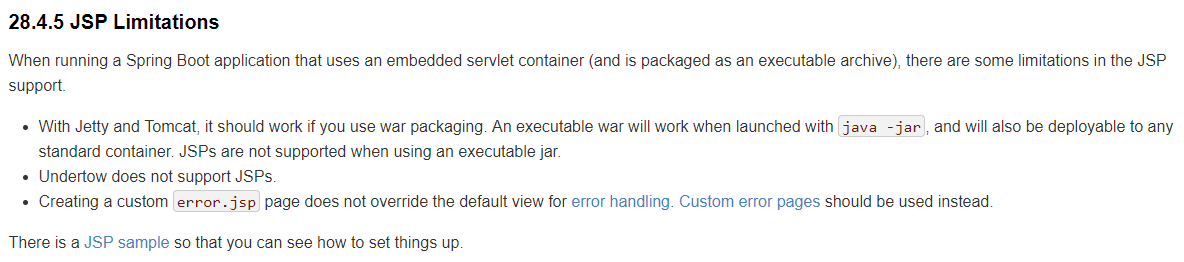
如果使用JSP,则需要将项目打包成war包,jar包不支持JSP。
打开JSP sample,这是一个github上的项目,点击Code标签页,clone or download下载源码,这里下载的代码中包含有很多个springboot项目,其中spring-boot-samples中包含有我们需要的spring-boot-sample-web-jsp
解压下载的文件,spring-boot-samples下项目很多,我们根据需要在eclipse中只导入spring-boot-sample-web-jsp项目,导入时可能出现以下异常
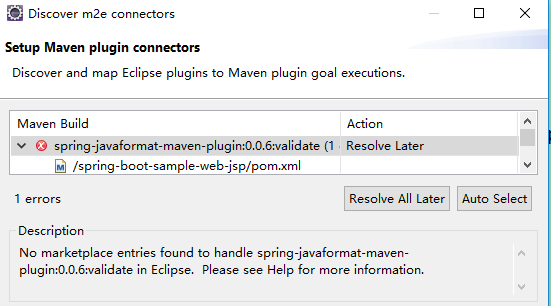
点击finish -- ok,pom.xml文件中出现异常
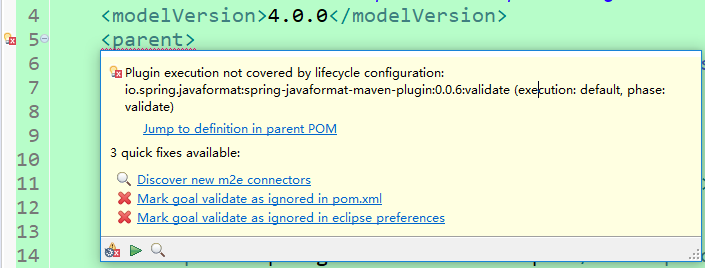
选择Mark goal validate as ignored in pom.xml忽略掉该信息

点击OK
此时若项目上还有红色的叉号,则在项目名称上右键 -- Maven -- Update Project -- OK。
项目结构

包sample.jsp下有两个类
控制器WelcomeController
package sample.jsp;

import java.util.Date;

import java.util.Map;

import org.springframework.beans.factory.annotation.Value;

import org.springframework.stereotype.Controller;

import org.springframework.web.bind.annotation.GetMapping;

import org.springframework.web.bind.annotation.RequestMapping;

@Controller

public class WelcomeController {

    @Value("${application.message:Hello World}")

    private String message = "Hello World";

    @GetMapping("/")

    public String welcome(Map<String, Object> model) {

        model.put("time", new Date());

        model.put("message", this.message);

        return "welcome";

    }

    @RequestMapping("/foo")

    public String foo(Map<String, Object> model) {

        throw new RuntimeException("Foo");

    }

}
启动类SampleWebJspApplication.java
package sample.jsp;

import org.springframework.boot.SpringApplication;

import org.springframework.boot.autoconfigure.SpringBootApplication;

import org.springframework.boot.builder.SpringApplicationBuilder;

import org.springframework.boot.web.servlet.support.SpringBootServletInitializer;

@SpringBootApplication

public class SampleWebJspApplication extends SpringBootServletInitializer {

    @Override

    protected SpringApplicationBuilder configure(SpringApplicationBuilder application) {

        return application.sources(SampleWebJspApplication.class);

    }

    public static void main(String[] args) {

        SpringApplication.run(SampleWebJspApplication.class, args);

    }

}
两个jsp页面
welcome.jsp
<!DOCTYPE html>

<%@ taglib prefix="spring" uri="http://www.springframework.org/tags"%>

<%@ taglib prefix="c" uri="http://java.sun.com/jsp/jstl/core"%>

<html lang="en">

<body>

    <c:url value="/resources/text.txt" var="url"/>

    <spring:url value="/resources/text.txt" htmlEscape="true" var="springUrl" />

    Spring URL: ${springUrl} at ${time}

    <br>

    JSTL URL: ${url}

    <br>

    Message: ${message}

</body>

</html>
error.jsp
<!DOCTYPE html>

<html lang="en">

<body>

Something went wrong: ${status} ${error}

</body>

</html>
pom.xml
<?xml version="1.0" encoding="UTF-8"?>

<project xmlns="http://maven.apache.org/POM/4.0.0" xmlns:xsi="http://www.w3.org/2001/XMLSchema-instance"

    xsi:schemaLocation="http://maven.apache.org/POM/4.0.0 http://maven.apache.org/xsd/maven-4.0.0.xsd">

    <modelVersion>4.0.0</modelVersion>

    <parent>

        <!-- Your own application should inherit from spring-boot-starter-parent -->

        <groupId>org.springframework.boot</groupId>

        <artifactId>spring-boot-samples</artifactId>

        <version>${revision}</version>

    </parent>

    <artifactId>spring-boot-sample-web-jsp</artifactId>

    <packaging>war</packaging>

    <name>Spring Boot Web JSP Sample</name>

    <description>Spring Boot Web JSP Sample</description>

    <properties>

        <main.basedir>${basedir}/../..</main.basedir>

        <m2eclipse.wtp.contextRoot>/</m2eclipse.wtp.contextRoot>

    </properties>

    <dependencies>

        <!-- Compile -->

        <dependency>

            <groupId>org.springframework.boot</groupId>

            <artifactId>spring-boot-starter-web</artifactId>

        </dependency>

        <dependency>

            <groupId>javax.servlet</groupId>

            <artifactId>jstl</artifactId>

        </dependency>

        <!-- Provided -->

        <dependency>

            <groupId>org.springframework.boot</groupId>

            <artifactId>spring-boot-starter-tomcat</artifactId>

            <scope>provided</scope>

        </dependency>

        <dependency>

            <groupId>org.apache.tomcat.embed</groupId>

            <artifactId>tomcat-embed-jasper</artifactId>

            <scope>provided</scope>

        </dependency>

        <!-- Test -->

        <dependency>

            <groupId>org.springframework.boot</groupId>

            <artifactId>spring-boot-starter-test</artifactId>

            <scope>test</scope>

        </dependency>

    </dependencies>

    <build>

        <plugins>

            <plugin>

                <groupId>org.springframework.boot</groupId>

                <artifactId>spring-boot-maven-plugin</artifactId>

            </plugin>

            <plugin>

                <groupId>org.apache.maven.plugins</groupId>

                <artifactId>maven-surefire-plugin</artifactId>

                <configuration>

                    <useSystemClassLoader>false</useSystemClassLoader>

                </configuration>

            </plugin>

        </plugins>

        <pluginManagement>

            <plugins>

                <!--This plugin's configuration is used to store Eclipse m2e settings only. It has no influence on the Maven build itself.-->

                <plugin>

                    <groupId>org.eclipse.m2e</groupId>

                    <artifactId>lifecycle-mapping</artifactId>

                    <version>1.0.0</version>

                    <configuration>

                        <lifecycleMappingMetadata>

                            <pluginExecutions>

                                <pluginExecution>

                                    <pluginExecutionFilter>

                                        <groupId>

                                            io.spring.javaformat

                                        </groupId>

                                        <artifactId>

                                            spring-javaformat-maven-plugin

                                        </artifactId>

                                        <versionRange>

                                            [0.0.6,)

                                        </versionRange>

                                        <goals>

                                            <goal>validate</goal>

                                        </goals>

                                    </pluginExecutionFilter>

                                    <action>

                                        <ignore></ignore>

                                    </action>

                                </pluginExecution>

                            </pluginExecutions>

                        </lifecycleMappingMetadata>

                    </configuration>

                </plugin>

            </plugins>

        </pluginManagement>

    </build>

</project>
以上为该Demo官网pom文件,但其中内容个人觉得有多余,spring-boot-starter-tomcat和tomcat-embed-jasper在spring-boot-starter-web中已经有引用,所以可以去掉
启动主函数
页面访问:http://localhost:8080/

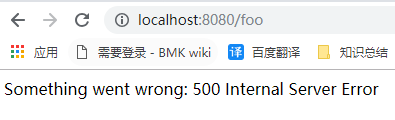
页面访问:http://localhost:8080/foo
一、本例中启动类继承了SpringBootServletInitializer,重写了configure方法,如果去掉该类的集成,能不能正常运行程序,其实是可以的(添加server.port=8081端口,与8080区分,测试)
二、SpringBootServletInitializer是做什么用处的?
springboot官方文档中 “91.1 Create a Deployable War File”有对该类的具体描述

三、按照当前pom.xml中配置,打包(eclipse中执行package),出现以下异常
[ERROR] Failed to execute goal io.spring.javaformat:spring-javaformat-maven-plugin:0.0.6:validate (default) on project spring-boot-sample-web-jsp: Formatting violations found in the following files:
日志中也给出了建议,使用:spring-javaformat:apply修复该问题
spring-javaformat:apply执行结束后,再次执行package,打包成功,打包过程中,会有很多的jar包下载。
进入到target目录,执行:java -jar .\spring-boot-sample-web-jsp-2.1.2.RELEASE.war,程序启动后,页面访问正常。
四、上面官方文档已经讲,打成可执行jar包,不支持JSP,下面尝试一下,是否如此,首先去掉主函数中集成SpringBootServletInitializer类,去掉重写的方法,pom.xml中war改为jar
1、运行主函数,jsp可正常访问
2、执行clean package打包,打包时出现异常,也许此异常与JSP无关,但此处就不在进行处理重新打包,毕竟官网也已经声明可执行jar不支持JSP
[ERROR] Failed to execute goal org.apache.maven.plugins:maven-checkstyle-plugin:3.0.0:check (checkstyle-validation) on project spring-boot-sample-web-jsp: You have 2 Checkstyle violations. -> [Help 1]
五、以上demo跑通后,也需要自己新建一个使用jsp的web项目,来运行测试下。
SpringBoot使用JSP(官网Demo)的更多相关文章
- Java 银联支付官网demo测试及项目整合代码
注:原文来源与 < Java 银联支付官网demo测试及项目整合代码 > 银联支付(网关支付B2C) 一.测试官网demo a)下载官网开发包,导入eclipse等待修改(下载的开发包没 ...
- jqgrid--api,官网demo,编辑
api参考: http://blog.csdn.net/hurryjiang/article/details/7551477 官网demo: http://www.trirand.com/blog/j ...
- webpack官网demo起步中遇到的问题
在webpack官网demo一开始搭建中
- application.properties /application.yml官网查看配置;springboot application.properties 官网查看,info yml 查看;springboot.yml查看info;springboot.yml查看Actuator监控中心info
官网查看: https://docs.spring.io/spring-boot/docs/current-SNAPSHOT/reference/htmlsingle/#appendix 查看info ...
- eclipse springboot 官网demo启动 SpringApplication类找不到
网上有很多类似的,我这种情况是:maven的问题,,, 我自己下载了maven并集成到了eclipse上,导致java.lang.NoClassDefFoundError: org/springfra ...
- 苹果官网 demo The Elements 阅读随笔
The Elements https://developer.apple.com/library/ios/samplecode/TheElements/Introduction/Intro.html# ...
- Datatable 导出到execl 官网demo
<!DOCTYPE html> <html> <head> <meta http-equiv="Content-type" content ...
- knockout——官网demo
<!doctype html> <html> <head> <meta charset="utf-8"> <title> ...
- Vertx上传 官网Demo Java版
package io.vertx.example.web.upload; import io.vertx.core.AbstractVerticle; import io.vertx.example. ...
随机推荐
- npm用法
查看包信息npm info mongodb 查看包的最新版本npm view mongodb version 安装npm install mongodb@2.2.33 已安装的包修改版本npm ins ...
- Linux 的进程间通信:管道
本文由云+社区发表 作者:邹立巍 版权声明: 本文章内容在非商业使用前提下可无需授权任意转载.发布. 转载.发布请务必注明作者和其微博.微信公众号地址,以便读者询问问题和甄误反馈,共同进步. 微博ID ...
- Spring源码情操陶冶#task:executor解析器
承接Spring源码情操陶冶-自定义节点的解析.线程池是jdk的一个很重要的概念,在很多的场景都会应用到,多用于处理多任务的并发处理,此处借由spring整合jdk的cocurrent包的方式来进行深 ...
- Java并发专题(一)认识线程
1.1 认识线程 线程是轻量级进程,也是程序执行的一个路径,每一个线程都有自己的局部变量表.程序计数器(指向正在执行的指令指针)以及各自的生命周期,现代操作系统中一般不止一个线程在运行.比如说,当我们 ...
- CentOS 7 镜像文件各个版本区别
CentOS ISO 镜像文件的功能 引导安装 CentOS ISO 镜像文件包含有安装程序,官方称其为 Anaconda,用来引导安装 CentOS 提供 CentOS 的安装文件 镜像文件不一定包 ...
- Spring中用了哪些设计模式
1 简单工厂模式 又叫做静态工厂方法(StaticFactory Method)模式,但不属于23种GOF设计模式之一. 简单工厂模式的实质是由一个工厂类根据传入的参数,动态决定应该创建哪一个产品类. ...
- k8s通过service访问pod(五)--技术流ken
service 每个 Pod 都有自己的 IP 地址.当 controller 用新 Pod 替代发生故障的 Pod 时,新 Pod 会分配到新的 IP 地址.这样就产生了一个问题: 如果一组 Pod ...
- tar -P参数含义
-p(小写) :保留备份数据的原本权限与属性,常用于备份(-c) 重要的配置文件-P(大写) :保留绝对路径,亦即允许备份数据中含有根目录存在之意: 在加上绝对路径出现的那个警告讯息“tar: Rem ...
- Android开发——获得Json数据,并显示图片
流程介绍 使用okhttp网络框架进行get请求,获得json数据 //一个封装好的工具类的静态方法 public static void sendOkHttpRequest(final String ...
- Git:五、操作远程仓库
0.一般流程 1)自己新写:GitHub创建有README的库 -> clone到本地 2)修改已有:GitHub上fork别人的仓库 -> clone自己账号下的库到本地 1.创建库 右 ...