
unittest同时支持参数化和生成html报告
最近在用python3.6+unittest+requests做自动化接口测试。发现一个问题,unittest中使用第3方插件parameterized进行参数化,再生成html报告时,运行就会失败。很奇怪,最终没有让这2个同时实现。
经过一段时间后,发现有2种方法;
1、用discover+测试报告
在run.py中,使用discover()方法找到要运行的测试用例,然后放到测试报告中:
 import time

 import unittest

 from BeautifulReport import BeautifulReport

 test_dir = './test_case'

 discover = unittest.defaultTestLoader.discover(test_dir,pattern='*testcase.py')

 if  __name__ == '__main__':

     now = time.strftime("%Y-%m-%d %H_%M_%S")

     html_file = r'D:\report'

    suite.addTest(ParametrizedTestCase.parametrize(WorkPlaceTestCase, 'test_b2_addplace'))   # 测试用例加入到测试套件

     runner = unittest.TextTestRunner()

     BeautifulReport(discover).report(filename='测试报告' + now, description='测试', log_path=html_file)

     runner.run(discover)
2、使用ParametrizedTestCase类
这个感觉绕了很大的弯,是最开始使用的。
百度到了一个人写的可参数化的ParametrizedTestCase类。再改动了一下,加上比较简单的list。虽然看起来很Low。但是最终目的还算是实现了。
接口测试用例的类如下:
 import unittest

 from pylibrary.PyLib import *

 class ParametrizedTestCase(unittest.TestCase):  #可参数化的类

     """ TestCase classes that want to be parametrized should

         inherit from this class.

     """

     def __init__(self, methodName='runTest', param=None):

         super(ParametrizedTestCase, self).__init__(methodName)

         self.param = param

     @staticmethod

     def parametrize(testcase_klass,defName=None, param=None):    #参数化方法

         """ Create a suite containing all tests taken from the given

             subclass, passing them the parameter 'param'.

         """

         testloader = unittest.TestLoader()

         testnames = testloader.getTestCaseNames(testcase_klass)

         suite = unittest.TestSuite()

         if defName !=None:

             for name in testnames:

                 if name==defName:

                     suite.addTest(testcase_klass(name, param=param))

         else:

             for name in testnames:

                 suite.addTest(testcase_klass(name, param=param))

         return suite

 list = [('2018-09-26', '2018-09-26', '测试', '', 49, 'TotalCallNum'),

         ('2018-09-26', '2018-09-26', '测试', '', 60, 'TotalCallAnswered'),

         ('2018-09-26', '2018-09-26', '测试', '', 60, 'RingNum'),

         ('2018-09-13', '2018-09-13', '测试', '', 4, 'TotalCallNum_Transfer')]

 class   Interface_report1(ParametrizedTestCase):

     def test_Agreport1(self):  #要被测试的用例

         self.num = self.param[4]

         self.report_num1 = PyLib().getAgReport(self.param[0],self.param[1],self.param[2],self.param[3])

         self.report_num=self.report_num1[0][self.param[5]]

         self.assertEqual(self.num,self.report_num)
再用run.py调用上面的testcase
 from interface.Interface_report1 import *

 from BeautifulReport import BeautifulReport

 if  __name__ == '__main__':

     now = time.strftime("%Y-%m-%d %H_%M_%S")

     # # 构造测试集

     # suite = unittest.TestSuite()

     # suite.addTest(Interface_report1('test_Agreport1'))

     #

     htmlfile = 'D:\\Python_code\\report\\'

     # fp = open(htmlfile, 'wb')

     # runner = HTMLTestRunner(stream=fp, title='测试报告', description='用例执行情况')

     # runner.run(suite)

     # fp.close()

     suite = unittest.TestSuite()

     #suite.addTest(Interface_report1('test_Agreport1'))

     for i in list:   #使用list

         suite.addTest(ParametrizedTestCase.parametrize(Interface_report1, 'test_Agreport1',param=i))

     BeautifulReport(suite).report(filename='测试报告'+now,description='测试报告',log_path=htmlfile)
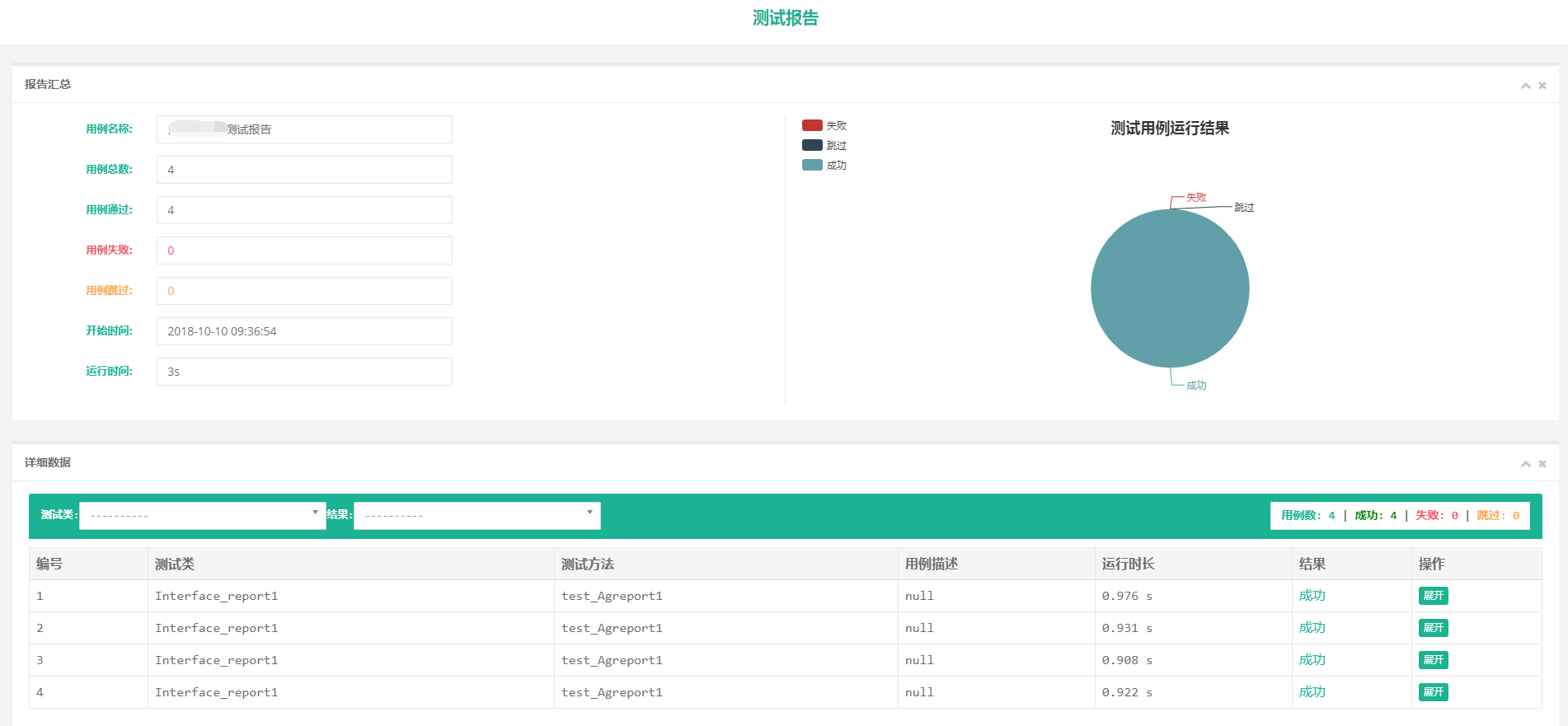
最后运行就可以了,生成的报告用的beautifulreport。感觉还是比较好看的
unittest同时支持参数化和生成html报告的更多相关文章
- 自动化测试===unittest配套的HTMLTestRunner.py生成html报告源码
更改版: 全部复制,命名为 HTMLTestRunner.py 文件 #使用方法参见之前的文档:自动化测试===unittest和requests接口测试案例,测试快递查询api(二) " ...
- pytest 学习笔记二:兼容unittest、执行方式、生成报告
1.官方文档上说pytest兼容unittest时,不支持setUpModule 和 tearDownModule,但实际验证是可以的. 验证的场景是py文件中,只有一个测试类, 经验证有多个测试类, ...
- python+requests+excel+unittest+ddt接口自动化数据驱动并生成html报告
1.环境准备: python3.6 requests xlrd openpyxl HTMLTestRunner_api 2.目前实现的功能: 封装requests请求方法 在excel填写接口请求参数 ...
- python+requests+excel+unittest+ddt接口自动化数据驱动并生成html报告(二)
可以参考 python+requests接口自动化完整项目设计源码(一)https://www.cnblogs.com/111testing/p/9612671.html 原文地址https://ww ...
- python+requests+excel+unittest+ddt接口自动化数据驱动并生成html报告(已弃用)
前言 1.环境准备: python3.6 requests xlrd openpyxl HTMLTestRunner_api 2.目前实现的功能: 封装requests请求方法 在excel填写接口请 ...
- unittest 运行slenium(五)---运行代码并生成HTMLTestRunner报告
整体代码如下: import os import sys import time import datetime import unittest import HTMLTestRunner # git ...
- python生成HTMl报告(unittest)
Python3 使用HTMLTestRunner.py 报错ImportError: No module named 'StringIO'处理方法 HTMLTestRunner.py文件是基于Py ...
- 解惑unittest框架中导入HTMLTestRunner模块后正常运行却无法生成HTML报告问题
1.HTMLTestRunner介绍 HTMLTestRunner是一个第三方的unittest HTML报告库,用于python单元测试框架的TestRunner.它是生成一个HTML报告,以一目了 ...
- pytest十六:allure2 生成 html 报告
allure 是一个 report 框架,支持 java 的 Junit/testng 等框架,当然也可以支持 python 的 pytest 框架,也可以集成到 Jenkins 上展示高大上的报告界 ...
随机推荐
- JDK8 Stream操作整理
1,forEach this.quoteItemList.forEach(p -> p.setMode(mode)); 2,获取对话属性,去重后生成集合 List<String> p ...
- yum 运行失败
https://stackoverflow.com/questions/47633870/rpm-lib64-liblzma-so-5-version-xz-5-1-2alpha-not-found- ...
- .net 操作web.config文件
XmlDocument doc = new XmlDocument(); string wc = HttpContext.Request.PhysicalApplicationPath + @&quo ...
- Unity3D判断当前所在平台
Unity3D是一个跨平台的开发工具,支持的平台五花八门,常常开发一款游戏要发布到不同的平台,在不同的平台上会使用不同的代码,难道要我们各平台分别使用一套代码,单独编译一次吗?当然不用了,呵呵. ...
- 关于C++ return * this
转自 :https://blog.csdn.net/u011846436/article/details/45222905 不废话,直接上例子,使用赋值构造函数解释为什么需要 return *this ...
- POSIX
API: POSIX (编译前的源代码) ABI: APPLICATION BINARY INTERFACE (编译后的二进制文件,linux & windows不兼容) ---------- ...
- [转载]Oracle用户创建及权限设置
出处:https://www.cnblogs.com/buxingzhelyd/p/7865194.html 权限: create session 允许用户登录数据库权限 create table ...
- Referer图片防盗链
前几天讲了<nginx下载防盗链>,今天继续说下图片防盗链. 他们两个使用的指令不同,前者使用secure link,并且需要程序配合,但是效果非常好;后者不需要程序配合,根据图片来源来实 ...
- DUILIB UI创建过程
函数调用过程: CDialogBuilder 内部过程循环创建控件树 上图中 在AttachDialog中设置窗口的主控件 并设置控件树的pm
- WEUI滚动加载
var row = 6, page = 1; var loading = false; //状态标记 $(document.body).infinite().on("infinite&quo ...