
通过EntityFramework操作sqlite(DbFirst)
记录一下通过 EntityFramework6 来操作sqlite过程
环境:
- visual studio 2017
- .net 4.5
- Console Application(项目类型)
- sqlite3
- navicat for sqlite
设计数据库
我使用了 navicat for sqlite 这个图形界面工具来快速生成数据库的;
非常简单,打开 navicat ,按照下图操作即可

新建表:
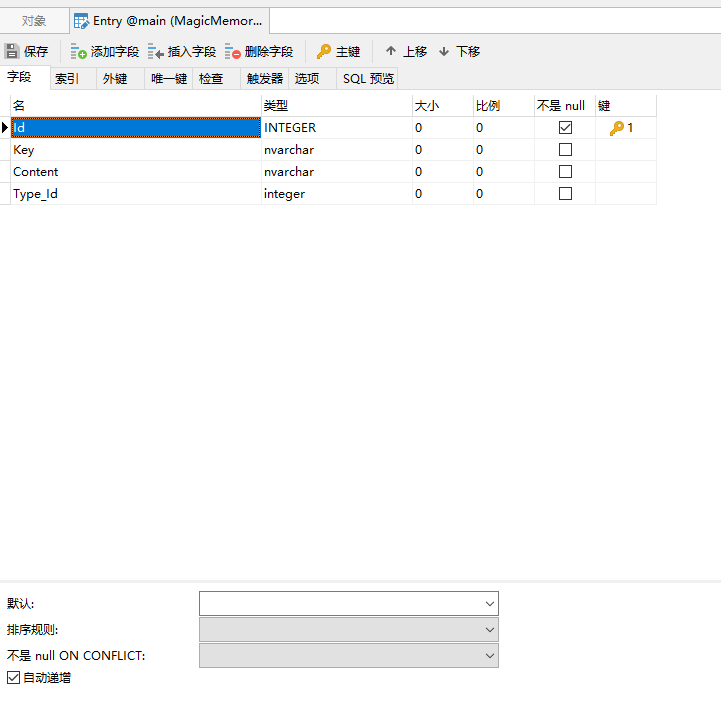
Entry表(Id为主键,勾选自增),Type_Id为外键.
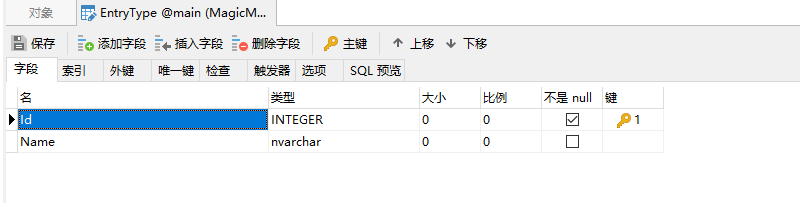
EntryType表(Id为主键,勾选自增)
完事之后点击左上角的保存!
在visual studio中建立控制台项目,安装必要的nuget包
打开nuget包管理工具,
在Browse选项卡中搜索 System.Data.SQLite
安装相应的nuget包,如图所示

之后在nuget包管理工具中查看已安装的nuget包
如下图:

然后在解决方案浏览器下可以看到App.config文件,
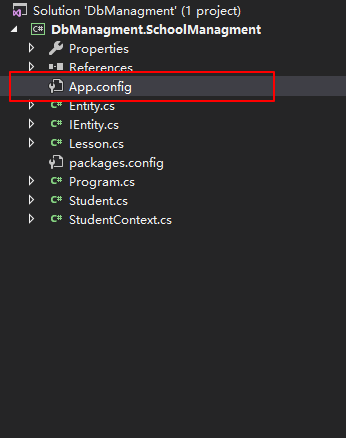
进去修改一下内容,在 provider 节点下加入下面的内容:
<provider invariantName="System.Data.SQLite" type="System.Data.SQLite.EF6.SQLiteProviderServices, System.Data.SQLite.EF6" />

建立 Entity 实体类
Entry 类 :
Entry
namespace MagicMemory.Core.Entities

{

    public class Entry

    {

        public int Id { get; set; }

        public string Key { get; set; }

        public string Content { get; set; }

        public int? EntryTypeId { get; set; }

        public virtual EntryType Type { get; set; }

    }

}
这里值得注意的是,Entry实体中有一个外键属性:
public virtual EntryType Type { get; set; }
一定要用virtual来修饰,这里不清楚为啥,我也是偶然看见的,不用virual就没用,可能因为是Dbfirst的原因,之前在.net core结合efcore使用的时候并不需要加virtual也行.这里的外键属性,Ef 会自动从数据库里相应的表中给我们映射过来.但是这个外键所在表也必须在 DbContext中作为DbSet<>的泛型参数存在才可以.
EntryType 类:
EntryType
using System;

namespace MagicMemory.Core.Entities


{


public class EntryType


{


public int Id { get; set; }


public string Name { get; set; }


}


}
实体类就这两个,差不多可以说明问题了,建立实体类的时候,实体类的属性名一定要和表的字段名相匹配(必须一样才行),名称不一样的话,则需要在属性的上方加一个注解属性
Column("Name").也可以使用fluentApi来进行配置,我跟喜欢这种方式,在DbContext中重写OnModelCreating()方法,对 column 进行配置.
当实体类型的属性名需要和不同名称的的表中的列进行映射时,可以使用下面的方法.
protected override void OnModelCreating(ModelBuilder modelBuilder)

    {

        modelBuilder.Entity<Blog>()

            .Property(b => b.BlogId)

            .HasColumnName("blog_id");

    }
继承DbContext,建立数据库上下文 xxxContext 类
EntryContext
using System.Data.Entity;

using System.Data.SQLite;

using MagicMemory.Core.Entities;

using SQLite.CodeFirst;

namespace MagicMemory.DbStudy


{


public class EntryContext:DbContext


{


public EntryContext():base(new SQLiteConnection("Data Source=MagicMemory.Db"),true)


{


}
    protected override void OnModelCreating(DbModelBuilder builder)

    {

        builder.Entity<Entry>().ToTable("Entry");

        builder.Entity<Entry>()

            .Property(e => e.EntryTypeId)

            .HasColumnName("EntryTypeId");

        builder.Entity<EntryType>().ToTable("EntryType");

        builder.Entity<EntryTag>().ToTable("EntryTagTable");

        builder.Entity<EntryTag>()

            .Property(t => t.Name)

            .HasColumnName("TagName");

        base.OnModelCreating(builder);

        Database.SetInitializer(new SqliteDropCreateDatabaseWhenModelChanges<EntryContext>(builder));

    }

    public DbSet<Entry> Entry { get; set; }

    public DbSet<EntryType> EntryType { get; set; }

    public DbSet<EntryTag> EntryTag { get; set; }

}


}
这里比较重要的是重写了 OnModelCreating() 方法,这个方法里面通过 fluent api的方式定义了实体类的属性和具体的数据库的字段的映射的关系;同时,在默认的构造函数里面,调用基类的构造函数,因为使用sqlite这个数据库,所以将继承了DbConnection的实例: new SQLiteConnection("[连接字符串]") 传递给基类的构造函数,用来连接数据库.
</div>通过EntityFramework操作sqlite(DbFirst)的更多相关文章
- 使用entityframework操作sqlite数据库
首先要安装好,所需要的类库,通过NuGet来处理 http://stackoverflow.com/questions/28507904/vs-2015-sqlite-data-provider 安装 ...
- EF操作sqlite数据库时的项目兼容性问题
问题:vs2015打不开vs2010建的操作sqlite的实体数据模型edmx文件 原因: 当前电脑必须先安装:驱动库及sqlite的vs拓展 正常情况下安装驱动和拓展后,vs2015就应该可以正常打 ...
- 【UWP】利用EF Core操作SQLite
在以往开发中,一定要在vs中安装SQLite for Universal App Platform以及一款wrapper,如SQLitePCL.现在有了EntitfyFramewrok Core,我们 ...
- Java操作Sqlite数据库-jdbc连接
Java操作Sqlite数据库步骤: 1. 导入Sqlite jdbc 本文使用sqlite-jdbc-3.7.2.jar,下载地址 http://pan.baidu.com/s/1kVHAGdD 2 ...
- C#操作SQLite数据库
SQLite介绍 SQLite is a software library that implements a self-contained, serverless, zero-configurati ...
- 无废话Android之android下junit测试框架配置、保存文件到手机内存、android下文件访问的权限、保存文件到SD卡、获取SD卡大小、使用SharedPreferences进行数据存储、使用Pull解析器操作XML文件、android下操作sqlite数据库和事务(2)
1.android下junit测试框架配置 单元测试需要在手机中进行安装测试 (1).在清单文件中manifest节点下配置如下节点 <instrumentation android:name= ...
- 操作SQLite的dbhelper
操作SQLite的dbhelper public class DbHelper { string connStr = @"Data Source=" + System.Enviro ...
- python操作sqlite数据库
root@cacti:~/box# cat convert.py #!/usr/bin/env python import sqlite3,time,rrdtool,os def boxstatus( ...
- .NET中操作SQLite
C#操作SQLite Database C#下SQLite操作驱动dll下载:System.Data.SQLite C#使用SQLite步骤: (1)新建一个project (2)添加SQLite操作 ...
随机推荐
- 最全面!2019年最新UX设计趋势预测合集
以下内容由Mockplus团队翻译整理,仅供学习交流,Mockplus是更快更简单的原型设计工具. 追逐潮流是每个行业都必做的一件事,对于直接影响数字产品定位和用户感知方式的UX设计也是如此. 不论你 ...
- 显式提交/隐式提交 //ajax方式的隐式提交
//创建jqueryAjax.html文件 <!DOCTYPE html><html><head><meta charset="UTF-8" ...
- Spring Boot学习笔记:项目开发中规范总结
Spring Boot在企业开发中使用的很广泛,不同的企业有不同的开发规范和标准.但是有些标准都是一致的. 项目包结构 以下是一个项目常见的包结构 以上是一个项目的基本目录结构,不同的项目结构会有差异 ...
- python之web开发“三剑客”
# django import django # flask import flask # tornado import tornado
- php-fpm安装、配置与优化
转载自:https://www.zybuluo.com/phper/note/89081 1.php中fastcgi和php-fpm是什么东西 最近在研究和学习PHP的性能方面的知识,看到了factc ...
- Codeforces Round #538 (Div. 2) C 数论 + 求b进制后缀零
https://codeforces.com/contest/1114/problem/C 题意 给你一个数n(<=1e8),要你求出n!在b进制下的后缀零个数(b<=1e12) 题解 a ...
- 百度api接口_知识积累
app_id, app_key, app_secret app_id 是用来标记你的开发者账号的, 是你的用户id, 这个id 在数据库添加检索, 方便快速查找 app_key 和 app_secre ...
- 访问前台页面${pageContext.request.contextPath}/el表达式失效问题解决
访问前台页面${pageContext.request.contextPath}/el表达式失效问题解决 2017年05月09日 10:54:18 AinUser 阅读数:922 标签: el表达式4 ...
- MFC载入JPG图片
## 1.定义画图函数 HRESULT CIPCamDlg::draw(char *lpImageFile, HWND hWnd, int nScrWidth, int nScrHeight) { H ...
- leaflet入门(二)GeoJson
GeoJson格式数据的形式 Using GeoJSON with Leaflet GeoJSON is becoming a very popular data format among many ...