
Python 日志模块详解
前言
我们知道查看日志是开发人员日常获取信息、排查异常、发现问题的最好途径,日志记录中通常会标记有异常产生的原因、发生时间、具体错误行数等信息,这极大的节省了我们的排查时间,无形中提高了编码效率。所以在程序里边加入日志模块很有必要。
日志分类
我们可以按照输出终端进行分类,也可以按照日志级别进行分类。输出终端指的是将日志在控制台输出显示和将日志存入文件;日志级别指的是 Debug、Info、WARNING、ERROR以及CRITICAL等严重等级进行划分。
Python 的 logging
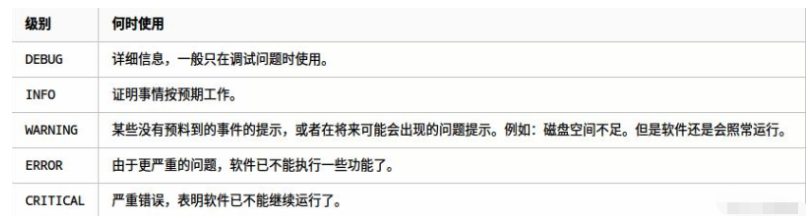
logging提供了一组便利的日志函数,它们分别是:debug()、 info()、 warning()、 error() 和 critical()。logging函数根据它们用来跟踪的事件的级别或严重程度来命名。标准级别及其适用性描述如下(以严重程度递增排序):
日志输出
输出到控制台
使用 logging 在控制台打印日志,这里我们用 Pycharm 编辑器来观察:
保存为.txt文件
依旧是强大的 basicConfig
logging.basicConfig(level=logging.DEBUG, filename='coder.log', filemode='a') # 配置中填写 filename (指定文件名) 和 filemode (文件写入方式)
Logging的四大组件的简单的介绍
在实际的工作或应用中,我们或许还需要指定文件存放路径、用随机数作为日志文件名、显示具体的信息输出代码行数、日志信息输出日期和日志写入方式等内容。再构思一下:
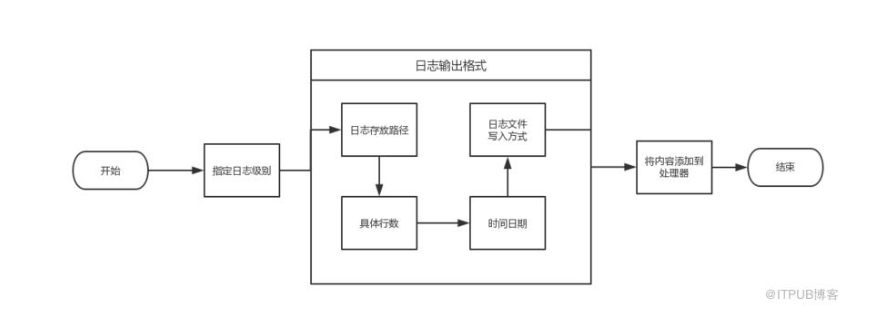
具体代码:
import os
import logging
import uuid
from logging import Handler, FileHandler, StreamHandler
class PathFileHandler(FileHandler):
def __init__(self, path, filename, mode='a', encoding=None, delay=False):
filename = os.fspath(filename)
if not os.path.exists(path):
os.mkdir(path)
self.baseFilename = os.path.join(path, filename)
self.mode = mode
self.encoding = encoding
self.delay = delay
if delay:
Handler.__init__(self)
self.stream = None
else:
StreamHandler.__init__(self, self._open())
class Loggers(object):
# 日志级别关系映射
level_relations = {
'debug': logging.DEBUG, 'info': logging.INFO, 'warning': logging.WARNING,
'error': logging.ERROR, 'critical': logging.CRITICAL
}
def __init__(self, filename='{uid}.log'.format(uid=uuid.uuid4()), level='info', log_dir='log',
fmt='%(asctime)s - %(filename)s[line:%(lineno)d] - %(levelname)s: %(message)s'):
self.logger = logging.getLogger(filename)
abspath = os.path.dirname(os.path.abspath(__file__))
self.directory = os.path.join(abspath, log_dir)
format_str = logging.Formatter(fmt) # 设置日志格式
self.logger.setLevel(self.level_relations.get(level)) # 设置日志级别
stream_handler = logging.StreamHandler() # 往屏幕上输出
stream_handler.setFormatter(format_str)
file_handler = PathFileHandler(path=self.directory, filename=filename, mode='a')
file_handler.setFormatter(format_str)
self.logger.addHandler(stream_handler)
self.logger.addHandler(file_handler)
if __name__ == "__main__":
txt = "谢谢关注玩转机器学习的博客园"
log = Loggers(level='debug')
log.logger.info(4)
log.logger.info(5)
log.logger.info(txt)
参考链接:http://blog.itpub.net/31557738/viewspace-2220741/
Python 日志模块详解的更多相关文章
- python time模块详解
python time模块详解 转自:http://blog.csdn.net/kiki113/article/details/4033017 python 的内嵌time模板翻译及说明 一.简介 ...
- python docopt模块详解
python docopt模块详解 docopt 本质上是在 Python 中引入了一种针对命令行参数的形式语言,在代码的最开头使用 """ ""&q ...
- (转)python collections模块详解
python collections模块详解 原文:http://www.cnblogs.com/dahu-daqing/p/7040490.html 1.模块简介 collections包含了一些特 ...
- python pathlib模块详解
python pathlib模块详解
- Python Fabric模块详解
Python Fabric模块详解 什么是Fabric? 简单介绍一下: Fabric是一个Python的库和命令行工具,用来提高基于SSH的应用部署和系统管理效率. 再具体点介绍一下,Fabri ...
- python time 模块详解
Python中time模块详解 发表于2011年5月5日 12:58 a.m. 位于分类我爱Python 在平常的代码中,我们常常需要与时间打交道.在Python中,与时间处理有关的模块就包括: ...
- python常用模块详解
python常用模块详解 什么是模块? 常见的场景:一个模块就是一个包含了python定义和声明的文件,文件名就是模块名字加上.py的后缀. 但其实import加载的模块分为四个通用类别: 1 使用p ...
- python os模块详解
一.Python os模块(Linux环境) 1.1 执行shell命令 os.system('cmd') 执行命令不保存结果 os.popen('command') 执行后返回结果,使用.read( ...
- Python ZipFile模块详解(转)
Python zipfile模块用来做zip格式编码的压缩和解压缩的,zipfile里有两个非常重要的class, 分别是ZipFile和ZipInfo, 在绝大多数的情况下,我们只需要使用这两个cl ...
随机推荐
- tensorflow文本分类实战——卷积神经网络CNN
首先说明使用的工具和环境:python3.6.8 tensorflow1.14.0 centos7.0(最好用Ubuntu) 关于环境的搭建只做简单说明,我这边是使用pip搭建了python的 ...
- VMware 设置共享文件夹
1. 打开: 虚拟机 -> 设置 -> 选项 2. 选择 “总是启用” ,然后点 “添加” 选择你要共享的本地文件夹,最后点确定. 3. Linux下在 /mnt/hgfs 文件夹下就可以 ...
- eslint检测规则中,括弧和函数名之间去掉空格的配置
在.eslintrc.js中配置: // add your custom rules here rules: { // no space before function name "spac ...
- Java中小数精度问题
代码如下:主要是利用java中写好的DecimalFormat类进行设置(#,0,%) import java.text.DecimalFormat; import java.util.Arrays; ...
- Spring Boot整合Mybatis(注解方式和XML方式)
其实对我个人而言还是不够熟悉JPA.hibernate,所以觉得这两种框架使用起来好麻烦啊. 一直用的Mybatis作为持久层框架, JPA(Hibernate)主张所有的SQL都用Java代码生成, ...
- 如何使用gcc_clang进行C语言的编译_编译的流程是什么?
编译命令 gcc/clang -g -O2 -o -c test test.c -I... -L... -l -g : 输出文件中的调试信息 -O : 对输出文件做出指令优化,默认是O1, O2优化更 ...
- Mini_Linux需要搭的环境
1.bash:ifconfig:command not found sudo yum install -y net-tools 2.如果Linux系统是通过复制得到 需要更改hostname vi ...
- C. Book Reading 求在[1,n]中的数中,能整除m的数 的个位的和
C. Book Reading time limit per test 1 second memory limit per test 256 megabytes input standard inpu ...
- Windows Server 2008 R2 SP1 中IIS7.5 和 TOMCAT7 整合笔记
Windows Server 2008 R2 SP1 中IIS7.5 和 TOMCAT7 整合笔记 来源:www.roak.com 整合文件在百度网盘或博客盘 配置了N次,64位操作系统真坑爹~~~下 ...
- ch4 圆角框
固定宽度的圆角框 只需要两个图像:一个应用于框的顶部,一个应用于底部 <div class="box"> <h2>Lorem Ipsum</h2> ...