
10分钟进阶SpringBoot - 05. 数据访问之JDBC(附加源码分析+代码下载)
- 代码下载:https://github.com/Jackson0714/study-spring-boot.git
- 05. 深入浅出 Spring Boot - 数据访问之JDBC(源码分析+代码下载)
- 06. 深入浅出 Spring Boot - 数据访问之Druid(附代码下载)
一、JDBC是什么?
JDBC API 属于Java APIJDBC用于以下几种功能:连接到数据库、执行SQL语句
二、Spring Boot中如何使用JDBC
2.1 创建 Spring Boot Project 时引入 JDBC API 依赖和 MySQL Driver依赖,以及Spring Web依赖(测试时用到)
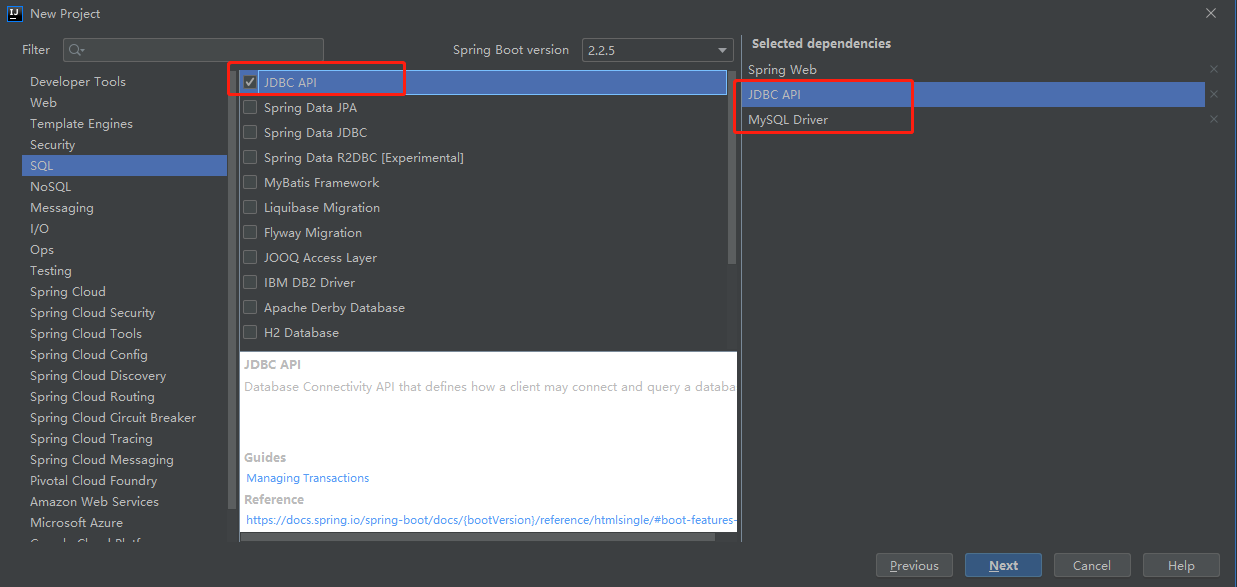
可以在POM中找到引入的JDBC依赖和mysql依赖:
JDBC 依赖:
<dependency>

  <groupId>org.springframework.boot</groupId>

  <artifactId>spring-boot-starter-jdbc</artifactId>

</dependency>
MySql 驱动依赖:
<dependency>

  <groupId>mysql</groupId>

  <artifactId>mysql-connector-java</artifactId>

  <scope>runtime</scope>

</dependency>
2.2 配置数据库连接
新增配置文件:src/main/resources/application.yml
spring:

  datasource:

    username: root

    password: root

    url: jdbc:mysql://localhost:3306/study-spring-boot?serverTimezone=UTC&useUnicode=true&zeroDateTimeBehavior=convertToNull&autoReconnect=true&characterEncoding=utf-8

    driverClassName: com.mysql.cj.jdbc.Driver
注意:com.mysq.jdbc.Driver 被废弃了,需要使用com.mysql.cj.jdbc.Driver
2.3 查看使用的数据源和数据库连接
package com.jackson0714.springboot;

import org.junit.jupiter.api.Test;

import org.springframework.beans.factory.annotation.Autowired;

import org.springframework.boot.test.context.SpringBootTest;

import javax.sql.DataSource;

import java.sql.Connection;

import java.sql.SQLException;

@SpringBootTest

class Springboot05DataJdbcApplicationTests {

	@Autowired

	DataSource dataSource; //自动配置数据源,使用yml配置

	@Test

	void contextLoads() throws SQLException {

		System.out.println("数据源:" + dataSource.getClass());

		Connection connection = dataSource.getConnection();

		System.out.println("数据库连接:" + connection);

		connection.close();

	}

}
默认数据源:class com.zaxxer.hikari.HikariDataSource
数据库连接:HikariProxyConnection@1335157064 wrapping com.mysql.cj.jdbc.ConnectionImpl@7ff8a9dc

三、自动配置原理
自动配置文件路径:org.springframework.boot.autoconfigure.jdbc
DataSourceConfiguration用来自动导入数据源(根据各种判断)
/**

	 * Tomcat Pool DataSource configuration.

	 */

	@Configuration(proxyBeanMethods = false)

	@ConditionalOnClass(org.apache.tomcat.jdbc.pool.DataSource.class)

	@ConditionalOnMissingBean(DataSource.class)

	@ConditionalOnProperty(name = "spring.datasource.type", havingValue = "org.apache.tomcat.jdbc.pool.DataSource",

			matchIfMissing = true)

	static class Tomcat {

		@Bean

		@ConfigurationProperties(prefix = "spring.datasource.tomcat")
3.1 自动选择数据源
如果导入了org.apache.tomcat.jdbc.pool.DataSource数据源,并且配置的spring.datasource.type配置的是org.apache.tomcat.jdbc.pool.DataSource,或没配置type也使用tomcat数据源
3.2 HikariDataSource数据源也类似这样判断。
3.3 默认使用tomcat数据源
3.4 默认支持以下数据源
org.apache.tomcat.jdbc.pool、HikariDataSource、org.apache.commons.dbcp2
3.5 支持自定义数据源
使用DataSourceBuilder创建数据源,利用反射创建响应type的数据源,并且绑定相关属性
	/**

	 * Generic DataSource configuration.

	 */

	@Configuration(proxyBeanMethods = false)

	@ConditionalOnMissingBean(DataSource.class)

	@ConditionalOnProperty(name = "spring.datasource.type")

	static class Generic {

		@Bean

		DataSource dataSource(DataSourceProperties properties) {

          //使用DataSourceBuilder创建数据源,利用反射创建响应type的数据源,并且绑定相关属性

			return properties.initializeDataSourceBuilder().build();

		}

	}
3.6 DataSourceInitializerInvoker 运行脚本
/**

 * Bean to handle {@link DataSource} initialization by running {@literal schema-*.sql} on

 * {@link InitializingBean#afterPropertiesSet()} and {@literal data-*.sql} SQL scripts on

 * a {@link DataSourceSchemaCreatedEvent}.

 *

 * @author Stephane Nicoll

 * @see DataSourceAutoConfiguration

 */

class DataSourceInitializerInvoker implements ApplicationListener<DataSourceSchemaCreatedEvent>, InitializingBean {
createSchema() 创建表 (文件名规则 schema-*.sql)

initSchema() 执行数据脚本 (文件名规则 data-*.sql)
getScripts() 来获取需要执行的脚本
private List<Resource> getScripts(String propertyName, List<String> resources, String fallback) {

  if (resources != null) {

    return getResources(propertyName, resources, true);

  }

  String platform = this.properties.getPlatform();

  List<String> fallbackResources = new ArrayList<>();

  fallbackResources.add("classpath*:" + fallback + "-" + platform + ".sql");

  fallbackResources.add("classpath*:" + fallback + ".sql");

  return getResources(propertyName, fallbackResources, false);

}
fallback= "schema",platform="all",会自动执行根目录下:schema-all.sql 或schema.sql 文件fallback= "data",platform="all",会自动执行根目录下:data-all.sql 或data.sql 文件
isEnabled() 方法判断是否开启了自动执行脚本
有三种模式:NEVER,EMBEDDED(默认),Always
疑问:用EMBEDDED模式返回false,开关关闭,不执行脚本,这是为啥呢?
用Always模式则每次启动spring boot重复执行脚本(创建表脚本都是先判断有没有表,有则删除后重建)
private boolean isEnabled() {

  DataSourceInitializationMode mode = this.properties.getInitializationMode();

  if (mode == DataSourceInitializationMode.NEVER) {

    return false;

  }

  if (mode == DataSourceInitializationMode.EMBEDDED && !isEmbedded()) {

    return false;

  }

  return true;

}
3.7 通过配置文件指定需要执行脚本
schema:

  - classpath:department.sql
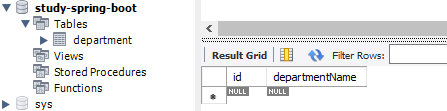
创建出的 department 表
四、JdbcTemplate
JdbcTemplateAutoConfiguration.java 文件 自动注入了JdbcTemplate。(JdbcTemplate用来操作数据库)
@Configuration(proxyBeanMethods = false)

@ConditionalOnClass({ DataSource.class, JdbcTemplate.class })

@ConditionalOnSingleCandidate(DataSource.class)

@AutoConfigureAfter(DataSourceAutoConfiguration.class)

@EnableConfigurationProperties(JdbcProperties.class)

@Import({ JdbcTemplateConfiguration.class, NamedParameterJdbcTemplateConfiguration.class })

public class JdbcTemplateAutoConfiguration {

}
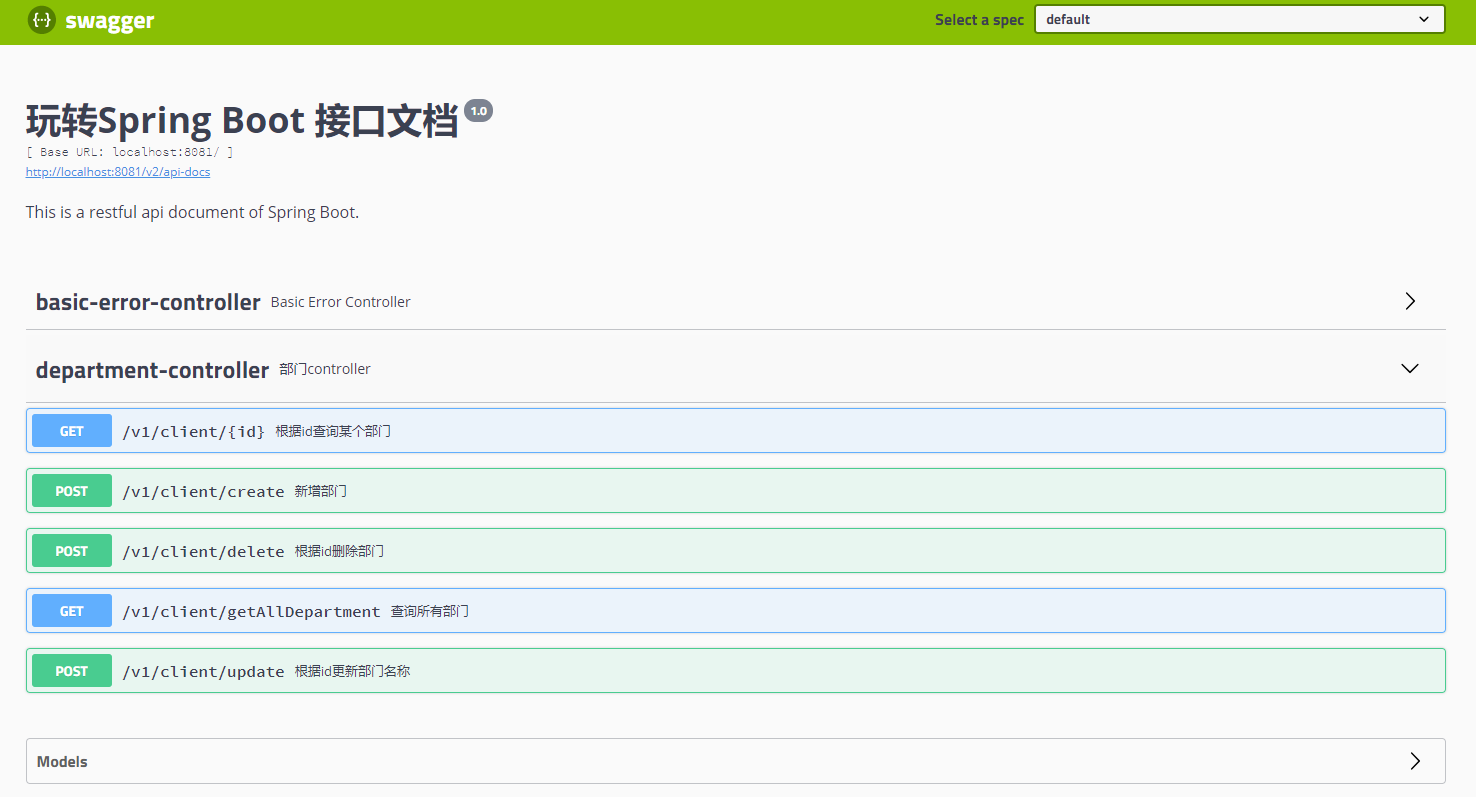
我们用Swagger的方式来测试
五、配置Swagger用来测试
5.1 pom.xml文件 添加swagger依赖
<!-- swagger -->

<dependency>

  <groupId>io.springfox</groupId>

  <artifactId>springfox-swagger2</artifactId>

  <version>2.9.2</version>

</dependency>

<dependency>

  <groupId>io.springfox</groupId>

  <artifactId>springfox-swagger-ui</artifactId>

  <version>2.9.2</version>

</dependency>
5.2 添加SwaggerConfig.java文件
package com.jackson0714.springboot.config;

import org.springframework.context.annotation.Bean;

import org.springframework.context.annotation.Configuration;

import springfox.documentation.builders.ApiInfoBuilder;

import springfox.documentation.builders.PathSelectors;

import springfox.documentation.builders.RequestHandlerSelectors;

import springfox.documentation.service.ApiInfo;

import springfox.documentation.spi.DocumentationType;

import springfox.documentation.spring.web.plugins.Docket;

import springfox.documentation.swagger2.annotations.EnableSwagger2;

@Configuration

@EnableSwagger2

public class SwaggerConfig {

    @Bean

    public Docket createRestApi(){

        return new Docket(DocumentationType.SWAGGER_2).apiInfo(apiInfo())

                .select()

                .apis(RequestHandlerSelectors.any())

                .paths(PathSelectors.any()).build();

    }

    private ApiInfo apiInfo(){

        return new ApiInfoBuilder()

                .title("玩转Spring Boot 接口文档")

                .description("This is a restful api document of Spring Boot.")

                .version("1.0")

                .build();

    }

}
5.3 访问Swagger文档
http://localhost:8081/swagger-ui.html
六、测试
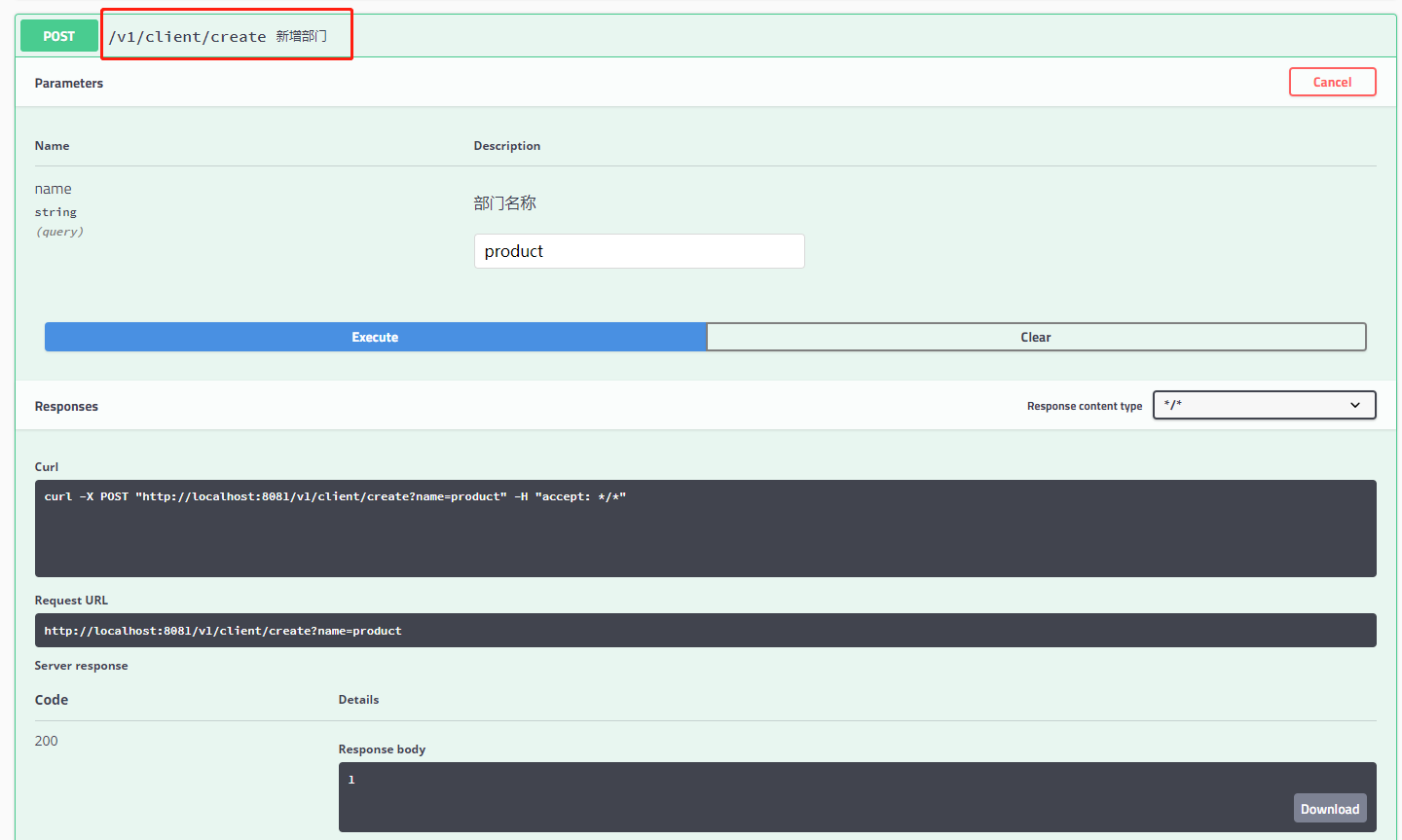
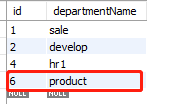
6.1 新增部门
@ApiOperation(value = "1.新增部门")

@ApiImplicitParams({

  @ApiImplicitParam(name = "name", value = "部门名称")

})

@PostMapping("/create")

public int createDepartment(@RequestParam String name) {

  String sql = String.format("insert into department(departmentName) value('%s')", name);

  int result = jdbcTemplate.update(sql);

  return result;

}
表记录
6.2 查询所有部门
@ApiOperation(value = "2.查询所有部门")

@GetMapping("/getAllDepartment")

public List<Map<String, Object>> getAllDepartment() {

  List<Map<String, Object>> list = jdbcTemplate.queryForList("select * from department");

  return list;

}

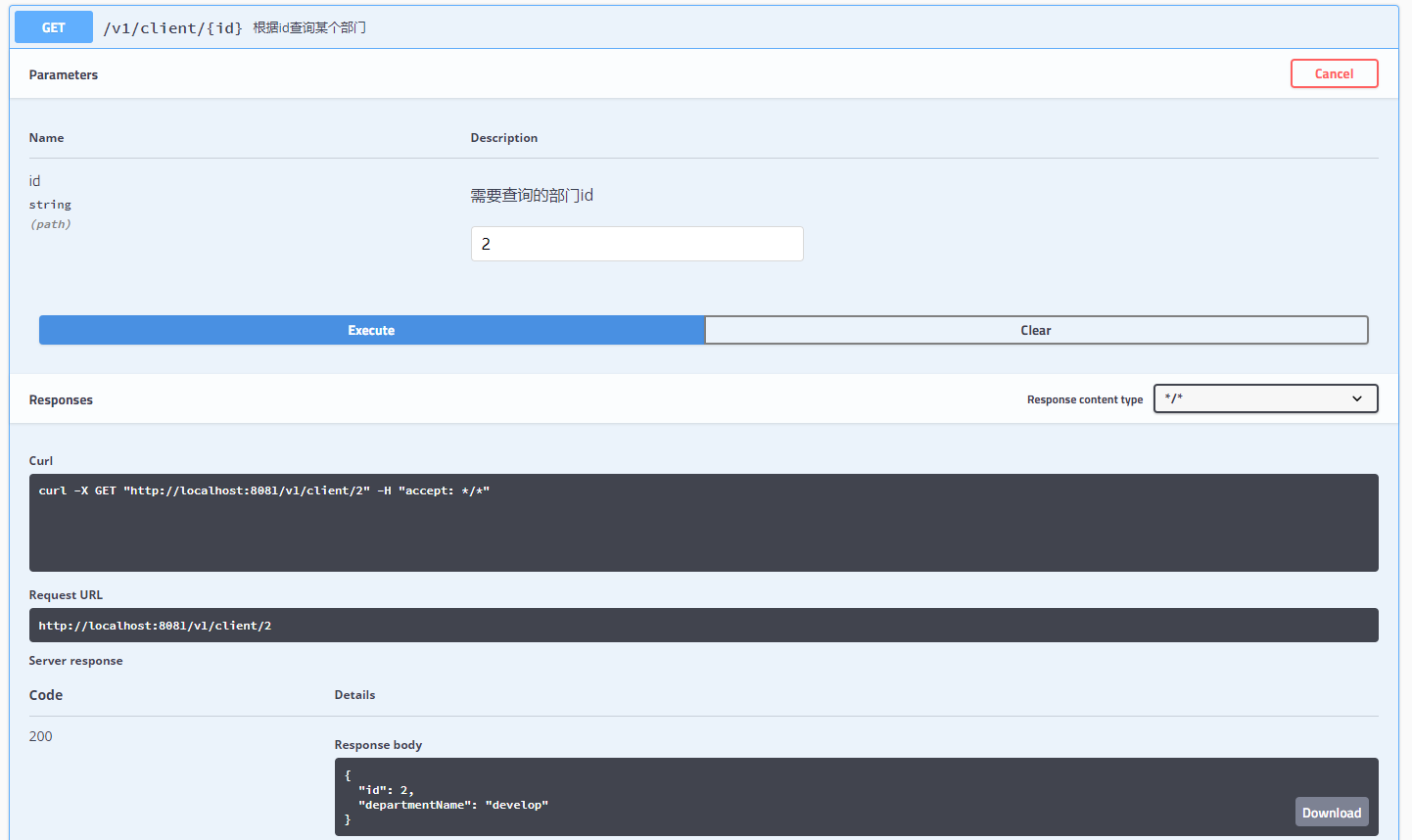
6.3 根据id查询某个部门
@ApiOperation(value = "3.根据id查询某个部门")

@ApiImplicitParams({

  @ApiImplicitParam(name = "id", value = "需要查询的部门id")

})

@GetMapping("/{id}")

public Map<String, Object> getDepartmentById(@PathVariable Long id) {

  String sql = "select * from department where id = " + id;

  List<Map<String, Object>> list = jdbcTemplate.queryForList(sql);

  return list.get(0);

}
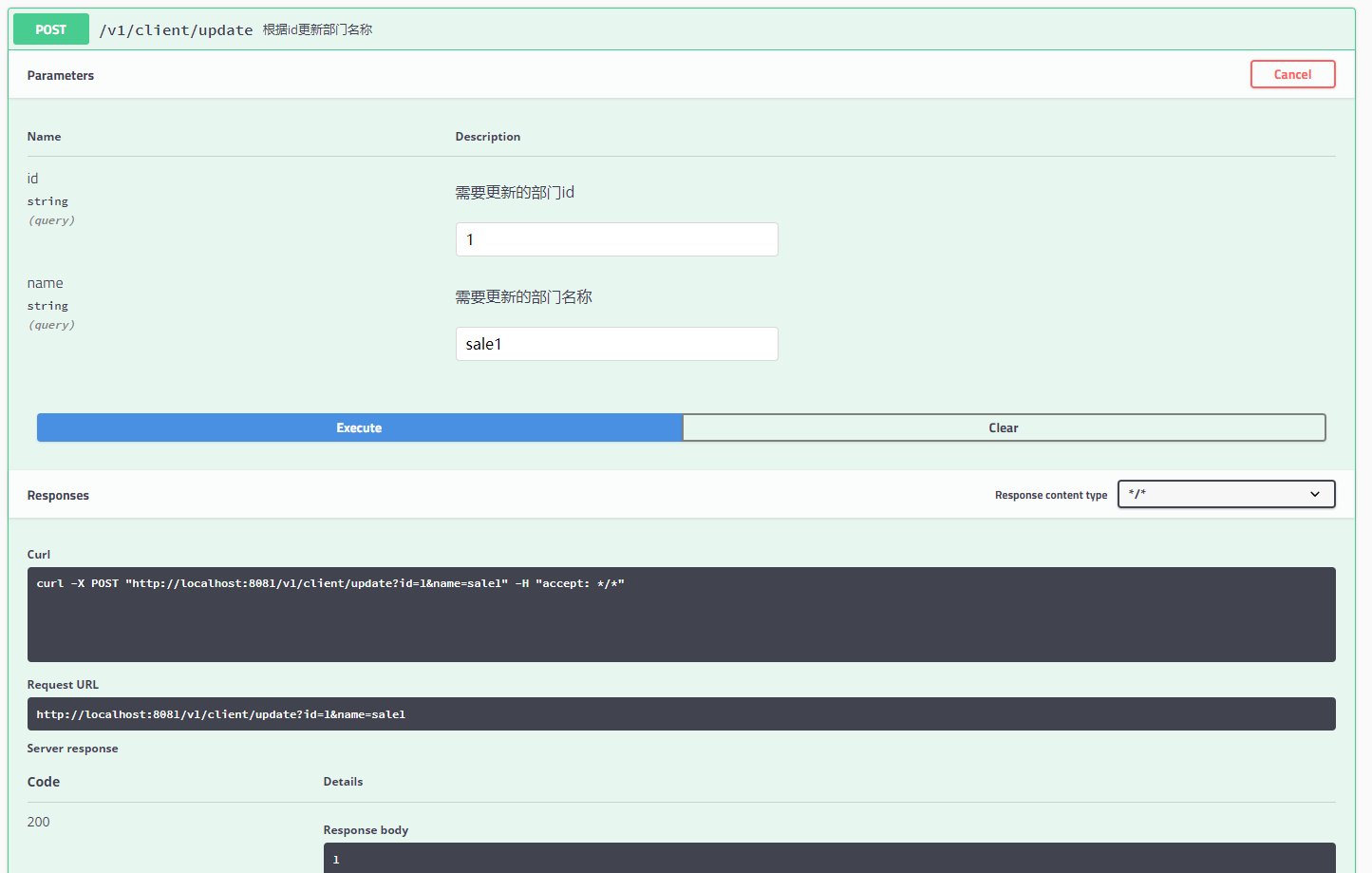
6.4 根据id更新部门名称
@ApiOperation(value = "根据id更新部门名称")

@ApiImplicitParams({

  @ApiImplicitParam(name = "id", value = "需要更新的部门id"),

  @ApiImplicitParam(name = "name", value = "需要更新的部门名称")

})

@PostMapping("/update")

public int updateDepartmentById(@RequestParam Long id, @RequestParam String name) {

  String sql = String.format("update department set departmentName = '%s' where id = %d", name, id);

  int result = jdbcTemplate.update(sql);

  return result;

}
6.5 根据id删除部门
@ApiOperation(value = "根据id删除部门")

@ApiImplicitParams({

  @ApiImplicitParam(name = "id", value = "需要删除的部门id")

})

@PostMapping("/delete")

public int deleteDepartment(@RequestParam Long id) {

  String sql = String.format("delete from department where id = %d", id);

  int result = jdbcTemplate.update(sql);

  return result;

}

七、报错和解决方案:
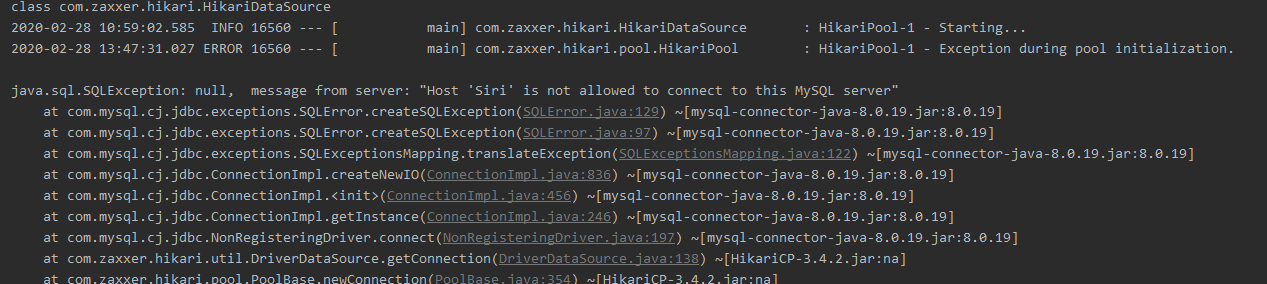
7.1 问题1
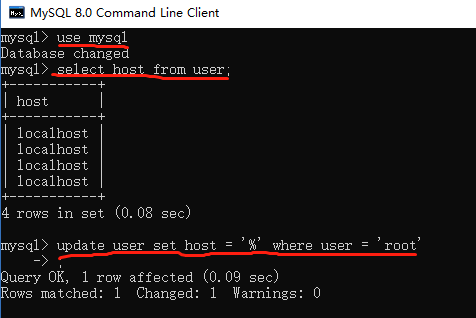
java.sql.SQLException:null, message from server: "Host 'Siri' is not allowed to connect to this MySQL server"
解决方案:
执行命令:
use mysql;

select host from user;

update user set host = '%' where user = 'root'
执行结果:
Query OK, 1 row affected
如下图所示:
7.2 问题2
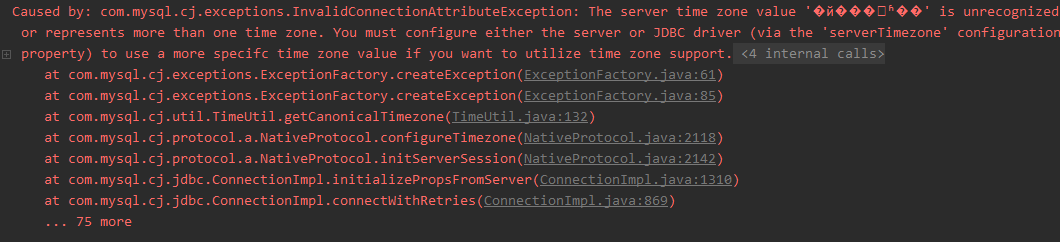
Caused by: com.mysql.cj.exceptions.InvalidConnectionAttributeException: The server time zone value '�й���ʱ��' is unrecognized or represents more than one time zone. You must configure either the server or JDBC driver (via the 'serverTimezone' configuration property) to use a more specifc time zone value if you want to utilize time zone support.
解决方案:
配置spring.datasource.url 时,增加参数:serverTimezone=UTC

关注公众号:悟空聊架构,回复pmp,领取pmp资料!回复悟空,领取架构师资料!

悟空聊架构
关注我,带你每天进步一点点!
10分钟进阶SpringBoot - 05. 数据访问之JDBC(附加源码分析+代码下载)的更多相关文章
- 20、Springboot 与数据访问(JDBC/自动配置)
简介: 对于数据访问层,无论是SQL还是NOSQL,Spring Boot默认采用整合 Spring Data的方式进行统一处理,添加大量自动配置,屏蔽了很多设置.引入 各种xxxTemplate,x ...
- springboot与数据访问之jdbc
官网的starthttps://docs.spring.io/spring-boot/docs/current/reference/htmlsingle/#using-boot-starter 添加依 ...
- 六、SpringBoot与数据访问
六.SpringBoot与数据访问 1.JDBC spring: datasource: username: root password: 123456 url: jdbc:mysql://192.1 ...
- SpringBoot之数据访问和事务-专题三
SpringBoot之数据访问和事务-专题三 四.数据访问 4.1.springboot整合使用JdbcTemplate 4.1.1 pom文件引入 <parent> <groupI ...
- 65、Spark Streaming:数据接收原理剖析与源码分析
一.数据接收原理 二.源码分析 入口包org.apache.spark.streaming.receiver下ReceiverSupervisorImpl类的onStart()方法 ### overr ...
- java框架之SpringBoot(9)-数据访问及整合MyBatis
简介 对于数据访问层,无论是 SQL 还是 NOSQL,SpringBoot 默认采用整合 SpringData 的方式进行统一处理,添加了大量的自动配置,引入了各种 Template.Reposit ...
- SpringBoot(九) -- SpringBoot与数据访问
一.简介 对于数据访问层,无论是SQL还是NOSQL,Spring Boot默认采用整合Spring Data的方式进行统一处理,添加大量自动配置,屏蔽了很多设置.引入各种xxxTemplate,xx ...
- SpringBoot 之数据访问
1. Spring Boot 与 JDBC 默认使用 org.apache.tomcat.jdbc.pool.DataSource 数据源; // application.yml spring: da ...
- Spring 4 官方文档学习(十)数据访问之JDBC
说明:未修订版,阅读起来极度困难 1.Spring框架JDBC的介绍 Spring JDBC - who does what? 动作 Spring 你 定义连接参数 是 打开连接 是 指定SQ ...
随机推荐
- Linux 使用rpm方式安装最新mysql(5.7)步骤以及常见问题解决
第一步:下载rpm包 mysql官网下载:http://dev.mysql.com/downloads/mysql/ 但如果你的下载网速不好的话也可以点下面的链接下载自己想要的版本 http://mi ...
- 蓝桥杯练习Day 2
问题描述 Fibonacci数列的递推公式为:Fn=Fn-1+Fn-2,其中F1=F2=1. 当n比较大时,Fn也非常大,现在我们想知道,Fn除以10007的余数是多少. 输入格式 输入包含一个整数n ...
- 功能区按钮调用Excel、PowerPoint、Word中的VBA宏:RunMacro
功能区按钮调用Excel.PowerPoint.Word中的VBA宏:RunMacro 众所周知,Excel.PPT.Word文档或加载宏文件中可以写很多过程和函数,调试的过程中当然可以按F8或F5直 ...
- Linux inode的正确理解
一.inode是什么? 理解inode,要从文件储存说起. 文件储存在硬盘上,硬盘的最小存储单位叫做"扇区"(Sector).每个扇区储存512字节(相当于0.5KB). 操作系统 ...
- Navicat for MySQL远程连接报10038的错误
#################################################### """ 1.网络检测 1)ping主机可以: 2)telnet ...
- Bc-数组-Stack
1.栈,堆栈,先进后出 2.栈的几个操作: > 入栈,push > 出栈,pop > 获取栈顶元素,peek > 获取栈中共有元素个数,getSize > 是否为空,is ...
- PCA的原理简述
PCA的实质就是要根据样本向量之间的相关性排序,去掉相关性低的信息,也就是冗余的特征信息. 我们都知道噪声信号与待测量的信号之间实际上是没有相关性的,所以我我们利用这个原理就可以将与待测量无关的噪声信 ...
- [LC] 105. Construct Binary Tree from Preorder and Inorder Traversal
Given preorder and inorder traversal of a tree, construct the binary tree. Note:You may assume that ...
- 59)PHP,管理员表中所存在的项
用户ID 用户名 用户密码 用户权限(就是他的角色等级,比如是1级 2级, 三级等等) 上次登录的IP 上次登录的时间
- docker 不同引擎导致历史垃圾镜像无法自动清除,致硬盘空间报警
查看硬盘占用大户是/var/lib/docker/vfs/dir 直觉是images文件,历史原因累积了大量的image docker rmi 清除掉不用的image文件 可用空间有提升但提升不大 / ...