
RESTful WebService 入门实例
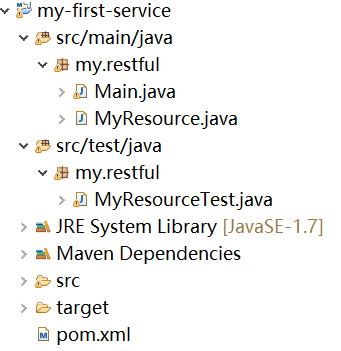
/* 新建MavenProject,使用以下代码,创建类和POM文件。
使用命令行切换到Project根目录,运行mvn package(或者,选中pom.xml 文件右键单击 > run as maven build > 在goals中填入 "clean package") , mvn exec:java 或 对于包含main方法的类my.restful.Main, run as Java application。
,即可启动RESTful service。
在浏览器中输入http://localhost:8080/myapp/myresource/,
此时会显示内容: Got it!
---<<Java RESTful Web Service 实战 >>*/
 package my.restful;

 import org.glassfish.grizzly.http.server.HttpServer;

 import org.glassfish.jersey.grizzly2.httpserver.GrizzlyHttpServerFactory;

 import org.glassfish.jersey.server.ResourceConfig;

 import java.io.IOException;

 import java.net.URI;

 /**

  * Main class.

  *

  */

 public class Main {

     // Base URI the Grizzly HTTP server will listen on

     public static final String BASE_URI = "http://localhost:8080/myapp/";

     /**

      * Starts Grizzly HTTP server exposing JAX-RS resources defined in this application.

      * @return Grizzly HTTP server.

      */

     public static HttpServer startServer() {

         // create a resource config that scans for JAX-RS resources and providers

         // in my.restful package

         final ResourceConfig rc = new ResourceConfig().packages("my.restful");

         // create and start a new instance of grizzly http server

         // exposing the Jersey application at BASE_URI

         return GrizzlyHttpServerFactory.createHttpServer(URI.create(BASE_URI), rc);

     }

     /**

      * Main method.

      * @param args

      * @throws IOException

      */

     public static void main(String[] args) throws IOException {

         final HttpServer server = startServer();

         System.out.println(String.format("Jersey app started with WADL available at "

                 + "%sapplication.wadl\nHit enter to stop it...", BASE_URI));

         System.in.read();

         server.stop();

     }

 }
package my.restful;

import javax.ws.rs.GET;

import javax.ws.rs.Path;

import javax.ws.rs.Produces;

import javax.ws.rs.core.MediaType;

/**

 * Root resource (exposed at "myresource" path)

 */

@Path("myresource")

public class MyResource {

    /**

     * Method handling HTTP GET requests. The returned object will be sent

     * to the client as "text/plain" media type.

     *

     * @return String that will be returned as a text/plain response.

     */

    @GET

    @Produces(MediaType.TEXT_PLAIN)

    public String getIt() {

        return "Got it!";

    }

}
package my.restful;

import javax.ws.rs.client.Client;

import javax.ws.rs.client.ClientBuilder;

import javax.ws.rs.client.WebTarget;

import org.glassfish.grizzly.http.server.HttpServer;

import org.junit.After;

import org.junit.Before;

import org.junit.Test;

import static org.junit.Assert.assertEquals;

public class MyResourceTest {

    private HttpServer server;

    private WebTarget target;

    @Before

    public void setUp() throws Exception {

        // start the server

        server = Main.startServer();

        // create the client

        Client c = ClientBuilder.newClient();

        // uncomment the following line if you want to enable

        // support for JSON in the client (you also have to uncomment

        // dependency on jersey-media-json module in pom.xml and Main.startServer())

        // --

        // c.configuration().enable(new org.glassfish.jersey.media.json.JsonJaxbFeature());

        target = c.target(Main.BASE_URI);

    }

    @After

    public void tearDown() throws Exception {

        server.stop();

    }

    /**

     * Test to see that the message "Got it!" is sent in the response.

     */

    @Test

    public void testGetIt() {

        String responseMsg = target.path("myresource").request().get(String.class);

        assertEquals("Got it!", responseMsg);

    }

}
 <project xmlns="http://maven.apache.org/POM/4.0.0" xmlns:xsi="http://www.w3.org/2001/XMLSchema-instance"

          xsi:schemaLocation="http://maven.apache.org/POM/4.0.0 http://maven.apache.org/maven-v4_0_0.xsd">

     <modelVersion>4.0.0</modelVersion>

     <groupId>my.restful</groupId>

     <artifactId>my-first-service</artifactId>

     <packaging>jar</packaging>

     <version>1.0-SNAPSHOT</version>

     <name>my-first-service</name>

     <dependencyManagement>

         <dependencies>

             <dependency>

                 <groupId>org.glassfish.jersey</groupId>

                 <artifactId>jersey-bom</artifactId>

                 <version>${jersey.version}</version>

                 <type>pom</type>

                 <scope>import</scope>

             </dependency>

         </dependencies>

     </dependencyManagement>

     <dependencies>

         <dependency>

             <groupId>org.glassfish.jersey.containers</groupId>

             <artifactId>jersey-container-grizzly2-http</artifactId>

         </dependency>

         <!-- uncomment this to get JSON support:

          <dependency>

             <groupId>org.glassfish.jersey.media</groupId>

             <artifactId>jersey-media-moxy</artifactId>

         </dependency>

         -->

         <dependency>

             <groupId>junit</groupId>

             <artifactId>junit</artifactId>

             <version>4.9</version>

             <scope>test</scope>

         </dependency>

     </dependencies>

     <build>

         <plugins>

             <plugin>

                 <groupId>org.apache.maven.plugins</groupId>

                 <artifactId>maven-compiler-plugin</artifactId>

                 <version>2.5.1</version>

                 <inherited>true</inherited>

                 <configuration>

                     <source>1.7</source>

                     <target>1.7</target>

                 </configuration>

             </plugin>

             <plugin>

                 <groupId>org.codehaus.mojo</groupId>

                 <artifactId>exec-maven-plugin</artifactId>

                 <version>1.2.1</version>

                 <executions>

                     <execution>

                         <goals>

                             <goal>java</goal>

                         </goals>

                     </execution>

                 </executions>

                 <configuration>

                     <mainClass>my.restful.Main</mainClass>

                 </configuration>

             </plugin>

         </plugins>

     </build>

     <properties>

         <jersey.version>2.22.1</jersey.version>

         <project.build.sourceEncoding>UTF-8</project.build.sourceEncoding>

     </properties>

 </project>
RESTful WebService 入门实例的更多相关文章
- RESTful WebService入门(转)
原创作品,允许转载,转载时请务必以超链接形式标明文章 原始出处 .作者信息和本声明.否则将追究法律责任.http://lavasoft.blog.51cto.com/62575/229206 REST ...
- RESTful WebService入门
RESTful WebService入门 RESTful WebService是比基于SOAP消息的WebService简单的多的一种轻量级Web服务,RESTful WebService是没有状 ...
- WebService入门实例教程
什么是WebService 通过使用WebService,您的应用程序可以向全世界发布信息,或提供某项功能,它是基于Web的服务,通过Web进行发布.查找和使用. WebService脚本平台需支持X ...
- RESTful WebService入门【转】
ESTful WebService是比基于SOAP消息的WebService简单的多的一种轻量级Web服务,RESTful WebService是没有状态的,发布和调用都非常的轻松容易. 下面写一 ...
- Java WebService入门实例
Web Services是由企业发布的完成其特定商务需求的在线应用服务,其他公司或应用软件能够通过Internet来访问并使用这项在线服务. Web Service的关键技术和规则: 1.XML:描述 ...
- webservice入门实例,CXF方式
1.下载CXF,及先关jar包. CXF 下载地址:http://cxf.apache.org/download.html,选择"File"列中的zip格式下载.解压后可以看到一些 ...
- RESTFul Client入门实例
client.html文件内容为: <!DOCTYPE html> <html> <head> <title>RESTFul Client test p ...
- RESTful Webservice
1,REST和RESTFUL是什么? REST ( REpresentational State Transfer ),State Transfer 为 "状态传输" 或 &quo ...
- CXF发布restful WebService的入门例子(客户端)
上篇说了怎么用cxf发布restful webservice,由于浏览器只能对该service发送http的GET请求,所以如果想对服务器上的数据,还需要实现客户端. 客户端的实现方式有无数种...可 ...
随机推荐
- Hi3531支持2GByte内存
型号为K4B4G1646B-HCKO 1.修改DDRC_RNKCFG 为 0x142 2.修改arch/arm/mach-godnet/include/mach/vmalloc.h 扩大 vmallo ...
- C语言中的可变参数函数的浅析(以Arm 程序中的printf()函数实现为例) .
我们在C语言编程中会遇到一些参数个数可变的函数,一般人对它的实现不理解.例如Printf(): Printf()函数是C语言中非常常用的一个典型的变参数函数,它 的原型为: int printf( c ...
- dojo报错总结
dojo报错总结 1.错误一 neteaseTracker is not defined dojo.js(第15行) 2.错误二 _10 is undefined _SearchMixin.js(第5 ...
- Java中的“&”和“&&”的区别
Java中的"&"和"&&"的区别 1."&"是位运算符,"&&"是逻辑 ...
- 微信小程序之公共函数引入
// 加载配置文件 const config = require('../config.js'); module.exports = { //提醒弹框 REMIND:function(that = ' ...
- ASP.NET Core轻松入门之Configure中IHostingEnvironment和IApplicationLifetime的使用
在StratUp.cs的Configure方法中,除了 常用的参数除了IApplicationBuilder和在我上一篇文章中提到的Iconfiguration点击打开链接 外 还有 IHostin ...
- 异常-----freemarker.template.TemplateException: Expected collection or sequence. datas evaluated instead to freemarker.core.HashLiteral$SequenceHash on line 7, column 18 in inc/select.ftl.
1.错误描述 六月 26, 2014 11:26:27 下午 freemarker.log.JDK14LoggerFactory$JDK14Logger error 严重: Template proc ...
- UniCode 下 CString 转 char* 的方法(转)
转自:http://blog.csdn.net/neverup_/article/details/5664733 今天进行文件操作时,将CString的GetBuffer()后直接倒到char数组后写 ...
- 小程序中点击input控件键盘弹出时placeholder文字上移
最近做的一个小程序项目中,出现了点击input控件键盘弹出时placeholder文字上移,刚开始以为是软键盘弹出布局上移问题是传说中典型的fixed 软键盘顶起问题,因此采纳了网上搜到的" ...
- JavaScript设计模式(8)-装饰者模式
装饰者模式 1. 作用: 可用来透明地把对象包装在具有同样接口的另一对象之中,这样可以给一个方法添加一些行为,然后将方法调用传递给原始对象. 可用于为对象增加功能,用来代替大量子类. 装饰者对其组件进 ...