
Android -BLE蓝牙小DEMO
原文地址:
https://blog.csdn.net/vnanyesheshou/article/details/51943870
一 环境
开发环境:
jdk1.6 Eclipse
or jdk1.8 AS3.0.1
运行环境:
华为V10(Android8.0)
实现功能:
Android 蓝牙BLE (搜索设备、蓝牙连接、通信等)。
二 代码结构
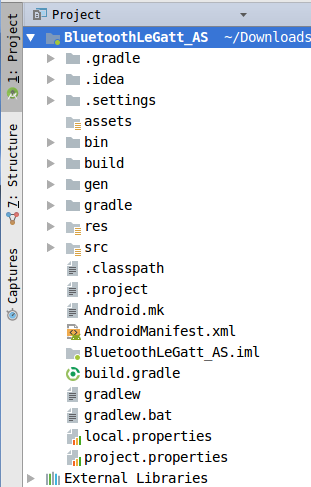
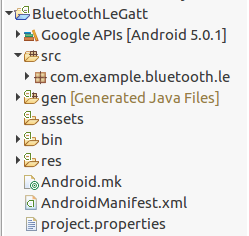
三、程序实现
一、ble简单介绍
BLE: Bluetooth Low Energy,即蓝牙低功耗,它是一种技术,从蓝牙4.0开始支持。蓝牙低功耗芯片有两种模式:单模和双模。
单模:只能执行低功耗协议栈,也就是只支持ble。
双模:支持传统蓝牙以及ble的使用。
较传统蓝牙:传输速度更快,覆盖范围更广,安全性更高,延迟更短,耗电低等优点。
关键术语和概念:
Gatt:(Generic Attribute Profile)—通用属性配置文件,用于在ble链路上发送和接收被称为“属性”的数据块。目前所有的ble应用都是基于GATT的。一个设备可以实现多个配置文件。
ble交互的桥梁是Service、Characteristic、Desciptor。
Characteristic:可以理解为一个数据类型,它包括一个value和0至多个对此characteristic的描述(Descriptor)。
Descriptor:对Characterisctic的描述,如范围、单位等。
Service:Characteristic的集合。它可以包含多个Characteristic。
一个ble终端可以包含多个Service,一个Service可以包含多个Characteristic,一个Characteristic包含一个value和多个Descriptor,一个Descriptor包含一个value。其中Characteristic比较重要,用的比较多。
这三部分都由UUID作为唯一标示符,以此区分。
UUID(Universally Unique Identifier),含义是通用唯一识别码,它是在一定范围内唯一的机器生成的标识符。标准的UUID格式为:xxxxxxxx-xxxx-xxxx-xxxx-xxxxxxxxxxxx (8-4-4-4-12)。
ble中有四个角色:
广播者(Braodcaster):广播发送者,是不可连接的设备。
观察者(Observer):扫描广播,不能够启动连接。
广播者和观察者不能建立连接。应用:温度传感器和温度显示器。
外围(periphery):广播发送者,可连接的设备,在单一链路层作为从机。
中央(central):扫描广播,启动连接,在单一或多链路层作为主机。
中央和外围可以进行配对、连接、数据通信。应用:手机和手表。
一个中央可以同时连接多个周边,但是一个周边只能连接一个中央(但是我测试,周边可以连接多个中央设备,并且能正常通信)。
二、Android
注意:Android 4.3(API 18)引入ble相关接口。
相关类
目录:frameworks/base/core/java/android/bluetooth/
BluetoothGatt:中央使用和处理数据;
BluetoothGattCallback:中央的回调。
BluetoothGattServer:周边提供数据;
BluetoothGattServerCallback:周边的回调
BluetoothGattService:Gatt服务
BluetoothGattCharacteristic:Gatt特性
BluetoothGattDescriptor:Gatt描述
2.1 中央设备
搜索ble设备
//搜索附近所有的外围设备

mBluetoothAdapter.startLeScan(mLeScanCallback);

//搜索某些uuid的外围设备。

mBluetoothAdapter.startLeScan(uuid[] ,mLeScanCallback);

停止扫描

mBluetoothAdapter.stopLeScan(mLeScanCallback);
监听扫描结果。
mLeScanCallback = new BluetoothAdapter.LeScanCallback() {

	public void onLeScan(BluetoothDevice device, int rssi, byte[] scanRecord) {

	}

};
device 搜索到的ble设备。
rssi 信号强度
scanRecord 远程设备广告记录的内容(蓝牙名称)
发起连接请求,获得中央。
mBluetoothGatt = device.connectGatt(mContext, false,mGattCallback);
第二个参数:
如果为false,则直接立即连接。
如果为true,则等待远程设备可用时(在范围内,。。)连接。并不是断开后重新连接。
第三个参数:连接回调
private BluetoothGattCallback mGattCallback = new BluetoothGattCallback() {};
BluetoothGattCallback 类中提供了许多回调,包括:连接状态改变、characteristic的read、write、change,mtu change等。根据需要实现即可。
连接成功后,发送 gatt服务发现请求。mBluetoothGatt.discoverServices().
发现服务成功会失败都会回调onServicesDiscovered()函数。通过mBluetoothGatt.getServices()获取连接的ble设备所提供的服务列表,返回值类型为List。
//连接状态改变回调

onConnectionStateChange(BluetoothGatt gatt, int status, int newState){

 if(newState == BluetoothProfile.STATE_CONNECTED){

    //连接成功后,发送发现服务请求。

  mBluetoothGatt.discoverServices();

 }

}

//发现服务回调。

public void onServicesDiscovered(BluetoothGatt gatt, int status) {

 if(status == BluetoothGatt.GATT_SUCCESS){

  //发现成功后,则可以通过下面方法获取service 列表。

  mBluetoothGatt.getServices();

 }

}
获得Characteristic和Descriptor。
通过服务列表中的BluetoothGattService,可以获取到服务所包含的characteristic(getCharacteristics()返回值类型为List)。
通过BluetoothGattCharacteristic可以获取特征所包含的descriptor(getDescriptors()返回值类型是List)。
BluetoothGattService、BluetoothGattCharacteristic和BluetoothGattDescriptor三个类中都提供了一个方法getUuid(),通过该方法可以获取其对应的uuid,从而可以判断是否是自己需要的service、characteristic或者descriptor。
通过获取的特征值,可以进行下操作:
写入特性值
读取特性值
订阅特性值。
写入特征值:
characteristic.setValue(data.getBytes());
mBluetoothGatt.writeCharacteristic(characteristic);
要想成功写入特征值:
首先此characteristic属性满足BluetoothGattCharacteristic.PROPERTY_WRITY或BluetoothGattCharacteristic.PROPERTY_WRITY_NO_RESPONSE,如果其property都不包含这两个,写特征值writeCharacteristic()函数直接返回false,什么都不做处理(具体可以看BluetoothGatt源码)。
其次此characteristic权限应满足BluetoothGattCharacteristic.PERMISSION_WRITE,否则onCharacteristicWrite()回调收到GATT_WRITE_NOT_PERMITTED回应。
写特征值前可以设置写的类型setWriteType(),写类型有三种,如下:
WRITE_TYPE_DEFAULT 默认类型,需要外围设备的确认,也就是需要外围设备的回应,这样才能继续发送写。
WRITE_TYPE_NO_RESPONSE 设置该类型不需要外围设备的回应,可以继续写数据。加快传输速率。
WRITE_TYPE_SIGNED 写特征携带认证签名,具体作用不太清楚。
外围设备收到中央写特征值的请求,会回调 onCharacteristicWriteRequest
如果此次请求需要回应,则外围设备回应 mGattServer.sendResponse
中央设备收到响应,回调onCharacteristicWrite(BluetoothGatt gatt,
BluetoothGattCharacteristic characteristic, int status)
读取特征值:
mBluetoothGatt.readCharacteristic(characteristic);
读特征值与写类似,也需要响应的权限和属性。
该characteristic属性需包含PROPERTY_READ,否则直接返回false(具体可以看BluetoothGatt源码)。
该characteristic权限应满足BluetoothGattCharacteristic.PERMISSION_READ,否则onCharacteristicRead()回调收到GATT_READ_NOT_PERMITTED回应。
外围设备接收到中央设备的读特征值请求,则会回调 onCharacteristicReadRequest()函数,
外围设备应该回应此请求 sendResponse。
中央设备收到响应回调
onCharacteristicRead(BluetoothGatt gatt, BluetoothGattCharacteristic characteristic, int status)
订阅:
//第二个参数:true则订阅该特征,false则取消订阅。
mBluetoothGatt.setCharacteristicNotification(characteristic, true);
当指定Characteristic值发生变化时,是否接收通知。
当设为true,如果Characteristic发生变化时,会回调方法:
onCharacteristicChanged(BluetoothGatt gatt, BluetoothGattCharacteristic characteristic)
通过参数characteristic,可获得getValue获得其中的内容。
注意:虽然订阅了该特征,并且该特征属性也满足PROPERTY_NOTIFY,但是并没有收到特征值改变的回调。这是为什么呢?查看sdk中的demo,发现需要写一下Descriptor。这样就可以正常监听特征值的改变了。
//CLIENT_CHARACTERISTIC_CONFIG = "00002902-0000-1000-8000-00805f9b34fb"

BluetoothGattDescriptor descriptor = characteristic.getDescriptor(      UUID.fromString(SampleGattAttributes.CLIENT_CHARACTERISTIC_CONFIG));

descriptor.setValue(BluetoothGattDescriptor.ENABLE_NOTIFICATION_VALUE);

mBluetoothGatt.writeDescriptor(descriptor);
中央设备的其他一些方法
readDescriptor(descriptor) 读取描述
writeDescriptor(descriptor) 写描述
readRemoteRssi() 读取连接设备的rssi。
disconnect(); 断开bel连接。
close(); 关闭中央设备。(不用时及时关闭,否则有的手机重连连不上。)
2.2 外围设备
获取/打开周边(外围)
mGattServer = mBluetoothManager.openGattServer(mContext, callback);

//其中callback是一个MyGattServerCallback(继承了BluetoothGattServerCallback)对象。
初始化描述、特性和服务。
//描述:

new BluetoothGattDescriptor(UUID.fromString(DESC_UUID), descPermissions);

//特性 :

final int properties = BluetoothGattCharacteristic.PROPERTY_READ

| BluetoothGattCharacteristic.PROPERTY_WRITE

| BluetoothGattCharacteristic.PROPERTY_NOTIFY;

final int permissions = BluetoothGattCharacteristic.PERMISSION_READ;

| BluetoothGattCharacteristic.PERMISSION_WRITE;

new BluetoothGattCharacteristic(UUID.fromString(CHAR_UUID), properties, permissions);

gattChar.addDescriptor(gattDesc);
property 表示属性。permission 表示权限。这两个都和权限相关。
如果property未设置PROPERTY_READ,permission设置PERMISSION_READ,则中央设备readCharacteristic主动读取特征值方法返回false,此操作失败。
而如果property设置PROPERTY_READ,permission未设置PERMISSION_READ,则中央设备readCharacteristic主动读取特征值方法返回true,此操作成功,外围设备发送响应,中央设备收到响应 GATT_READ_NOT_PERMITTED。
所以说如果想要characteristic可读,则这两个都要设置。
PROPERTY_WRITE和PERMISSION_WRITE也和上面类似。
PROPERTY_NOTIFY 表示支持notification。
//服务:

BluetoothGattService bs = new BluetoothGattService( UUID.fromString(SERV_UUID),

BluetoothGattService.SERVICE_TYPE_PRIMARY);

bs.addCharacteristic(gattChar);
第二个参数为service type,
SERVICE_TYPE_PRIMARY 基础服务、主要服务。
SERVICE_TYPE_SECONDARY 辅助服务(由初级服务包含在内)。
BluetoothGattService 类中方法
addService(bluetoothGattService),将辅助服务添加到主要服务中。
getIncludeedServices() 获取包含的服务列表。
getType() 获取服务的type。
getUuid() 获取服务的UUID。
添加服务
mGattServer.addService(bs);
设置广播数据
开始广播
这在android4.3没有提供,在android5.0才提供了设置广播数据,发送广告包等方法。我们开发是基于android4.3的,按理说我们是不可以作为外围设备的,不过我们framework以及底层都进行了修改,提供了这些方法,说以我们的android4.3设备可以作为外围。
mGattServer.startAdvertising();//开始广播
mGattServer.stopAdvertising();//停止广播
收到central扫描请求,回应扫描请求。
这个不需要我们管理,此时会广播之前的设置的广播数据。
收到central连接请求,建立连接。
连接成功后 外围可以断开连接。
mGattServer.cancelConnection(device);
响应central发起的gatt服务发现请求,回应服务信息。
响应central发起的gatt特性发现请求,回应特性信息。
响应central发起的gatt描述发现请求,回应描述信息。
这三个不需要我们去操作,系统底层会处理。
对central的读写做响应。
回应特性值
更新特性值。
回应特征值:
MyGattServerCallback extends BluetoothGattServerCallback.
其中有几个常用的方法:
onConnectionStateChange(BluetoothDevice device, int status, int newState)
监听设备连接状态。
device远程设备
newStateble连接状态,只能为BluetoothProfile.STATE_CONNECTED和BluetoothProfile.STATE_DISCONNECTED。
onCharacteristicReadRequest(BluetoothDevice device, int requestId, int offset,
BluetoothGattCharacteristic characteristic)
监听中心设备读Characteristic的请求,
requestId 请求的标识。
offset 特性值偏移量。
Characteristic 要读的特性。
此方法要求作出响应。
mGattServer.sendResponse(device, requestId,
BluetoothGatt.GATT_SUCCESS, offset, null);
最后一个参数可以设置传的数据,byte[]类型的。
onCharacteristicWriteRequest(BluetoothDevice device, int requestId, BluetoothGattCharacteristic characteristic,
boolean preparedWrite, boolean responseNeeded, int offset, byte[] value)
监听中心设备写Characteristic的请求,
preparedWrite true则写操作必须排队等待稍后执行。
responseNeeded 是否需要响应。
value 写的数据。
需要响应则必须sendResponse.
更新特征值:
外围设备向中心设备不能发送数据,必须通过notify 或者indicate的方式,andorid只发现notify接口。
characteristic.setValue(res.getBytes());
mGattServer.notifyCharacteristicChanged(device,
characteristic, false);
最后一个参数表示是否需要客户端确认。
欢迎扫一扫关注我的微信公众号,定期推送优质技术文章:
Android -BLE蓝牙小DEMO

注:本文著作权归作者,由demo大师代发,拒绝转载,转载需要作者授权
Android -BLE蓝牙小DEMO的更多相关文章
- Android ble 蓝牙4.0 总结
本文介绍Android ble 蓝牙4.0,也就是说API level >= 18,且支持蓝牙4.0的手机才可以使用,如果手机系统版本API level < 18,也是用不了蓝牙4.0的哦 ...
- Android ble 蓝牙4.0 总结一
本文介绍Android ble 蓝牙4.0,也就是说API level >= 18,且支持蓝牙4.0的手机才可以使用,如果手机系统版本API level < 18,也是用不了蓝牙4.0的哦 ...
- Android BLE蓝牙详细解读
代码地址如下:http://www.demodashi.com/demo/15062.html 随着物联网时代的到来,越来越多的智能硬件设备开始流行起来,比如智能手环.心率检测仪.以及各式各样的智能家 ...
- Android BLE 蓝牙编程(一)
最近在研究这个,等我有时间来写吧! 终于在端午节给自己放个假,现在就来说说关于android蓝牙ble的 最近的学习成果吧!! 需要材料(写个简单教程吧--关于小米手环的哦!嘿嘿) Android 手 ...
- Android BLE 蓝牙低功耗教程,中央BluetoothGatt和周边BluetoothGattServer的实现
http://blog.csdn.net/wave_1102/article/details/39271693 分类: Android(105) 作者同类文章X Android4.3 规范了BLE的A ...
- Android -- 自定义View小Demo,动态画圆(一)
1,转载:(http://blog.csdn.NET/lmj623565791/article/details/24500107),现在如下图的效果: 由上面的效果图可以看到其实是一个在一个圆上换不同 ...
- android ble蓝牙开发略解
Android 蓝牙4.0开发 1. 权限和相关属性 “android:required="true"表示apk只有在具有bluetooth_le属性的系统里运行,这个4.3之前 ...
- Android ble蓝牙使用注意
以下均为自己在Android ble开发项目中遇到的问题 1.尽量不要在BluetoothGattCallback里面的回调函数中执行读写通知操作,最多一个,因为例如在onServicesDiscov ...
- Android BLE 蓝牙开发——扫码枪基于BLESSED
一.蓝牙模式HID与BLE 当扫码枪与手机连接时,通常采用的是蓝牙HID(Human Interface Device)模式.本质上是一个把扫码枪作为一个硬件键盘,按照键盘协议把扫码后的结果逐个输入到 ...
随机推荐
- 常用 iOS 开源库和第三方组件
1.通过CocoaPods安装 项目名称 项目信息 AFNetworking 网络请求组件 FMDB 本地数据库组件 SDWebImage 多个缩略图缓存组件 UICKeyChainStore 存放用 ...
- mysql事件的开启和调用
检测事件是否开启 show variables like 'event_scheduler'; 开启事件 set global event_scheduler = on; 创建一个存储过程 delim ...
- Programmable current source requires no power supply
Engineering labs are usually equipped with various power supplies, voltmeters, function generators, ...
- How to make a combo box with fulltext search autocomplete support?
I would like a user to be able to type in the second or third word from a TComboBoxitem and for that ...
- PNP NPN NMOS PMOS S8050 S8550 SI2301 SI2302 2N3904 2N3906 78L05 TL431
- mysql世界国家省市地区的信息中英文
项目的主要业务是在国外, 所以以前的省市数据不仅不全, 而且没有英文翻译, 幸好在网上找到一个符合要求的数据 感谢: https://github.com/moolighty/geo
- android 水纹上涨与水滴滴下效果
这两天项目比较紧,本来打算完成以后再写博客的,今天终于实现了一个炫的功能,怀着激动的心情,趁热打铁,把项目经验记录一下,效果图如下: 对功能的几点说明: 1.圆形边框旋转 2.水纹上涨 3.水滴滴下 ...
- HTML5画:线、圆、矩形、渐变
示例一:矩形 <!DOCTYPE html><head> <meta charset=utf-8> <title>HTML5画线.圆.矩形</ti ...
- Visual Studio 2012连接TFS2010登录不了
一直用VS2012+TFS2010开发项目, 最近几天忽然很不正常, 在VS中会频繁要求输入TFS的账号密码, 经常要输入很多遍才可以正常连接签入签出. 这几天更甚, 基本上直接连接不了了. 网上找到 ...
- MVC4 过滤器(转)
先来看看一个例子演示过滤器有什么用: public class AdminController : Controller { // ... instance variables and constru ...