
C#使用Docx操作word文档
C#使用Docx编写word表格
最近接手了一个小Demo,要求使用Docx,将Xml文件中的数据转换为word文档,组织数据形成表格。
写了已经一周,网络上的知识太零碎,就想自己先统计整理出来,方便以后查阅。
目前就记录自己会用的和知道的一些,后续的知识,会持续的更新补上。
//检定原始记录——补偿器
public void CreatTable_Compensator(string path)
{
string realpath = @path + "\\补偿器.docx";
try
{
if (File.Exists(realpath))
{
//若存在则删除
File.Delete(realpath);
} //File.Create(realpath).Close(); //创建表格
using (var document = DocX.Create(realpath))
{ var title = document.InsertParagraph().Append("补偿器检定记录").Bold().FontSize(20);
title.Alignment = Alignment.center; var table = document.AddTable(24, 6);
table.Design = TableDesign.TableGrid;
/*table.AutoFit = AutoFit.Window;*/ table.Alignment = Alignment.center;
List<Row> rows = table.Rows; Row row0 = rows[0];
row0.Height = 50;
row0.MergeCells(0, 2);
row0.Cells[0].Paragraphs[0].Append("设备ID:" + "18635445").FontSize(16).Font(new FontFamily("Arial")).Bold().Alignment = Alignment.center;
row0.Cells[0].VerticalAlignment = VerticalAlignment.Center;
row0.MergeCells(1, 3);
row0.Cells[1].Paragraphs[0].Append("仪器编号:" + "FH5919").FontSize(16).Font(new FontFamily("Arial")).Bold().Alignment = Alignment.center;
row0.Cells[1].VerticalAlignment = VerticalAlignment.Center; //第二行
Row row1 = rows[1];
row1.MergeCells(0, 5);
row1.Cells[0].Paragraphs[0].Append("补偿范围检定记录").Bold().FontSize(11).Font(new FontFamily("Arial")).Alignment = Alignment.center;
row1.Height = 60;
row1.Cells[0].VerticalAlignment = VerticalAlignment.Center; //第三行
Row row2 = rows[2];
row2.MergeCells(0, 1);
row2.Cells[0].Paragraphs[0].Append("次序").FontSize(11).Font(new FontFamily("等线")).Alignment = Alignment.center;
row2.MergeCells(1, 4);
row2.Cells[1].Paragraphs[0].Append("观测值显示").FontSize(11).Font(new FontFamily("Arial")).Alignment = Alignment.center; //第四行
Row row3 = rows[3];
row3.MergeCells(0, 1);
row3.Cells[0].Paragraphs[0].Append("1").FontSize(11).Font(new FontFamily("Arial")).Alignment = Alignment.center;
row3.MergeCells(1, 4);
row3.Cells[1].Paragraphs[0].Append("3.[1]").FontSize(11).Font(new FontFamily("Arial")).Alignment = Alignment.center;
row3.Height = 35;
row3.Cells[0].VerticalAlignment = VerticalAlignment.Center;
row3.Cells[1].VerticalAlignment = VerticalAlignment.Center; //第五行
Row row4 = rows[4];
row4.MergeCells(0, 1);
row4.Cells[0].Paragraphs[0].Append("2").FontSize(11).Font(new FontFamily("Arial")).Alignment = Alignment.center;
row4.MergeCells(1, 4);
row4.Cells[1].Paragraphs[0].Append("4.[1]").FontSize(11).Font(new FontFamily("Arial")).Alignment = Alignment.center;
row4.Height = 35;
row4.Cells[0].VerticalAlignment = VerticalAlignment.Center;
row4.Cells[1].VerticalAlignment = VerticalAlignment.Center; //第六行
Row row5 = rows[5];
row5.MergeCells(0, 1);
row5.Cells[0].Paragraphs[0].Append("计算结果").FontSize(11).Font(new FontFamily("Arial")).Alignment = Alignment.center; ;
row5.MergeCells(1, 4);
row5.Cells[1].Paragraphs[0].Append("5.[1]").FontSize(11).Font(new FontFamily("Arial"));
row5.Height = 35;
row5.Cells[0].VerticalAlignment = VerticalAlignment.Center;
row5.Cells[1].VerticalAlignment = VerticalAlignment.Center; //第七行
Row row6 = rows[6];
row6.MergeCells(0, 5);
row6.Cells[0].Paragraphs[0].Append("补偿器零位误差检定记录").FontSize(11).Font(new FontFamily("Arial")).Bold().Alignment = Alignment.center;
row6.Height = 60;
row6.Cells[0].VerticalAlignment = VerticalAlignment.Center; //第八行
Row row7 = rows[7];
row7.MergeCells(0, 1);
row7.Cells[0].Paragraphs[0].Append("次序").FontSize(11).Font(new FontFamily("Arial")).Alignment = Alignment.center;
row7.Cells[1].Paragraphs[0].Append("方向").FontSize(11).Font(new FontFamily("Arial")).Alignment = Alignment.center;
row7.Cells[2].Paragraphs[0].Append("Ⅰ").FontSize(11).Font(new FontFamily("Arial")).Alignment = Alignment.center;
row7.Cells[3].Paragraphs[0].Append("Ⅱ").FontSize(11).Font(new FontFamily("Arial")).Alignment = Alignment.center;
row7.Cells[4].Paragraphs[0].Append("平均").FontSize(11).Font(new FontFamily("Arial")).Alignment = Alignment.center; //第九行
Row row8 = rows[8];
row8.MergeCells(0, 1);
//.InsertParagraph()
row8.Cells[1].Paragraphs[0].Append("XL").FontSize(11).Font(new FontFamily("Arial")).Alignment = Alignment.center;
row8.Cells[2].Paragraphs[0].Append("8.[2]").FontSize(11).Font(new FontFamily("Arial")).Alignment = Alignment.center;
row8.Cells[3].Paragraphs[0].Append("8.[3]").FontSize(11).Font(new FontFamily("Arial")).Alignment = Alignment.center;
row8.Height = 30;
row8.Cells[1].VerticalAlignment = VerticalAlignment.Center;
row8.Cells[2].VerticalAlignment = VerticalAlignment.Center;
row8.Cells[3].VerticalAlignment = VerticalAlignment.Center;
row8.Cells[0].Paragraphs[0].Append("1").FontSize(11).Font(new FontFamily("Arial")).Alignment = Alignment.center;
row8.Cells[4].Paragraphs[0].Append("8.4").FontSize(11).Font(new FontFamily("Arial")).Alignment = Alignment.center;
row8.Cells[0].VerticalAlignment = VerticalAlignment.Center;
row8.Cells[4].VerticalAlignment = VerticalAlignment.Center; //第十行
Row row9 = rows[9];
row9.MergeCells(0, 1);
table.MergeCellsInColumn(0, 8, 9);//列合并
table.MergeCellsInColumn(4, 8, 9);//列合并
row9.Cells[1].Paragraphs[0].Append("YL").FontSize(11).Font(new FontFamily("Arial")).Alignment = Alignment.center;
row9.Cells[2].Paragraphs[0].Append("9.[2]").FontSize(11).Font(new FontFamily("Arial")).Alignment = Alignment.center;
row9.Cells[3].Paragraphs[0].Append("9.[3]").FontSize(11).Font(new FontFamily("Arial")).Alignment = Alignment.center;
row9.Height = 30;
row9.Cells[1].VerticalAlignment = VerticalAlignment.Center;
row9.Cells[2].VerticalAlignment = VerticalAlignment.Center;
row9.Cells[3].VerticalAlignment = VerticalAlignment.Center; //第十一行
Row row10 = rows[10];
row10.MergeCells(0, 1);
row10.Cells[1].Paragraphs[0].Append("XL").FontSize(11).Font(new FontFamily("Arial")).Alignment = Alignment.center;
row10.Cells[2].Paragraphs[0].Append("10.[2]").FontSize(11).Font(new FontFamily("Arial")).Alignment = Alignment.center;
row10.Cells[3].Paragraphs[0].Append("10.[3]").FontSize(11).Font(new FontFamily("Arial")).Alignment = Alignment.center;
row10.Height = 30;
row10.Cells[1].VerticalAlignment = VerticalAlignment.Center;
row10.Cells[2].VerticalAlignment = VerticalAlignment.Center;
row10.Cells[3].VerticalAlignment = VerticalAlignment.Center;
row10.Cells[0].Paragraphs[0].Append("2").FontSize(11).Font(new FontFamily("Arial")).Alignment = Alignment.center;
row10.Cells[4].Paragraphs[0].Append("10.4").FontSize(11).Font(new FontFamily("Arial")).Alignment = Alignment.center;
row10.Cells[0].VerticalAlignment = VerticalAlignment.Center;
row10.Cells[4].VerticalAlignment = VerticalAlignment.Center; //第十二行
Row row11 = rows[11];
row11.MergeCells(0, 1);
table.MergeCellsInColumn(0, 10, 11);//第11和12列的第1行合并
table.MergeCellsInColumn(4, 10, 11);//第11和12列的第4行合并
row11.Cells[1].Paragraphs[0].Append("YL").FontSize(11).Font(new FontFamily("Arial")).Alignment = Alignment.center;
row11.Cells[2].Paragraphs[0].Append("11.[2]").FontSize(11).Font(new FontFamily("Arial")).Alignment = Alignment.center;
row11.Cells[3].Paragraphs[0].Append("11.[3]").FontSize(11).Font(new FontFamily("Arial")).Alignment = Alignment.center;
row11.Height = 30;
row11.Cells[1].VerticalAlignment = VerticalAlignment.Center;
row11.Cells[2].VerticalAlignment = VerticalAlignment.Center;
row11.Cells[3].VerticalAlignment = VerticalAlignment.Center; //第十三行
Row row12 = rows[12];
row12.MergeCells(0, 1);
row12.Cells[0].Paragraphs[0].Append("计算结果").FontSize(11).Font(new FontFamily("Arial")).Alignment = Alignment.center;
row12.MergeCells(1, 4);
row12.Cells[1].Paragraphs[0].Append("12.[1]").FontSize(11).Font(new FontFamily("Arial"));
row12.Cells[0].VerticalAlignment = VerticalAlignment.Center;
row12.Cells[1].VerticalAlignment = VerticalAlignment.Center;
row12.Height = 35; //第十四行
Row row13 = rows[13];
row13.MergeCells(0, 5);
row13.Cells[0].Paragraphs[0].Append("倾斜补偿器误差检定记录").FontSize(11).Font(new FontFamily("Arial")).Bold().Alignment = Alignment.center;
row13.Height = 60;
row13.Cells[0].VerticalAlignment = VerticalAlignment.Center; //第十五行
Row row14 = rows[14];
row14.MergeCells(0, 1);
row14.Cells[0].Paragraphs[0].Append("补偿").FontSize(11).Font(new FontFamily("Arial")).Alignment = Alignment.center;
row14.Cells[1].Paragraphs[0].Append("Ⅰ").FontSize(11).Font(new FontFamily("Arial")).Alignment = Alignment.center;
row14.Cells[2].Paragraphs[0].Append("Ⅱ").FontSize(11).Font(new FontFamily("Arial")).Alignment = Alignment.center;
row14.Cells[3].Paragraphs[0].Append("III").FontSize(11).Font(new FontFamily("Arial")).Alignment = Alignment.center;
row14.Cells[4].Paragraphs[0].Append("平均").FontSize(11).Font(new FontFamily("Arial")).Alignment = Alignment.center;
row14.Cells[0].VerticalAlignment = VerticalAlignment.Center;
row14.Cells[1].VerticalAlignment = VerticalAlignment.Center;
row14.Cells[2].VerticalAlignment = VerticalAlignment.Center;
row14.Cells[3].VerticalAlignment = VerticalAlignment.Center;
row14.Cells[4].VerticalAlignment = VerticalAlignment.Center; //第十六行
Row row15 = rows[15];
row15.Cells[0].Width = 30f;
row15.Cells[0].Paragraphs[0].Append("竖").FontSize(11).Font(new FontFamily("Arial")).Alignment = Alignment.center;
row15.Cells[0].InsertParagraph().Append("直").FontSize(11).Font(new FontFamily("Arial")).Alignment = Alignment.center;
row15.Cells[0].InsertParagraph().Append("角").FontSize(11).Font(new FontFamily("Arial")).Alignment = Alignment.center;
row15.Cells[0].VerticalAlignment = VerticalAlignment.Center; row15.Cells[1].Paragraphs[0].Append("M1(水平)").FontSize(11).Font(new FontFamily("Arial")).Alignment = Alignment.center;
row15.Cells[2].Paragraphs[0].Append("15.[1]").FontSize(11).Font(new FontFamily("Arial")).Alignment = Alignment.center;
row15.Cells[3].Paragraphs[0].Append("15.[2]").FontSize(11).Font(new FontFamily("Arial")).Alignment = Alignment.center;
row15.Cells[4].Paragraphs[0].Append("15.[3]").FontSize(11).Font(new FontFamily("Arial")).Alignment = Alignment.center;
row15.Cells[5].Paragraphs[0].Append("15.[4]").FontSize(11).Font(new FontFamily("Arial")).Alignment = Alignment.center;
//第十七行
Row row16 = rows[16];
row16.Cells[1].Paragraphs[0].Append("M2(上倾)").FontSize(11).Font(new FontFamily("Arial")).Alignment = Alignment.center;
row16.Cells[2].Paragraphs[0].Append("16.[1]").FontSize(11).Font(new FontFamily("Arial")).Alignment = Alignment.center;
row16.Cells[3].Paragraphs[0].Append("16.[2]").FontSize(11).Font(new FontFamily("Arial")).Alignment = Alignment.center;
row16.Cells[4].Paragraphs[0].Append("16.[3]").FontSize(11).Font(new FontFamily("Arial")).Alignment = Alignment.center;
row16.Cells[5].Paragraphs[0].Append("16.[4]").FontSize(11).Font(new FontFamily("Arial")).Alignment = Alignment.center;
//第十八行 Row row17 = rows[17];
table.Rows.RemoveRange(3, 2); row17.Cells[1].Paragraphs[0].Append("M3(下倾)").FontSize(11).Font(new FontFamily("Arial")).Alignment = Alignment.center;
row17.Cells[2].Paragraphs[0].Append("17.[1]").FontSize(11).Font(new FontFamily("Arial")).Alignment = Alignment.center;
row17.Cells[3].Paragraphs[0].Append("17.[2]").FontSize(11).Font(new FontFamily("Arial")).Alignment = Alignment.center;
row17.Cells[4].Paragraphs[0].Append("17.[3]").FontSize(11).Font(new FontFamily("Arial")).Alignment = Alignment.center;
row17.Cells[5].Paragraphs[0].Append("17.[4]").FontSize(11).Font(new FontFamily("Arial")).Alignment = Alignment.center;
//第十九行
Row row18 = rows[18];
table.MergeCellsInColumn(0, 15, 18);//列合并
row18.Cells[1].Paragraphs[0].Append("M4(再水平)").FontSize(11).Font(new FontFamily("Arial")).Alignment = Alignment.center;
row18.Cells[2].Paragraphs[0].Append("18.[1]").FontSize(11).Font(new FontFamily("Arial")).Alignment = Alignment.center;
row18.Cells[3].Paragraphs[0].Append("18.[2]").FontSize(11).Font(new FontFamily("Arial")).Alignment = Alignment.center;
row18.Cells[4].Paragraphs[0].Append("18.[3]").FontSize(11).Font(new FontFamily("Arial")).Alignment = Alignment.center;
row18.Cells[5].Paragraphs[0].Append("18.[4]").FontSize(11).Font(new FontFamily("Arial")).Alignment = Alignment.center; //第二十行
Row row19 = rows[19];
row19.Cells[0].Width = 30f;
row19.Cells[0].Paragraphs[0].Append("水").FontSize(11).Font(new FontFamily("Arial")).Alignment = Alignment.center;
row19.Cells[0].InsertParagraph().Append("平").FontSize(11).Font(new FontFamily("Arial")).Alignment = Alignment.center;
row19.Cells[0].InsertParagraph().Append("角").FontSize(11).Font(new FontFamily("Arial")).Alignment = Alignment.center;
row19.Cells[0].VerticalAlignment = VerticalAlignment.Center;
row19.Cells[1].Paragraphs[0].Append("N1(水平)").FontSize(11).Font(new FontFamily("Arial")).Alignment = Alignment.center;
row19.Cells[2].Paragraphs[0].Append("19.[1]").FontSize(11).Font(new FontFamily("Arial")).Alignment = Alignment.center;
row19.Cells[3].Paragraphs[0].Append("19.[2]").FontSize(11).Font(new FontFamily("Arial")).Alignment = Alignment.center;
row19.Cells[4].Paragraphs[0].Append("19.[3]").FontSize(11).Font(new FontFamily("Arial")).Alignment = Alignment.center;
row19.Cells[5].Paragraphs[0].Append("19.[4]").FontSize(11).Font(new FontFamily("Arial")).Alignment = Alignment.center;
//第二十一行
Row row20 = rows[20];
row20.Cells[1].Paragraphs[0].Append("N3(下倾)").FontSize(11).Font(new FontFamily("Arial")).Alignment = Alignment.center;
row20.Cells[2].Paragraphs[0].Append("20.[1]").FontSize(11).Font(new FontFamily("Arial")).Alignment = Alignment.center;
row20.Cells[3].Paragraphs[0].Append("20.[2]").FontSize(11).Font(new FontFamily("Arial")).Alignment = Alignment.center;
row20.Cells[4].Paragraphs[0].Append("20.[3]").FontSize(11).Font(new FontFamily("Arial")).Alignment = Alignment.center;
row20.Cells[5].Paragraphs[0].Append("20.[4]").FontSize(11).Font(new FontFamily("Arial")).Alignment = Alignment.center;
//第二十二行
Row row21 = rows[21];
row21.Cells[1].Paragraphs[0].Append("N3(下倾)").FontSize(11).Font(new FontFamily("Arial")).Alignment = Alignment.center;
row21.Cells[2].Paragraphs[0].Append("21.[1]").FontSize(11).Font(new FontFamily("Arial")).Alignment = Alignment.center;
row21.Cells[3].Paragraphs[0].Append("21.[2]").FontSize(11).Font(new FontFamily("Arial")).Alignment = Alignment.center;
row21.Cells[4].Paragraphs[0].Append("21.[1]").FontSize(11).Font(new FontFamily("Arial")).Alignment = Alignment.center;
row21.Cells[5].Paragraphs[0].Append("21.[4]").FontSize(11).Font(new FontFamily("Arial")).Alignment = Alignment.center;
//第二十三行
Row row22 = rows[22];
table.MergeCellsInColumn(0, 19, 22);//列合并
row22.Cells[1].Paragraphs[0].Append("N4(再水平)").FontSize(11).Font(new FontFamily("Arial")).Alignment = Alignment.center;
row22.Cells[2].Paragraphs[0].Append("22.[1]").FontSize(11).Font(new FontFamily("Arial")).Alignment = Alignment.center;
row22.Cells[3].Paragraphs[0].Append("22.[2]").FontSize(11).Font(new FontFamily("Arial")).Alignment = Alignment.center;
row22.Cells[4].Paragraphs[0].Append("22.[3]").FontSize(11).Font(new FontFamily("Arial")).Alignment = Alignment.center;
row22.Cells[5].Paragraphs[0].Append("22.[4]").FontSize(11).Font(new FontFamily("Arial")).Alignment = Alignment.center; //第二十四行
Row row23 = rows[23];
row23.MergeCells(0, 1);
row23.Cells[0].Paragraphs[0].Append("计算结果").FontSize(11).Font(new FontFamily("Arial")).Alignment = Alignment.center;
row23.MergeCells(1, 4);
row23.Cells[1].Paragraphs[0].Append("row23.Cells[1]").FontSize(11).Font(new FontFamily("Arial"));
row23.Cells[0].VerticalAlignment = VerticalAlignment.Center;
row23.Cells[1].VerticalAlignment = VerticalAlignment.Center;
row23.Height = 35; var p1 = document.InsertParagraph();
p1.InsertTableAfterSelf(table);
// 保存当前文档
document.Save();
//结果信息输出 } }
catch (Exception ex)
{
Console.WriteLine(ex.Message); } }
其中代码输出的样式为下图所示:
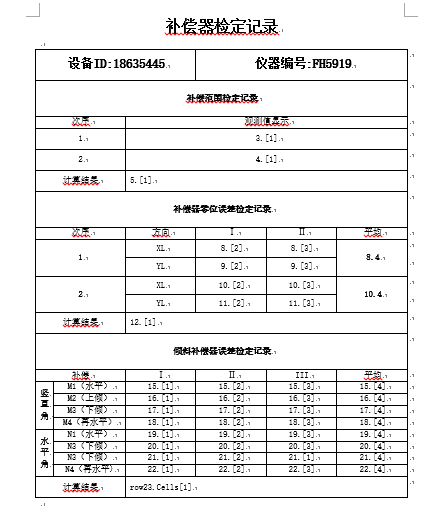
这是一个关于测量仪器的检测值表,且不去管有什么作用。
总结下一些比较重要的函数和方法:
- 引用Docx的dll到解决方案的引用中,然后再using 其对应的命名空间。//(注意dll与命名空间不同而引发的错误)。
- 创建文件: var document = DocX.Create(realpath) //realpath=文件创建的地址/名称.docx。
- 表格大小:table.AutoFit = AutoFit.Contents; //在不设定的时候,会默认大小,在wps中无法改动,设定了也无法改动!!office不用设定,自动A4大小
- 插入标题: var title = document.InsertParagraph().Append("补偿器检定记录").Bold().FontSize(20);
- InsertParagraph插入一个段落,同理的insertRow 添加行与insertColumn添加列。
- Append在web开发的Jq中也有运用,即在被选元素的结尾(仍然在内部)插入指定内容。
- Bold()为字符加粗。
- FontSize(20)为字体大小
- Font(new FontFamily("Arial")) //设置字体样式为Arial(在office中无效,在wps中可用)。
- title.Alignment = Alignment.center; //标题水平居中
- row0.Cells[1].VerticalAlignment = VerticalAlignment.Center; //单元格中的内容垂直居中
- 创建表格: var table = document.AddTable(24, 6); //创建一个24行6列的表格
- var p1 = document.InsertParagraph();
p1.InsertTableAfterSelf(table); //插入创建的表格 - 表格的边框样式:table.Design = TableDesign.TableGrid //在输入TableGrid.后会有相应的提示,这里就不一一举例了。
- 具体的单元格操纵:row[0].Cells[0].Paragraphs[0]..... //第一行的第一个单元格的第一个段落(从0开始,类似数组的计数)。
- 单元格的横向合并:row[0].MergeCells(0, 1); //第1行的第1个和第2个单元格合并,MergeCells(int ,int)起始位和终止位。
- 单元格的纵向合并:table.MergeCellsInColumn(0, 10, 11); //第11和12列的第1行合并,道理同上。
- 单元格的高度调整:row23.Height = 36;
- 单元格的宽度调整:row19.Cells[0].Width = 30; //有一些问题!!
- 保存文档:document.Save();
当前依旧没有解决的问题:
单元格的宽度调整:只能设定一整列的宽度来调整单元格的宽度,无法设定某一固定单元格的宽度!(猜想,在某行之后插入新的一行,然后操纵新的一行里面的单元格?)
如何画斜线:目前尚且不清楚如何在表格中画出斜线。
字体设定:上面举出的方法中,office中是无效的,但是wps中却是可用的,应该是方法错了。
如何调整表格大小:如上所述,wps下一旦表格过大,就会超出文档的可视范围。office下却显示正常(Docx对office有版本要求)
总结:
Docx还是蛮好用的,但是没有一个详细的开发者文档(在git上有吧,但是英语废,找不着QAQ)
后续如果解决了问题或者发现了新的功能,会一直更新的!
如果哪位大佬知道如何处理的话,也请不吝赐教,谢谢了。
PS.刚学C#一个月,肯定存在很多不对的地方,如果哪里有错,请务必指正,我会汲取经验的,谢谢....
O(∩_∩)O~
2018-09-10
C#使用Docx操作word文档的更多相关文章
- C#中使用Spire.docx操作Word文档
使用docx一段时间之后,一些地方还是不方便,然后就尝试寻找一种更加简便的方法. 之前有尝试过使用Npoi操作word表格,但是太烦人了,随后放弃,然后发现免费版本的spire不错,并且在莫种程度上比 ...
- iText操作word文档总结
操作word文档的工具有很多,除了iText之外还有POI,但是POI擅长的功能是操作excel,虽然也可以操作word,但是能力有限,而且还有很多的bug,技术并不成熟,下面就重点介绍一种操作wor ...
- C#操作Word文档(加密、解密、对应书签插入分页符)
原文:C#操作Word文档(加密.解密.对应书签插入分页符) 最近做一个项目,客户要求对已经生成好的RTF文件中的内容进行分页显示,由于之前对这方面没有什么了解,后来在网上也找了相关的资料,并结合自己 ...
- 利用Python操作Word文档【图片】
利用Python操作Word文档
- Java文件操作系列[3]——使用jacob操作word文档
Java对word文档的操作需要通过第三方组件实现,例如jacob.iText.POI和java2word等.jacob组件的功能最强大,可以操作word,Excel等格式的文件.该组件调用的的是操作 ...
- C#开源组件DocX处理Word文档基本操作(二)
上一篇 C#开源组件DocX处理Word文档基本操作(一) 介绍了DocX的段落.表格及图片的处理,本篇介绍页眉页脚的处理. 示例代码所用DocX版本为:1.3.0.0.关于版本的区别,请参见上篇,而 ...
- python 操作word文档
因为工作需要操作一些word文档,记录一下学习思路 #-*- encoding: utf8 -*- import win32com from win32com.client import Dispat ...
- 2.QT中操作word文档
Qt/Windows桌面版提供了ActiveQt框架,用以为Qt和ActiveX提供完美结合.ActiveQt由两个模块组成: A QAxContainer模块允许我们使用COM对象并且可以 ...
- C# 操作Word 文档——添加Word页眉、页脚和页码
在Word文档中,我们可以通过添加页眉.页脚的方式来丰富文档内容.添加页眉.页脚时,可以添加时间.日期.文档标题,文档引用信息.页码.内容解释.图片/LOGO等多种图文信息.同时也可根据需要调整文字或 ...
随机推荐
- BZOJ 5427: 最长上升子序列
$f[i] 表示长度为i的最长上升子序列的最后一位的最小值是多少$ 对于普通的$LIS我们可以二分确定位置去更新$ 再来考虑对于这个,如果有某一位没有确定的话 那么这一位是可以随便取的,也就是说,所有 ...
- Miller_Rabbin大素数测试
伪素数: 如果存在和n互素的正整数a满足a^(n-1)≡1(mod n),则n是基于a的伪素数. 是伪素数但不是素数的个数是非常非常少的,所以如果一个数是伪素数,那么他几乎是素数. Miller_Ra ...
- POJ - 3648 Wedding (2-SAT 输出解决方案)
题意:有N-1对夫妇和1对新郎新娘要出席婚礼,这N对人要坐在走廊两侧.要求每对夫妇要坐在不同侧.有M对人有通奸关系,对于这一对人,不能同时坐在新娘对面(新娘新郎也可能和别人有通奸关系).求如何避免冲突 ...
- Python的socket网络编程(一)
(注:本文部分内容摘自互联网,由于作者水平有限,不足之处,还望留言指正.) 先写首诗,抒抒情. 一. 食堂.校园 见过你那么多次 卑微的我 只敢偷偷瞄上一眼 心扑通 扑通 春天真好 不是么 二. 学子 ...
- 简单封装get和jsonp
/** * 向服务器发送GET请求. * * @param {type} url * @param {type} async 是否异步调用 * @param {type} fnCallback 回调 ...
- 浅谈boost.variant的几种访问方式
前言 variant类型在C++14并没有加入,在cppreference网站上可以看到该类型将会在C++17加入,若想在不支持C++17的编译器上使用variant类型,我们可以通过boost的va ...
- xml简单介绍及libmxml编程
今天我们来简单介绍一下,关于xml的一些内容,包括自己编写一些程序进行生成和解析. 首先我们我们还是从xml的演化历史来了解一下它吧. 历史演化 GML: 在20世纪60年代为了促进数据交换和操作,通 ...
- (转)C#自制Web 服务器开发:用C#开发自己的Web服务器
当输入:127.0.0.1:5050 GET / HTTP/1.1 Accept: text/html, application/xhtml+xml, */* Accept-Language: zh- ...
- 关于office word 应用程序下载配置
Retrieving the COM class factory for component with CLSID {000209FF-0000-0000-C000-000000000046} fai ...
- Eye Protection FAQ
Q: Why does smart protection not work? A: Please make sure the checkbox "Eye Protection" i ...