
框架布局FrameLayout
框架布局FrameLayout
一、简介

二、代码实例
结果图:
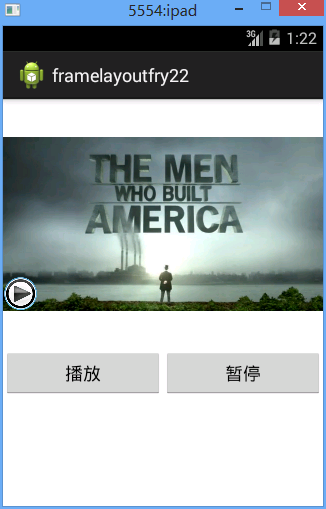
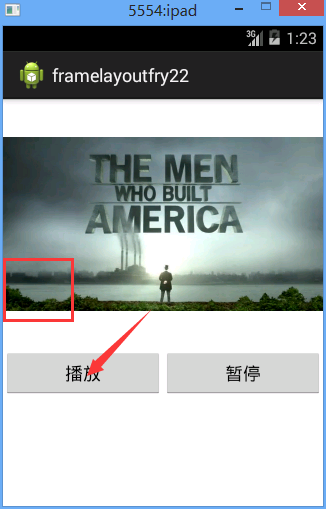
代码:
需要注意的代码:
imageView_play.setVisibility(View.INVISIBLE);
<FrameLayout
framelayoutfry2.MainActivity
 package framelayoutfry2;

 import com.example.framelayoutfry2.R;

 import android.app.Activity;

 import android.content.Intent;

 import android.os.Bundle;

 import android.view.View;

 import android.view.View.OnClickListener;

 import android.widget.Button;

 import android.widget.ImageView;

 public class MainActivity extends Activity implements OnClickListener{

     private Button btn_play;//创建一个button对象

     private Button btn_pause;//创建一个button对象

     private ImageView imageView_play;

      protected void onCreate(Bundle savedInstanceState) {

             super.onCreate(savedInstanceState);//父类操作

             setContentView(R.layout.activity_main);//引入名为activity_main的界面

             imageView_play=(ImageView) findViewById(R.id.imageView_play);

             btn_play=(Button) findViewById(R.id.btn_play);

             btn_pause=(Button) findViewById(R.id.btn_pause);

             btn_play.setOnClickListener(this);

             btn_pause.setOnClickListener(this);

         }

     @Override

     public void onClick(View v) {

         // TODO Auto-generated method stub

         switch (v.getId()) {

         case R.id.btn_play:

             imageView_play.setVisibility(View.INVISIBLE);

             break;

         case R.id.btn_pause:

             imageView_play.setVisibility(View.VISIBLE);

             break;

         default:

             break;

         }

     }

 }
/Test_FrameLayout/res/layout/activity_main.xml
 <?xml version="1.0" encoding="utf-8"?>

 <LinearLayout xmlns:android="http://schemas.android.com/apk/res/android"

     android:layout_width="match_parent"

     android:layout_height="match_parent"

     android:orientation="vertical" >

 7     <FrameLayout

 8         android:layout_width="match_parent"

 9         android:layout_height="wrap_content"

10

11         >

12         <ImageView

13             android:layout_width="match_parent"

14             android:layout_height="250dp"

15             android:src="@drawable/frame_bg"

16             />

17

18         <ImageView

19             android:id="@+id/imageView_play"

20             android:layout_width="35dp"

21             android:layout_height="35dp"

22             android:src="@drawable/play"

23             android:layout_gravity="bottom"

24             android:layout_marginBottom="38dp"

25             />

26

27     </FrameLayout>

     <LinearLayout

         android:layout_width="match_parent"

         android:layout_height="wrap_content"

         android:orientation="horizontal"

         >

         <Button

             android:id="@+id/btn_play"

             android:layout_width="wrap_content"

             android:layout_height="wrap_content"

             android:text="播放"

             android:layout_weight="1"

             />

         <Button

             android:id="@+id/btn_pause"

             android:layout_width="wrap_content"

             android:layout_height="wrap_content"

             android:text="暂停"

             android:layout_weight="1"

             />

     </LinearLayout>

 </LinearLayout>
框架布局FrameLayout的更多相关文章
- .Net程序猿乐Android发展---(10)框架布局FrameLayout
帧布局FrameLayout中全部的控件都在界面的左上側,后绘制的空间会覆盖之前的控件.布局内控件以层叠方式显示,用在游戏开发方面可能多些. 1.层叠展示 以下这个样例 ...
- Android 框架布局 FrameLayout
<?xml version="1.0" encoding="utf-8"?> <FrameLayout xmlns:android=" ...
- android FragmentActivity+FragmentTabHost+Fragment框架布局
这周比较闲,计划系统的学习一下android开发,我本是一名IOS程序员,对手机开发还是有自己的一套思路的, 固这套思路用到我当前学android上了,先选择从Main页面的tabbar部分代码入手, ...
- Android用户界面设计:框架布局(转)
摘要:框架布局是Android开发者组织视图控件最简单和最有效的布局之一.通过本文,你将学到所有关于框架布局的知识,它们主要用来在屏幕上组织特别的或重叠的视图控件.使用得当的话,很多有趣的Androi ...
- Android笔记(九) Android中的布局——框架布局
框架布局没有任何定位方式,所有的控件都会摆放在布局的左上角. 代码示例: framelayout.xml <?xml version="1.0" encoding=" ...
- Android中帧布局-FrameLayout和网格布局-GridLayout
帧布局-FrameLayout 一.概念 帧布局中,容器为每个加入其中的空间创建一个空白的区域(成为一帧).每个空间占据一帧,这些帧会按gravity属性自动对齐. 帧布局的效果是将其中的所有空间叠加 ...
- Android 自学之帧布局 FrameLayout
帧布局(FrameLayout)直接继承了ViewGroup组件: 帧布局容器为每一个加入其中的组件都创建了一个空白的区域,这个区域我们称之为一帧,所有每个组件都占据一帧,这些都会根据gravity属 ...
- Flutter实战视频-移动电商-53.购物车_商品列表UI框架布局
53.购物车_商品列表UI框架布局 cart_page.dart 清空原来写的持久化的代码; 添加对应的引用,stless生成一个静态的类.建议始终静态的类,防止重复渲染 纠正个错误,上图的CartP ...
- Layui栅格系统与后台框架布局
一.栅格布局规则: 1. 采用 layui-row 来定义行,如:<div class="layui-row"></div> 2. 采用类似 layui-c ...
随机推荐
- Create a Group Policy Central Store
一.How to create a Group Policy Central Store You have downloaded or created your own Group Policy Ad ...
- iOS开发——生命周期
为了处理好应用程序的挂起.暂停等情况下的数据保存,或对应添加所需处理,我们必须了解ios生命周期. 但是不要去背去记,做个实验就好. - (BOOL)application:(UIApplicatio ...
- 【我的Android进阶之旅】如何隐藏Android中EditText控件的默认下划线
Android EditText控件是经常使用的控件,但是有时候我们并不需要它的一些默认的属性,比如说下划线,因为有时候这样的默认下划线看起来特别怪异,和其他控件在一起搭配的时候不协调,因此有时候就需 ...
- jquery补充
- Python3+Selenium3自动化测试-(四)
selenium鼠标事件 # coding=utf-8 import time from selenium import webdriver from selenium.webdriver.commo ...
- mongo distinct 指定条件
db.Article.distinct("字段名称",{"Comment.Reply.email" : "xxx"})
- Redis一(Redis-py与String操作)
Redis 介绍 redis是一个key-value存储系统.和Memcached类似,它支持存储的value类型相对更多,包括string(字符串).list(链表).set(集合).zset(so ...
- zookeer安装
解压:tar xf zookeeper-3.4.9.tar.gz进入目录cd /opt/zookeeper-3.4.9/ 编辑配置文件:vim zoo.cfg# The number of milli ...
- java 中JFinal getModel方法和数据库使用出现问题解决办法
JFinal getModel方法(从页面表单中获取Model对象)+数据库存储问题 一.getmodel方法 1.在JConfig配置类中的数据库映射(存储到数据库时需要此配置) public vo ...
- Codeforces Round #397 by Kaspersky Lab and Barcelona Bootcamp (Div. 1 + Div. 2 combined) B - Code obfuscation
地址:http://codeforces.com/contest/765/problem/B 题目: B. Code obfuscation time limit per test 2 seconds ...