
Unity3d + PureMVC框架搭建
0、流程:LoginView-SendNotification()---->LoginCommand--Execute()--->调用proxy中的函数操作模型数据--LoginProxy---->接收服务器返回-操作数据-返回通知视图控制器--LoginMediator--->操作视图。
(虽然很繁琐,一个功能需要写很多个文件,但是对于大型项目来说使用起来是很舒服的。比如A复制背包,B复制商场,这里都需要用到人物的金币信息,对与A/B来说我只要监听到了金币更新的操作,我就通过视图控制器来做update操作就可以了,不关心是谁的操作引起的金币变化。好处就不多说了,看下面代码吧)
1、下载puremvc,http://www.puremvc.org/
2、复制puremvc源代码到项目scripts目录下
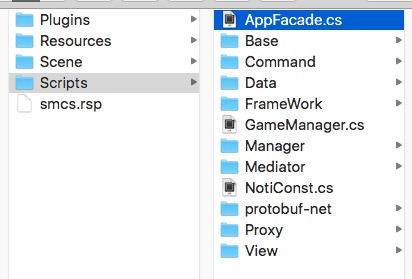
3、AppFacade.cs文件,这是puremvc的启动文件
 using UnityEngine;

 using System.Collections;

 using PureMVC.Patterns;

 using PureMVC.Interfaces;

 public class AppFacade : Facade,IFacade {

     public const string STARTUP = "starup";

     public const string LOGIN = "login";

     private static AppFacade _instance;

     public static AppFacade getInstance

     {

         get{

             if (_instance == null) {

                 _instance = new AppFacade ();

             }

             return _instance;

         }

     }

     protected override void InitializeController ()

     {

         base.InitializeController ();

         RegisterCommand (STARTUP, typeof(StartupCommand));

         RegisterCommand (NotiConst.S_LOGIN, typeof(LoginCommand));

     }

     public void startup()

     {

         SendNotification (STARTUP);

     }

 }
4、在场景中创建一个GameManager.cs文件,挂在Main Camera上
 using UnityEngine;

 using System.Collections;

 public class GameManager : MonoBehaviour {

     // Use this for initialization

     void Start () {

         DontDestroyOnLoad (this.gameObject);

         AppFacade.getInstance.startup ();

     }

     // Update is called once per frame

     void Update () {

     }

 }
5、编写StartupCommand.cs文件,在这里注册所有的command。
 using UnityEngine;

 using System.Collections;

 using PureMVC.Patterns;

 public class StartupCommand : MacroCommand {

     protected override void InitializeMacroCommand ()

     {

         AddSubCommand (typeof(ModelPreCommand));

     }

 }
5、创建ModelPreCommand.cs文件,这里注册proxy文件。
 // 创建Proxy,并注册。

 public class ModelPreCommand : SimpleCommand {

     public override void Execute (PureMVC.Interfaces.INotification notification)

     {

         Facade.RegisterProxy (new LoginProxy());

     }

 }
6、在AppFacade.cs文件InitializeController方法中注册消息号与Command直接的监听关系。这里使用了NotiConst来定义所有的消息号。
7、创建LoginView.cs这是一个视图文件,同时创建LoginViewMediator.cs文件。
 using UnityEngine;

 using System.Collections;

 using System.Collections.Generic;

 using PureMVC.Patterns;

 using PureMVC.Interfaces;

 public class LoginViewMediator : Mediator,IMediator {

     public const string NAME = "LoginViewMediator";

     public LoginViewMediator(LoginView _view):base(NAME,_view){

     }

     //需要监听的消息号

     public override System.Collections.Generic.IList<string> ListNotificationInterests ()

     {

         List<string> list = new List<string>();

         list.Add (NotiConst.R_LOGIN);

         return list;

     }

     //接收消息到消息之后处理

     public override void HandleNotification (PureMVC.Interfaces.INotification notification)

     {

         string name = notification.Name;

         object vo = notification.Body;

         switch (name) {

         case NotiConst.R_LOGIN:

                 (this.ViewComponent as LoginView).receiveMessage (vo);

                 break;

         }

     }

 }
LoginView.cs
 void Start () {

 //注册mediator

         AppFacade.getInstance.RegisterMediator (new LoginViewMediator (this));

     }

 void OnDestory(){

         AppFacade.getInstance.RemoveMediator (LoginViewMediator.NAME);

     }
8、编写LoginCommand.cs文件,监听发送过来的消息。
在AppFacade里面InitializeController注册:RegisterCommand (NotiConst.S_LOGIN, typeof(LoginCommand));
 using UnityEngine;

 using System.Collections;

 using PureMVC.Patterns;

 public class LoginCommand : SimpleCommand {

     public override void Execute (PureMVC.Interfaces.INotification notification)

     {

         Debug.Log ("LoginCommand");

         object obj = notification.Body;

         LoginProxy loginProxy;

         loginProxy = Facade.RetrieveProxy (LoginProxy.NAME) as LoginProxy;

         string name = notification.Name;

         switch (name) {

         case NotiConst.S_LOGIN:

             loginProxy.sendLogin (obj);

             break;

         }

     }

 }
9、创建LoginProxy.cs文件,这里复制数据处理,与服务器通讯等操作。
 using UnityEngine;

 using System.Collections;

 using PureMVC.Patterns;

 using PureMVC.Interfaces;

 using LitJson;

 public class LoginProxy : Proxy,IProxy {

     public const string NAME = "LoginProxy";

     // Use this for initialization

     public LoginProxy():base(NAME){}

     //请求登陆

     public void sendLogin(object data)

     {

         //与服务器通讯,返回消息处理玩之后,如果需要改变试图则调用下面消息

         receiveLogin();

     }

     // 登陆返回

     private void receiveLogin(JsonData rData)

     {

        SendNotification (NotiConst.R_LOGIN, rData);

     }

 }
10、测试。在视图里面创建一个按钮点击按钮发送登陆消息。
 void sendNotice(){

     int obj = ;

     AppFacade.getInstance.SendNotification (NotiConst.S_LOGIN,obj);

 }
然后在写一个接收到服务器端返回数据的操作函数
 public void receiveLogin(object obj){

     //下一步操作

 }
原文地址:https://my.oschina.net/u/1582495/blog/601547
Unity3d + PureMVC框架搭建的更多相关文章
- Unity3d中PureMVC框架的搭建及使用资料
1.下载PureMVC框架 https://github.com/PureMVC/puremvc-csharp-multicore-framework https://github.com/PureM ...
- Unity 游戏框架搭建 (一) 概述
为了重构手头的一款项目,翻出来当时未接触Unity时候收藏的视频<Unity项目架构设计与开发管理>,对于我这种初学者来说全是干货.简单的总结了一下,以后慢慢提炼. 关于Unity的架 ...
- Unity 游戏框架搭建 (六) 关于框架的一些好文和一些思考
在进行项目架构阶段,游戏框架可以解决一部分问题.剩下的架构问题还需要根据不同的项目解决.总之游戏框架是游戏架构的一部分. 关于锤子和钉子: 最近又拿起了<代码大全>和<暗时间 ...
- SpringMVC笔记——SSM框架搭建简单实例
落叶枫桥 博客园 首页 新随笔 联系 订阅 管理 SpringMVC笔记——SSM框架搭建简单实例 简介 Spring+SpringMVC+MyBatis框架(SSM)是比较热门的中小型企业级项目开发 ...
- Unity 游戏框架搭建 (十一) 简易AssetBundle打包工具(一)
最近在看Unity官方的AssetBundle(以下简称AB)的教程,也照着做了一遍,不过做出来的AssetBundleManager的API设计得有些不太习惯.目前想到了一个可行的解决方案.AB相关 ...
- Unity 游戏框架搭建 (九) 减少加班利器-QConsole
为毛要实现这个工具? 在我小时候,每当游戏在真机运行时,我们看到的日志是这样的. 没高亮啊,还有乱七八糟的堆栈信息,好干扰日志查看,好影响心情. 还有就是必须始终连着usb线啊,我想要想躺着测试... ...
- Angular企业级开发(5)-项目框架搭建
1.AngularJS Seed项目目录结构 AngularJS官方网站提供了一个angular-phonecat项目,另外一个就是Angular-Seed项目.所以大多数团队会基于Angular-S ...
- 一步一步使用ABP框架搭建正式项目系列教程之本地化详解
返回总目录<一步一步使用ABP框架搭建正式项目系列教程> 本篇目录 扯扯本地化 ABP中的本地化 小结 扯扯本地化 本节来说说本地化,也有叫国际化.全球化的,不管怎么个叫法,反正道理都是一 ...
- ABP框架搭建项目系列教程基础版完结篇
返回总目录<一步一步使用ABP框架搭建正式项目系列教程> 经过前面十二篇的基础教程,现在终于该做个总结了. 回顾 第一篇,我们建议新手朋友们先通过ABP官网的启动模板生成解决方案,因为这样 ...
随机推荐
- [k8s]prometheus+grafana监控node和mysql(普罗/grafana均vm安装)
https://github.com/prometheus/prometheus Architecture overview Prometheus Server Prometheus Server 负 ...
- 教你如何写thinkphp多表查询语句
1.table()函数 thinkphp中提供了一个table()函数,具体用法参考以下语句: $list=$Demo->table('think_blog blog,think_type ty ...
- 李洪强漫谈iOS开发[C语言-054]-函数
// // main.c // 02 翻译数字的优化 // // Created by vic fan on 2017/6/4. // Copyright © 2017年 李洪强. All r ...
- 使用Scala编写Spark程序求基站下移动用户停留时长TopN
使用Scala编写Spark程序求基站下移动用户停留时长TopN 1. 需求:根据手机基站日志计算停留时长的TopN 我们的手机之所以能够实现移动通信,是因为在全国各地有许许多多的基站,只要手机一开机 ...
- Win7 CMD大全
Win7 CMD大全 compmgmt.msc---计算机管理 conf—-启动 netmeeting charmap–-启动字符映射表 calc—-启动计算器 chkdsk.exe–-Chkds ...
- C#中模拟用户登陆SharePoint网站
自动化测试一个SharePoint网站,首先要登陆,我们今天就模拟一下用户登陆SharePoint网站的过程,这一过程可以通过其他方式完成模拟,比如通过Coded UI Test录制脚本会更方便,但是 ...
- 一款基于jquery和css3的响应式二级导航菜单
今天给大家分享一款基于jquery和css3的响应式二级导航菜单,这款导航是传统的基于顶部,鼠标经过的时候显示二级导航,还采用了当前流行的响应式设计.效果图如下: 在线预览 源码下载 实现的代码. ...
- mongodb常见管理命令
----------1.复制数据库 wind:PRIMARY> show dbs; jinri 0.078GB local 1.078GB test 0.078GB wind 0.078GB w ...
- Message Delivery Semantics
4.6 Message Delivery Semantics Now that we understand a little about how producers and consumers wor ...
- 【Unity笔记】将角色的碰撞体朝向鼠标点击方向——角色朝向鼠标
int floorMask; // 自动寻路层 void Awake() { floorMask = LayerMask.NameToLayer("Floor"); } void ...