
IOS开发小功能1:引导页的开发

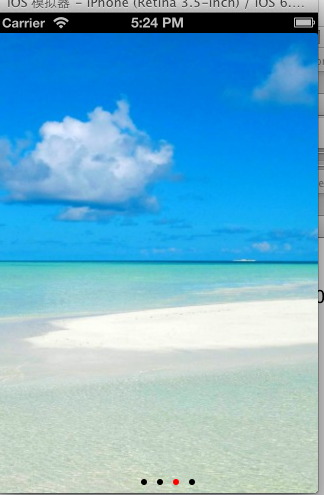

效果图如上,实现的是一个页面引导页,最后跳到主页面,主页面是一个navigationController,但是导航栏给我隐藏了。
文件目录:自己定制的viewcontroller以及navigationController
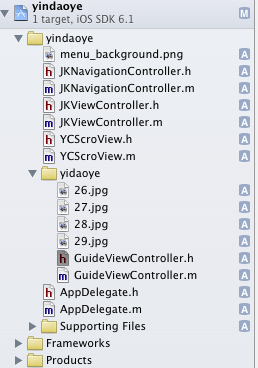
先贴代码吧。
1、首先是GuideViewController类
GuideViewController.h
#import <UIKit/UIKit.h>

#import "JKViewController.h"

@interface GuideViewController : JKViewController <UIScrollViewDelegate>

@property (strong,nonatomic) UIScrollView *scrollView;

@property (strong,nonatomic) NSMutableArray *slideImages;

@property (strong,nonatomic) UIPageControl *pageControl;

@end
GuideViewController.m
#import "GuideViewController.h"

#import "JKNavigationController.h"

@interface GuideViewController()

{

    NSTimer *fanyeTime;

}

@end

@implementation GuideViewController

@synthesize slideImages,scrollView;

@synthesize pageControl;

-(void)dealloc

{

    [fanyeTime release];

    [scrollView release];

    [slideImages release];

    [pageControl release];

}

-(void)viewDidLoad

{

    [super viewDidLoad];

    //定时器循环

    fanyeTime = [NSTimer scheduledTimerWithTimeInterval: target:self selector:@selector(runTimePage) userInfo:nil repeats:YES];

    //初始化 scrollView

    self.scrollView = [[UIScrollView alloc]initWithFrame:CGRectMake(, , , self.view.frame.size.height)];

    scrollView.bounces = YES;

    scrollView.pagingEnabled = YES;

    scrollView.delegate = self;

    scrollView.showsHorizontalScrollIndicator = NO;

    [self.view addSubview:scrollView];

    //初始化数组,并添加四张照片

    slideImages = [[NSMutableArray alloc]initWithObjects:@"26.jpg",@"27.jpg",@"28.jpg",@"29.jpg",@" ",nil];

    //初始化pageControl

    self.pageControl = [[UIPageControl alloc]initWithFrame:CGRectMake(,,,)];

    [pageControl setCurrentPageIndicatorTintColor:[UIColor redColor]];

    [pageControl setPageIndicatorTintColor:[UIColor blackColor]];

    pageControl.numberOfPages = [self.slideImages count] - ;

    pageControl.currentPage = ;

    [pageControl addTarget:self action:@selector(turnPage) forControlEvents:UIControlEventValueChanged];

    [self.view addSubview:pageControl];

    //创建四个图片 imageView

    for (int i = ; i < [slideImages count]; i++) {

        UIImageView *imageView = [[UIImageView alloc] initWithImage:[UIImage imageNamed:[slideImages objectAtIndex:i]]];        imageView.frame = CGRectMake( * i, , , self.view.frame.size.height);

        [scrollView setContentSize:CGSizeMake( * [slideImages count], self.view.frame.size.height)];

        [scrollView addSubview:imageView]; // 首页是第0页,默认从第1页开始的。所以+320。。。

    }

}

//scrollView的委托函数

-(void)scrollViewDidEndDecelerating:(UIScrollView *)scrollView

{

    NSTimeInterval secondsPerDay = **;

    NSDate *thire = [NSDate dateWithTimeIntervalSinceNow:secondsPerDay];

    [fanyeTime setFireDate:thire];

    CGFloat pagewidth = self.scrollView.frame.size.width;

    int currentPage = floor((self.scrollView.contentOffset.x - pagewidth/ ([slideImages count]+)) / pagewidth) + ;

    NSLog(@"currentPage------>%d",currentPage);

    pageControl.currentPage = currentPage;

    NSLog(@"slideImages count------>%d",[slideImages count]);

    if (currentPage==([slideImages count]-)){

        [self tiaozhuan];

    }

}

//

-(void)tiaozhuan

{

    JKNavigationController *navigationController = [[[JKNavigationController alloc] initWithRootViewController:[[[JKViewController alloc]init]autorelease]]autorelease];

    navigationController.navigationBarHidden = YES;

    [self presentViewController:navigationController animated:YES completion:nil];

}

//pagecontrol的方法

-(void)turnPage

{

    int page = pageControl.currentPage;

    NSLog(@"page----->%d",page);

    [self.scrollView scrollRectToVisible:CGRectMake(*page,,,) animated:NO];

    if (page == ) {

        [fanyeTime invalidate];

        [NSTimer scheduledTimerWithTimeInterval: target:self selector:@selector(tiaozhuan) userInfo:nil repeats:YES];

    }

}

//定时器绑定方法

-(void)runTimePage

{

    int page = pageControl.currentPage;

    page++;

    pageControl.currentPage = page;

    [self turnPage];

}

- (void)didReceiveMemoryWarning

{

    [super didReceiveMemoryWarning];

    // Dispose of any resources that can be recreated.

}

@end
2、接着是YCScroView类
YCScroView.h
#import <UIKit/UIKit.h>

@protocol TapImageDelegate <NSObject>

-(void)tapImage:(int)index;

@end

@interface YCScroView : UIView

@property (retain,nonatomic) id<TapImageDelegate>delegate;

-(id)initWithArray:(NSArray*)array WithTitle:(NSString *)title WithFrame:(CGRect)frame;

@end
YCScroView.v
#import "YCScroView.h"

#define Max 10

@interface YCScroView() <UIScrollViewDelegate>

{

    NSArray *_array;

    int pageWidth,pageHight;

}

@property (strong,nonatomic)UIScrollView *scrollView;

@property (strong,nonatomic)NSMutableArray *slideImages;

@property (strong,nonatomic)UIPageControl *pageControl;

@property (strong,nonatomic)UITapGestureRecognizer *tap;

@end

@implementation YCScroView

@synthesize scrollView,slideImages;

@synthesize pageControl;

@synthesize tap;

-(id)initWithArray:(NSArray *)array WithTitle:(NSString *)title WithFrame:(CGRect)frame

{

    self = [super initWithFrame:frame];

    if (self) {

        _array = array;

        pageWidth = frame.size.width;

        pageHight = frame.size.height;

        [self creatScollView];

    }

    return self;

}

-(void)creatScollView

{

    self.scrollView = [[UIScrollView alloc]initWithFrame:CGRectMake(, , pageWidth, pageHight)];

    scrollView.bounces = YES;

    scrollView.pagingEnabled = YES;

    scrollView.delegate = self;

    scrollView.userInteractionEnabled = YES;

    scrollView.showsHorizontalScrollIndicator = NO;

    [self addSubview:scrollView];

    slideImages = [NSMutableArray arrayWithArray:_array];

    [slideImages retain];

    self.pageControl = [[UIPageControl alloc]initWithFrame:CGRectMake(, pageHight-, , )];

    [pageControl setCurrentPageIndicatorTintColor:[UIColor whiteColor]];

    [pageControl setPageIndicatorTintColor:[UIColor grayColor]];

    pageControl.numberOfPages = [_array count];

    pageControl.currentPage = ;

      //  [pageControl addTarget:self action:@selector(turnPage) forControlEvents:UIControlEventValueChanged]; // 触摸mypagecontrol触发change这个方法事件

    [self addSubview:pageControl];

    for (int i =; i<[slideImages count]; i++) {

        UIImageView *imageView = [[UIImageView alloc]initWithImage:[UIImage imageNamed:[slideImages objectAtIndex:i]]];

        imageView.frame = CGRectMake((pageWidth * i)+ pageWidth, , pageWidth, pageHight);

        [scrollView addSubview:imageView]; // 首页是第0页,默认从第1页开始的。所以+320。。。

    }

    UIImageView *imageView = [[UIImageView alloc] initWithImage:[UIImage imageNamed:[slideImages objectAtIndex:([slideImages count]-)]]];

    imageView.frame = CGRectMake(, , pageWidth, pageHight);

    [scrollView addSubview:imageView];

    //取数组第一张图片,放在最后

    imageView = [[UIImageView alloc] initWithImage:[UIImage imageNamed:[slideImages objectAtIndex:]]];

    imageView.frame = CGRectMake((pageWidth * ([slideImages count] + )) , , pageWidth, pageHight); // 添加第1页在最后 循环

    [scrollView addSubview:imageView];

    [scrollView setContentSize:CGSizeMake(pageWidth * ([slideImages count] + ), pageHight)]; //  +上第1页和第4页  原理:4-[1-2-3-4]-1

    [scrollView setContentOffset:CGPointMake(, )];

    [self.scrollView scrollRectToVisible:CGRectMake(pageWidth,,pageWidth,pageHight) animated:NO];

    [self addTapEventOnMyScrollView];

    UIImageView *View=[[UIImageView alloc]initWithFrame:CGRectMake(, , pageWidth, )];

    View.image=[UIImage imageNamed:@"huixian.png"];

    [self addSubview:View];

    UIImageView *View1=[[UIImageView alloc]initWithFrame:CGRectMake(, , , )];

    View1.image=[UIImage imageNamed:@"lanxian.png"];

    View1.tag=;

    [self addSubview:View1];

}

-(void)addTapEventOnMyScrollView;

{

    tap = [[UIGestureRecognizer alloc] initWithTarget:self action:@selector(tapEvent)];

    [scrollView addGestureRecognizer:tap];

}

-(void)tapEvent

{

    [self.delegate tapImage:pageControl.currentPage];

}

-(void)scrollViewDidScroll:(UIScrollView *)scrollView

{

    CGFloat pagewidth = self.scrollView.frame.size.width;

    int page = floor((self.scrollView.contentOffset.x - pagewidth/([slideImages count]+))/pagewidth)+;

    page --;  // 默认从第二页开始

    pageControl.currentPage = page;

}

-(void)scrollViewDidEndDecelerating:(UIScrollView *)scrollView

{

    CGFloat pagewidth = self.scrollView.frame.size.width;

    int currentPage = floor((self.scrollView.contentOffset.x - pagewidth/ ([slideImages count]+)) / pagewidth) + ;

    if (currentPage==)

    {

        [self.scrollView scrollRectToVisible:CGRectMake( * [slideImages count],,,pageHight) animated:NO]; // 序号0 最后1页

    }

    else if (currentPage==([slideImages count]+))

    {

        [self.scrollView scrollRectToVisible:CGRectMake(,,,pageHight) animated:NO]; // 最后+1,循环第1页

    }

    UIImageView* imageView=(UIImageView*)[self viewWithTag:];

    [imageView removeFromSuperview];

    UIImageView* imageview=[[UIImageView alloc]initWithImage:[UIImage imageNamed:@"lanxian.png"]];

    imageview.frame=CGRectMake(pageControl.currentPage*, , , );

    imageview.tag=;

    [self addSubview:imageview];

}

- (void)runTimePage

{

    int page = pageControl.currentPage; // 获取当前的page

    page++;

    page = page > [slideImages count]- ?  : page ;

    pageControl.currentPage = page;

    [self turnPage];

}

// pagecontrol 选择器的方法

- (void)turnPage

{

    int page = pageControl.currentPage; // 获取当前的page

    [self.scrollView scrollRectToVisible:CGRectMake(*(page+),,,) animated:NO]; // 触摸pagecontroller那个点点 往后翻一页 +1

}

-(void)dealloc{

    [super dealloc];

}

- (BOOL)shouldAutorotateToInterfaceOrientation:(UIInterfaceOrientation)interfaceOrientation

{

    return (interfaceOrientation == UIInterfaceOrientationPortrait);

}

@end
这是来那个最主要的类,完成这两个类,基本上引导页就已经完成了。
IOS开发小功能1:引导页的开发的更多相关文章
- iOS - GitHub干货分享(APP引导页的高度集成 - DHGuidePageHUD - ②)
距上一篇博客"APP引导页的高度集成 - DHGuidePageHUD - ①"的发布有一段时间了, 后来又在SDK中补充了一些新的内容进去但是一直没来得及跟大家分享, 今天来跟大 ...
- 网页引导:jQuery插件实现的页面功能介绍引导页效果
现在很多网站不仅是介绍,更多的是有一些功能,怎么样让客户快速的知道网站有哪些功能呢?这里pagewalkthrough.js插件能帮我们实现,它是一个轻量级的jQuery插件,它可以帮助我们创建一个遮 ...
- jQuery插件实现的页面功能介绍引导页效果
新产品上线或是改版升级,我们会在用户第一次使用产品时建立一个使用向导,引导用户如何使用产品,如使用演示的方式逐一介绍界面上的功能模块,从而提升了用户体验和产品的亲和力. Helloweba.com之前 ...
- iOS常用小功能
CHENYILONG Blog 常用小功能 技术博客http://www.cnblogs.com/ChenYilong/ 新浪微博http://weibo.com/luohanchenyilong ...
- iOS 常用小功能 总结
常用小功能 iOS中的很多小功能都是非常简单的,几行代码就搞定了,比如打电话.打开网址.发邮件.发短信等 打电话 方法一(不被采用): 拨号之前会弹框询问用户是否拨号,拨完后能自动回到原应用 NSUR ...
- iOS - GitHub干货分享(APP引导页的高度集成 - DHGuidePageHUD - ①)
好长时间没更新博客, 是时候来一波干货分享了;APP引导页话不多说每一个APP都会用到,分量不重但是不可缺少,不论是APP的首次安装还是版本的更新,首先展现给用户眼前的也就只有它了吧,当然这里讲的不是 ...
- IOS开发小功能2:二维码扫描界面的设计(横线上下移动)
效果图如上,实现的是一个二维码扫描界面. 下面我贴出线条上下移动的代码,至于二维码的代码是用的第三方库. 首先是整体的结构: 注意下面的库文件一个都不能少,否则会报错. TLTiltHighlight ...
- iOS之小功能模块--彩虹动画进度条学习和自主封装改进
前言: 首先展示一下这个iOS小示例的彩色进度条动画效果: 阅读本文先说说好处:对于基础不好的读者,可以直接阅读文末尾的"如何使用彩虹动画进度条"章节,然后将我封装好的这个功能模块 ...
- 【Android】Android开发小功能,倒计时的实现。时间计时器倒计时功能。
作者:程序员小冰,GitHub主页:https://github.com/QQ986945193 新浪微博:http://weibo.com/mcxiaobing 首先给大家看一下我们今天这个最终实现 ...
随机推荐
- 【C++模版之旅】项目中一次活用C++模板(traits)的经历
曾经曾在一个项目中碰到过一个挺简单的问题,但一时又不能用普通常规的方法去非常好的解决,最后通过C++模板的活用,通过traits相对照较巧妙的攻克了这个问题.本文主要想重现问题发生,若干解决方式的比較 ...
- Linux在iptables教程基本应用防火墙
iptables它是Linux防火墙软件经常使用,下面说一下iptables设备.删除iptables规则.iptables只要打开指定的port.iptables屏蔽指定ip.ip科和解锁.删除添加 ...
- 面向对象三大特征之继承(extends)——Java笔记(六)
继承: 从一般到特殊的关系,是一种拓展关系,子类对象是父类的一种,也可称为”is a“的关系 泛化: 把子类里的共性抽取到父类里的来的过程 特化: ...
- 第4章 建造者模式(Builder Pattern)
原文 第4章 建造者模式(Builder Pattern) 定义 将一个复杂对象的构造与它的表示分离,使同样的构建过程可以创建不同的表示,这样的设计模式被称为建造者模式. 实用范围 1 当创建复杂对象 ...
- php_json入库有关
php入库json信息 有些字符需要特殊处理 //组装 $test=array(); $test["k1"]= urlencode($k1); $test["k2&quo ...
- 中英文url解码vc++源程序
本文主要讨论中文url解码实现问题,没有具体解说url编码,utf-8编码.想对编解码问题有更加具体的了解,请查阅相关文档 url编码:实质字符ascii码的十六进制.仅仅是略微有些变动,须要在前面加 ...
- windows phone8.1:Xml,Json序列化和反序列化
原文:windows phone8.1:Xml,Json序列化和反序列化 小梦本例主要实现以下四点内容: 将Car对象序列化为xml 将Car对象序列化为Json 将xml反序列化为Car对象 将js ...
- 关于fork()函数的作用
(1) 先看一个实例: #include <unistd.h>; #include <sys/types.h>; main () { pid_t pi ...
- Windows 10技术布局,谈微软王者归来
Windows 10技术布局,谈微软王者归来 每个时代都有王者,王者的成功,往往是因为恰逢其时地发布了一个成功的产品(具有里程碑意义,划时代的产品).Windows 95的成功标示着微软是PC时代的王 ...
- 深入Objective-C的动态特性 Runtime
Objective-C具有相当多的动态特性,基本的,也是经常被提到和用到的有动态类型(Dynamic typing),动态绑定(Dynamic binding)和动态加载(Dynamic loadin ...