
错误解析:org.apache.catalina.LifecycleException: Protocol handler start failed
以下是报错代码:
org.apache.catalina.LifecycleException: Protocol handler start failed
at org.apache.catalina.connector.Connector.startInternal(Connector.java:1008) ~[tomcat-embed-core-9.0.24.jar:9.0.24]

at org.apache.catalina.util.LifecycleBase.start(LifecycleBase.java:183) ~[tomcat-embed-core-9.0.24.jar:9.0.24]

at org.apache.catalina.core.StandardService.addConnector(StandardService.java:227) [tomcat-embed-core-9.0.24.jar:9.0.24]

at org.springframework.boot.web.embedded.tomcat.TomcatWebServer.addPreviouslyRemovedConnectors(TomcatWebServer.java:263) [spring-boot-2.1.8.RELEASE.jar:2.1.8.RELEASE]

at org.springframework.boot.web.embedded.tomcat.TomcatWebServer.start(TomcatWebServer.java:195) [spring-boot-2.1.8.RELEASE.jar:2.1.8.RELEASE]

at org.springframework.boot.web.servlet.context.ServletWebServerApplicationContext.startWebServer(ServletWebServerApplicationContext.java:297) [spring-boot-2.1.8.RELEASE.jar:2.1.8.RELEASE]

at org.springframework.boot.web.servlet.context.ServletWebServerApplicationContext.finishRefresh(ServletWebServerApplicationContext.java:163) [spring-boot-2.1.8.RELEASE.jar:2.1.8.RELEASE]

at org.springframework.context.support.AbstractApplicationContext.refresh(AbstractApplicationContext.java:552) [spring-context-5.1.9.RELEASE.jar:5.1.9.RELEASE]

at org.springframework.boot.web.servlet.context.ServletWebServerApplicationContext.refresh(ServletWebServerApplicationContext.java:141) [spring-boot-2.1.8.RELEASE.jar:2.1.8.RELEASE]

at org.springframework.boot.SpringApplication.refresh(SpringApplication.java:744) [spring-boot-2.1.8.RELEASE.jar:2.1.8.RELEASE]

at org.springframework.boot.SpringApplication.refreshContext(SpringApplication.java:391) [spring-boot-2.1.8.RELEASE.jar:2.1.8.RELEASE]

at org.springframework.boot.SpringApplication.run(SpringApplication.java:312) [spring-boot-2.1.8.RELEASE.jar:2.1.8.RELEASE]

at org.springframework.boot.SpringApplication.run(SpringApplication.java:1215) [spring-boot-2.1.8.RELEASE.jar:2.1.8.RELEASE]

at org.springframework.boot.SpringApplication.run(SpringApplication.java:1204) [spring-boot-2.1.8.RELEASE.jar:2.1.8.RELEASE]

at com.job.subsidy.JobsubsidyApplication.main(JobsubsidyApplication.java:23) [classes/:na]

at sun.reflect.NativeMethodAccessorImpl.invoke0(Native Method) ~[na:1.8.0_171]

at sun.reflect.NativeMethodAccessorImpl.invoke(NativeMethodAccessorImpl.java:62) ~[na:1.8.0_171]

at sun.reflect.DelegatingMethodAccessorImpl.invoke(DelegatingMethodAccessorImpl.java:43) ~[na:1.8.0_171]

at java.lang.reflect.Method.invoke(Method.java:498) ~[na:1.8.0_171]

at org.springframework.boot.devtools.restart.RestartLauncher.run(RestartLauncher.java:49) [spring-boot-devtools-2.1.8.RELEASE.jar:2.1.8.RELEASE]
Caused by: java.net.BindException: Address already in use: bind
at sun.nio.ch.Net.bind0(Native Method) ~[na:1.8.0_171]

at sun.nio.ch.Net.bind(Net.java:433) ~[na:1.8.0_171]

at sun.nio.ch.Net.bind(Net.java:425) ~[na:1.8.0_171]

at sun.nio.ch.ServerSocketChannelImpl.bind(ServerSocketChannelImpl.java:223) ~[na:1.8.0_171]

at sun.nio.ch.ServerSocketAdaptor.bind(ServerSocketAdaptor.java:74) ~[na:1.8.0_171]

at org.apache.tomcat.util.net.NioEndpoint.initServerSocket(NioEndpoint.java:230) ~[tomcat-embed-core-9.0.24.jar:9.0.24]

at org.apache.tomcat.util.net.NioEndpoint.bind(NioEndpoint.java:213) ~[tomcat-embed-core-9.0.24.jar:9.0.24]

at org.apache.tomcat.util.net.AbstractEndpoint.bindWithCleanup(AbstractEndpoint.java:1124) ~[tomcat-embed-core-9.0.24.jar:9.0.24]

at org.apache.tomcat.util.net.AbstractEndpoint.start(AbstractEndpoint.java:1210) ~[tomcat-embed-core-9.0.24.jar:9.0.24]

at org.apache.coyote.AbstractProtocol.start(AbstractProtocol.java:585) ~[tomcat-embed-core-9.0.24.jar:9.0.24]

at org.apache.catalina.connector.Connector.startInternal(Connector.java:1005) ~[tomcat-embed-core-9.0.24.jar:9.0.24]

... 19 common frames omitted
错误原因:端口被占用,所以启动失败。
解决方法:
第一种解决方法:简单粗暴方式:直接修改端口号,重启项目。
第二种解决方法:关掉java进程,再重启项目。
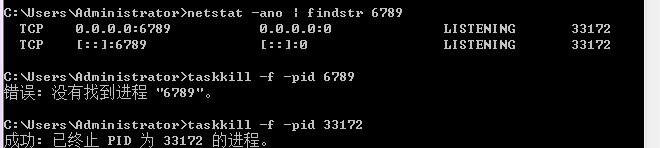
第三种解决方法:或者直接在命令行操作:
      使用命令:netstat -nao|findstr 端口号(端口号是自己在项目里自己设置的)

      杀死这个端口号的进程,使用命令:taskkill /pid 进程号(这进程号是自己服务器上的进程号)-t -f

      图片中的第二行TCP中的 6789 是为端口被占用 进程号为 33172
以下是运行cmd小黑窗的结果(咳咳,那个错误不要在意[尴尬]/[尴尬]/[尴尬][表情包])
错误解析:org.apache.catalina.LifecycleException: Protocol handler start failed的更多相关文章
- 错误:org.apache.catalina.LifecycleException: Protocol handler start failed
org.apache.catalina.LifecycleException: Protocol handler start failed at org.apache.catalina.connect ...
- springboot启动端口占用问题,报错org.apache.catalina.LifecycleException: Protocol handler start failed
解决办法,找到被占用的端口
- Caused by: org.apache.catalina.LifecycleException: A child container failed during start
错误提示: 严重: A child container failed during start java.util.concurrent.ExecutionException: org.apache. ...
- Spring Boot启动提示:org.apache.catalina.LifecycleException: A child container failed during start
一.问题回顾 最近在做一个新项目,从git上下载导入idea后,启动项目,但是报了如下错误: java.util.concurrent.ExecutionException: org.apache.c ...
- 【LifecycleException】: org.apache.catalina.LifecycleException: A child container failed during start 解决
看了好多种解决方案: 第一种:从tomcat remove project -> clean project -> reboot project; 第二种:说用到的 jasper jsp解 ...
- linux中搭建solr集群出现org.apache.catalina.LifecycleException: Failed to initialize component ,解决办法
07-Jan-2018 20:19:21.489 严重 [main] org.apache.catalina.core.StandardService.initInternal Failed to i ...
- 启动项目报错:org.apache.catalina.LifecycleException: Failed to start component
原因 环境异常重启,项目java进程未关闭,原项目的端口依旧在占用. 一般为8080端口被占用 解决方法 以下两种方法都可以解决,原理相同(结束异常进程) 1. 简单粗暴: 打开任务管理器找到java ...
- maven运行出现错误:Caused by: org.apache.catalina.LifecycleException: Failed to start component [StandardEngine[Tomcat].StandardHost[localhost].StandardContext[]](xjl456852原创)
maven在使用tomcat插件tomcat7-maven-plugin:2.2:run运行项目,出现下面错误: 严重: A child container failed during start j ...
- Tomcat启动报错:org.apache.catalina.LifecycleException: Failed to start component...java.util.zip.ZipException: error in opening zip file
1.项目环境 IntelliJ IDEA2018.1.6 apache-tomcat-8.0.53 基于springboot开发的项目 maven3.5.3 2.出现问题 从svn同步下项目 启动to ...
随机推荐
- 入职大厂,齐姐精选的 9 道 Java 集合面试题
Java 集合框架其实都讲过了,有一篇讲 Collection 的,有一篇讲 HashMap 的,那没有看过的小伙伴快去补下啦,文末也都有链接:看过的小伙伴,那本文就是检测学习成果的时候啦 今天这篇文 ...
- js 递归的理解
友情提示:阅读本文需花 3分钟左右! 递归函数必须接受参数. (比如我要递归谁?) 在递归函数的定义初始,应该有一个判断条件,当参数满足这个条件的时候,函数停止执行,并返回值.(指定退出条件,否则就会 ...
- axio跨域请求,vue中的config的配置项。
这是我用 vue cli 脚手架搭建的跨域.以上是可以请求到的.
- day33 Pyhton 常用模块03
一.正则表达式: 1.元字符 . 匹配除换行符以外的任意字符 \w 匹配字母或数字或下划线 \s 匹配任意的空白符 \d 匹配数字 \n 匹配一个换行符 \t 匹配一个制表符 \b 匹配一个单词的结尾 ...
- 新手学习C语言/C++编程你所必须要了解的知识!从计算机原理开始!
C语言是面向过程的,而C++是面向对象的 C和C++的区别: C是一个结构化语言,它的重点在于算法和数据结构.C程序的设计首要考虑的是如何通过一个过程,对输入(或环境条件)进行运算处理得到输出(或实现 ...
- gti 常用命令
git add 文件 : 追踪指定文件git add . :追踪所有的文件git commit -m "注释" : 提交报本地仓库git push : 推送远程仓库git pull ...
- 【API管理 APIM】APIM中如何配置使用URL路径的方式传递参数(如由test.htm?name=xxx 变为test\xxx)
问题描述 在默认的URL传递参数中,我们使用的是https://test01.azure-api.cn/echo/resource?param1=sample¶m2=testname这 ...
- 【转】Python3 正则表达式特殊符号及用法(详细列表)
转载自鱼c论坛:https://fishc.com.cn/forum.php?mod=viewthread&tid=57691&extra=page%3D1%26filter%3Dty ...
- node的function函数和路由代码的小例子
1.node事件循环 事件: const events=require("events"); emt=new events.EventEmitter(); function eve ...
- Aspose.Words实现邮件合并功能和打印
前言 最近公司要做一个B/S架构的web打印系统,主要是可以上传.下载.邮件合并.打印等等,还有就是角色的分配.用户的创建.日志记录等等,跟一般的web系统一样.可能不一样的就是需求:想把excel的 ...