
算法(Algorithms)第4版 练习 1.5.2
0 1 2 3 4 5 6 7 8 9

10 components

9 0

0 1 2 3 4 5 6 7 8

9 components

3 4

0 1 2  4 5 6 7 8 0

8 components

5 8

0 1 2 4 4  6 7 8 0

7 components

7 2

0 1 2 4 4 8 6  8 0

6 components

2 1

0 1  4 4 8 6 2 8 0

5 components

5 7

0 1 1 4 4 8 6 2  0

4 components

0 3

 1 1 4 4 8 6 2 1 0

3 components

4 2

4 1 1 4  8 6 2 1 0

2 components
森林图:
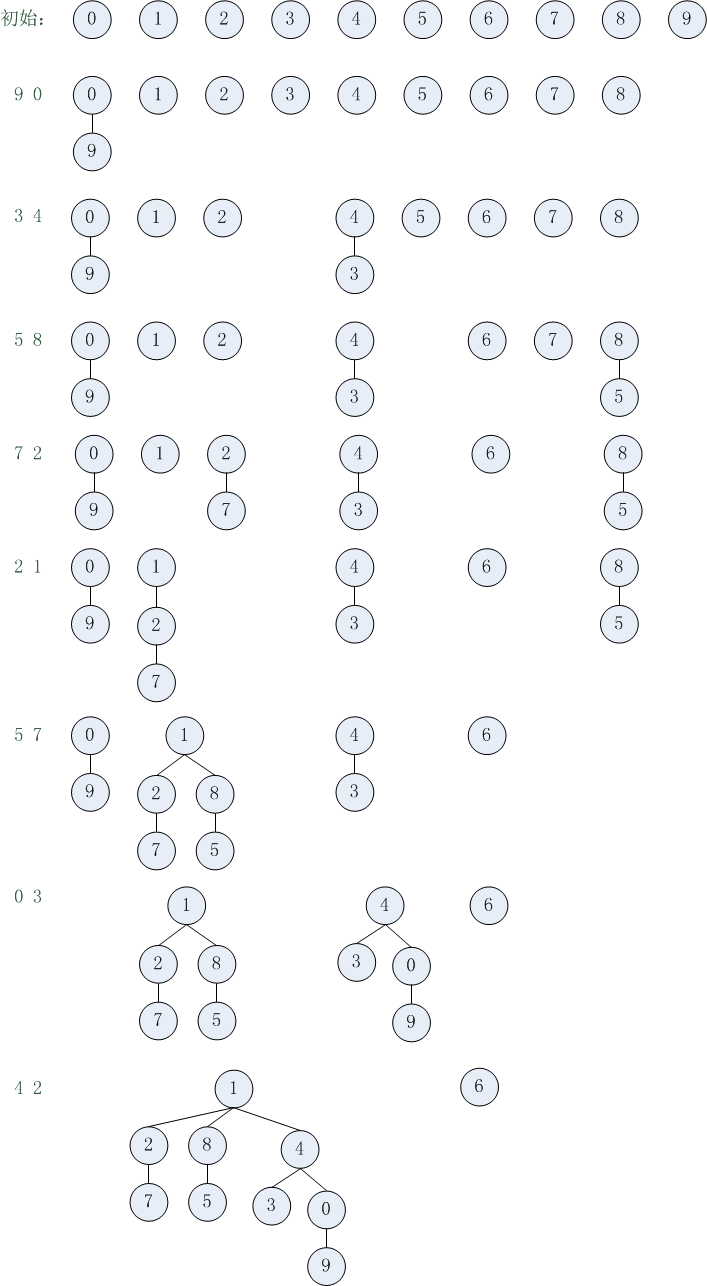
操作次数分析:
find函数每次访问数组次数是1 + 2 * depth
connected函数每次调用两次find函数
union函数每次调用两次find函数(如果两个连接点不在同一个树的话,则多一次数组访问)
  public static void main(String[] args) {

        //initialize N components

        int N = StdIn.readInt();

        UFQuickUnion uf = new UFQuickUnion(N);

        StdOut.println(uf);

        while(!StdIn.isEmpty()) {

            int p = StdIn.readInt();

            int q = StdIn.readInt();

            if(uf.connected(p, q)) {//ignore if connected

                StdOut.println(p + " " + q + " is connected");

                continue;

            }

            uf.union(p, q);//connect p and q

            StdOut.println(p + " " + q);

            StdOut.println(uf);

        }

    }
对于这个client,对每个数据对,都调用一次connected函数和union函数。
下边对数组访问次数进行分析:
9 0:9和0的深度都为0,find访问数组次数为1,connected为2 * 1, union为2 * 1 + 1,总的为2 * 1 + 2 * 1 + 1
3 4:3和4的深度都为0,find访问数组次数为1,connected为2 * 1, union为2 * 1 + 1,总的为2 * 1 + 2 * 1 + 1
5 8:5和8的深度都为0,find访问数组次数为1,connected为2 * 1, union为2 * 1 + 1,总的为2 * 1 + 2 * 1 + 1
7 2:7和2的深度都为0,find访问数组次数为1,connected为2 * 1, union为2 * 1 + 1,总的为2 * 1 + 2 * 1 + 1
2 1:2和1的深度都为0,find访问数组次数为1,connected为2 * 1, union为2 * 1 + 1,总的为2 * 1 + 2 * 1 + 1
5 7:5的深度为1,7的深度为2。find访问数组次数分别为3、5,connected为3 + 5, union为3 + 5 + 1,总的为3 + 5 +3 + 5 + 1
0 3:0的深度为0,3的深度为1。find访问数组次数分别为1、3,connected为1 + 3, union为1 + 3 + 1,总的为1 + 3 +1 + 3 + 1
4 2:4的深度为0,2的深度为1。find访问数组次数分别为1、3,connected为1 + 3, union为1 + 3 + 1,总的为1 + 3 +1 + 3 + 1
源代码:
package com.qiusongde;

import edu.princeton.cs.algs4.StdIn;

import edu.princeton.cs.algs4.StdOut;

public class UFQuickUnion {

    private int[] id;//save the site's parent link(site indexed)

    private int count;//number of components

    public UFQuickUnion(int n) {

        count = n;

        id = new int[n];

        for(int i = 0; i < n; i++)

            id[i] = i;

    }

    public int count() {

        return count;

    }

    public boolean connected(int p, int q) {

        return find(p) == find(q);

    }

    public int find(int p) {

        //find root

        //id[p] save the parent of p

        while(p != id[p])

            p = id[p];

        return p;

    }

    public void union(int p, int q) {

        int pRoot = find(p);//find pRoot

        int qRoot = find(q);//find qRoot

        if(pRoot == qRoot)

            return;

        id[pRoot] = qRoot;

        count--;

    }

    @Override

    public String toString() {

        String s = "";

        for(int i = 0; i < id.length; i++) {

            s += id[i] + " ";

        }

        s += "\n" + count + " components";

        return s;

    }

    public static void main(String[] args) {

        //initialize N components

        int N = StdIn.readInt();

        UFQuickUnion uf = new UFQuickUnion(N);

        StdOut.println(uf);

        while(!StdIn.isEmpty()) {

            int p = StdIn.readInt();

            int q = StdIn.readInt();

            if(uf.connected(p, q)) {//ignore if connected

                StdOut.println(p + " " + q + " is connected");

                continue;

            }

            uf.union(p, q);//connect p and q

            StdOut.println(p + " " + q);

            StdOut.println(uf);

        }

    }

}
算法(Algorithms)第4版 练习 1.5.2的更多相关文章
- 1.2 Data Abstraction(算法 Algorithms 第4版)
1.2.1 package com.qiusongde; import edu.princeton.cs.algs4.Point2D; import edu.princeton.cs.algs4.St ...
- 1.1 BASIC PROGRAMMING MODEL(算法 Algorithms 第4版)
1.1.1 private static void exercise111() { StdOut.println("1.1.1:"); StdOut.println((0+15)/ ...
- ubuntu命令行下java工程编辑与算法(第四版)环境配置
ubuntu命令行下java工程编辑与算法(第四版)环境配置 java 命令行 javac java 在学习算法(第四版)中的实例时,因需要安装配套的java编译环境,可是在编译java文件的时候总是 ...
- 配置算法(第4版)的Java编译环境
1. 下载 1.1 JDK http://www.oracle.com/technetwork/java/javase/downloads/index.html选择“Windows x64 180.5 ...
- 算法(第四版)C# 习题题解——1.3.49 用 6 个栈实现一个 O(1) 队列
因为这个解法有点复杂,因此单独开一贴介绍. 那么这里就使用六个栈来解决这个问题. 这个算法来自于这篇论文. 原文里用的是 Pure Lisp,不过语法很简单,还是很容易看懂的. 先导知识——用两个栈模 ...
- 在Eclipse下配置算法(第四版)运行环境
第一步:配置Eclipse运行环境 Eclipse运行环境配置过程是很简单的,用过Eclipse进行java开发或学习的同学应该都很熟悉这个过程了. 配置过程: (1)系统环境:Windows7 64 ...
- 排序算法总结(C语言版)
排序算法总结(C语言版) 1. 插入排序 1.1 直接插入排序 1.2 Shell排序 2. 交换排序 2.1 冒泡排序 2.2 快速排序 3. 选择 ...
- 算法(第四版)C#题解——2.1
算法(第四版)C#题解——2.1 写在前面 整个项目都托管在了 Github 上:https://github.com/ikesnowy/Algorithms-4th-Edition-in-Csh ...
- 《算法》第四版 IDEA 运行环境的搭建
<算法>第四版 IDEA 运行环境的搭建 新建 模板 小书匠 在搭建之初,我是想不到会出现如此之多的问题.我看了网上的大部分教程,都是基于Eclipse搭建的,还没有使用IDEA搭建的教程 ...
- 常见排序算法题(java版)
常见排序算法题(java版) //插入排序: package org.rut.util.algorithm.support; import org.rut.util.algorithm.Sor ...
随机推荐
- Cocos2D-X2.2.3学习笔记5(UI系统)
前言: 1.字体 2.标签 3.菜单 4.进度条 5.计时器 Cocos2d-x中得UI控件没有几个.在游戏制作的过程中也不须要什么UI.即使有些复杂的UI,那都得我们自己来封装的.比方.关卡选择. ...
- ckediter一些小的问题解决办法
上传图片后,不能看到缩略图. 解决的方法是: BaseDir = "";Thumbnails.Dir = BaseDir + "_thumbs/"; 改为 Th ...
- dynamic与var
dynamic与var示例 var是一种语法省略写法,编译器会根据上下文推断出正确的类型. , , , , , , , }; foreach (var item in scores) { Consol ...
- wireshark:Couldn't run /usr/bin/dumpcap in child process: Permission denied
When start wireshark, I met an error like: 引用 Couldn't run /usr/bin/dumpcap in child process: Permis ...
- 在ListView的GroupItem头中显示每列的Summary
问题描述 WPF自带的ListView和DataGrid控,都提供了数据分组的支持,并可以对分组的Header进行自定义.但是,如果想在每个分组的Header中,显示出本分组的"小计&quo ...
- 【BZOJ2790】[Poi2012]Distance 筛素数+调和级数
[BZOJ2790][Poi2012]Distance Description 对于两个正整数a.b,这样定义函数d(a,b):每次操作可以选择一个质数p,将a变成a*p或a/p, 如果选择变成a/p ...
- Linux根目录下重要文件夹
bin存放系统命令的目录,普通用户和超级用户都可以执行,不过放在这里的命令在单用户模式下也可以执行 sbin保存和系统环境设置相关的命令,只有超级用户可以使用这些命令进行系统环境的设置,但有些命令可以 ...
- 教你使用SQL查询(1-12)
教你使用 Select 查询语句 (1) SELECT 语句基本语法简介 http://jimshu.blog.51cto.com/3171847/1363101(2) TOP 和 OFFSET 筛选 ...
- python -virtualenvwrapper 切换不同的python版本
环境: 安装了python2.7和python3.4, 两个版本都安装了virtualenv和virtualenvwrapper 在windows cmd中键入mkvirtualenv -p C:\P ...
- Android Studio 1.1 使用介绍及导入 jar 包和第三方依赖库
导入 jar 包 导入 jar 包的方式非常简单,就是在项目中的 libs 中放入你需要导入的 jar 包,然后右键你的 jar 文件,选择“add as a library”即可在你的项目中使用这个 ...