
java框架之Struts2(3)-OGNL&ValueStack
OGNL
概述
OGNL 是 Object-Graph Navigation Language 的缩写,它是一种第三方的、功能强大的表达式语言,通过它简单一致的表达式语法,可以存取对象的任意属性,调用对象的方法,遍历整个对象的结构图,实现字段类型转化等功能。它使用相同的表达式去存取对象的属性。
入门
java工程下使用
package com.zze.bean;

import java.util.Date;

public class User {
    private String name;
    private Integer age;
    private Date birthday;

    public String getName() {
        return name;
    }

    public void setName(String name) {
        this.name = name;
    }

    public Integer getAge() {
        return age;
    }

    public void setAge(Integer age) {
        this.age = age;
    }

    public Date getBirthday() {
        return birthday;
    }

    public void setBirthday(Date birthday) {
        this.birthday = birthday;
    }

    @Override
    public String toString() {
        return "User{" +
                "name='" + name + '\'' +
                ", age=" + age +
                ", birthday=" + birthday +
                '}';
    }
}
com.zze.bean.User
@Test
public void test1() throws OgnlException {
    // 获得 context
    OgnlContext context = new OgnlContext();
    // 获得根对象
    Object root = context.getRoot();
    Object value = Ognl.getValue("'hello Struts2'.length()", context, root);
    System.out.println(value);

    /*
    13
     */
}
例:调用对象方法
@Test
public void test2() throws OgnlException {
    // 获得 context
    OgnlContext context = new OgnlContext();
    // 获得根对象
    Object root = context.getRoot();
    // 执行表达式:@类名@方法名
    Object value = Ognl.getValue("@java.lang.Math@random()", context, root);
    System.out.println(value);
    /*
    0.6367826736345159
     */
}
例:调用静态方法
@Test
public void test3() throws OgnlException {
    // 获得 context
    OgnlContext context = new OgnlContext();
    User user = new User();
    user.setName("张三");
    user.setAge(12);
    context.setRoot(user);
    // 表达式直接写放入 root 中对象的属性名称即可取到对应属性名的值
    Object name = Ognl.getValue("name", context, context.getRoot());
    Object age = Ognl.getValue("age", context, context.getRoot());
    System.out.println(name);
    System.out.println(age);
    System.out.println(age.getClass());
    /*
    张三
    12
    class java.lang.Integer
     */
}
例:访问 Root 中的数据
@Test
public void test4() throws OgnlException {
    // 获得 context
    OgnlContext context = new OgnlContext();
    User user = new User();
    user.setName("张三");
    user.setAge(12);
    context.put("user", user);
    // 表达式直接写放入 context 中 #key 即可取到对应值
    Object name = Ognl.getValue("#user.name", context, context.getRoot());
    Object age = Ognl.getValue("#user.age", context, context.getRoot());
    System.out.println(name);
    System.out.println(age);
    /*
    张三
    12
     */
}
例:访问 context 中的数据
Struts中使用
<%@ page contentType="text/html;charset=UTF-8" language="java" %>
<%@ taglib prefix="s" uri="/struts-tags" %>
<html>
<head>
    <title>Test</title>
</head>
<body>
<%--访问对象方法--%>
<s:property value="'hello Struts2'.length()"/>

<hr>

<%--
访问静态方法
需要设置常量:struts.ognl.allowStaticMethodAccess = true
--%>
<s:property value="@java.lang.Math@random()"/>
</body>
</html>
例:访问对象方法 & 静态方法
特殊符号
#
<%@ page contentType="text/html;charset=UTF-8" language="java" %>
<%@ taglib prefix="s" uri="/struts-tags" %>
<html>
<head>
    <title>Test</title>
</head>
<body>
<%
    request.setAttribute("str", "托马斯的小货车");
%>
<s:property value="#request.str"/>
</body>
</html>
'#' 号可以用来获取值栈中 context 区域的数据
<%@ page contentType="text/html;charset=UTF-8" language="java" %>
<%@ taglib prefix="s" uri="/struts-tags" %>
<html>
<head>
    <title>Test</title>
</head>
<body>
<%--构建 List--%>
<s:iterator var="letter" value="{'a','b','c'}">
    <s:property value="letter"/>|<s:property value="#letter"/>
</s:iterator>
<hr>
<%--构建 Map--%>
<s:iterator var="entry" value="#{1:'aa',2:'bb',3:'cc'}">
    <s:property value="key"/>|<s:property value="#entry.key"/>
    <s:property value="value"/>|<s:property value="#entry.value"/>
    <br>
</s:iterator>
</body>
</html>
'#' 号可以用来构建一个 Map
%
<%@ page contentType="text/html;charset=UTF-8" language="java" %>
<%@ taglib prefix="s" uri="/struts-tags" %>
<html>
<head>
    <title>Test</title>
</head>
<body>
<%
    request.setAttribute("name", "托马斯");
%>

<s:property value="#request.name"/>
<br>
<%--
按如下嵌套标签会报错:
<s:textfield name="name" value="<s:property value="#request.name"/>" />
可以利用 %{} 强制解析表达式
--%>

<s:textfield name="name" value="%{#request.name}" />
</body>
</html>
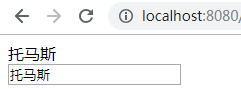
'%' 号可以用来强制解析字符串为表达式
$
<validators>
     <field name=”intb”>
             <field-validator type=”int”>
             <param name=”min”>10</param>
             <param name=”max”>100</param>
             < message>BAction-test校验:数字必须为${min}为${max}之间!</message>
         </field-validator>
     </field>
</validators>
'$' 号可以用来在配置文件中引用值栈中的值
ValueStack
概述
ValueStack 是 Struts 的一个接口,字面意义为值栈,OgnlValueStack 是 ValueStack 的实现类,客户端发起一个请求 Struts2 架构会创建一个 Action 实例同时创建一个 OgnlValueStack 值栈实例,OgnlValueStack 贯穿整个Action 的生命周期,Struts2 中使用 OGNL 将请求 Action 的参数封装为对象存储到值栈中,并通过 OGNL 表达式读取值栈中对象的属性值。
ValueStack 其实类似一个数据中转站,Struts2 中的数据都保存在值栈中。
值栈的内部结构
ValueStack 中有两个主要的区域:
- root:其实就是一个 ArrayList。
- context:其实就是一个 Map。
context 中放置了 web 开发中常用对象的引用,例如:
request:原生 Servlet 请求对象。
session:会话对象。
application:ServletContext对象
parameters:请求参数对象。
attr:依次在 request、session、application 寻找匹配值。
所说的操作值栈,通常指的是操作 ValueStack 中的 root 区域。
在 request、session、application 中存取值就相当于操作 ValueStack 的 context 区域。
值栈与ActionContext的关系
首先请求时会经过核心过滤器,查看核心过滤器的 doFilter 方法:
 public void doFilter(ServletRequest req, ServletResponse res, FilterChain chain) throws IOException, ServletException {

     HttpServletRequest request = (HttpServletRequest) req;
     HttpServletResponse response = (HttpServletResponse) res;

     try {
         if (excludedPatterns != null && prepare.isUrlExcluded(request, excludedPatterns)) {
             chain.doFilter(request, response);
         } else {
             prepare.setEncodingAndLocale(request, response);
             prepare.createActionContext(request, response);
             prepare.assignDispatcherToThread();
             request = prepare.wrapRequest(request);
             ActionMapping mapping = prepare.findActionMapping(request, response, true);
             if (mapping == null) {
                 boolean handled = execute.executeStaticResourceRequest(request, response);
                 if (!handled) {
                     chain.doFilter(request, response);
                 }
             } else {
                 execute.executeAction(request, response, mapping);
             }
         }
     } finally {
         prepare.cleanupRequest(request);
     }
 }
org.apache.struts2.dispatcher.ng.filter.StrutsPrepareAndExecuteFilter#doFilter
创建 ActionContext 就在第 11 行,查看 createActionContext 方法:
 public ActionContext createActionContext(HttpServletRequest request, HttpServletResponse response) {
     ActionContext ctx;
     Integer counter = 1;
     Integer oldCounter = (Integer) request.getAttribute(CLEANUP_RECURSION_COUNTER);
     if (oldCounter != null) {
         counter = oldCounter + 1;
     }

     ActionContext oldContext = ActionContext.getContext();
     if (oldContext != null) {
         // detected existing context, so we are probably in a forward
         ctx = new ActionContext(new HashMap<String, Object>(oldContext.getContextMap()));
     } else {
         ValueStack stack = dispatcher.getContainer().getInstance(ValueStackFactory.class).createValueStack();
         stack.getContext().putAll(dispatcher.createContextMap(request, response, null));
         ctx = new ActionContext(stack.getContext());
     }
     request.setAttribute(CLEANUP_RECURSION_COUNTER, counter);
     ActionContext.setContext(ctx);
     return ctx;
 }
org.apache.struts2.dispatcher.ng.PrepareOperations#createActionContext
直接从 14 行开始看,在 14 行创建了值栈对象 stack ,接着在 16 行将 stack.getContext() 传给了 ActionContext 来创建 ActionContext 实例,而 stack.getContext() 中拥有对值栈的引用,也就是说这部分执行完后在 ActionContext 中是直接可以取到值栈的。
结论:ActionContext 之所以能访问 Servlet 的 API ,是因为在其内部有值栈的引用,而值栈的 context 部分又拥有对 Servlet 常用对象(request、session、servletContext)的引用。
ValueStack的获得
通过上一节,已经知道是可以通过 ActionContext 获取到值栈的引用的。接着看核心过滤器的 doFilter 方法:
public void doFilter(ServletRequest req, ServletResponse res, FilterChain chain) throws IOException, ServletException {

    HttpServletRequest request = (HttpServletRequest) req;
    HttpServletResponse response = (HttpServletResponse) res;

    try {
        if (excludedPatterns != null && prepare.isUrlExcluded(request, excludedPatterns)) {
            chain.doFilter(request, response);
        } else {
            prepare.setEncodingAndLocale(request, response);
            prepare.createActionContext(request, response);
            prepare.assignDispatcherToThread();
            request = prepare.wrapRequest(request);
            ActionMapping mapping = prepare.findActionMapping(request, response, true);
            if (mapping == null) {
                boolean handled = execute.executeStaticResourceRequest(request, response);
                if (!handled) {
                    chain.doFilter(request, response);
                }
            } else {
                execute.executeAction(request, response, mapping);
            }
        }
    } finally {
        prepare.cleanupRequest(request);
    }
}
org.apache.struts2.dispatcher.ng.filter.StrutsPrepareAndExecuteFilter#doFilter
看到 21 行,这行用来开始执行 Action,查看 executeAction 方法:
 public void executeAction(HttpServletRequest request, HttpServletResponse response, ActionMapping mapping) throws ServletException {
     dispatcher.serviceAction(request, response, mapping);
 }
org.apache.struts2.dispatcher.ng.ExecuteOperations#executeAction
接着看到 serviceAction 方法:
 public void serviceAction(HttpServletRequest request, HttpServletResponse response, ActionMapping mapping)
         throws ServletException {

     Map<String, Object> extraContext = createContextMap(request, response, mapping);

     // If there was a previous value stack, then create a new copy and pass it in to be used by the new Action
     ValueStack stack = (ValueStack) request.getAttribute(ServletActionContext.STRUTS_VALUESTACK_KEY);
     boolean nullStack = stack == null;
     if (nullStack) {
         ActionContext ctx = ActionContext.getContext();
         if (ctx != null) {
             stack = ctx.getValueStack();
         }
     }
     if (stack != null) {
         extraContext.put(ActionContext.VALUE_STACK, valueStackFactory.createValueStack(stack));
     }

     String timerKey = "Handling request from Dispatcher";
     try {
         UtilTimerStack.push(timerKey);
         String namespace = mapping.getNamespace();
         String name = mapping.getName();
         String method = mapping.getMethod();

         ActionProxy proxy = getContainer().getInstance(ActionProxyFactory.class).createActionProxy(
                 namespace, name, method, extraContext, true, false);

         request.setAttribute(ServletActionContext.STRUTS_VALUESTACK_KEY, proxy.getInvocation().getStack());

         // if the ActionMapping says to go straight to a result, do it!
         if (mapping.getResult() != null) {
             Result result = mapping.getResult();
             result.execute(proxy.getInvocation());
         } else {
             proxy.execute();
         }

         // If there was a previous value stack then set it back onto the request
         if (!nullStack) {
             request.setAttribute(ServletActionContext.STRUTS_VALUESTACK_KEY, stack);
         }
     } catch (ConfigurationException e) {
         logConfigurationException(request, e);
         sendError(request, response, HttpServletResponse.SC_NOT_FOUND, e);
     } catch (Exception e) {
         if (handleException || devMode) {
             sendError(request, response, HttpServletResponse.SC_INTERNAL_SERVER_ERROR, e);
         } else {
             throw new ServletException(e);
         }
     } finally {
         UtilTimerStack.pop(timerKey);
     }
 }
org.apache.struts2.dispatcher.Dispatcher#serviceAction
直接看 41 行,当值栈不为空时,将值栈的引用放入了 request 域。
结论:除了通过 ActionContext 获得值栈,我们还可以通过 request 获取到值栈。
所以在 Action 中我们可以通过如下代码获取值栈:
// 获取值栈方式 1 、通过 ActionContext
ValueStack valueStack1 = ActionContext.getContext().getValueStack();

// 获取值栈方式 2 、通过 request
// STRUTS_VALUESTACK_KEY = "struts.valueStack";
ValueStack valueStack2 = (ValueStack)ServletActionContext.getRequest().getAttribute(ServletActionContext.STRUTS_VALUESTACK_KEY);

System.out.println(valueStack1 == valueStack2); // true
操作值栈
方法一:在Action中提供属性的get方法
默认情况下,Struts2 会将访问的 Action 对象压入值栈,所以在 Action 中提供的属性会随之存入值栈:
package com.zze.action;

import com.opensymphony.xwork2.ActionSupport;

public class Test1Action extends ActionSupport {
    private String name;

    private Integer age;

    public String getName() {
        return name;
    }

    public Integer getAge() {
        return age;
    }

    @Override
    public String execute() throws Exception {
        this.name = "张三";
        this.age = 19;
        return super.execute();
    }
}
Action
<%@ page contentType="text/html;charset=UTF-8" language="java" %>
<%@ taglib prefix="s" uri="/struts-tags" %>
<html>
<head>
    <title>Test</title>
</head>
<body>
<s:property value="name"/>
<s:property value="age"/>
</body>
</html>
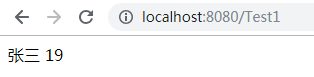
jsp
方法二:手动调用值栈方法
我们已经知道了如何在 Action 中获取值栈,当然也可以在 Action 中操作值栈:
package com.zze.action;

import com.opensymphony.xwork2.ActionContext;
import com.opensymphony.xwork2.ActionSupport;

public class Test2Action extends ActionSupport {
    @Override
    public String execute() throws Exception {
        ActionContext.getContext().getValueStack().set("name","张三");
        ActionContext.getContext().getValueStack().set("age",20);
        return super.execute();
    }
}
Action
<%@ page contentType="text/html;charset=UTF-8" language="java" %>
<%@ taglib prefix="s" uri="/struts-tags" %>
<html>
<head>
    <title>Test</title>
</head>
<body>
<s:property value="name"/>
<s:property value="age"/>
</body>
</html>
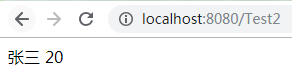
jsp
查看值栈数据
Struts2 为方便我们调试,给我们提供了一个标签,我们用这个标签可以直接查看到值栈中的数据:
<%@ page contentType="text/html;charset=UTF-8" language="java" %>
<%@ taglib prefix="s" uri="/struts-tags" %>
<html>
<head>
    <title>Test</title>
</head>
<body>
<s:debug/>
</body>
</html>
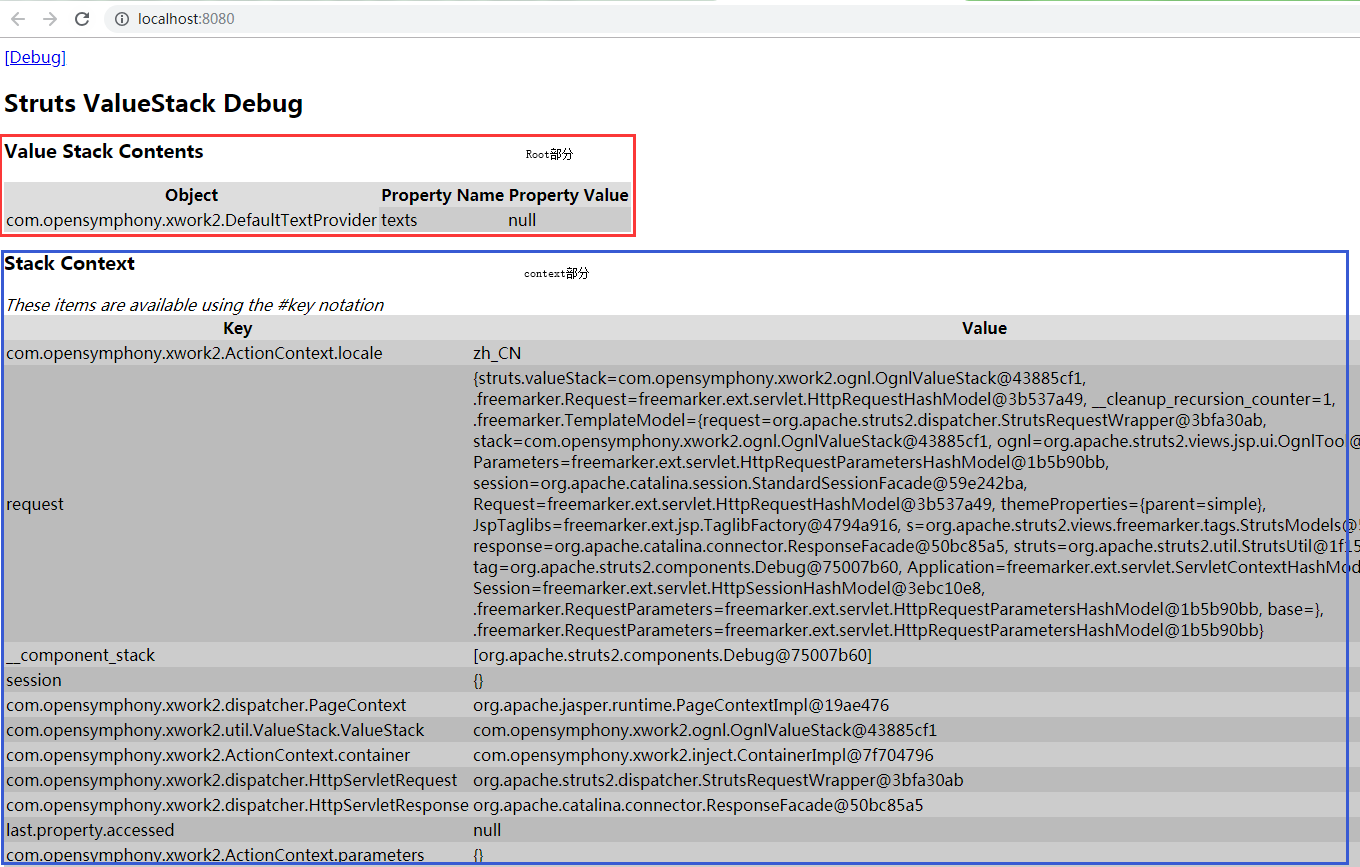
jsp
标签获取值栈数据
已经知道如何操作值栈,现在我们看一下如何在页面中获取到值栈中的数据。
Struts2 为简易我们在页面中获取值栈数据的操作,给我们提供了一些标签,看如下示例:
准备
package com.zze.bean;

import java.util.Date;

public class User {
    private String name;
    private Integer age;
    private Date birthday;

    public String getName() {
        return name;
    }

    public void setName(String name) {
        this.name = name;
    }

    public Integer getAge() {
        return age;
    }

    public void setAge(Integer age) {
        this.age = age;
    }

    public Date getBirthday() {
        return birthday;
    }

    public void setBirthday(Date birthday) {
        this.birthday = birthday;
    }

    @Override
    public String toString() {
        return "User{" +
                "name='" + name + '\'' +
                ", age=" + age +
                ", birthday=" + birthday +
                '}';
    }
}
com.zze.bean.User
<?xml version="1.0" encoding="UTF-8" ?>
<!DOCTYPE struts PUBLIC
        "-//Apache Software Foundation//DTD Struts Configuration 2.3//EN"
        "http://struts.apache.org/dtds/struts-2.3.dtd">
<struts>
    <constant name="struts.devMode" value="true"/>
    <package name="test" extends="struts-default" namespace="/">
        <action name="*" class="com.zze.action.{1}Action">
            <result>/index.jsp</result>
        </action>
    </package>
</struts>
struts.xml
例1:root中获取JavaBean对象
package com.zze.action;

import com.opensymphony.xwork2.ActionContext;
import com.opensymphony.xwork2.ActionSupport;
import com.zze.bean.User;

public class Test1Action extends ActionSupport {
    @Override
    public String execute() throws Exception {
        User user = new User();
        user.setName("张三");
        user.setAge(29);
        // 将 user 压入栈顶
        ActionContext.getContext().getValueStack().push(user);
        return super.execute();
    }
}
com.zze.action.Test1Action
<%@ page contentType="text/html;charset=UTF-8" language="java" %>
<%@ taglib prefix="s" uri="/struts-tags" %>
<html>
<head>
    <title>Test</title>
</head>
<body>
<%--可直接访问栈顶对象属性--%>
<s:property value="name"/>
<s:property value="age"/>

<s:debug/>
</body>
</html>
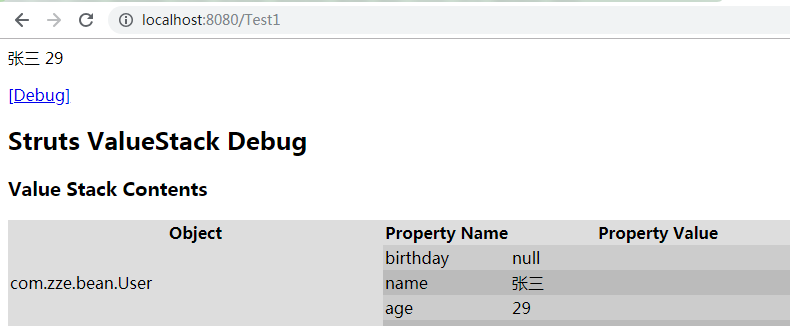
index.jsp
例2:root中获取JavaBean对象集合
package com.zze.action;

import com.opensymphony.xwork2.ActionContext;
import com.opensymphony.xwork2.ActionSupport;
import com.zze.bean.User;

import java.util.ArrayList;
import java.util.List;

public class Test2Action extends ActionSupport {
    @Override
    public String execute() throws Exception {
        User user1 = new User();
        user1.setName("张三");
        user1.setAge(29);
        User user2 = new User();
        user2.setName("李四");
        user2.setAge(30);

        List<User> userList = new ArrayList<>();
        userList.add(user1);
        userList.add(user2);

        ActionContext.getContext().getValueStack().set("userList",userList);
        return super.execute();
    }
}
com.zze.action.Test2Action
<%@ page contentType="text/html;charset=UTF-8" language="java" %>
<%@ taglib prefix="s" uri="/struts-tags" %>
<html>
<head>
    <title>Test</title>
</head>
<body>
<s:property value="userList[0].name"/>
<s:property value="userList[0].age"/>
<s:property value="userList[1].name"/>
<s:property value="userList[1].age"/>
<s:debug/>
</body>
</html>
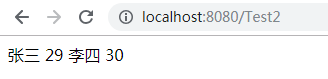
index.jsp
例3:context中获取域字段
package com.zze.action;

import com.opensymphony.xwork2.ActionContext;
import com.opensymphony.xwork2.ActionSupport;

public class Test3Action extends ActionSupport {

    @Override
    public String execute() throws Exception {
        ActionContext.getContext().put("name","张三");
        ActionContext.getContext().getSession().put("name","李四");
        ActionContext.getContext().getApplication().put("name","王五");
        return super.execute();
    }
}
com.zze.action.Test3Action
<%@ page contentType="text/html;charset=UTF-8" language="java" %>
<%@ taglib prefix="s" uri="/struts-tags" %>
<html>
<head>
    <title>Test</title>
</head>
<body>
<s:property value="#request.name"/>
<s:property value="#session.name"/>
<s:property value="#application.name"/>
<s:debug/>
</body>
</html>
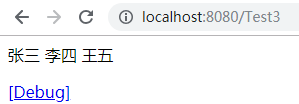
index.jsp
获取 root 区域中数据直接使用对象属性名即可,如果是 map 则使用 key;获取 context 中属性需在 key 前加上 ‘#’。
EL获取值栈数据
获取值栈数据的方式除了上面通过 Struts2 提供的标签的方式,还可以通过 EL 表达式获取,例如:
package com.zze.action;

import com.opensymphony.xwork2.ActionContext;
import com.opensymphony.xwork2.ActionSupport;
import com.zze.bean.User;

public class Test4Action extends ActionSupport {

    @Override
    public String execute() throws Exception {
        User user = new User();
        user.setName("托马斯");
        ActionContext.getContext().getValueStack().push(user);
        return super.execute();
    }
}
com.zze.action.Test4Action
<%@ page contentType="text/html;charset=UTF-8" language="java" %>
<%@ taglib prefix="s" uri="/struts-tags" %>
<html>
<head>
    <title>Test</title>
</head>
<body>
${name}

<s:debug/>
</body>
</html>
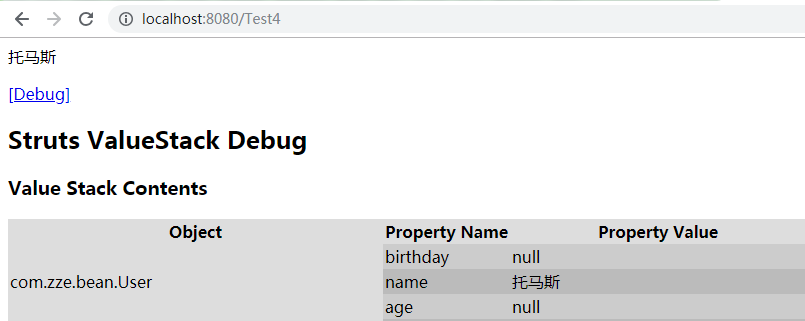
index.jsp
我们知道,EL 表达式本来就只能获取 11 个隐式对象中的数据,为什么在这里还能获取值栈中的数据呢?当然是 Struts2 做了手脚,依旧从核心过滤器开始查看源码:
 public void doFilter(ServletRequest req, ServletResponse res, FilterChain chain) throws IOException, ServletException {

     HttpServletRequest request = (HttpServletRequest) req;
     HttpServletResponse response = (HttpServletResponse) res;

     try {
         if (excludedPatterns != null && prepare.isUrlExcluded(request, excludedPatterns)) {
             chain.doFilter(request, response);
         } else {
             prepare.setEncodingAndLocale(request, response);
             prepare.createActionContext(request, response);
             prepare.assignDispatcherToThread();
             request = prepare.wrapRequest(request);
             ActionMapping mapping = prepare.findActionMapping(request, response, true);
             if (mapping == null) {
                 boolean handled = execute.executeStaticResourceRequest(request, response);
                 if (!handled) {
                     chain.doFilter(request, response);
                 }
             } else {
                 execute.executeAction(request, response, mapping);
             }
         }
     } finally {
         prepare.cleanupRequest(request);
     }
 }
org.apache.struts2.dispatcher.ng.filter.StrutsPrepareAndExecuteFilter#doFilter
看到第 13 行,通过 prepare.wrapRequest(request) 将原生 request 进行了包装,查看 wrapRequest 方法:
 public HttpServletRequest wrapRequest(HttpServletRequest oldRequest) throws ServletException {
     HttpServletRequest request = oldRequest;
     try {
         // Wrap request first, just in case it is multipart/form-data
         // parameters might not be accessible through before encoding (ww-1278)
         request = dispatcher.wrapRequest(request);
         ServletActionContext.setRequest(request);
     } catch (IOException e) {
         throw new ServletException("Could not wrap servlet request with MultipartRequestWrapper!", e);
     }
     return request;
 }
org.apache.struts2.dispatcher.ng.PrepareOperations#wrapRequest
继续进入 dispatcher.wrapRequest 方法:
 public HttpServletRequest wrapRequest(HttpServletRequest request) throws IOException {
     // don't wrap more than once
     if (request instanceof StrutsRequestWrapper) {
         return request;
     }

     String content_type = request.getContentType();
     if (content_type != null && content_type.contains("multipart/form-data")) {
         MultiPartRequest mpr = getMultiPartRequest();
         LocaleProvider provider = getContainer().getInstance(LocaleProvider.class);
         request = new MultiPartRequestWrapper(mpr, request, getSaveDir(), provider, disableRequestAttributeValueStackLookup);
     } else {
         request = new StrutsRequestWrapper(request, disableRequestAttributeValueStackLookup);
     }

     return request;
 }
org.apache.struts2.dispatcher.Dispatcher#wrapRequest
看 8-14 行,如果不是文件上传类的请求,将会执行第 13 行,也就是说普通情况下请求 Action 该方法返回的 request 就是 StrutsRequestWrapper 的实例,查看该类:
 package org.apache.struts2.dispatcher;

 import com.opensymphony.xwork2.ActionContext;
 import com.opensymphony.xwork2.util.ValueStack;

 import javax.servlet.http.HttpServletRequest;
 import javax.servlet.http.HttpServletRequestWrapper;

 import static org.apache.commons.lang3.BooleanUtils.isTrue;

 public class StrutsRequestWrapper extends HttpServletRequestWrapper {

     private static final String REQUEST_WRAPPER_GET_ATTRIBUTE = "__requestWrapper.getAttribute";
     private final boolean disableRequestAttributeValueStackLookup;

     public StrutsRequestWrapper(HttpServletRequest req) {
         this(req, false);
     }

     public StrutsRequestWrapper(HttpServletRequest req, boolean disableRequestAttributeValueStackLookup) {
         super(req);
         this.disableRequestAttributeValueStackLookup = disableRequestAttributeValueStackLookup;
     }

     public Object getAttribute(String key) {
         if (key == null) {
             throw new NullPointerException("You must specify a key value");
         }

         if (disableRequestAttributeValueStackLookup || key.startsWith("javax.servlet")) {
             return super.getAttribute(key);
         }

         ActionContext ctx = ActionContext.getContext();
         Object attribute = super.getAttribute(key);

         if (ctx != null && attribute == null) {
             boolean alreadyIn = isTrue((Boolean) ctx.get(REQUEST_WRAPPER_GET_ATTRIBUTE));

             if (!alreadyIn && !key.contains("#")) {
                 try {
                     // If not found, then try the ValueStack
                     ctx.put(REQUEST_WRAPPER_GET_ATTRIBUTE, Boolean.TRUE);
                     ValueStack stack = ctx.getValueStack();
                     if (stack != null) {
                         attribute = stack.findValue(key);
                     }
                 } finally {
                     ctx.put(REQUEST_WRAPPER_GET_ATTRIBUTE, Boolean.FALSE);
                 }
             }
         }
         return attribute;
     }
 }
org.apache.struts2.dispatcher.StrutsRequestWrapper
可以看到这个类其实就是将 getAttribute 方法进行了重写,当通过该方法获取一个值时,如果通过原生 request 未获取到,则继续从值栈中寻找这个 key 对应的值并返回。
而我们通过 EL 表达式获取值实际上也会调用 request.getAttribute 方法,此时 Struts2 对该方法进行了包装增强,这就是使用 EL 能获取到值栈数据的原因。
java框架之Struts2(3)-OGNL&ValueStack的更多相关文章
- Java - 框架之 Struts2
一. Package 标签 1. 标签属性:name : 包的名称,只有在一个项目中不重名即可.extends : 继承哪个包,默认为 struts-default.name ...
- Java框架之Struts2(一)
在学习Struts2之前,我们要知道Java为什么要有反射机制呢?反射机制可以说是填补Java不能动态访问某一个类的空白.利用反射机制,动态的创建一个对象.动态的访问类的某个属性,而且访问哪一个属性自 ...
- java框架之Struts2(4)-拦截器&标签库
拦截器 概述 Interceptor (拦截器):起到拦截客户端对 Action 请求的作用. Filter:过滤器,过滤客户端向服务器发送的请求. Interceptor:拦截器,拦截的是客户端对 ...
- Java框架之Struts2(六)
一.OGNL表达式语言 Ognl Object Graphic Navigation Language(对象图导航语言),它是一种功能强大的表达式语言(Expression Language,简称为E ...
- java框架篇---struts之OGNL详解
OGNL(Object Graph Navigation Language),是一种表达式语言.使用这种表达式语言,你可以通过某种表达式语法,存取Java对象树中的任意属性.调用Java对象树的方法. ...
- java框架之Struts2(1)-简介及入门
简介 Struts2 是一个基于 MVC 设计模式的 Web 应用框架,它本质上相当于一个 servlet,在 MVC 设计模式中,Struts2 作为控制器 (Controller) 来建立模型与视 ...
- Java框架之Struts2(二)
一.Action 配置说明 //请求的直接转发 <package name="packageUser" namespace="" extends=&quo ...
- java框架之Struts2(2)-访问Servlet API及请求数据封装
准备 为后面测试示例编写代码及配置如下: package com.zze.bean; import java.util.Date; public class User { private String ...
- java框架篇---Struts2的处理流程
一.Struts2的处理流程: 客户端产生一个HttpServletRequest的请求,该请求被提交到一系列的标准过滤器(Filter)组建链中(如ActionContextCleanUp:它主要是 ...
随机推荐
- Unity3D修改LWRP,HDRP的几项小问题及解决
最近在看Book of the Dead的demo,其中对HDPR进行修改以构建自己的SRP,于是自己尝试了下.. 一般直接去Github下载对应unity版本的SRP工程: https://gith ...
- [转]Mybatis foreach 批量操作
原文地址:https://blog.csdn.net/jason5186/article/details/40896043 foreach属性属性 描述item 循环体中的具体对象.支持属 ...
- 深入浅出 1 - AI量化策略快速理解
我们在用AI来编写量化策略过程中,主要用到了机器学习,先来从一张图直观理解什么是机器学习:人类对新问题做出有效决策依靠的是过去积累的许多经验,并对经验进行利用,而对机器来说,“经验”以“数据”方式 ...
- 给你的app添加桌面widget
首先,什么是桌面widget,桌面widget是一种桌面插件,如下图: 这种类型的控件叫做widget,一般长按桌面会弹出一个界面让你选择控件,选择完了拖到桌面就能使用了. 下面我们为这个app来添加 ...
- babel配置项目目录支持转换es6语法,引入非项目目录js后,引入Js转换无效
我遇到了一个问题,我在已经配置babel的项目中通过require引入了一个项目目录外层的另一个js文件,前期是可以成功转换并打包的,但是到了后期就不行了,报错: 这个报错的意思是,引入的js文件中有 ...
- python中导入一个需要传参的模块
最近跑实验,遇到了一个问题:由于实验数据集比较多,每次跑完一个数据集就需要手动更改文件路径,再将文件传到服务器,再运行实验,这样的话效率很低,必须要专门看着这个实验,啥时候跑完就手动修改运行下一个实验 ...
- 公开的免费WebService接口分享
天气预报Web服务,数据来源于中国气象局 Endpoint Disco WSDL IP地址来源搜索 WEB 服务(是目前最完整的IP地址数据) Endpoint Disco WSDL 随机英文 ...
- 面向对象的类关系及其C++实现
在面向对象的程序设计中,类之间有6中关系,分别是继承, 组合, 聚合,关联, 依赖,实现,如果使用C语言实现,上面的这些关系通过"结构体包含结构体.结构体包含结构体指针以及函数指针等语法实现 ...
- CentOS 7.0关闭服务器的防火墙服务命令
1.直接关闭防火墙systemctl stop firewalld.service #停止firewallsystemctl disable firewalld.service #禁止firewall ...
- java课程课后作业04之动手动脑
一.多层的异常捕获-1 先贴出代码: public class CatchWho { public static void main(String[] args) { try { try { thro ...