
[tldk][dpdk][dev] TLDK--基于dpdk的用户态协议栈传输层组件简单调研
2024-10-14 02:20:49
原文如题,以下是一份简单的快速调研。
TLDK: Transport Layer Development Kit
一 什么是TLDK
transport layer development kit
处理tcp/udp的库
- 不提供socket api
- 构建在dpdk的上层。
- 专注在tcp, udp不做完整的协议栈。
- 没有arp, ip, eth, 路由表等。
VPP的一个节点
VPP协议栈的组成部分。
非VPP框架也能用
专门补充了一下功能,用来支持非VPP环境。netlink agents, packaging等。
二 TLDK的背景
tldk是VPP的一个graph node,VPP是fd.io项目的核心技术,由思科提交。fd.io是托管在linux基金会的项目。
tldk应该与vpp有相同的license。
什么是fd.io
FD.io (Fast data – Input/Output) is a collection of several projects and libraries to amplify the transformation that began with Data Plane Development Kit (DPDK) to support flexible, programmable and composable services on a generic hardware platform. FD.io offers the Software Defined Infrastructure developer community a landing site with multiple projects fostering innovations in software-based packet processing towards the creation of high-throughput, low-latency and resource-efficient IO services suitable to many architectures (x86, ARM, and PowerPC) and deployment environments (bare metal, VM, container).
什么是vpp
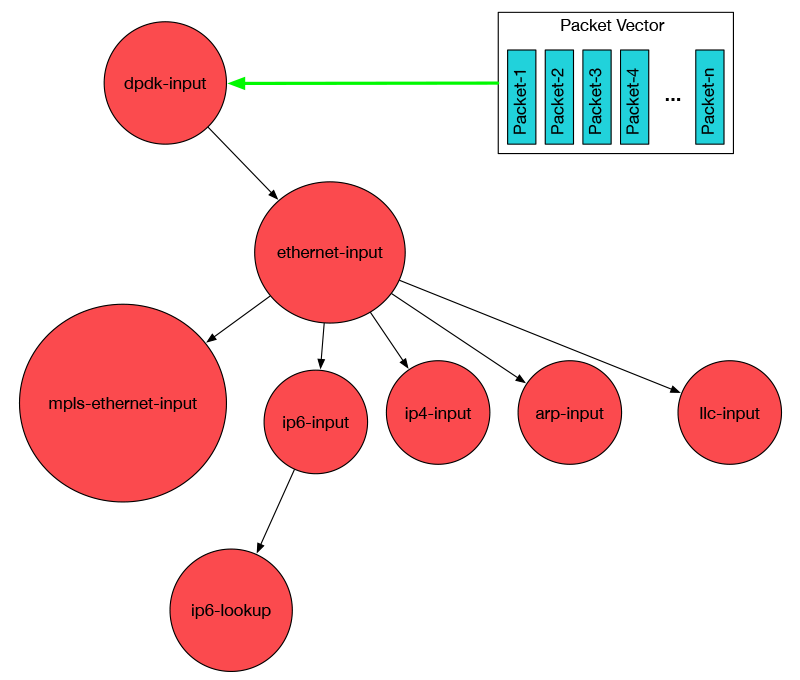
A key component is the Vector Packet Processing (VPP) library donated by Cisco. This code is already running in products on the market today. The VPP library is highly modular, allowing for new graph nodes to be easily “plugged in” without changes to the underlying code base. This gives developers the potential to easily build any number of packet processing solutions with varying forwarding graphs.
In development since 2002, VPP is production code currently running in shipping products. It runs in user space on multiple architectures including x86, ARM, and Power architectures on both x86 servers and embedded devices. The design of VPP is hardware, kernel, and deployment (bare metal, VM, container) agnostic. It runs completely in userspace.
资料
扫盲概述:https://fd.io/about/
什么是VPP: https://wiki.fd.io/view/VPP/What_is_VPP%3F
VPP的基本架构:https://fd.io/technology/
tldk主页:https://wiki.fd.io/view/TLDK
tldk代码页:https://github.com/FDio/tldk
IRC Channel: #fdio, #fdio-tldk
三 编译
kernel
version: 3.10.0-327.36.3.el7.x86_64
dpdk
version:tag v18.02-rc4
tldk
version: tag v18.02
代码结构
   $(TLDK_ROOT)

   |

   +----app

   |      |

   |      +-- nginx - a clone of nginx integrated with TLDK

   |          (refer to app/nginx/README.TLDK for more information)

   |

   +----lib

   |      |

   |      +--libtle_dring - dring library

   |      |

   |      +--libtle_l4p - implementation of the TCP/UDP packet processing

   |      |

   |      +--libtle_timer - implementation of the timer library

   |

   +----examples

   |      |

   |      +--l4fwd - sample app to demonstrate and test libtle_l4p TCP/UDP

   |            usage (refer to examples/l4fwd/README for more information)

   |

   +----test - unit-tests

   |      |

   |      +--dring - UT for libtle_dring (standalone app)

   |      |

   |      +--gtest - UT for libtle_dring, libtle_l4p and libtle_timer

   |      |     (googletest)

   |      |

   |      +--timer - UT for libtle_timer (standalone app)
步骤
export RTE_SDK=/root/Src/thirdparty/dpdk.git

export RTE_TARGET=x86_64-native-linuxapp-gcc

[root@T9 tldk.git]# make all
四 接口
接口文件
tle_ctx.h

tle_dpdk_wrapper.h

tle_dring.h

tle_event.h

tle_tcp.h

tle_timer.h

tle_udp.h

tle_version.h
接口文档
doc/l4_api_desc.txt
主要接口
模型
数据结构
ctx

 |

 |-----> stream

 |-----> stream

 |          |

 |          |-------------->  属性 endpoint(addr, port)  # 类型 socket

 |          |

 |          `-------------->  方法 open/send/recv/close

 |

 |-----> dev  (网卡的抽象)

 |

 `-----> dev
初始化API
tle_ctx_create()
tle_ctx_destroy()
tle_add_dev()
tle_del_dev()
recv/send机制
类型:
callback
event
API:
tle_tcp_stream_recv()
tle_tcp_stream_send()
tle_tcp_readv()
tle_tcp_writev()
tle_udp_stream_recv()
tle_udp_stream_send()
BackEnd API
tle_tcp_rx_bulk()
tle_tcp_tx_bulk()
tle_tcp_process()
tle_udp_rx_bulk()
tle_udp_tx_bulk()
FrontEnd API
tle_tcp_stream_open(ctx, send_callback/event, recv_callback/event)
tle_tcp_stream_close()
tle_tcp_stream_abort() /* 重置tcp状态,不释放资源。 */
tle_udp_stream_open()
tle_udp_stream_close()
server side API
tle_tcp_stream_listen()
tle_tcp_stream_synreqs()
tle_tcp_stream_accept()
client side API
tle_tcp_stream_connect()
五 例子程序
l4fwd
+----------------------------+                +-------------------------------+

|                   TLDK Box |                | Linux Box                     |

|                            |                |                               |

|                     port 0 +----------------+ port 0                        |

|                192.168.1.1 |                | 192.168.1.2                   |

|          2001:4860:b002::1 |                | 2001:4860:b002::2             |

|          AA:BB:CC:DD:EE:F1 |                | AA:BB:CC:DD:EE:F2             |

+----------------------------+                +-------------------------------+
运行方法
- 加载dpdk uio驱动,并绑定好网卡。
- 写配置文件
[root@D129 app]# cat b.conf

port=0,addr=192.168.8.0,masklen=24,mac=82:8c:82:22:33:a5

[root@D129 app]# cat f.conf

lcore=1,op=echo,laddr=192.168.8.100,lport=8088,raddr=0.0.0.0,rport=0
- 运行
# server

[root@D129 app]# ./l4fwd -l 0,1 -w 0000:00:04.0 -- -P -T -L -R 256 -S 256 -s 256 -b b.conf  -f f.conf -a  port=0,lcore=1,ipv4=192.168.8.100

# client

sudo arp -s 192.168.8.100 00:00:00:01:00:02
参数解读:
在我的虚拟机里,必须要显示指定-w
-R/-S 影响window大小。
-P/-a 可以不设置。
- 运行结果演示
client端的echo效果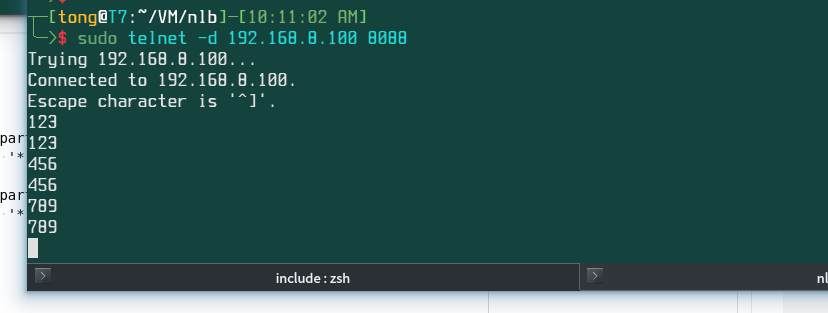
client设备出口抓包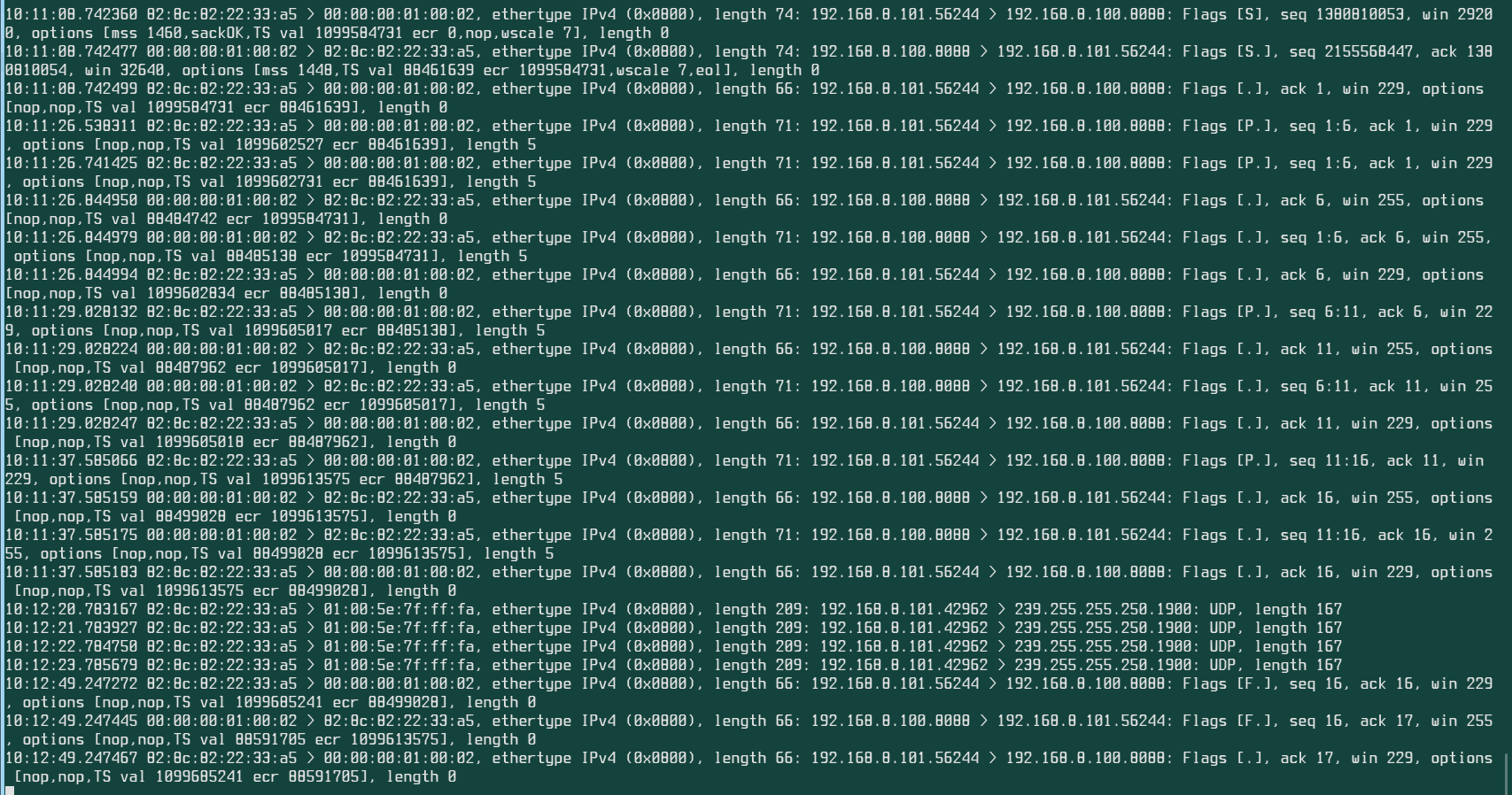
- 代码分析
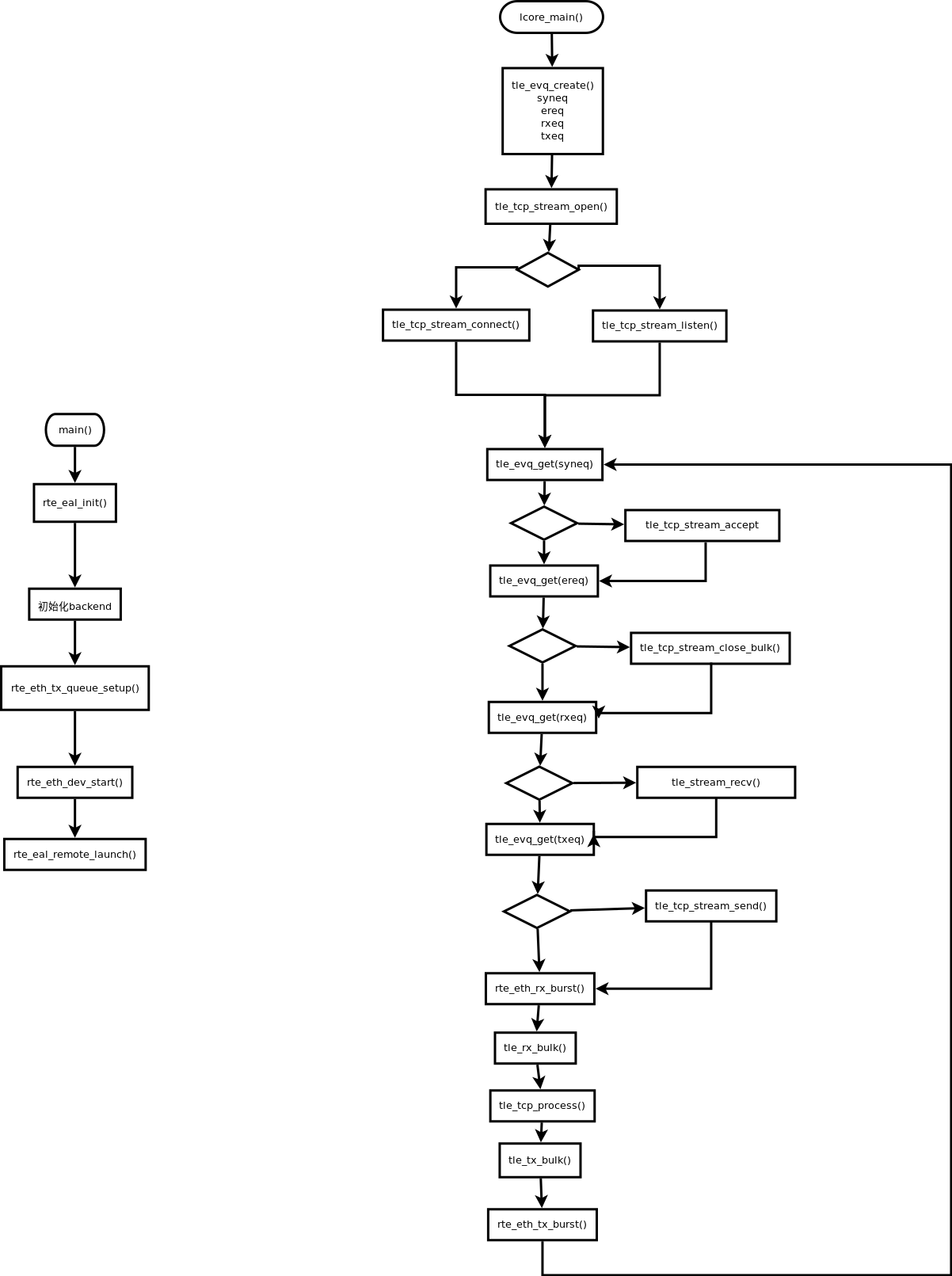
nginx
TODO
六 性能
TODO
七 VPP场景
TODO
八 实现分析
TODO
九 其他
约1w行代码。
┬─[tong@T7:~/Src/thirdparty/tldk.git]─[03:36:35 PM]

╰─>$ find ./lib/ -name '*.c' -exec cat \{\} \; |wc -l

5549

┬─[tong@T7:~/Src/thirdparty/tldk.git]─[03:36:38 PM]

╰─>$ find ./lib/ -name '*.h' -exec cat \{\} \; |wc -l

5480
[tldk][dpdk][dev] TLDK--基于dpdk的用户态协议栈传输层组件简单调研的更多相关文章
- [转帖]技术扫盲:新一代基于UDP的低延时网络传输层协议——QUIC详解
技术扫盲:新一代基于UDP的低延时网络传输层协议——QUIC详解 http://www.52im.net/thread-1309-1-1.html 本文来自腾讯资深研发工程师罗成的技术分享, ...
- NFV、DPDK以及部分用户态协议研究
本文为作者原创,转载请注明出处(http://www.cnblogs.com/mar-q/)by 负赑屃 对我而言,这是一个新的领域,很有意思. 一.解释名词: NFV(Network Functio ...
- 基于DPDK的高效包处理系统
一.概念 Intel® DPDK全称Intel Data Plane Development Kit,是intel提供的数据平面开发工具集,为Intel architecture(IA)处理器架构下用 ...
- 用户态tcp协议栈调研
一.各种用户态socket的对比 1.MTCP 简单介绍: 韩国高校的一个科研项目,在DPDK的2016年的技术开发者大会上有讲,所以intel将这个也放到了官方上,所以一般搜索DPDK的用户态的协议 ...
- C1000k 新思路:用户态 TCP/IP 协议栈
现在的服务器支撑上百万个并发 TCP 连接已经不是新闻(余锋2010年的演讲,ideawu 的 iComet 开源项目,WhatsApp 做到了 2.5M).实现 C1000k 的常规做法是调整内核参 ...
- [中英对照]Introduction to DPDK: Architecture and Principles | DPDK概论: 体系结构与实现原理
[中英对照]Introduction to DPDK: Architecture and Principles | DPDK概论: 体系结构与实现原理 Introduction to DPDK: ...
- 基于jwt的用户登录认证
最近在app的开发过程中,做了一个基于token的用户登录认证,使用vue+node+mongoDB进行的开发,前来总结一下. token认证流程: 1:用户输入用户名和密码,进行登录操作,发送登录信 ...
- Laravel 5 中使用 JWT(Json Web Token) 实现基于API的用户认证
在JavaScript前端技术大行其道的今天,我们通常只需在后台构建API提供给前端调用,并且后端仅仅设计为给前端移动App调用.用户认证是Web应用的重要组成部分,基于API的用户认证有两个最佳解决 ...
- 项目一:第十一天 2、运单waybill快速录入 3、权限demo演示-了解 5、权限模块数据模型 6、基于shiro实现用户认证-登录(重点)
1. easyui DataGrid行编辑功能 2. 运单waybill快速录入 3. 权限demo演示-了解 4. Apache shiro安全框架概述 5. 权限模块数据模型 6. 基于shiro ...
随机推荐
- Windows下python3生成UTF8的CSV文件和sha256sum踩坑记录
CSV的坑 在Ubuntu下是简单的写入完事 import csv ... with open(filename, 'w') as output: f = csv.writer(output) f.w ...
- 游戏行业DDoS攻击解决方案
行业综述 根据全球游戏和全球移动互联网行业第三方分析机构Newzoo的数据显示:2017年上半年,中国以275亿美元的游戏市场收入超过美国和日本,成为全球榜首. 游戏行业的快速发展.高额的攻击利润.日 ...
- Android Studio打包程序时出现transformClassesWithDexForRelease错误
百度半天.没找到直接原因..国外网站上有写这个错误的..国内的真心没找到..英语水平有太低..实在没看懂怎么搞.. 后来发现clean项目的时候是提示如下错误: Information:Gradle ...
- 【12c】12c RMAN新特性之通过网络远程恢复数据库(RESTORE/Recover from Service)
[12c]12c RMAN新特性之通过网络远程恢复数据库(RESTORE/Recover from Service) 通过网络远程恢复数据库(Restore/Recover from Service) ...
- MYSQL 文件类型
首先, 表结构文件 : 1) *.frm是描述了表的结构, 数据及索引文件 如果是MyISAM引擎,则是 1) *.MYD保存了表的数据记录, 2) *.MYI则是表的索引 对于 InnoDB引擎,则 ...
- python利用opencv合成模糊图像
之前需要评估图像质量来筛选成像质量不错的图片,去除由于对焦,运动等造成的模糊图像,所以在构建数据集的时候考虑用opencv对清晰的图片进行处理获得模糊的图片从而进行训练. 1) 运动模糊图像 一般来说 ...
- [python] python3.6 安装 pytesseract 出错
安装pytesseact出错, 下载 tesseract-ocr , 地址 https://github.com/tesseract-ocr/tesseract 修改pytesseract.py 设置 ...
- 赵雅智_Swift(4)_断言
可选能够让你推断值是否存在.你能够在代码中优雅地处理值缺失的情况.然而,在某些情况下,假设值缺失或者值并不满足特定的条件.你的代码可能并不须要继续执行.这时.你能够在你的代码中触发一个断言(asser ...
- pom.xml文件最详细的讲解
1 引入额外的jar包 <dependency> <groupId>bitwalker</groupId> <artifactId>UserAgentU ...
- PHP memcached memcache 扩展安装
好久没配置环境今天安装PHP 开发环境, 项目比较老,一开始以为项目用的是memcache 装完后发现 项目用的是memcached 所以正好两个都装了. 碰到些坑希望能帮助到百度到这篇文章的伙伴 . ...