
20.1翻译系列:EF 6中自动数据迁移技术【EF 6 Code-First系列】
原文链接:https://www.entityframeworktutorial.net/code-first/automated-migration-in-code-first.aspx
EF 6 Code-First系列文章目录:
- 1 翻译系列:什么是Code First(EF 6 Code First 系列)
- 2.翻译系列:为EF Code-First设置开发环境(EF 6 Code-First系列)
- 3.翻译系列:EF Code-First 示例(EF 6 Code-First系列)
- 4.翻译系列:EF 6 Code-First默认约定(EF 6 Code-First系列)
- 5.翻译系列:EF 6中数据库的初始化(EF 6 Code-First 系列)
- 6.翻译系列:EF 6 Code-First中数据库初始化策略(EF 6 Code-First系列
- 7.翻译系列:EF 6中的继承策略(EF 6 Code-First 系列)
- 8.翻译系列: EF 6中配置领域类(EF 6 Code-First 系列)
- 9.翻译系列:EF 6以及EF Core中的数据注解特性(EF 6 Code-First系列)
- 9.1 翻译系列:数据注解特性之----Table【EF 6 Code-First 系列】
- 9.2 翻译系列:数据注解特性之---Column【EF 6 Code First系列】
- 9.3 翻译系列:数据注解特性之Key【EF 6 Code-First 系列】
- 9.4 翻译系列:EF 6以及 EF Core中的NotMapped特性(EF 6 Code-First系列)
- 9.5 翻译系列:数据注解之ForeignKey特性【EF 6 Code-First系列】
- 9.6 翻译系列:数据注解之Index特性【EF 6 Code-First系列】
- 9.7 翻译系列:EF数据注解特性之--InverseProperty【EF 6 Code-First系列】
- 9.8 翻译系列:数据注解特性之--Required 【EF 6 Code-First系列】
- 9.9 翻译系列:数据注解特性之--MaxLength 【EF 6 Code-First系列】
- 9.10 翻译系列:EF数据注解特性之StringLength【EF 6 Code-First系列】
- 9.11 翻译系列:数据注解特性之--Timestamp【EF 6 Code-First系列】
- 9.12 翻译系列:数据注解特性之ConcurrencyCheck【EF 6 Code-First系列】
- 10.翻译系列:EF 6中的Fluent API配置【EF 6 Code-First系列】
- 10.1.翻译系列:EF 6中的实体映射【EF 6 Code-First系列】
- 10.2.翻译系列:使用Fluent API进行属性映射【EF 6 Code-First】
- 11.翻译系列:在EF 6中配置一对零或者一对一的关系【EF 6 Code-First系列】
- 12.翻译系列:EF 6 中配置一对多的关系【EF 6 Code-First系列】
- 13.翻译系列:Code-First方式配置多对多关系【EF 6 Code-First系列】
- 14.翻译系列:从已经存在的数据库中生成上下文类和实体类【EF 6 Code-First系列】
- 15.翻译系列:EF 6中的级联删除【EF 6 Code-First 系列】
- 16.翻译系列:EF 6 Code -First中使用存储过程【EF 6 Code-First系列】
- 17.翻译系列:将Fluent API的配置迁移到单独的类中【EF 6 Code-First系列】
- 18.翻译系列:EF 6 Code-First 中的Seed Data(种子数据或原始测试数据)【EF 6 Code-First系列】
- 19.翻译系列:EF 6中定义自定义的约定【EF 6 Code-First约定】
- 20.翻译系列:Code-First中的数据库迁移技术【EF 6 Code-First系列】
- 20.1翻译系列:EF 6中自动数据迁移技术【EF 6 Code-First系列】
- 20.2.翻译系列:EF 6中基于代码的数据库迁移技术【EF 6 Code-First系列】
- 21.翻译系列:Entity Framework 6 Power Tools【EF 6 Code-First系列】
Entity Framework介绍了自动迁移技术,所以每次实体发生改变的时候,你不用手动去处理数据库迁移。
自动迁移技术可以通过在程序包管理控制台中输入并执行:enable-migrations命令做到。打开程序包管理控制台,输入:enable-migrations –EnableAutomaticMigration:$true【确保默认的项目是你现在要执行的项目】

当命令执行成功之后,将会创建一个internal sealed Configuration 类,这个Configuration类继承自DbMigrationConfiguration :
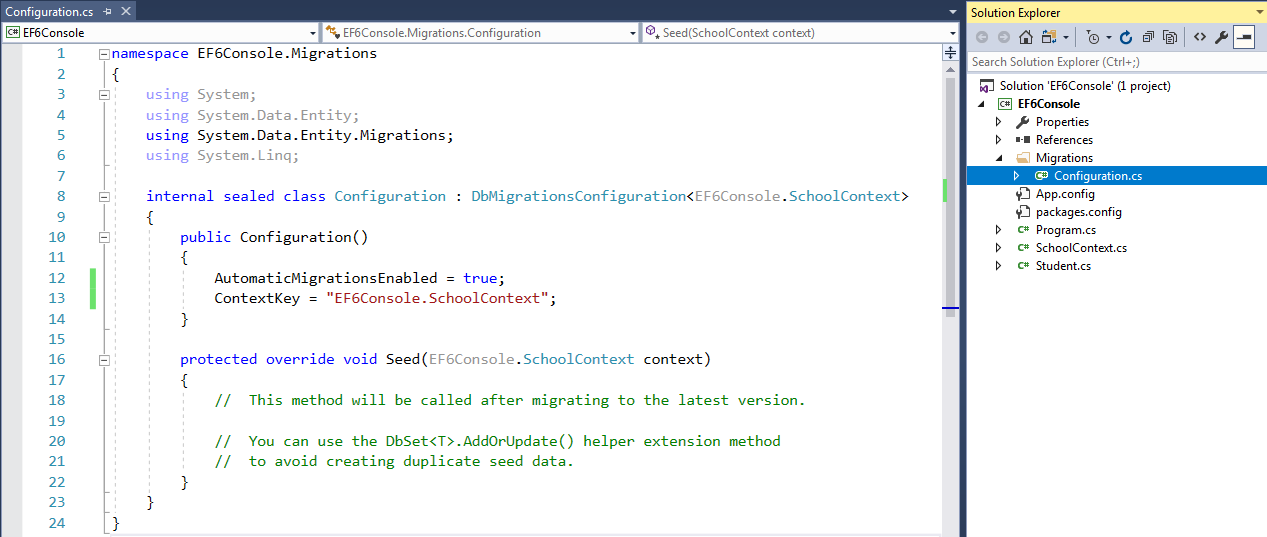
正如你在COnfiguration类的构造函数中看到的那样,AutomaticMigrationsEnabled 被设置为true.
下一步,就是在上下文类中设置数据库初始化策略为MigrateDatabaseToLatestVersion:
public class SchoolContext: DbContext

{

    public SchoolDBContext(): base("SchoolDB")

    {

        Database.SetInitializer(new MigrateDatabaseToLatestVersion<SchoolDBContext, EF6Console.Migrations.Configuration>());

    }

    public DbSet<Student> Students { get; set; }

    protected override void OnModelCreating(DbModelBuilder modelBuilder)

    {

        base.OnModelCreating(modelBuilder);

    }

}
现在你就完成了自动化迁移技术的配置。当实体发生改变的时候,EF将会自动进行数据库迁移。目前为止,我们只有一个Student实体,还有一个上下文类,我们运行项目看看生成的数据库:
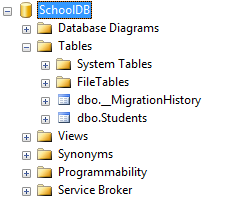
你将会发现EF API创建了__MigrationHistory 表和Students表。__MigrationHistory 包含了每次数据库迁移的历史记录。
现在,你添加一个新的领域类实体,运行程序,会发现数据库自动包含了所有实体所映射的表。你不用运行任何其他命令。
然而,这样只是针对添加实体或者移除实体才有用,当你向实体中添加、修改或者删除属性的时候,并不起作用。删除领域类的任何一个属性,运行项目:
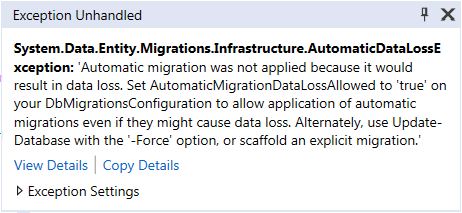
这样是因为你将会丢失相应列的数据。为了解决这个,你需要在Configuration类的构造函数中,设置AutomaticMigrationDataLossAllowed 为true,并且设置AutomaticMigrationsEnabled = true。
为了了解更多enable-migrations命令的参数,可以执行get-help enable-migrations 或者get-help enable-migrations -detailed,你将会看到:
PM> get-help enable-migrations

NAME

    Enable-Migrations

SYNOPSIS

    Enables Code First Migrations in a project.

SYNTAX

    Enable-Migrations [-ContextTypeName <String>] [-EnableAutomaticMigrations]

    [-MigrationsDirectory <String>] [-ProjectName <String>] [-StartUpProjectName

    <String>] [-ContextProjectName <String>] [-ConnectionStringName <String>]

    [-Force] [-ContextAssemblyName <String>] [-AppDomainBaseDirectory <String>]

    [<CommonParameters>]

    Enable-Migrations [-ContextTypeName <String>] [-EnableAutomaticMigrations]

    [-MigrationsDirectory <String>] [-ProjectName <String>] [-StartUpProjectName

    <String>] [-ContextProjectName <String>] -ConnectionString <String>

    -ConnectionProviderName <String> [-Force] [-ContextAssemblyName <String>]

    [-AppDomainBaseDirectory <String>] [<CommonParameters>]

DESCRIPTION

    Enables Migrations by scaffolding a migrations configuration class in the project. If the

    target database was created by an initializer, an initial migration will be created (unless

    automatic migrations are enabled via the EnableAutomaticMigrations parameter).

RELATED LINKS

REMARKS

    To see the examples, type: "get-help Enable-Migrations -examples".

    For more information, type: "get-help Enable-Migrations -detailed".

    For technical information, type: "get-help Enable-Migrations -full".
20.1翻译系列:EF 6中自动数据迁移技术【EF 6 Code-First系列】的更多相关文章
- 20.翻译系列:Code-First中的数据库迁移技术【EF 6 Code-First系列】
原文链接:https://www.entityframeworktutorial.net/code-first/migration-in-code-first.aspx EF 6 Code-First ...
- 15.翻译系列:EF 6中的级联删除【EF 6 Code-First 系列】
原文链接:https://www.entityframeworktutorial.net/code-first/cascade-delete-in-code-first.aspx EF 6 Code- ...
- 5.翻译系列:EF 6中数据库的初始化(EF 6 Code-First 系列)
原文地址:http://www.entityframeworktutorial.net/code-first/database-initialization-in-code-first.aspx EF ...
- 7.翻译系列:EF 6中的继承策略(EF 6 Code-First 系列)
原文地址:http://www.entityframeworktutorial.net/code-first/inheritance-strategy-in-code-first.aspx EF 6 ...
- 8.翻译系列: EF 6中配置领域类(EF 6 Code-First 系列)
原文地址:http://www.entityframeworktutorial.net/code-first/configure-classes-in-code-first.aspx EF 6 Cod ...
- 9.翻译系列:EF 6以及EF Core中的数据注解特性(EF 6 Code-First系列)
原文地址:http://www.entityframeworktutorial.net/code-first/dataannotation-in-code-first.aspx EF 6 Code-F ...
- 9.4 翻译系列:EF 6以及 EF Core中的NotMapped特性(EF 6 Code-First系列)
原文链接:http://www.entityframeworktutorial.net/code-first/notmapped-dataannotations-attribute-in-code-f ...
- 10.1.翻译系列:EF 6中的实体映射【EF 6 Code-First系列】
原文链接:https://www.entityframeworktutorial.net/code-first/configure-entity-mappings-using-fluent-api.a ...
- 文章翻译:ABP如何在EF core中添加数据过滤器
原文地址:https://aspnetboilerplate.com/Pages/Documents/Articles%5CHow-To%5Cadd-custom-data-filter-ef-cor ...
随机推荐
- Windows10家庭版如何升级至Windows10专业版
Windows10家庭版和专业版系统文件其实是一样的iso镜像文件,但是由于Microsoft某些限制导致一些用户无法享受到专业版的福利,说实话这是一种很让人蛋疼的操作... 接下来我来告诉各位如何把 ...
- python之psutil模块(获取系统性能信息(CPU,内存,磁盘,网络)
一.psutil模块 1. psutil是一个跨平台库(http://code.google.com/p/psutil/),能够轻松实现获取系统运行的进程和系统利用率(包括CPU.内存.磁盘.网络等) ...
- Typescript中抽象类与接口详细对比与应用场景介绍
现如今,TS正在逐渐成为前端OO编程的不二之选,以下是我在学习过程中对抽象类和接口做的横向对比. 1. 抽象类当做父类,被继承.且抽象类的派生类的构造函数中必须调用super():接口可以当做“子类” ...
- XamarinSQLite教程添加列
XamarinSQLite教程添加列 如果开发者想要在现有的表中添加列,并不需要删除重新创建数据表,只需要修改数据表.操作步骤如下. (1)右击需要添加列的表,单击Add column…(beta)命 ...
- ;(function(){ //代码})(); 自执行函数开头为什么要加;或者!
我们有时候会在自执行函数中看到这样的代码;(function(){ //我们的代码.. alert('Hello!'); })(); !(function(){ //我们的代码.. alert('He ...
- 单片机软件proteus的汉化步骤
整体思想:把汉化包里的文件替换软件的英文的软件 右键打开文件安装的位置,找到Translations文件夹,打开它等待被替换. 打开这个找到Translations文件夹,把下面的文件全部复制替换上面 ...
- Vue子页面给父页面传递数据
子页面: <template> <div> <p>子组件</p> <button @click="sendMsg">传递 ...
- BZOJ2368 : Modern Art Plagiarism 树同构
枚举$T_1$的树根,然后DP,设$f[i][j]$表示$T_1$的子树$i$是否存在包括i的连通子树与$T_2$的子树$j$同构. 若$j$是叶子,那么显然可以. 若$deg_i<deg_j$ ...
- python网络编程(十三)
协程-greenlet版 为了更好使用协程来完成多任务,python中的greenlet模块对其封装,从而使得切换任务变的更加简单 安装方式 使用如下命令安装greenlet模块: sudo pip ...
- JS 单体内置对象
内置对象: 由ECMAScript提供的.不依赖于宿主环境的对象,这些对象在ECMAScript程序执行之前就已经存在了. 不必由开发人员显式地实例化内置对象 比如: Object Array Str ...