
iOS:模态弹出窗控制器UIPopoverPresentationController
模态弹出窗控制器:UIPopoverPresentationController
实质:就是将内容控制器包装成PopoverPresentationController的形式,然后再模态出来,必须指定来源视图及其frame区域,也即指向谁。
功能:它也是一个弹出窗控制器,它在iOS8中替代了UIPopoverController,它在功能上与旧的controller完全等同,并且新增了一些内置的适配特性,可以自动适配iPad与iPhone。当然它也需要一个继承于UIViewController的控制器作为内容控制器,然后模态它的窗口,即显示弹出窗。
枚举:模态显示类型
typedef NS_ENUM(NSInteger, UIModalPresentationStyle) {
UIModalPresentationFullScreen = 0,
UIModalPresentationPageSheet ,
UIModalPresentationFormSheet ,
UIModalPresentationCurrentContext ,
UIModalPresentationCustom ,
UIModalPresentationOverFullScreen ,
UIModalPresentationOverCurrentContext ,
UIModalPresentationPopover , //模态显示弹出窗
UIModalPresentationNone = -1,
};
模态弹出窗控制器介绍:
@interface UIPopoverPresentationController : UIPresentationController
属性:
//模态弹出窗控制器代理
@property (nonatomic, assign) id <UIPopoverPresentationControllerDelegate> delegate;
//弹出窗箭头方向
@property (nonatomic, assign) UIPopoverArrowDirection permittedArrowDirections;
//弹出窗显示的视图资源
@property (nonatomic, retain) UIView *sourceView;
//弹出窗显示的区域
@property (nonatomic, assign) CGRect sourceRect;
//工具条按钮
@property (nonatomic, retain) UIBarButtonItem *barButtonItem;
//弹出窗箭头方向(只读)
@property (nonatomic, readonly) UIPopoverArrowDirection arrowDirection;
//过滤视图控件,设置不可与用户做交互
@property (nonatomic, copy) NSArray *passthroughViews;
//弹出窗背景颜色
@property (nonatomic, copy) UIColor *backgroundColor;
//弹出窗偏移位置
@property (nonatomic, readwrite) UIEdgeInsets popoverLayoutMargins;
//弹出窗背景视图的类
@property (nonatomic, readwrite, retain) Class <UIPopoverBackgroundViewMethods> popoverBackgroundViewClass;
@end
协议:
@protocol UIPopoverPresentationControllerDelegate
@optional
//模态弹出窗窗口时触发的方法,可以进行数据传输
- (void)prepareForPopoverPresentation:(UIPopoverPresentationController*)popoverPresentationController;
//将要关闭弹出窗窗口时触发的方法
- (BOOL)popoverPresentationControllerShouldDismissPopover:(UIPopoverPresentationController*)popoverPresentationController;
//已经关闭弹出窗窗口时触发的方法
- (void)popoverPresentationControllerDidDismissPopover (UIPopoverPresentationController*) popoverPresentationController;
//弹出窗将要复位到指定视图区域时触发的方法
- (void)popoverPresentationController:(UIPopoverPresentationController*)popoverPresentationController willRepositionPopoverToRect:(inout CGRect *)rect inView:(inout UIView**)view;
@end
视图控制器类
@interface UIViewController
//设置内容控制器大小
@property (nonatomic) CGSize preferredContentSize
//模态显示类型
@property(nonatomic,assign) UIModalPresentationStyle modalPresentationStyle
@end
视图控制器分类(适配显示)
@interface UIViewController (UIAdaptivePresentations)
//管理模态窗口的显示控制器(presentingViewController、presentedViewController)
@property (nonatomic,readonly) UIPresentationController *presentationController;
//模态弹出窗控制器
@property (nonatomic,readonly) UIPopoverPresentationController *popoverPresentationController ;
@end
演示实例如下:
1.创建一个继承自UIViewController的内容控制器ContentViewController:

2.需要的文件截图为:
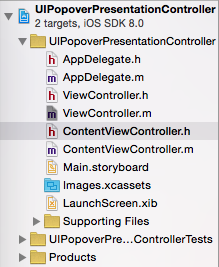
3.在内容控制器ContentViewController.m文件中设置模态弹出窗的大小和背景颜色
- (void)viewDidLoad {

    [super viewDidLoad];

    //设置内容区域大小

    self.preferredContentSize = CGSizeMake(, );

    //设置内容背景颜色

    self.view.backgroundColor = [UIColor blueColor];

}
4.在ViewController.m文件中操作的代码如下:
//声明必要的属性
@interface ViewController ()

@property (strong,nonatomic)UIPopoverPresentationController *popoverPresentVC;//声明模态弹出窗控制器

@property (strong,nonatomic)UIPopoverController *popoverVC;   //声明弹出窗控制器

@property (strong,nonatomic)ContentViewController *contentVC; //声明内容控制器

@end
//创建按钮,并添加按钮事件,用来打开模态弹出窗
    //创建按钮

    UIButton *button = [[UIButton alloc]initWithFrame:CGRectMake(, , , )];

    //设置按钮背景颜色

    button.backgroundColor = [UIColor purpleColor];

    //设置按钮标题

    [button setTitle:@"打开" forState:UIControlStateNormal];

    //添加按钮事件

    [button addTarget:self action:@selector(Open:) forControlEvents:UIControlEventTouchUpInside];

    //将按钮添加到视图中

    [self.view addSubview:button];
//实现按钮事件
#pragma mark -打开弹窗(将内容控制器以模态窗口的形式打开和关闭)

-(void)Open:(UIButton *)sender

{

    if (!self.popoverVC.isPopoverVisible)

    {

        //创建内容控制器

        self.contentVC = [[ContentViewController alloc]init];

        //设置内容控制器模态显示类型为模态弹出窗

        self.contentVC.modalPresentationStyle = UIModalPresentationPopover;

        //创建popoverPresentVC模态弹出窗控制器,包装内容控制器

        self.popoverPresentVC = self.contentVC.popoverPresentationController;

        //设置一直显示后,即使点击按钮,此时弹窗也关闭不了,所以不这么设置

        //[self.popoverPresentVC setPassthroughViews:@[self.view,sender]];

        //设置模态弹窗的显示区域

        self.popoverPresentVC.sourceView = sender;

        self.popoverPresentVC.sourceRect = sender.bounds;

        //设置箭头方向自适应

        self.popoverPresentVC.permittedArrowDirections = UIPopoverArrowDirectionAny;

        //打开模态窗口

        [self presentViewController:self.contentVC animated:YES completion:nil];

    }

    else

    {

        //关闭模态弹窗

        [self.contentVC dismissViewControllerAnimated:YES completion:nil];

    }

}
演示结果截图:
开始时: 点击按钮时,模态出内容弹出窗:
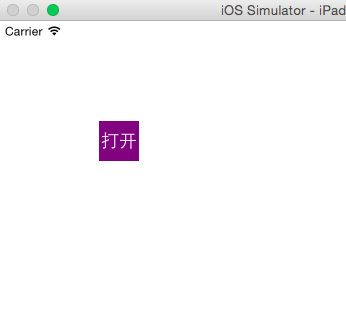

在点击屏幕中任何一处时,都可以关闭模态的弹出窗:

iOS:模态弹出窗控制器UIPopoverPresentationController的更多相关文章
- iOS:弹出窗控制器:UIPopoverController
弹出窗控制器:UIPopoverController 截图: 实质:就是将内容控制器包装成popoverController的形式,然后在模态出来,必须给定指向目标(target.frame). ...
- Bootstrap模态弹出窗
Bootstrap模态弹出窗有三种方式: 1.href触发模态弹出窗元素: <a class="btn btn-primary" data-toggle="moda ...
- data-参数说明(模态弹出窗的使用)
除了通过data-toggle和data-target来控制模态弹出窗之外,Bootstrap框架针对模态弹出框还提供了其他自定义data-属性,来控制模态弹出窗.比如说:是否有灰色背景modal-b ...
- bootstrap-data-target触发模态弹出窗元素的data使用 data-toggle与data-target的作用 深入ASP.NET MVC之九:Ajax支持 Asp.Net MVC4系列--进阶篇之AJAX
bootstrap-data-target触发模态弹出窗元素的data使用 时间:2017-05-27 14:22:34 阅读:4479 评论:0 收藏:0 [ ...
- iOS模态弹出半透明视图控制器
项目中需要实现点击按钮出现的视图全屏覆盖,呈半透明状态可以看到下面的视图? 解决方案: 绕了很多弯路原来可以使用模态弹出一个视图控制器 在iOS8之后只需要设置一个最新的属性 SecondViewCo ...
- bootstrap学习--模态弹出框modals轮子
1.点击按钮型 <link rel="stylesheet" href="lib/bootstrap/css/bootstrap.min.css"> ...
- Bootstrap模态弹出框
前面的话 在 Bootstrap 框架中把模态弹出框统一称为 Modal.这种弹出框效果在大多数 Web 网站的交互中都可见.比如点击一个按钮弹出一个框,弹出的框可能是一段文件描述,也可能带有按钮操作 ...
- 玩转Bootstrap(JS插件篇)-第1章 模态弹出框 :1-4 模态弹出框--结构分析
模态弹出框--结构分析 Bootstrap框架中的模态弹出框,分别运用了“modal”.“modal-dialog”和“modal-content”样式,而弹出窗真正的内容都放置在“modal-con ...
- 玩转Bootstrap(JS插件篇)-第1章 模态弹出框 :1-3 模态弹出框
模态弹出框(Modals) 这一小节我们先来讲解一个“模态弹出框”,插件的源文件:modal.js. 右侧代码编辑器(30行)就是单独引入 bootstrap 中发布出的“modal.js”文件. 样 ...
随机推荐
- Android -- 获取汉字的首字母
转换 获取一个汉 ...
- Node.js 学习(六)Node.js EventEmitter
Node.js 所有的异步 I/O 操作在完成时都会发送一个事件到事件队列. Node.js里面的许多对象都会分发事件:一个net.Server对象会在每次有新连接时分发一个事件, 一个fs.read ...
- 百度地图之POI
// // PoiViewController.m // baiDuDemo // // Created by City--Online on 15/6/4. // Copyright (c) 201 ...
- 网页数据采集 - 系列之Flash数据采集
经常看到一些朋友在讨论如何采集flash中的数据,讨论来讨论区,结论就是:flash不能采集,其实也不总是这样.本篇就跟大家分享如何采集flash中的数据. 在开始之前,先说明一下:一般来说flash ...
- 【bzoj1004】[HNOI2008]Cards
1004: [HNOI2008]Cards Time Limit: 10 Sec Memory Limit: 162 MBSubmit: 2928 Solved: 1754[Submit][Sta ...
- WP手机升级WIN10被PIN码锁定
WP8.1手机升级WIN10后,需要输入PIN码(不知道啊),多次输入(1234,0000,8888 ...)后被锁定,无法使用手机(郁闷), 重启无数次,提示由于多次输入PIN码,手机无法使用(天啊 ...
- linux 配置ssh免密码登录
1.确保主机名唯一 主机名修改方法: a.修改/etc/sysconfig/network,HOSTNAME=想要设置的主机名称 b.修改/etc/hosts,127.0.0.1 localhos ...
- 快速、直接的XSS漏洞检测爬虫 – XSScrapy
XSScrapy是一个快速.直接的XSS漏洞检测爬虫,你只需要一个URL,它便可以帮助你发现XSS跨站脚本漏洞. XSScrapy的XSS漏洞攻击测试向量将会覆盖 Http头中的Referer字段 U ...
- 负MARGIN之讲解
css中的负边距(negative margin)是布局中的一个常用技巧,只要运用得合理常常会有意想不到的效果.很多特殊的css布局方法都依赖于负边距,所以掌握它的用法对于前端的同学来说,那是必须的. ...
- javascript陷阱,一不小心你就中招了