
DataGrid( 数据表格) 组件[5]
本节课重点了解 EasyUI 中 DataGrid(数据表格)组件的使用方法,这个组件依赖于
Panel(面板)、Resizeable(调整大小)、LinkButton(按钮)、Pageination(分页)组件。
一. 新增功能

columns : [[
{
field : 'user',
title : '帐号',
sortable : true,
width : 100,
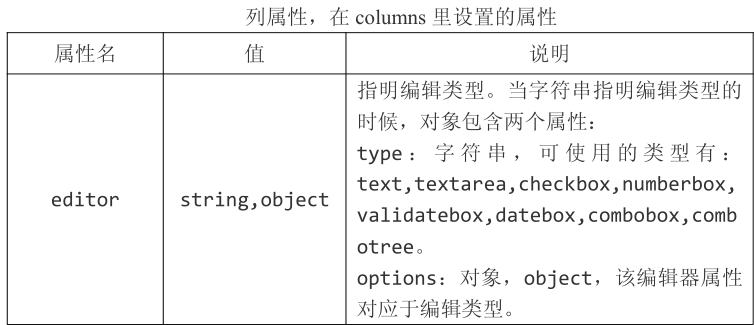
editor : {
type : 'validatebox',
options : {
required : true,
},
},
},
{
field : 'email',
title : '邮件',
sortable : true,
width : 100,
editor : {
type : 'validatebox',
options : {
required : true,
validType: 'email',
},
},
},
{
field : 'date',
title : '创建时间',
sortable : true,
width : 100,
editor : {
type : 'datetimebox',
options : {
required : true,
},
},
},
]],
//扩展 dateTimeBox
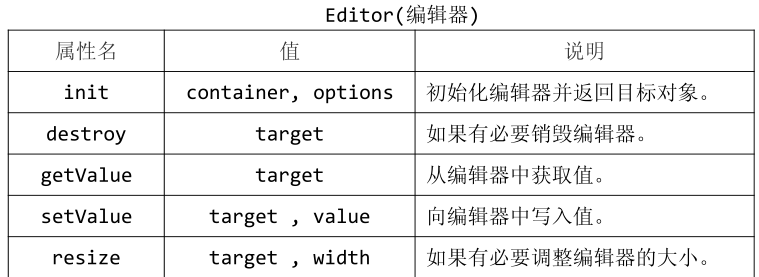
$.extend($.fn.datagrid.defaults.editors, {
datetimebox : {
init: function(container, options){
var input = $('<input type="text">').appendTo(container);
options.editable = false;
input.datetimebox(options);
return input;
},
getValue: function(target){
return $(target).datetimebox('getValue');
},
setValue: function(target, value){
$(target).datetimebox('setValue', value);
},
resize: function(target, width){
$(target).datetimebox('resize', width);
},
destroy : function (target) {
$(target).datetimebox('destroy');
},
}
});
//实现添加方法
obj = {
editRow : false,
search : function () {
$('#box').datagrid('load', {
user : $.trim($('input[name="user"]').val()),
date_from : $('input[name="date_from"]').val(),
date_to : $('input[name="date_to"]').val(),
});
},
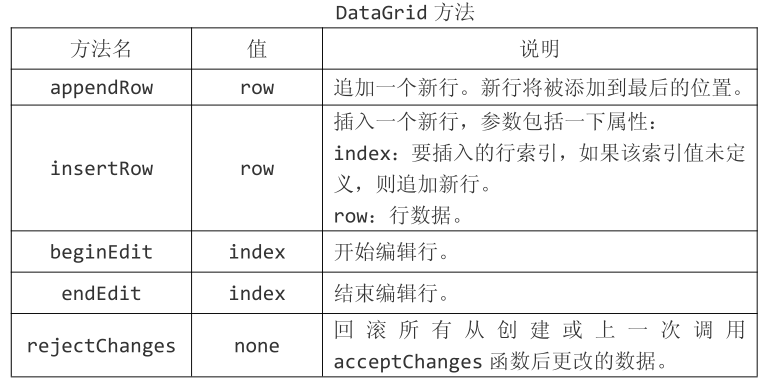
add : function () {
$('#save').show();
$('#redo').show();
if (!this.editRow) {
$('#box').datagrid('endEdit', this.editRow);
} else {
$('#box').datagrid('insertRow', {
index : 0,
row : {
//date : (new Date()).Format("yyyy-MM-dd hh:mm:ss"),
},
});
$('#box').datagrid('beginEdit', 0);
this.editRow = true;
}
},
save : function () {
$('#save,#redo').hide();
this.editRow = false;
//将新增的一行设置为结束编辑状态
$('#box').datagrid('endEdit', 0);
},
redo : function () {
$('#save,#redo').hide();
this.editRow = false;
$('#box').datagrid('rejectChanges');
},
};
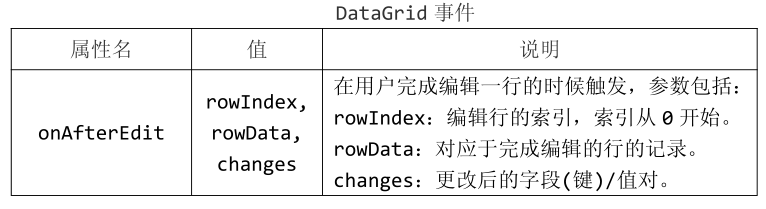
onAfterEdit : function (rowIndex, rowData, changes) {
console.log(rowData)
},
L //HTML 部分
<div style="margin-bottom:5px">
<a href="#" class="easyui-linkbutton" iconCls="icon-add"
plain="true" onclick="obj.add();">添加</a>
<a href="#" class="easyui-linkbutton" iconCls="icon-edit"
plain="true">修改</a>
<a href="#" class="easyui-linkbutton" iconCls="icon-remove"
plain="true">删除</a>
<a href="#" class="easyui-linkbutton" iconCls="icon-save"
plain="true" style="display:none;" id="save" onclick="obj.save();">保存
</a>
<a href="#" class="easyui-linkbutton" iconCls="icon-redo"
plain="true" style="display:none;" id="redo" onclick="obj.redo();">取消编
辑</a>
</div>
DataGrid( 数据表格) 组件[5]的更多相关文章
- DataGrid( 数据表格) 组件[9]
本节课重点了解 EasyUI 中 DataGrid(数据表格)组件的使用方法,这个组件依赖于Panel(面板).Resizeable(调整大小).LinkButton(按钮).Pageination( ...
- DataGrid( 数据表格) 组件[8]
本节课重点了解 EasyUI 中 DataGrid(数据表格)组件的使用方法,这个组件依赖于Panel(面板).Resizeable(调整大小).LinkButton(按钮).Pageination( ...
- DataGrid( 数据表格) 组件[7]
本节课重点了解 EasyUI 中 DataGrid(数据表格)组件的使用方法,这个组件依赖于Panel(面板).Resizeable(调整大小).LinkButton(按钮).Pageination( ...
- DataGrid( 数据表格) 组件[6]
本节课重点了解 EasyUI 中 DataGrid(数据表格)组件的使用方法,这个组件依赖于Panel(面板).Resizeable(调整大小).LinkButton(按钮).Pageination( ...
- DataGrid( 数据表格) 组件[4]
本节课重点了解 EasyUI 中 DataGrid(数据表格)组件的使用方法,这个组件依赖于Panel(面板).Resizeable(调整大小).LinkButton(按钮).Pageination( ...
- DataGrid( 数据表格) 组件[3]
本节课重点了解 EasyUI 中 DataGrid(数据表格)组件的使用方法,这个组件依赖于Panel(面板).Resizeable(调整大小).LinkButton(按钮).Pageination( ...
- DataGrid( 数据表格) 组件[2]
本节课重点了解 EasyUI 中 DataGrid(数据表格)组件的使用方法,这个组件依赖于Panel(面板).Resizeable(调整大小).LinkButton(按钮).Pageination( ...
- DataGrid( 数据表格) 组件[1]
本节课重点了解 EasyUI 中 DataGrid(数据表格)组件的使用方法,这个组件依赖于Panel(面板).Resizeable(调整大小).LinkButton(按钮).Pageination( ...
- 第二百二十二节,jQuery EasyUI,DataGrid(数据表格)组件
jQuery EasyUI,DataGrid(数据表格)组件 学习要点: 1.加载方式 2.分页功能 本节课重点了解 EasyUI 中 DataGrid(数据表格)组件的使用方法,这个组件依赖于 Pa ...
随机推荐
- IO流+数据库课后习题
1,读取 试题文件 然后做题算分 File file1=new File("D:\\file","test.txt"); try{ FileReader in1 ...
- jsp连接MySQL操作GIS地图数据,实现添加point的功能
index_map.jsp中的代码: <%@ page language="java" pageEncoding="utf-8"%> <%@ ...
- jquery 获取 outerHtml 包含当前节点本身的代码
在开发过程中,jQuery.html() 是获取当前节点下的html代码,并不包含当前节点本身的代码,然后我们有时候确需要,找遍jQuery api文档也没有任何方法可以拿到. 看到有的人通过pare ...
- javascript解析从服务器返回的json格式数据
在javascript中我们可以将服务器返回的json格式数据转换成json格式进行使用,如下: 1.服务器返回的json格式数据: 通过response.responseText获得: " ...
- JQUERY1.9学习笔记 之基本过滤器(七) 语言选择器
语言选择器 jQuery( ":lang(language)" ) 描述:选择所有用特定语言指定的标签. 根据标签指定语言的不同给标签上色. <!DOCTYPE html&g ...
- Ubuntu 12.04更换显示器后显示“显示不支援”,只能进恢复模式工作
以前用的一台14寸液晶,换成17寸后,进入系统显示器上“显示不支援” .仔细观查,电脑硬盘自检能显示后,后面都是黑屏. 解决过程. 因为grub 启动菜单不能显示.盲按方向键,发现菜单里的其它项目可 ...
- WebSQL实例记录
<table id="content"> </table> <br> <input type="button" id= ...
- 『邪恶のWIFI』搭建假冒WIFI热点等女神来蹭网啊 - -。
pic by baidu 0x 00 ╮(╯▽╰)╭ 请喊我万恶的标题党 哈哈哈哈哈 0x 01 这里正题 虚拟机(Kali)不支持内置网卡,还好我有神器,插上我的RT8187L,开始搞起 参考资料 ...
- 转:BZERO()等的区别
BZERO()等的区别 bzero 原型: extern void bzero(void *s, int n); 用法: #include <string.h> 功能:置字节字符串s的前 ...
- Cracking the coding interview--Q1.5
原文 Implement a method to perform basic string compression using the counts of repeated characters. F ...