
Git访问TFS出现权限不足(Using Personal Access Tokens to access Visual Studio Online)
使用GIT克隆TFS服务器上的代码到本地时出现错误如下:
fatal: Authentication failed for 'https://***.visualstudio.com/***Project/_git/***/'
解决办法:
原文请查看(https://roadtoalm.com/2015/07/22/using-personal-access-tokens-to-access-visual-studio-online/)
People who use Visual Studio Online for a while are probably familiar with the alternate credentials. These are used when accessing the REST API or when using an external client for accessing your Git repositories.
You configure your alternate credentials on your [My Profile] page and fill a username and password of your choice.
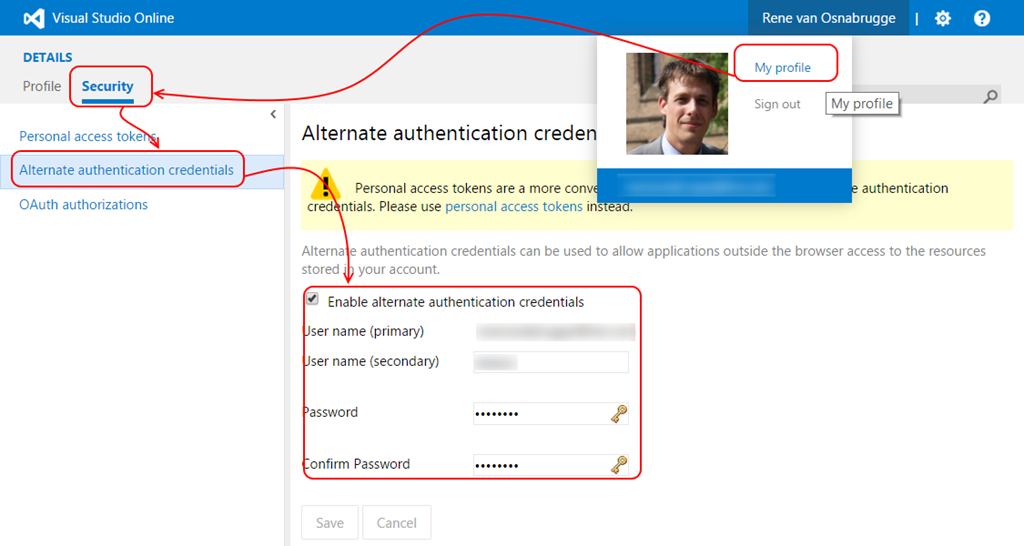
Once you enable your credentials, you can use these credentials when doing a REST call or (easier to test) clone a Git repository
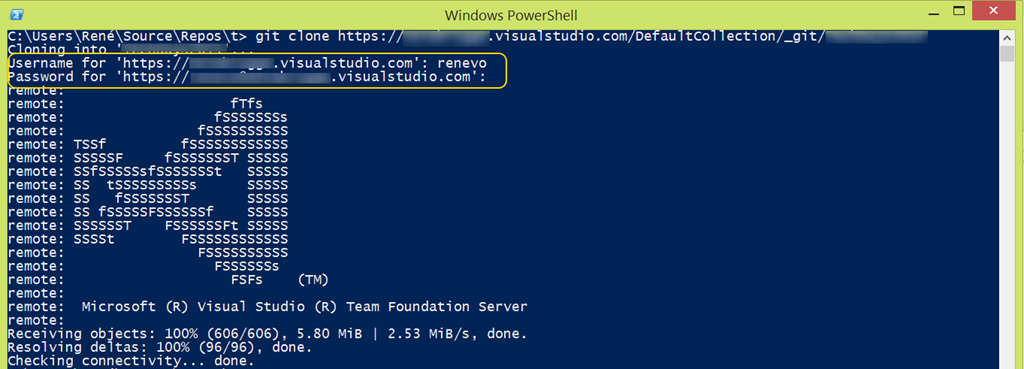
This is great but not the most secure way of doing things.
Personal Access Tokens
In the update of July 7th, we now have the ability to use Personal Access Tokens as an alternative to the Alternate Credentials. Instead of sending our username and password over the wire we an now use a secure token that we can scope to a timeframe and to functionality within VSO. On the [My Profile] page you can configure one or more Personal Access Tokens. For example a token to access Code Features.
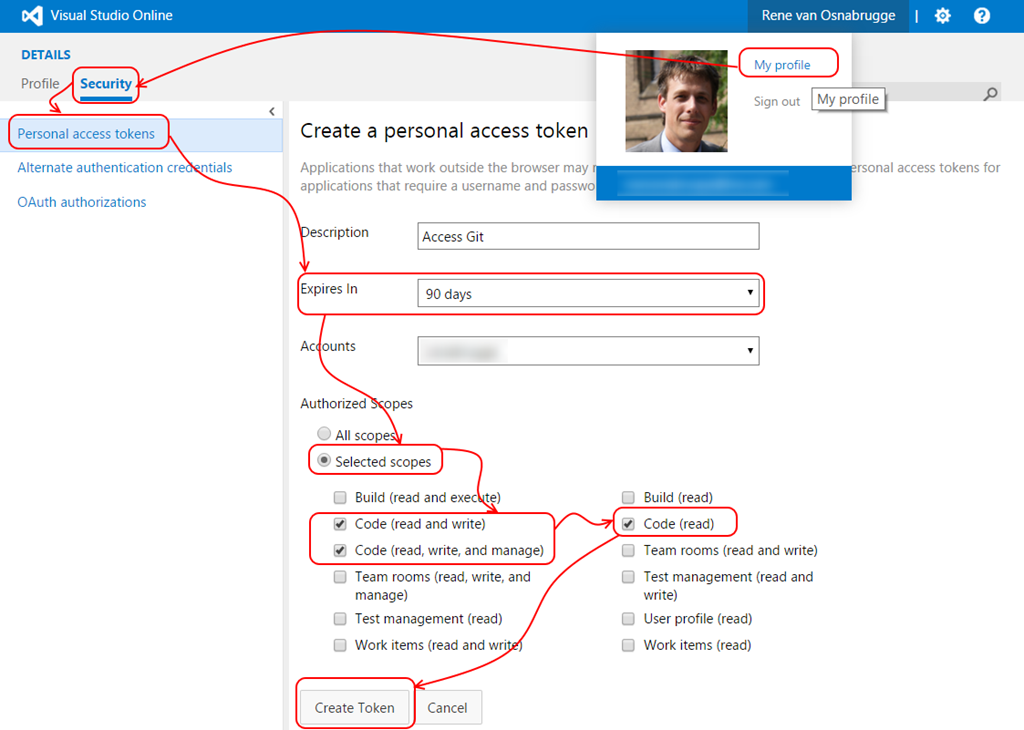
When you create the token, you see a token (only visible after creation !) that you should copy and keep safe.

This token alone is sufficient to authenticate against VSO. So when you now clone a Git repository you only have to fill in this token in the password box. Username can be empty or any value

The great thing is that you can revoke rights or the token afterwards and make sure that people cannot access stuff anymore.
Hope this helps!
Git访问TFS出现权限不足(Using Personal Access Tokens to access Visual Studio Online)的更多相关文章
- Visual Studio 2013 always switches source control plugin to Git and disconnect TFS
A few days ago, I've been facing a strange behavior with Visual Studio 2013. No matter what solu ...
- Visual Studio 2010 使用 Git Extensions 连接 google code
下载最新版本 Git Extensions http://code.google.com/p/gitextensions/downloads/list Git Extensions 2.46 Wind ...
- 使用VSTS的Git进行版本控制(四)——在Visual Studio中管理分支
使用VSTS的Git进行版本控制(四)--在Visual Studio中管理分支 可以从web版Team Services Git repo 的Branches视图中管理工作.定制视图来跟踪最关注的分 ...
- Git访问远程出现错误
错误示例 remote: HTTP Basic: Access denied fatal: Authentication failed for "xxx" 错误原因 由于修改了公司 ...
- TFS(Visual Studio Team Services) git认证失败 authentication fails 的解决方案
问题描述 TFS 在visual studio中使用正常,可是git pull运行失败,提示 authentication fails. 初步判断原因为默认的 credential.helper 与 ...
- CentOS7虚拟机配置git仓库(配置虚拟机,网络,git仓库,windows端git访问)
想要达成的目的:从windows使用git访问CentOS7服务器上搭建的git仓库 用到的软件: (1)VMware-workstation-full-15.5.0-14665864.exe (2) ...
- Security10:授予访问Object的权限
1,将访问Object的权限授予Database Role 或 User 的语法如下 GRANT <permission> [ ,...n ] ON [ OBJECT :: ][ sche ...
- WCF服务器证书配置说明-没有能够进行密钥交换的私钥,或者进程可能没有访问私钥的权限
WCF服务器证书配置说明 1.创建证书: makecert.exe -sr LocalMachine -ss My -a sha1 -n CN=XXX -sky exchange -pe 说明: -s ...
- 新版本eclipse Neon 4.6.1,登录git报401 没有权限
新版本eclipse Neon 4.6.1,登录git报401 没有权限 经过查找原因竟然是新的eclipse需要进行update.比较坑,新版eclipse竟然需要先更新一下才能用! eclipse ...
随机推荐
- 移动端优化 && 清除移动端网站点击a标签时闪现的边框或遮罩层(CSS) && 移动端点击 && 文字不可选择
在移动端网站,当你点击加了a标签的文字或图片时,该元素的周围会闪现一个蓝色的边框,在微信上的网站就是如此:而有的浏览器会闪现一个半透明遮罩层,比如移动端的Chrome浏览器,其实这些特效无非就是为 ...
- hibernate多对一单向关联注解方式
多对一单向关联,在多的一方加上一的一方作为外键.在程序里表现为:在多的一方加上一的引用. 小组类Group,用户User: Group: package com.oracle.hibernate; i ...
- 爱奇艺视频显示列表CSS实现
css: body{margin:0;font-size: 12px;font-family: "宋体":} ul{margin:0;padding:0;list-style: n ...
- [心平气和读经典]The TCP/IP Guide(002)
The TCP/IP Guide [Page 41, 42] Goals of The TCP/IP Guide | 本书的目标 Every author who sets out to write ...
- 证书透明度Certificate Transparency
发现使用google浏览器访问HTTPS网址时,点击小锁-->>连接-->>有一项服务器未提供任何 certificate transparency 信息?只有google浏览 ...
- 《Think Python》第16章学习笔记
目录 <Think Python>第16章学习笔记 16.1 Time 16.2 纯函数(Pure functions) 16.3 修改器(Modifiers) 16.4 原型 vs. 方 ...
- Java责任链模式
责任链模式 顾名思义,责任链模式(Chain of Responsibility Pattern)为请求创建了一个接收者对象的链.这种模式给予请求的类型,对请求的发送者和接收者进行解耦.这种类型的设计 ...
- Python 逐行分割大txt文件
# -*- coding: <encoding name> -*- import io LIMIT = 150000 file_count = 0 url_list = [] with i ...
- webpack 报错 No PostCSS Config found 解决方案。
webpack 报错 No PostCSS Config found 这个问题我在百度上找了好久,也没有找到解决方案,最后没有办法只能自己去啃官方文档,本案例在本人的webpack 学习感悟中已经写 ...
- ASP.ENT前台更改绑定数据的日期格式
1.Eval和Bind的区别 绑定表达式 < %# Eval("字段名") %> < %# Bind("字段名") %> 区别 1.ev ...