
Unity ScriptableObject自定义属性显示
1. 继承Editor,重写OnInspectorGUI方法
需求
将TestClass中intData属性和stringData按指定格式显示。
实现
定义一个测试类TestClass,一个可序列化类DataClass
[CreateAssetMenu]

public class TestClass : ScriptableObject

{

    [Range(, )]

    public int intData;

    public string stringData;

    public List<DataClass> dataList;

}

[System.Serializable]

public class DataClass

{

    [Range(, )]

    public int id;

    public Vector3 position;

    public List<int> list;

}
//指定类型

[CustomEditor(typeof(TestClass))]

public class TestClassEditor  : Editor

{

    SerializedProperty intField;

    SerializedProperty stringField;

    void OnEnable()

    {

        intField = serializedObject.FindProperty("intData");

        stringField = serializedObject.FindProperty("stringData");

    }

    public override void OnInspectorGUI()

    {

        // Update the serializedProperty - always do this in the beginning of OnInspectorGUI.

        serializedObject.Update();

        EditorGUILayout.IntSlider(intField, , , new GUIContent("initData"));

        EditorGUILayout.BeginHorizontal();

        EditorGUILayout.PropertyField(stringField);

        if(GUILayout.Button("Select"))

        {

            stringField.stringValue = EditorUtility.OpenFilePanel("", Application.dataPath, "");

        }

        EditorGUILayout.EndHorizontal();

        // Apply changes to the serializedProperty - always do this in the end of OnInspectorGUI.

        //需要在OnInspectorGUI之前修改属性,否则无法修改值

        serializedObject.ApplyModifiedProperties();

        base.OnInspectorGUI();

    }

}
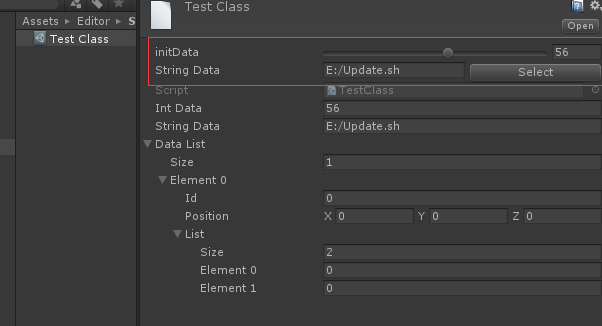
Editor嵌套
通过Edtiro.CreateEditor可实现Editor的嵌套。
创建一个类TestClass2,它包含一个TestClass的属性。
[CreateAssetMenu]

public class TestClass2 : ScriptableObject

{

    public TestClass data;

}
创建一个Test2Class的asset。它的Inspector面板的默认显示:
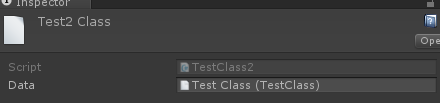
它并没有把TestClass的属性显示出来,如果要查看TestClass的属性,必须双击,跳到相应界面,但这样有看不到TestClass2的属性。
如果想在Test2Class的Inspector面板中直接看到并且可以修改TestClass的属性,可以重写TestClass2的Editor,并在其中嵌套TestClass的Editor。
 [CustomEditor(typeof(TestClass2))]

 public class TestClass2Editor : Editor

 {

     Editor cacheEditor;

     public override void OnInspectorGUI()

     {

         // Update the serializedProperty - always do this in the beginning of OnInspectorGUI.

         serializedObject.Update();

         //显示TestClass2的默认UI

         base.OnInspectorGUI();

         GUILayout.Space();

         var data = ( (TestClass2)target ).data;

         if(data != null)

         {

             //创建TestClass的Editor

             if (cacheEditor == null)

                 cacheEditor = Editor.CreateEditor(data);

             GUILayout.Label("this is TestClass2");

             cacheEditor.OnInspectorGUI();

         }

     }

 }
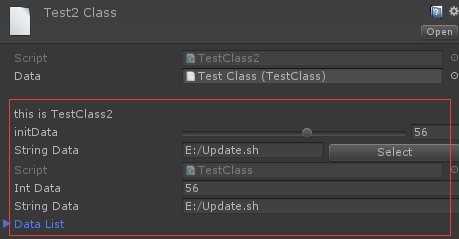
这样就可以直接在TestClass2的面板中直接查看和编辑TestClass的属性。
2. 使用PropertyDrawer
如果想修改某种特定类型的显示,使用继承Editor的方式就会变得很麻烦,因为所有使用特定类型的asset都需要去实现一个自定义的Editor,效率非常低。这种情况就可以通过继承PropertyDrawer的方式,对指定类型的属性,进行统一显示。
需求
为Inspector面板中的所有string属性添加一个选择文件按钮,选中文件的路径直接赋值给该变量。
实现
 [CustomPropertyDrawer(typeof(string))]

 public class StringPropertyDrawer : PropertyDrawer

 {

     public override void OnGUI(Rect position, SerializedProperty property, GUIContent label)

     {

         Rect btnRect = new Rect(position);

         position.width -= ;

         btnRect.x += btnRect.width - ;

         btnRect.width = ;

         EditorGUI.BeginProperty(position, label, property);

         EditorGUI.PropertyField(position, property, true);

         if (GUI.Button(btnRect, "select"))

         {

             string path = property.stringValue;

             string selectStr = EditorUtility.OpenFilePanel("选择文件", path, "");

             if (!string.IsNullOrEmpty(selectStr))

             {

                 property.stringValue = selectStr;

             }

         }

         EditorGUI.EndProperty();

     }

 }

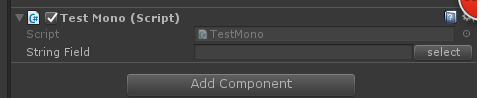
加了一个PropertyDrawer之后,Inspector面板中的所有string变量都会额外添加一个Select按钮。
注意事项
- PropertyDrawer只对可序列化的类有效,非可序列化的类没法在Inspector面板中显示。
- OnGUI方法里只能使用GUI相关方法,不能使用Layout相关方法。
- PropertyDrawer对应类型的所有属性的显示方式都会修改,例如创建一个带string属性的MonoBehaviour:
3. 使用PropertyAttribute
如果想要修改部分类的指定类型的属性的显示,直接使用PropertyDrawer就无法满足条件,这时可以结合PropertyAttribute和PropertyAttribute来实现需求。
需求
为部分指定类的int或float属性的显示添加滑动条,滑动条的上下限可根据类和属性自行设置。
实现
 public class RangeAttribute : PropertyAttribute

 {

     public float min;

     public float max;

     public RangeAttribute(float min, float max)

     {

         this.min = min;

         this.max = max;

     }

 }

 [CustomPropertyDrawer(typeof(RangeAttribute))]

 public class RangeDrawer : PropertyDrawer

 {

     // Draw the property inside the given rect

     public override void OnGUI(Rect position, SerializedProperty property, GUIContent label)

     {

         // First get the attribute since it contains the range for the slider

         RangeAttribute range = attribute as RangeAttribute;

         // Now draw the property as a Slider or an IntSlider based on whether it's a float or integer.

         if (property.propertyType == SerializedPropertyType.Float)

             EditorGUI.Slider(position, property, range.min, range.max, label);

         else if (property.propertyType == SerializedPropertyType.Integer)

             EditorGUI.IntSlider(position, property, (int)range.min, (int)range.max, label);

         else

             EditorGUI.LabelField(position, label.text, "Use Range with float or int.");

     }

 }
修改TestClass和DataClass
 [CreateAssetMenu]

 public class TestClass : ScriptableObject

 {

     [Range(, )]

     public int intData;

     public string stringData;

     public List<DataClass> dataList;

 }

 [System.Serializable]

 public class DataClass

 {

     [Range(, )]

     public int id;

     public Vector3 position;

     public List<int> list;

 }
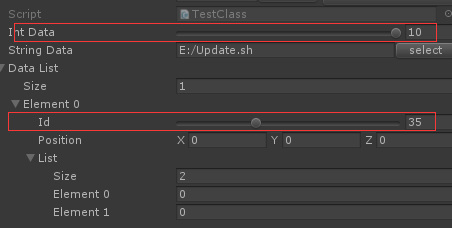
其他
- 需要修改显示的类都需要满足Unity的序列化规则
- 这几种显示方式对Serializable Class都可以使用,并不需要一定是ScriptableObject。只是在编辑器下,ScriptableObject来保存临时数据比较常用,所以使用ScriptableObject来做例子。
转载请注明出处:http://www.cnblogs.com/chiguozi/p/6873050.html
Unity ScriptableObject自定义属性显示的更多相关文章
- Draw Call(Unity 5中显示为SetPass calls
Draw Call(Unity 5中显示为SetPass calls
- 自定义ScriptableObject属性显示
自定义ScriptableObject属性显示的三种方式 1. 继承Editor,重写OnInspectorGUI方法 Editor官方文档 需求 将TestClass中intData属性和strin ...
- Unity ScriptableObject的使用
ScriptableObject主要实现对象序列化的保存,因为是Unity自己的序列化,所以比xml,json序列化方便很多,但相对可控性也比较差 1.Editor下写入和读取测试: using Un ...
- Ubuntu14.04下Unity桌面托盘图标显示问题
本来想丰富一下功能,遂开始安装大开眼界:Ubuntu下10个厉害的Indicator小程序这里的Indicator小程序. 很不幸,在安装到indicator-multiload的时候,准备注销看一下 ...
- Unity 之 图片显示的真实大小
图片放入Unity中自身的属性 在做帽子游戏的时候,看到这么一段代码 //获取保龄球的自身宽度 float ballWidth=ball.GetComponent<Renderer>(). ...
- 【Unity/Kinect】显示Kinect摄像头内容,屏幕显示环境背景及人体投影
最近学习用Unity做些体感小游戏,使用Kinect的Unity插件,结合一些官方Demo学习(网上资源用Unity做的较少,蛋疼).插件及其Demo就在Unity商店里搜Kinect即可找到,其中下 ...
- Unity项目中显示项目的FPS
using UnityEngine; using System.Collections; public class ShowFpsOnGUI : MonoBehaviour { public floa ...
- Unity 3D 无法显示中文的解决方法
大家开始用unity3D时想必都会遇到一个问题,使用中文时会乱码.这是由于编码方式不同导致的,具体解决方法如下: 程序写代码什么的最好下个像Notepad++类似的工具,这里使用Notepad++修改 ...
- unity 分数的显示
通常 在完成 条件之后再增加分数 所以 一开始先增加 public int 得到分数; public Text 分数ui; 在完成条件后增加 得到分数++; 分数ui.text = 得到分数.ToSt ...
随机推荐
- PHPStorm配置xdebug(phpStudy/wamp)
一.下载并配置XDebug wamp环境: 1.获取xdebug
- PAT——1031. 查验身份证
一个合法的身份证号码由17位地区.日期编号和顺序编号加1位校验码组成.校验码的计算规则如下: 首先对前17位数字加权求和,权重分配为:{7,9,10,5,8,4,2,1,6,3,7,9,10,5,8, ...
- win10 切换网卡的bat
@echo off >nul 2>&1 "%SYSTEMROOT%\system32\cacls.exe" "%SYSTEMROOT%\system3 ...
- 01 Oracle分区索引
Oracle分区索引 索引与表类似,也可以分区: 分区索引分为两类: Locally partitioned index(局部分区索引) Globally partitioned index(全局 ...
- vue 创建项目的命令
1 cmd 创建项目 找到指定目录 vue create test 或 vue ui (可视化创建)推荐 ---------------------------------------- ...
- 【项目笔记】完成一个基于SSM框架的增删改查的模块后总结的问题
最近为了准备新工作重新摸出了SSM框架,同时从0学习了JQuery,终于用一周做完了一个包括增删改查的模块(主要是属性太多了,其中一个类50+,复制粘贴耗时). 从中特意记下了几个遇到的问题,总结一下 ...
- MongoDB的入门
MongoDB mongodb是非关系型数据库 对于关系型数据库,存储数据的时候需要提前建表建库,随着数据的复杂度越来越高,所建的表的数量也越来越多:但是非关系型却不需要 mongodb的基本的命令的 ...
- 解决 Cydia 源显示空白的问题
打开 Cydia 所有源都显示空白,没有任何插件,已安装的列表也显示空白,解决方法是下载 var.lib_tar 包 下载链接: https://pan.baidu.com/s/1jzJ8KehoBo ...
- 大专生自学html5到找到工作的心得
先做个自我介绍,我13年考上一所很烂专科民办的学校,学的是生物专业,具体的学校名称我就不说出来献丑了.13年我就辍学了,我在那样的学校,一年学费要1万多,但是根本没有人学习,我实在看不到希望,我就退学 ...
- Redis笔记 -- make编译安装报错记录2则(一)
1.Redis的获取与安装,目前最新稳定版本为4.0.10 Redis: https://redis.io/download GitHub: https://github.com/antirez/ ...