
android 原生 MediaPlayer 和 MediaCodec 的区别和联系(三)
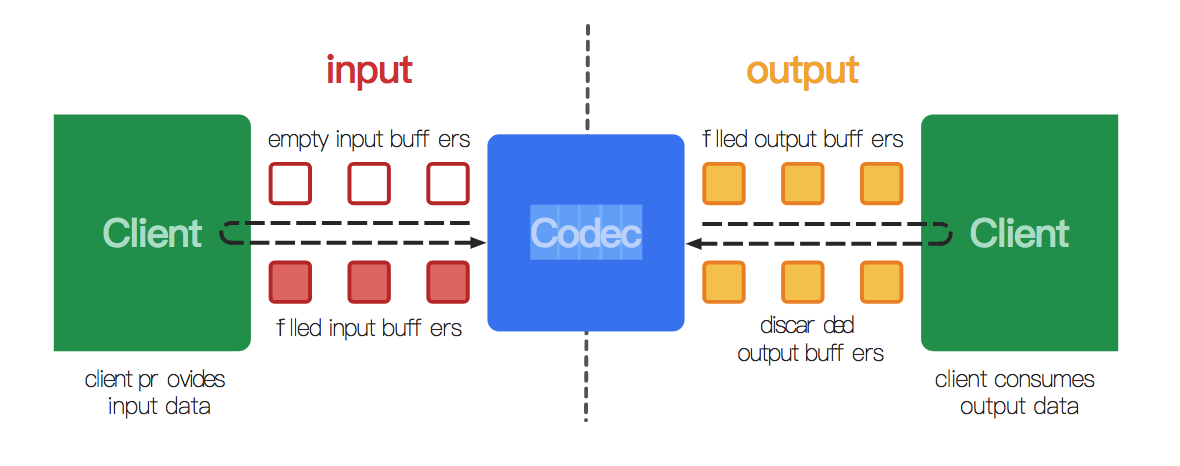

- native raw video format:这由 MediaCodecInfo.CodecCapabilities.COLOR_FormatSurface 标记,并且它可以和输入输出缓冲区一起使用。
- flexible YUV buffers(例如MediaCodecInfo.CodecCapabilities.COLOR_FormatYUV420Flexible):通过使用getInput/OutputImage(int) ,它们可以与输入/输出 Surface 一起使用,也可以在 ByteBuffer 模式下使用。
- other, specific formats:这些通常仅在 ByteBuffer 模式下受支持。某些颜色格式是供应商特定的。 其他在MediaCodecInfo.CodecCapabilities中定义。 对于等效于灵活格式的颜色格式,您仍然可以使用getInput/OutputImage(int)。
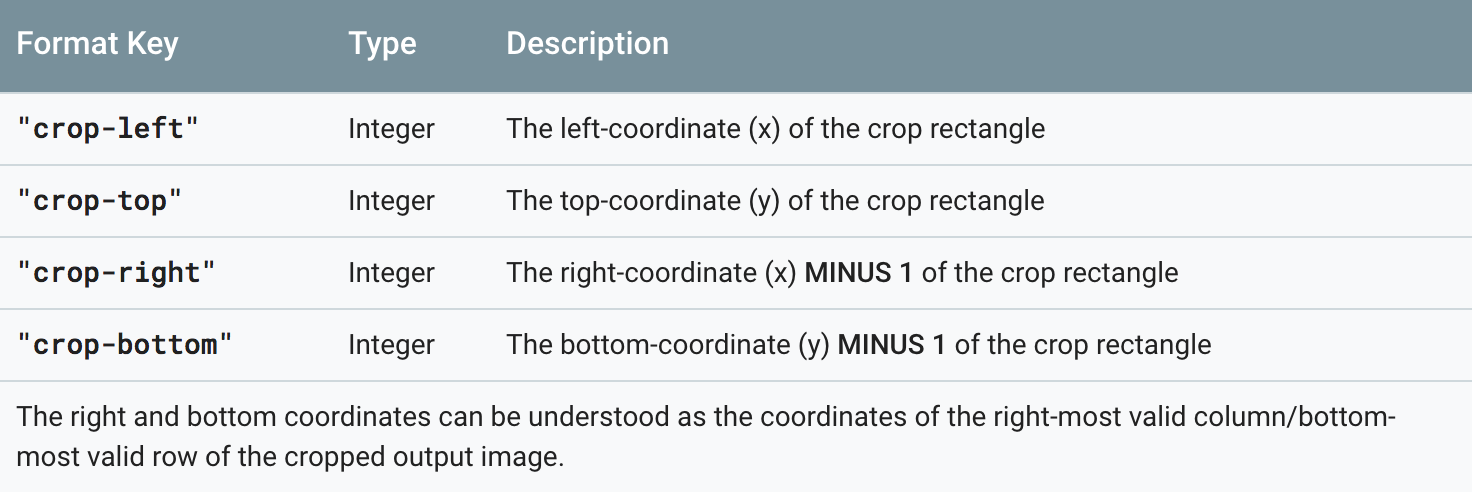
 MediaFormat format = decoder.getOutputFormat(…);

 int width = format.getInteger(MediaFormat.KEY_WIDTH);

 if (format.containsKey("crop-left") && format.containsKey("crop-right")) {

     width = format.getInteger("crop-right") + 1 - format.getInteger("crop-left");

 }

 int height = format.getInteger(MediaFormat.KEY_HEIGHT);

 if (format.containsKey("crop-top") && format.containsKey("crop-bottom")) {

     height = format.getInteger("crop-bottom") + 1 - format.getInteger("crop-top");

 }
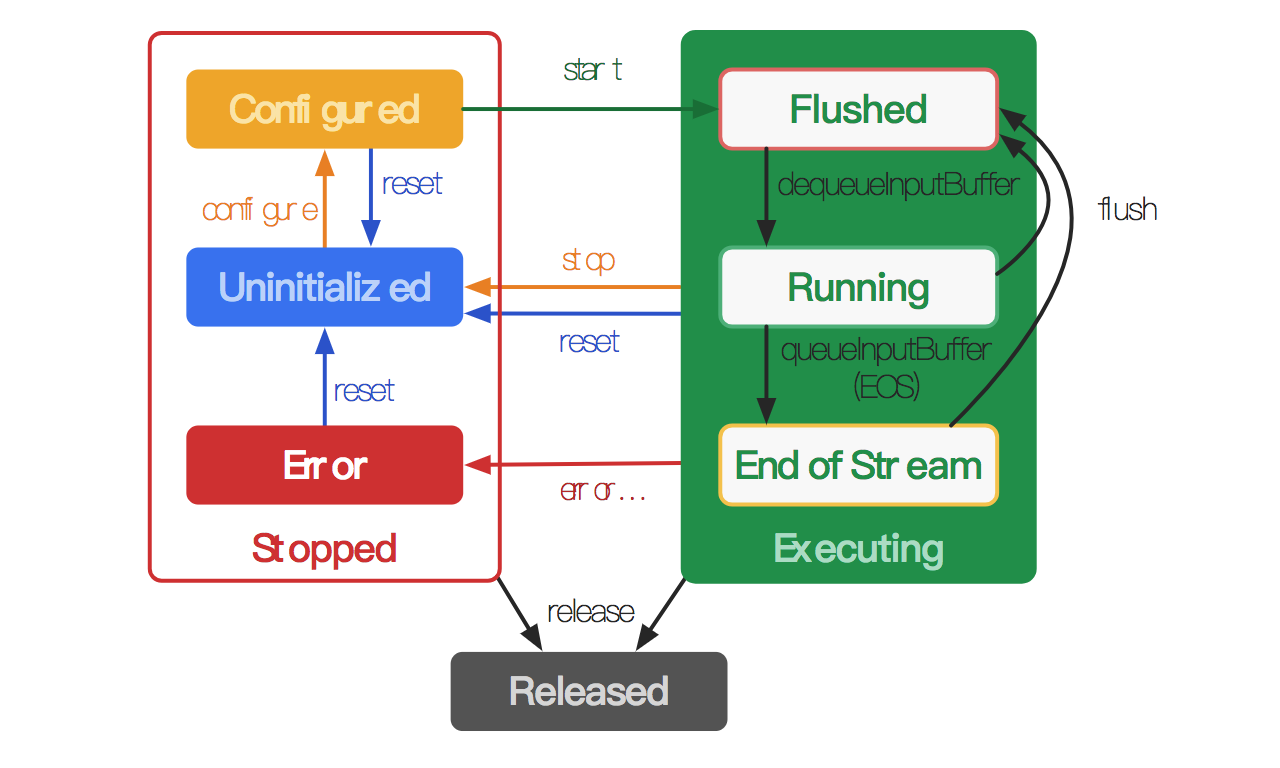



 MediaCodec codec = MediaCodec.createByCodecName(name);

 MediaFormat mOutputFormat; // member variable

 codec.setCallback(new MediaCodec.Callback() {

   @Override

   void onInputBufferAvailable(MediaCodec mc, int inputBufferId) {

     ByteBuffer inputBuffer = codec.getInputBuffer(inputBufferId);

     // fill inputBuffer with valid data

     …

     codec.queueInputBuffer(inputBufferId, …);

   }

   @Override

   void onOutputBufferAvailable(MediaCodec mc, int outputBufferId, …) {

     ByteBuffer outputBuffer = codec.getOutputBuffer(outputBufferId);

     MediaFormat bufferFormat = codec.getOutputFormat(outputBufferId); // option A

     // bufferFormat is equivalent to mOutputFormat

     // outputBuffer is ready to be processed or rendered.

     …

     codec.releaseOutputBuffer(outputBufferId, …);

   }

   @Override

   void onOutputFormatChanged(MediaCodec mc, MediaFormat format) {

     // Subsequent data will conform to new format.

     // Can ignore if using getOutputFormat(outputBufferId)

     mOutputFormat = format; // option B

   }

   @Override

   void onError(…) {

     …

   }

 });

 codec.configure(format, …);

 mOutputFormat = codec.getOutputFormat(); // option B

 codec.start();

 // wait for processing to complete

 codec.stop();

 codec.release();
 MediaCodec codec = MediaCodec.createByCodecName(name);

 codec.configure(format, …);

 MediaFormat outputFormat = codec.getOutputFormat(); // option B

 codec.start();

 for (;;) {

   int inputBufferId = codec.dequeueInputBuffer(timeoutUs);

   if (inputBufferId >= 0) {

     ByteBuffer inputBuffer = codec.getInputBuffer(…);

     // fill inputBuffer with valid data

     …

     codec.queueInputBuffer(inputBufferId, …);

   }

   int outputBufferId = codec.dequeueOutputBuffer(…);

   if (outputBufferId >= 0) {

     ByteBuffer outputBuffer = codec.getOutputBuffer(outputBufferId);

     MediaFormat bufferFormat = codec.getOutputFormat(outputBufferId); // option A

     // bufferFormat is identical to outputFormat

     // outputBuffer is ready to be processed or rendered.

     …

     codec.releaseOutputBuffer(outputBufferId, …);

   } else if (outputBufferId == MediaCodec.INFO_OUTPUT_FORMAT_CHANGED) {

     // Subsequent data will conform to new format.

     // Can ignore if using getOutputFormat(outputBufferId)

     outputFormat = codec.getOutputFormat(); // option B

   }

 }

 codec.stop();

 codec.release();
 MediaCodec codec = MediaCodec.createByCodecName(name);

 codec.configure(format, …);

 codec.start();

 ByteBuffer[] inputBuffers = codec.getInputBuffers();

 ByteBuffer[] outputBuffers = codec.getOutputBuffers();

 for (;;) {

   int inputBufferId = codec.dequeueInputBuffer(…);

   if (inputBufferId >= 0) {

     // fill inputBuffers[inputBufferId] with valid data

     …

     codec.queueInputBuffer(inputBufferId, …);

   }

   int outputBufferId = codec.dequeueOutputBuffer(…);

   if (outputBufferId >= 0) {

     // outputBuffers[outputBufferId] is ready to be processed or rendered.

     …

     codec.releaseOutputBuffer(outputBufferId, …);

   } else if (outputBufferId == MediaCodec.INFO_OUTPUT_BUFFERS_CHANGED) {

     outputBuffers = codec.getOutputBuffers();

   } else if (outputBufferId == MediaCodec.INFO_OUTPUT_FORMAT_CHANGED) {

     // Subsequent data will conform to new format.

     MediaFormat format = codec.getOutputFormat();

   }

 }

 codec.stop();

 codec.release();
流末端处理(End-of-stream Handling)
- 不渲染缓冲区:调用releaseOutputBuffer(bufferId, false)。
- 使用默认时间戳呈现缓冲区:调用releaseOutputBuffer(bufferId, true)。
- 使用特定时间戳呈现缓冲区:调用releaseOutputBuffer(bufferId, timestamp)。
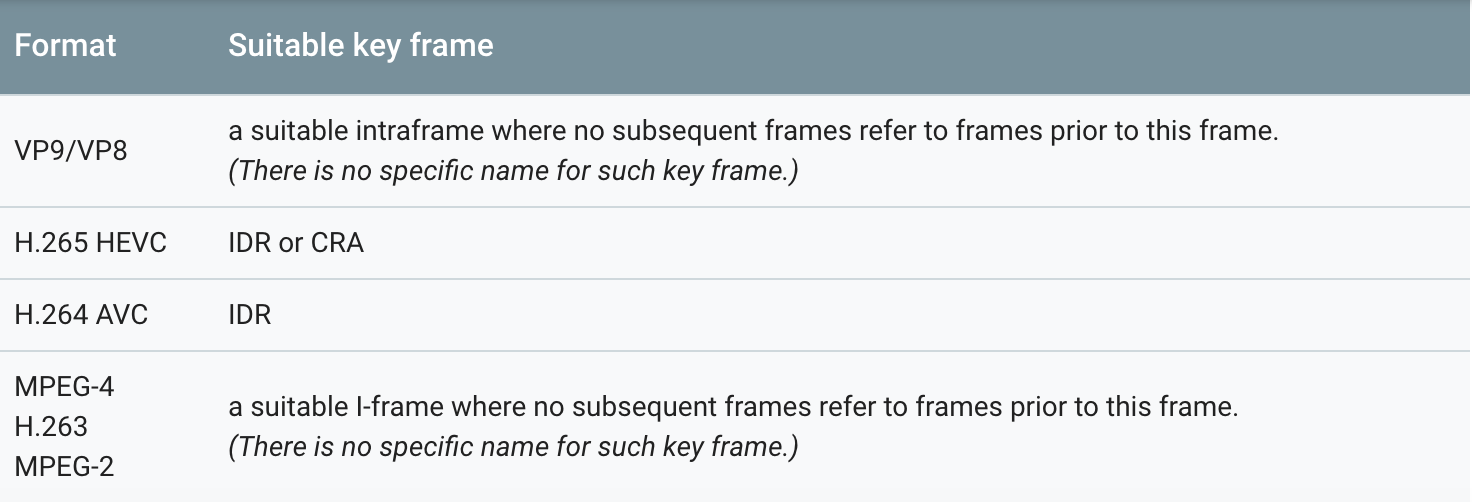
- 可恢复的错误:如果isRecoverable()返回 true,则调用stop(),configure(…)和start()进行恢复。
- 瞬态错误:如果iisTransient()返回 true,则资源暂时不可用,并且可以在以后重试该方法。
- 致命错误:如果isRecoverable()和isTransient()都返回 false,则CodecException是致命的,并且必须重置(reset )或释放编解码器(released)。
android 原生 MediaPlayer 和 MediaCodec 的区别和联系(三)的更多相关文章
- Android 原生 MediaPlayer 和 MediaCodec 的区别和联系(二)
目录: (3)Android 官方网站 对 MediaPlayer的介绍 正文: Android 官方网站 对 MediaPlayer的介绍 MediaPlayer pub ...
- Android MediaPlayer 和 MediaCodec 的区别和联系(一)
目录: (1)概念解释 : 硬解.软解 (2)Intel关于Android MediaCodec的相关说明 正文: 一.硬解.软解 (1)概念: a.硬 ...
- Android原生编解码接口 MediaCodec 之——踩坑
版权声明:本文为博主原创文章,遵循 CC 4.0 BY-SA 版权协议,转载请附上原文出处链接和本声明.本文链接:https://blog.csdn.net/gb702250823/article/d ...
- Android中style和theme的区别
在学习Xamarin android的过程中,最先开始学习的还是熟练掌握android的六大布局-LinearLayout .RelativeLayout.TableLayout.FrameLayou ...
- Android进阶(二十七)Android原生扰人烦的布局
Android原生扰人烦的布局 在开发Android应用时,UI布局是一件令人烦恼的事情.下面主要讲解一下Android中的界面布局. 一.线性布局(LinearLayout) 线性布局分为: (1) ...
- 像写Flutter一样开发Android原生应用
要问到Flutter和Android原生App,在开发是有何区别,编程方式是绕不开的话题.Flutter采用声明式编程,Android原生开发则采用命令式编程. 声明式编程 VS. 命令式编程 我们首 ...
- 拓展 Android 原生 CountDownTimer 倒计时
拓展 Android 原生 CountDownTimer 倒计时 [TOC] CountDownTimer 在系统的CountDownTimer上进行的修改,主要是拓展了功能,当然也保留了系统默认的模 ...
- Android原生json和fastjson的简单使用
android原生操作json数据 主要是两个类 JSONObject 操作对象 JONSArray操作json数组 对象转json //创建学生对象 Student student=new ...
- Android原生游戏开发:使用JustWeEngine开发微信打飞机
使用JustWeEngine开发微信打飞机: 作者博客: 博客园 引擎地址:JustWeEngine 示例代码:EngineDemo JustWeEngine? JustWeEngine是托管在Git ...
随机推荐
- bzoj3956: Count (单调栈+st表)
题面链接 bzoj 题解 非常巧妙的一道题 类似[hnoi影魔] 每个点会给左右第一个大于它的点对产生贡献 可以用单调栈求出 这里有点小细节,就是处理相等的点时,最左边的点管左边的贡献,最右边的点管最 ...
- Codeforces - 149D 不错的区间DP
题意:有一个字符串 s. 这个字符串是一个完全匹配的括号序列.在这个完全匹配的括号序列里,每个括号都有一个和它匹配的括号 你现在可以给这个匹配的括号序列中的括号染色,且有三个要求: 每个括号只有三种情 ...
- FreeRTOS-07内核控制函数
根据正点原子FreeRTOS视频整理 单片机:STM32F207VC FreeRTOS源码版本:v10.0.1 内核控制函数:
- typescript 入门
为什么要使用typescript? 出现拼写错误,可以立即指出错误. 出现模块引入错误,立即指出错误. 出现函数.变量类型错误,立即指出错误. 在react组件中制定好了基本的props和state之 ...
- 如何查看yum安装路径
#yum install hdf5 #rpm -qa|grep hdf5 hdf5-1.8.7-1.el6.rf.x86_64 #rpm -ql hdf5-1.8.7-1.el6.rf.x86_64
- 之前为dd写的一个小的demo(robotium)
测试类的编写: package com.m1905.dd.mobile; import com.robotium.solo.By; import com.robotium.solo.Solo; imp ...
- css3基础下
box-shadow:0 5px 5px rgba(0,0,0,0.5) 文本 text-shadow:5px 5px 4px green; word-wrap: 背景: background:#ff ...
- 使用VNC访问Linux桌面
在一个严重依赖Windows的工作环境中,比如电子邮件被限定为Outlook(因为加密要求), VPN软件不支持Linux版本,那么,只使用Linux桌面是不够的,还需要在Linux桌面上跑个虚拟机运 ...
- sourceTree git 空目录从远程仓库克隆代码出现warning: templates not found
解决办法: 在安装git时没有默认安装到c盘,而是安装到了d盘.在使用SourceTree进行代码克隆时提示warning: templates not found in D:\software\de ...
- 师傅领进门之6步教你跑通一个AI程序!
欢迎大家前往腾讯云+社区,获取更多腾讯海量技术实践干货哦~ 本文由云计算基础发表于云+社区专栏 源码下载地址请点击原文查看. 初学机器学习,写篇文章mark一下,希望能为将入坑者解点惑.本文介绍一些机 ...