
springMVC(二): @RequestBody @ResponseBody 注解实现分析
一、继承结构
@RequestBody、@ResponseBody的处理器:RequestResponseBodyMethodProcessor
@ModelAttribute处理器: ModelAttributeMethodProcessor
HttpEntity处理器: HttpEntityMethodProcessor
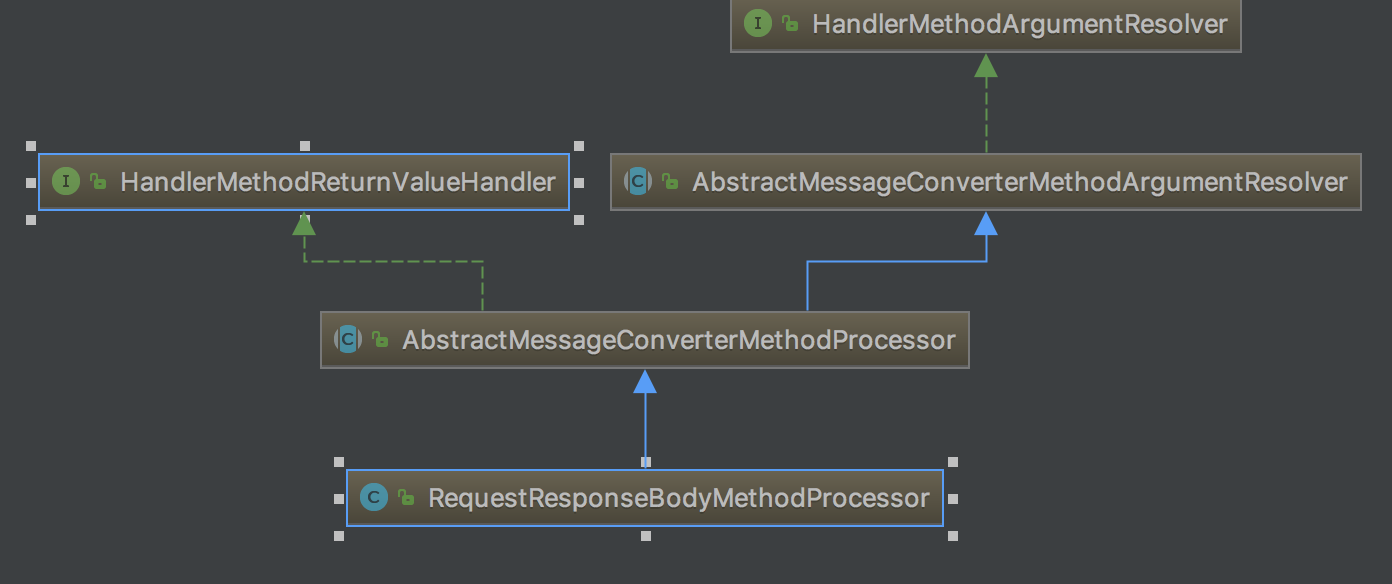
参数值解析器: HandlerMethodArgumentResolver
返回值处理器: HandlerMethodReturnValueHandler
使用HttpMessageConverter 转换方法参数: AbstractMessageConverterMethodArgumentResolver
二、 处理过程
1. RequestResponseBodyMethodProcessor的resolveArgument过程
    @Override

    public Object resolveArgument(MethodParameter parameter, ModelAndViewContainer mavContainer,

            NativeWebRequest webRequest, WebDataBinderFactory binderFactory) throws Exception {


     //返回@RequestBody需要的参数, Spring使用我们自定义的RequestBodyAdvice, ResponseBodyAdvice发生在这里

        Object arg = readWithMessageConverters(webRequest, parameter, parameter.getGenericParameterType());

        String name = Conventions.getVariableNameForParameter(parameter);


     //输入参数转换成Java对象发生在这里,后面有专门的文章讲解,注意:每次请求绑定的对象的重新生成的

        WebDataBinder binder = binderFactory.createBinder(webRequest, arg, name);

        if (arg != null) {

            validateIfApplicable(binder, parameter);

            if (binder.getBindingResult().hasErrors() && isBindExceptionRequired(binder, parameter)) {

                throw new MethodArgumentNotValidException(parameter, binder.getBindingResult());

            }

        }

        mavContainer.addAttribute(BindingResult.MODEL_KEY_PREFIX + name, binder.getBindingResult());

        return arg;

    }

    @Override

    protected <T> Object readWithMessageConverters(NativeWebRequest webRequest, MethodParameter methodParam,

            Type paramType) throws IOException, HttpMediaTypeNotSupportedException, HttpMessageNotReadableException {

        HttpServletRequest servletRequest = webRequest.getNativeRequest(HttpServletRequest.class);

        ServletServerHttpRequest inputMessage = new ServletServerHttpRequest(servletRequest);


     //调用父类的readWithMessageCoverters()方法

        Object arg = readWithMessageConverters(inputMessage, methodParam, paramType);

        if (arg == null) {

            if (methodParam.getParameterAnnotation(RequestBody.class).required()) {

                throw new HttpMessageNotReadableException("Required request body is missing: " +

                        methodParam.getMethod().toGenericString());

            }

        }

        return arg;

    }
springMVC(二): @RequestBody @ResponseBody 注解实现分析的更多相关文章
- @RequestBody, @ResponseBody 注解详解(转)
原文地址: https://www.cnblogs.com/qq78292959/p/3760651.html @RequestBody, @ResponseBody 注解详解(转) 引言: 接上一篇 ...
- SpringMVC学习八 @ResponseBody注解
(一)在方法上只有@RequestMapping 时,无论方法返回值是什么认为需要跳转,代码实例如下 @RequestMapping("demo10") public People ...
- @RequestBody, @ResponseBody 注解理解
@RequestBody, @ResponseBody 注解理解 自己以前没怎么留意过,来实习后公司采用前后端分离的开发方式,前后端拿到的注释都是 json 格式的,这时候 @RequestBody, ...
- @RequestBody, @ResponseBody 注解详解
简介: @RequestBody 作用: i) 该注解用于读取Request请求的body部分数据,使用系统默认配置的HttpMessageConverter进行解析,然后把相应的数据绑定到要返回的对 ...
- SpringMVC中 解决@ResponseBody注解返回中文乱码
问题:在前端通过get请求服务端返回String类型的服务时,会出现中文乱码问题 原因:由于spring默认对String类型的返回的编码采用的是 StringHttpMessageConverter ...
- SpringMVC中使用@ResponseBody注解将任意POJO对象返回值转换成json进行返回
@ResponseBody 作用: 该注解用于将Controller的方法返回的对象,通过适当的HttpMessageConverter转换为指定格式后,写入到Response对象的body数据区. ...
- 在SpringMVC中使用@RequestBody和@ResponseBody注解处理json时,报出HTTP Status 415的解决方案
我在使用SpringMVC的@RequestBody和@ResponseBody注解处理JSON数据的时候,总是出现415的错误,说是不支持所提交数据格式,我在页面中使用了JQuery的AJAX来发出 ...
- SpringMVC源码剖析5:消息转换器HttpMessageConverter与@ResponseBody注解
转自 SpringMVC关于json.xml自动转换的原理研究[附带源码分析] 本系列文章首发于我的个人博客:https://h2pl.github.io/ 欢迎阅览我的CSDN专栏:Spring源码 ...
- @RequestBody、@ResponseBody注解是如何将输入输出转换成json的
@RequestBody.@ResponseBody注解,可以直接将输入解析成Json.将输出解析成Json,但HTTP 请求和响应是基于文本的,意味着浏览器和服务器通过交换原始文本进行通信,而这里其 ...
随机推荐
- Oracle垃圾数据清理相关问题 分类: Oracle 2015-08-06 11:14 12人阅读 评论(0) 收藏
垃圾数据清理,简单的说,就是删除不需要的那些数据,释放存储空间 最常用的就是delete命令.truncate命令,甚至是删除表空间重建,具体操作都很简单,不是本文的重点 下面,总结几个垃圾数据清理常 ...
- zabbix参考文档
http://www.zsythink.net/archives/category/%E8%BF%90%E7%BB%B4%E7%9B%B8%E5%85%B3/zabbix/
- 在WPS中删除整行的快捷键是什么?
选中需要删除的行,(方法:点击最左侧的行号):按快捷键Ctrl+-(按着Ctrl不放,再按小键盘的减号“-”),“-”是删除,“+”是插入,选中行,是对行操作,选中列就是对列操作,选中单元格,就是单元 ...
- A - River Hopscotch
Every year the cows hold an event featuring a peculiar version of hopscotch that involves carefully ...
- ThinkPHP框架 自定义 Empty 方法保护本地信息不被暴露!!!
在使用ThinkPHP框架开发过程中,在每个Controller文件夹里面都要设置一个空控制器,用来保护本地信息不被泄露(EmptyController.class.php) 此方法很有效的隐藏系统内 ...
- 移动端H5混合开发,Touch触控,拖拽,长按, 滑屏 实现方案
概述 近期由于产品快速原型开发的需要,不想用原声的方式开发App两端一起搞时间来不及,目前产品处于大量上feature的阶段,采用混合开发是最合适的选择,所以花了3天的时间研究怎么去实现移动端,拖拽, ...
- hdu4300 Clairewd’s message【next数组应用】
Clairewd’s message Time Limit: 2000/1000 MS (Java/Others) Memory Limit: 32768/32768 K (Java/Other ...
- CentOS-6.9安装配置JDK-7
CentOS-6.9安装配置JDK-7 安装说明 系统环境:centos-6.9安装方式:rpm安装 软件:jdk-7u79-linux-x64.rpm下载地址:http://download.ora ...
- 【待补】splay 模板
#define _CRT_SECURE_NO_WARNINGS #include<cmath> #include<iostream> #include<stdio.h&g ...
- canvas 线性规划
小结: 1.线性规划 <!DOCTYPE html> <html> <head> <meta charset="utf-8"> &l ...