
ABP框架系列之五十:(Swagger-UI-集成)
Introduction
From it's web site: "....with a Swagger-enabled API, you get interactive documentation, client SDK generation and discoverability."
从它的网站:“使API,你得到的交互式文档,客户端SDK的生成和发现。”
ASP.NET Core
Install Nuget Package
Install Swashbuckle.AspNetCore nuget package to your Web project.
Configure
Add configuration code for Swagger into ConfigureServices method of your Startup.cs
public IServiceProvider ConfigureServices(IServiceCollection services)

{

    //your other code...

      services.AddSwaggerGen(options =>

            {

                options.SwaggerDoc("v1", new Info { Title = "AbpZeroTemplate API", Version = "v1" });

                options.DocInclusionPredicate((docName, description) => true);

            });

    //your other code...

}
Then, add below code into Configure method of Startup.cs to use Swagger
public void Configure(IApplicationBuilder app, IHostingEnvironment env, ILoggerFactory loggerFactory)

{

    //your other code...

     app.UseSwagger();

            //Enable middleware to serve swagger - ui assets(HTML, JS, CSS etc.)

            app.UseSwaggerUI(options =>

            {

                options.SwaggerEndpoint("/swagger/v1/swagger.json", "AbpZeroTemplate API V1");

            }); //URL: /swagger

    //your other code...

}
Test
That's all. You can browse swagger ui under "/swagger".
ASP.NET 5.x
Install Nuget Package
Install Swashbuckle.Core nuget package to your WebApi project (or Web project).
Configure
Add configuration code for Swagger into Initialize method of your module. Example:
public class SwaggerIntegrationDemoWebApiModule : AbpModule

{

    public override void Initialize()

    {

        //your other code...

        ConfigureSwaggerUi();

    }

    private void ConfigureSwaggerUi()

    {

        Configuration.Modules.AbpWebApi().HttpConfiguration

            .EnableSwagger(c =>

            {

                c.SingleApiVersion("v1", "SwaggerIntegrationDemo.WebApi");

                c.ResolveConflictingActions(apiDescriptions => apiDescriptions.First());

            })

            .EnableSwaggerUi(c =>

            {

                c.InjectJavaScript(Assembly.GetAssembly(typeof(AbpProjectNameWebApiModule)), "AbpCompanyName.AbpProjectName.Api.Scripts.Swagger-Custom.js");

            });

    }

}
Notice that, we inject a javascript file named "Swagger-Custom.js" while configuring swagger ui. This script file is used to add CSRF token to requests while testing api services on swagger ui. You also need to add this file to your WebApi project as embedded resource and use it's Logical Name in InjectJavaScript method while injecting it.
IMPORTANT: The code above will be slightly different for your project (Namespace will not be AbpCompanyName.AbpProjectName... and AbpProjectNameWebApiModule will be YourProjectNameWebApiModule).
Content of the Swagger-Custom.js here:
var getCookieValue = function(key) {

    var equalities = document.cookie.split('; ');

    for (var i = 0; i < equalities.length; i++) {

        if (!equalities[i]) {

            continue;

        }

        var splitted = equalities[i].split('=');

        if (splitted.length !== 2) {

            continue;

        }

        if (decodeURIComponent(splitted[0]) === key) {

            return decodeURIComponent(splitted[1] || '');

        }

    }

    return null;

};

var csrfCookie = getCookieValue("XSRF-TOKEN");

var csrfCookieAuth = new SwaggerClient.ApiKeyAuthorization("X-XSRF-TOKEN", csrfCookie, "header");

swaggerUi.api.clientAuthorizations.add("X-XSRF-TOKEN", csrfCookieAuth);
See Swashbuckle documentation for more configuration options.
Test
That's all. Let's browse /swagger/ui/index:
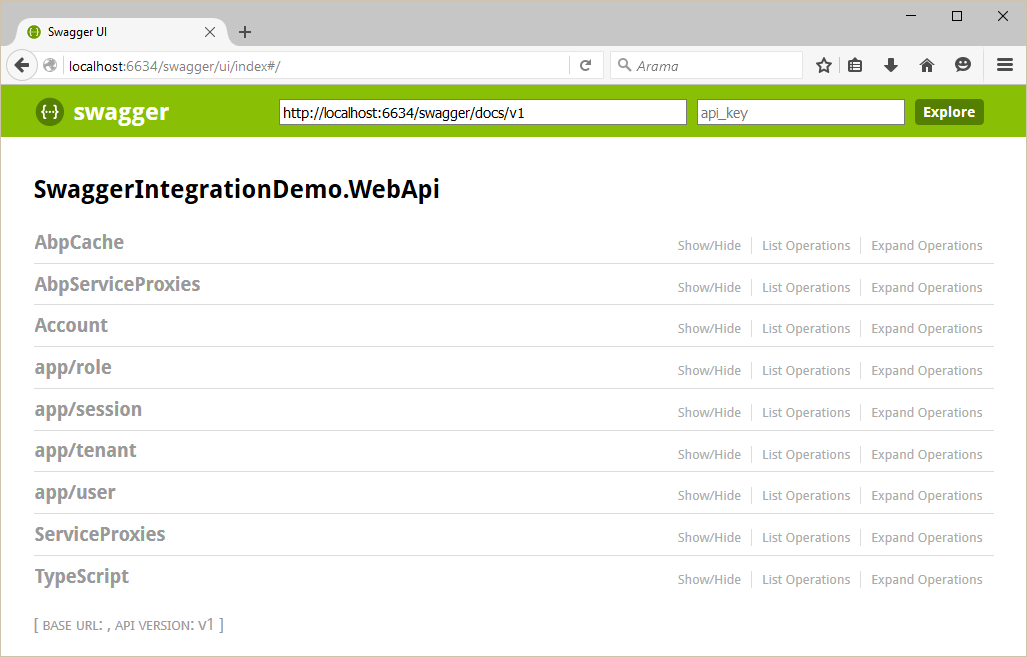

You can see all Web API Controllers (and also dynamic web api controllers) and test them.
ABP框架系列之五十:(Swagger-UI-集成)的更多相关文章
- ABP框架系列之五十四:(XSRF-CSRF-Protection-跨站请求伪造保护)
Introduction "Cross-Site Request Forgery (CSRF) is a type of attack that occurs when a maliciou ...
- ABP框架系列之五十二:(Validating-Data-Transfer-Objects-验证数据传输对象)
Introduction to validation Inputs of an application should be validated first. This input can be sen ...
- ABP框架系列之三十四:(Multi-Tenancy-多租户)
What Is Multi Tenancy? "Software Multitenancy refers to a software architecture in which a sing ...
- ABP框架系列之四十:(Notification-System-通知系统)
Introduction Notifications are used to inform users on specific events in the system. ASP.NET Boiler ...
- ABP框架系列之十六:(Dapper-Integration-Dapper集成)
Introduction Dapper is an object-relational mapper (ORM) for .NET. Abp.Dapper package simply integra ...
- ABP框架系列之三十八:(NHibernate-Integration-NHibernate-集成)
ASP.NET Boilerplate can work with any O/RM framework. It has built-in integration with NHibernate. T ...
- ABP框架系列之三十九:(NLayer-Architecture-多层架构)
Introduction Layering of an application's codebase is a widely accepted technique to help reduce com ...
- ABP框架系列之四十九:(Startup-Configuration-启动配置)
ASP.NET Boilerplate provides an infrastructure and a model to configure it and modules on startup. A ...
- ABP框架系列之十五:(Caching-缓存)
Introduction ASP.NET Boilerplate provides an abstraction for caching. It internally uses this cache ...
随机推荐
- wordpress 插件Simple Social Buttons import处漏洞复现
前言: 漏洞范围范围:simple socail buttons v2.0.4到v2.0.22之间的所有版本 利用条件,wordpress的普通用户 漏洞细节:该插件缺少权限的检查,非管理管权限执行管 ...
- VRay材质练习(一):水、玻璃、牛奶
软件环境 a) 3ds max 2014b) V-Ray 3.60.03 渲染效果图集 玻璃杯 玻璃杯+水 玻璃杯+牛奶 材质详细参数 一.玻璃材质 Diffuse (0,0,0), Roughnes ...
- CRM 模拟用户
web api 模拟用户 转:https://blog.csdn.net/vic0228/article/details/80649615 var req = new XMLHttpRequest() ...
- docker 在windows7 、8下的安装
这里说明一下这种安装方式适合win7 win8的系统环境下安装的,当然win10也可以,但是win10有更好的方式 即安装Docker Toolbox,同时还附加安装 Docker Client fo ...
- 八(第一篇)、主体结构元素——article元素、section元素
article元素 article元素代表文档.页面或应用程序中独立的.完整的.可以独自被外部引用的内容. 他可以是一篇博客或者报刊中的文章,一篇轮胎帖子.一段用户评论或独立的插件,或其他任何独立的插 ...
- python grib气象数据可视化
基于Python的Grib数据可视化 利用Python语言实现Grib数据可视化主要依靠三个库——pygrib.numpy和matplotlib.pygrib是欧洲中期天气预报中心 ...
- React将某段文字插入到某个元素里
最基本使用: 引入依赖文件: <script src="https://unpkg.com/react@16/umd/react.development.js">< ...
- OS模块的介绍
os,语义为操作系统,模块提供了访问多个操作系统服务的功能,可以处理文件和目录这些我们日常手动需要做的操作.os和它的子模块os.path还包括一些用于检查.构造.删除目录和文件的函数,以及一些处理路 ...
- hitTest,UIWindow sendEvent ,touchbegan, 响应链
https://developer.apple.com/documentation/uikit/touches_presses_and_gestures/using_responders_and_th ...
- Microsoft DQS sqlException 0x80131904 - SetDataQualitySessionPhaseTwo
遇到这个问题的原因可以从报错信息看出来,大概率是.net framework的问题 可以尝试如下解决途径 1. regenerate .net Assemble for DQS 2. 如果步骤一无法解 ...