
linux_base_commond_two
1.linux privilege commond
a.throught ll commond can get follow picture
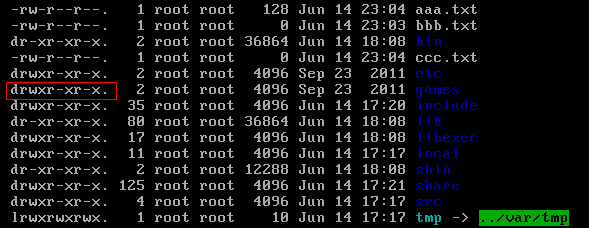
d directory - file l link , after nine number is three numbers a group
a.first group is user(属主) privileges b. second group is group(属组) privileges c.third group is other privileges
r read privilege 4 w writer privilege 2 x expression executalbe 1
b.modify privilege
chmod u=rwx, g=rw, o=r a.txt
chmod 764 a.txt
2.install soft commond
a.install JDK
NOTE:soft commond with rpm is equal to windows soft assisantor
1) look up current linux system whether or not installed JDK
rpm -qa |grep java
2)uninstalling jdk soft from one look up
rpm -e --nodeps unstall_soft_name

3)upload JDK to linux through SSH soft
4)decompression JDK soft
tar –xvf jdk-7u71-linux-i586.tar.gz –C /usr/local
5)config JDK environment variable,open /etc/profile and add following content
|
#set java environment JAVA_HOME=/usr/local/jdk1.7.0_71 CLASSPATH=.:$JAVA_HOME/lib.tools.jar PATH=$JAVA_HOME/bin:$PATH export JAVA_HOME CLASSPATH PATH |
6)reflush /etc/profile
source /etc/profile
b.installed MYSQL
1.look up centos with MYSQL
rpm -qa | grep mysql
2.unstall mysql
3.upload mysql to linux
4.decompression mysql
tar -xvf MySQL-5.6.22-1.el6.i686.rpm-bundle.tar -C /usr/local/mysql
5.installing mysql on /usr/local/mysql directory
install server-side:rpm -ivh MySQL-server-5.6.22-1.el6.i686.rpm
install client-side:rpm -ivh MySQL-client-5.6.22-1.el6.i686.rpm
6.startup mysql
service mysql start
7.link mysql services into system services and set start with boot
join system services:chkconfing --add mysql
auto start :chkconfig mysql on
8.login mysql
installed mysql will generate a random password in /root/.mysql_secret
mysql -u root -p
9.modify mysql password
set password=password('root')
10.started remote login
in default situation ,mysql isn't support to remote login,so you need set it. enabling remote login.
login mysql that you input follow command
grant all privileges on *.* to 'root' @'%' identified by 'root';
flush privileges;
11.open access ports 3306
/sbin/iptables -I INPUT -p tcp --dport 3306 -j ACCEPT
/etc/rc.d/init.d/iptables save ---(keep firewall all the time)
c.installed Tomcat
1.upload tomcat into linux
2.decompression tomcat into /usr/local
3.open ports 8080
/sbin/iptables -I INPUT -p tcp --dport 8080 -j ACCEPT
/etc/rc.d/init.d/iptables save
4.launch an close tomcat
in the bin directory: ./startup.sh
in the bin drecrory: ./shutdown.sh
linux_base_commond_two的更多相关文章
随机推荐
- !Web云笔记--HTML基础
Web自学笔记第一阶段笔记综合汇总 参考资料:<Head First HTML&CSS>(中文第二版)(美国)弗里昂ISBN:9787508356464 中国电力出版社 全部阶段: ...
- 201521123082 《Java程序设计》第9周学习总结
201521123082 <Java程序设计>第9周学习总结 标签(空格分隔):java 1.本周学习总结 1.1 以你喜欢的方式(思维导图或其他)归纳总结异常相关内容. 2. 书面作业 ...
- JAVA基础第三组(5道题)
11 [程序11] 题目:有1.2.3.4个数字,能组成多少个互不相同且无重复数字的三位数?都是多少? 1.程序分析:可填在百位.十位.个位的数字都是1.2.3.4.组成所有的排列后再去 掉不满足条件 ...
- 软件工程HW1-四则运算软件
题目描述 程序自动生成小学四则运算题目,用户输入每道题的答案之后,将答错的题目标出并计算此次答题的正确率. 项目链接 我的项目 项目运行截图 个人软件过程 此次开发的四个步骤: 1):需求分析 2): ...
- Beta的计划和人员的变动
一.新的成员和组长是否重选: 刘光华:先加入的一个帅哥,乐于助人,编码基础不是很好,但是有一颗热爱学习的心,会积极主动的完成自己的任务的,一句话宣言:我们的团队是最棒的! 程志铭:做事认真负责,工作脚 ...
- 201521123065《java程序设计》第七周学习总结
1. 本周学习总结 1.Iterator迭代器用于遍历集合中的元素: 2.使用迭代器删除元素一定要先指向下一个元素在删除第一个元素: 3.List可以有重复对象: Set不能有重复对象: 4.Map是 ...
- 201521123105 第9周Java学习总结
1. 本周学习总结 2. 书面作业 本次PTA作业题集异常 1.常用异常 题目5-1 1.1 截图你的提交结果(出现学号) 1.2 自己以前编写的代码中经常出现什么异常.需要捕获吗(为什么)?应如何避 ...
- 201521123006 《java程序设计》 第11周学习总结
1. 本周学习总结 1.1 以你喜欢的方式(思维导图或其他)归纳总结多线程相关内容. 2. 书面作业 本次PTA作业题集多线程 1.互斥访问与同步访问 完成题集4-4(互斥访问)与4-5(同步访问) ...
- php中的多条件查询
首先是查询所有,步骤不详述,连接数据库,查询表中的所有信息,foreach循环以表格的形式打印出来 然后就是form表单中提交查询的数据,这里以post方式提交到本页面,所以要判断post中是否有值, ...
- 数据库复用代码【c3p0配置文件、数据库连接池】
前言 为了复用,记载一些以前写过的工具类.方法 c3p0配置文件[c3p0-config.xml] <?xml version="1.0" encoding="UT ...