
Selenium1 Selenium2 WebDriver
1、Selenium 1 原理
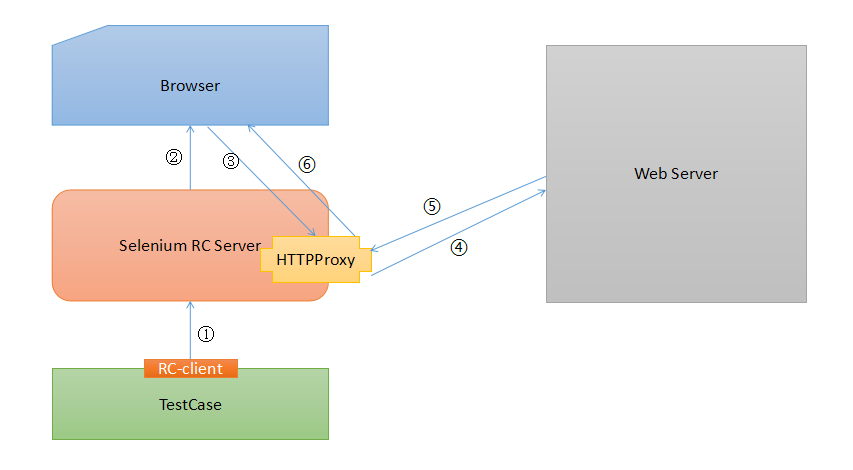
(1).测试用例(Testcase)通过Client Lib的接口向Selenium Server发送Http请求,要求和Selenium Server建立连接。
为什么要通过发送Http请求控制Selenium Server而不采用其他方式呢?从上文可以看出,Selenium Server是一个独立的中间服务器(确切地说是代理服务器),它可以架设在其他机器上!所以测试案例通过发送HTTP请求去控制Selenium Server是很正常的。
(2).Selenium Server的Launcher启动浏览器,把Selenium Core加载入浏览器页面当中,并把浏览器的代理设置为Selenium Server的Http Proxy。
(3).测试案例通过Client Lib的接口向Selenium Server发送Http请求,Selenium Server对请求进行解析,然后通过Http Proxy发送JS命令通知Selenium Core执行操作浏览器的动作。
(4).Selenium Core接收到指令后,执行操作。
(5).浏览器收到新的页面请求信息(因为在(4)中,Selenium Core的操作可能引发新的页面请求),于是发送Http请求,请求新的Web页面。
由于Selenium Server在启动浏览器时做了手脚,所以Selenium Server会接收到所有由它启动的浏览器发送的请求。
(6).Selenium Server接收到浏览器的发送的Http请求后,自己重组Http请求,获取对应的Web页面。
(7).Selenium Server的Http Proxy把接收的Web页面返回给浏览器。
2、WebDriver
WebDriver 提供了一堆用于查找和维护页面元素(DOM元素)的接口,以此方式来控制浏览器行为。目前已纳入W3C管理。
https://www.w3.org/TR/webdriver/
2.1 Webdriver 组件
在WebDriver协议里,包括local,remote,Intermidary,endpoint等概念:
·Local End:代表了WebDriver通信的客户端,通常情况下,是由一些特定语言基于通信协议组成的一套Client API。
·Remote End:remote是在通信协议的服务端。用于处理Client请求并作出响应。它包括两大类:
Intermidary node:intermidary 通常是代理,它实现了local,并代理了remote。
Endpoint :endpoint 才是实际上的remote 端的处理的地方。和Java Web开发中的action、Webservice中的endpoint是类似的概念。
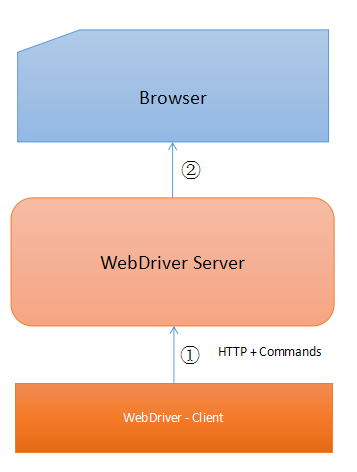
Webdriver 的通信协议是基于HTTP的以命令(command)方式组织的各种请求。WebDriver在处理一个命令时,可能会使browser执行一系列的操作。上面图中,webdriver server就是remote end,WebDriver Client就是local end。
2.2 WebDriver 协议
2.2.1 Remote End 处理流程
在local end与remote end的连接建立后,Remote End会做如下处理:
1、根据HTTP协议读取一个完整的HTTP请求,并封装成request对象。
2、根据http request method, url对请求进行匹配,找到相应的endpoint。
3、如果匹配到了error ,就发送一个error给local end,然后step 1。
4、使用sessionid进行session匹配
5、如果匹配失败(session 列表里找不到与sessionid相关联的session),响应一个error,然后step 1。
6、如果是post请求,以json方式解析requet body。如果解析成功,但并不是一个对象,或者解析失败,响应一个error给Local。然后step 1。
7、等待浏览器导航完毕
8、响应结果
2.2.2 Commands & Endpoints & 请求路由
为了控制browser的行为,提供了一系列的command,大体可以分为几类:
1)Session管理(remote 与local之间的session)
2)浏览器URL导航
3)浏览器窗口管理
4)DOM元素管理
5)JS脚本执行
6)Cookie管理
7)Alert
8)截屏
9)一些操作例如(键盘,鼠标,批处理等)
Remote在接收到这些命令时,会进行Endpoint匹配。匹配时是根据URL、http method。
他们的对应关系是:
|
Method |
URI Template |
Command |
|
POST |
/session |
|
|
DELETE |
/session/{session id} |
|
|
GET |
/status |
|
|
GET |
/session/{session id}/timeouts |
|
|
POST |
/session/{session id}/timeouts |
|
|
POST |
/session/{session id}/url |
|
|
GET |
/session/{session id}/url |
|
|
POST |
/session/{session id}/back |
|
|
POST |
/session/{session id}/forward |
|
|
POST |
/session/{session id}/refresh |
|
|
GET |
/session/{session id}/title |
|
|
GET |
/session/{session id}/window |
|
|
DELETE |
/session/{session id}/window |
|
|
POST |
/session/{session id}/window |
|
|
GET |
/session/{session id}/window/handles |
|
|
POST |
/session/{session id}/frame |
|
|
POST |
/session/{session id}/frame/parent |
|
|
GET |
/session/{session id}/window/rect |
|
|
POST |
/session/{session id}/window/rect |
|
|
POST |
/session/{session id}/window/maximize |
|
|
POST |
/session/{session id}/window/minimize |
|
|
POST |
/session/{session id}/window/fullscreen |
|
|
GET |
/session/{session id}/element/active |
|
|
POST |
/session/{session id}/element |
|
|
POST |
/session/{session id}/elements |
|
|
POST |
/session/{session id}/element/{element id}/element |
|
|
POST |
/session/{session id}/element/{element id}/elements |
|
|
GET |
/session/{session id}/element/{element id}/selected |
|
|
GET |
/session/{session id}/element/{element id}/attribute/{name} |
|
|
GET |
/session/{session id}/element/{element id}/property/{name} |
|
|
GET |
/session/{session id}/element/{element id}/css/{property name} |
|
|
GET |
/session/{session id}/element/{element id}/text |
|
|
GET |
/session/{session id}/element/{element id}/name |
|
|
GET |
/session/{session id}/element/{element id}/rect |
|
|
GET |
/session/{session id}/element/{element id}/enabled |
|
|
POST |
/session/{session id}/element/{element id}/click |
|
|
POST |
/session/{session id}/element/{element id}/clear |
|
|
POST |
/session/{session id}/element/{element id}/value |
|
|
GET |
/session/{session id}/source |
|
|
POST |
/session/{session id}/execute/sync |
|
|
POST |
/session/{session id}/execute/async |
|
|
GET |
/session/{session id}/cookie |
|
|
GET |
/session/{session id}/cookie/{name} |
|
|
POST |
/session/{session id}/cookie |
|
|
DELETE |
/session/{session id}/cookie/{name} |
|
|
DELETE |
/session/{session id)/cookie |
|
|
POST |
/session/{session id}/actions |
|
|
DELETE |
/session/{session id}/actions |
|
|
POST |
/session/{session id}/alert/dismiss |
|
|
POST |
/session/{session id}/alert/accept |
|
|
GET |
/session/{session id}/alert/text |
|
|
POST |
/session/{session id}/alert/text |
|
|
GET |
/session/{session id}/screenshot |
|
|
GET |
/session/{session id}/element/{element id}/screenshot |
2.2.3 错误消息
从上面的流程里,有多次提到发现error时,回发一个error。而实际上返回的错误需要包括
|
{ Error: // 错误码 Message://错误信息 Stacktrace:// 发生错误时的stack } |
下面是各种错误的描述:
|
Error Code |
HTTP Status |
JSON Error Code |
Description |
|
element click intercepted |
400 |
element click intercepted |
The Element Click command could not be completed because the element receiving the events is obscuring the element that was requested clicked. |
|
element not selectable |
400 |
element not selectable |
An attempt was made to select an element that cannot be selected. |
|
element not interactable |
400 |
element not interactable |
A command could not be completed because the element is notpointer- or keyboard interactable. |
|
insecure certificate |
400 |
insecure certificate |
Navigation caused the user agent to hit a certificate warning, which is usually the result of an expired or invalid TLS certificate. |
|
invalid argument |
400 |
invalid argument |
The arguments passed to a command are either invalid or malformed. |
|
invalid cookie domain |
400 |
invalid cookie domain |
An illegal attempt was made to set a cookie under a different domain than the current page. |
|
invalid coordinates |
400 |
invalid coordinates |
The coordinates provided to an interactions operation are invalid. |
|
invalid element state |
400 |
invalid element state |
A command could not be completed because the element is in an invalid state, e.g. attempting to click an element that is no longer attached to the document. |
|
invalid selector |
400 |
invalid selector |
Argument was an invalid selector. |
|
invalid session id |
404 |
invalid session id |
Occurs if the given session id is not in the list of active sessions, meaning the session either does not exist or that it’s not active. |
|
javascript error |
500 |
javascript error |
An error occurred while executing JavaScript supplied by the user. |
|
move target out of bounds |
500 |
move target out of bounds |
The target for mouse interaction is not in the browser’s viewport and cannot be brought into that viewport. |
|
no such alert |
400 |
no such alert |
An attempt was made to operate on a modal dialog when one was not open. |
|
no such cookie |
404 |
no such cookie |
No cookie matching the given path name was found amongst the associated cookies of the current browsing context’sactive document. |
|
no such element |
404 |
no such element |
An element could not be located on the page using the given search parameters. |
|
no such frame |
400 |
no such frame |
A command to switch to a frame could not be satisfied because the frame could not be found. |
|
no such window |
400 |
no such window |
A command to switch to a window could not be satisfied because the window could not be found. |
|
script timeout |
408 |
script timeout |
A script did not complete before its timeout expired. |
|
session not created |
500 |
session not created |
A new session could not be created. |
|
stale element reference |
400 |
stale element reference |
A command failed because the referenced element is no longer attached to the DOM. |
|
timeout |
408 |
timeout |
An operation did not complete before its timeout expired. |
|
unable to set cookie |
500 |
unable to set cookie |
A command to set a cookie’s value could not be satisfied. |
|
unable to capture screen |
500 |
unable to capture screen |
A screen capture was made impossible. |
|
unexpected alert open |
500 |
unexpected alert open |
A modal dialog was open, blocking this operation. |
|
unknown command |
404 |
unknown command |
A command could not be executed because the remote end is not aware of it. |
|
unknown error |
500 |
unknown error |
An unknown error occurred in the remote end while processing the command. |
|
unknown method |
405 |
unknown method |
The requested command matched a known URL but did not match an method for that URL. |
|
unsupported operation |
500 |
unsupported operation |
Indicates that a command that should have executed properly cannot be supported for some reason. |
2.3 WebDriver 兼容性
为了支持各个浏览器,自然要由各个浏览器厂商来实现这一套协议。各个厂商的浏览器毕竟不同,各有各自的一些特性等。为了更好的支持各个浏览器,各个厂商可以在创建Session时,指定一些自定义的配置。
一些标准的配置有:
|
Capability |
Key |
Value Type |
Description |
|
Browser name |
"browserName" |
string |
Identifies the user agent. |
|
Browser version |
"browserVersion" |
string |
Identifies the version of the user agent. |
|
Platform name |
"platformName" |
string |
Identifies the operating system of the endpoint node. |
|
Accept insecure TLS certificates |
"acceptInsecureCerts" |
boolean |
Indicates whether untrusted and self-signed TLS certificates are implicitly trusted onnavigation for the duration of the session. |
|
Page load strategy |
"pageLoadStrategy" |
string |
Defines the current session’spage load strategy. |
|
Proxy configuration |
"proxy" |
JSONObject |
Defines the current session’sproxy configuration. |
|
Window dimensioning/positioning |
"setWindowRect" |
boolean |
Indicates whether the remote end supports all of thecommands in Resizing and Positioning Windows. |
|
"timeouts" |
JSONObject |
Describes the timeouts imposed on certain session operations. |
|
|
Unhandled prompt behavior |
"unhandledPromptBehavior" |
string |
Describes the current session’s user prompt handler. |
除此之外,各个厂商可以自定义自己的配置。
3、Selenium 2
Selenium 2 = WebDriver + Selenium1
只需要将Selenium 1 中的RC Server ,RC Client替换成 WebDriver ,就成了Selenium2的结构。
Selenium1 Selenium2 WebDriver的更多相关文章
- selenium2 Webdriver + Java 自动化测试实战和完全教程
selenium2 Webdriver + Java 自动化测试实战和完全教程一.快速开始 博客分类: Selenium-webdriverselenium webdriver 学习selenium ...
- selenium1,selenium2,watir的比较
接触web方面的自动化测试,会接触几个常用的工具,selenium1,selenium2,watir 有的时候总是混淆,那么他们的优缺点啥的呢,在让你给项目选自动化框架,会选择哪个??? 1,语言的支 ...
- selenium2 WebDriver 在asp.net项目中的应用
selenium2 WebDriver是一款跨平台的 自动化测试工具,它可以操纵浏览器,模拟用户行为,非常方便用户进行自动化测试. .net项目使用它,首先要通过 Visual Studio 的 nu ...
- selenium2(WebDriver) API
selenium2(WebDriver) API 作者:Glen.He出处:http://www.cnblogs.com/puresoul/ 1.1 下载selenium2.0的包 官方downl ...
- Selenium2(WebDriver)总结(二)---Firefox的firebug插件参数设置(补充)
本文是对上一节的补充:http://www.cnblogs.com/puresoul/p/4251536.html 使用Selenium2(webdriver)启动firefox且自动加载firebu ...
- Selenium2(WebDriver)总结(一)---启动浏览器、设置profile&加载插件
本文主要记录下在使用selenium2/webdriver时启动各种浏览器的方法.以及如何加载插件.定制浏览器信息(设置profile)等 环境搭建可参考我的另一篇文章:http://www.cnbl ...
- Selenium1(RC)与Selenium2(WebDriver)的概念介绍
最近网上学习了Selenium1和selenium2,自己做一些总结,方便以后查阅. 部分内容引用: http://www.cnblogs.com/hyddd/archive/2009/05/30/1 ...
- 自动化测试之 seleniumIDE,Selenium1,selenium2和testNG入门
由于前期三个月公司的项目一直在改需求阶段,一直是手动测试,现在项目雏形以及基本页面功能都确定下来,为了不让自己陷入天天测同一功能的无限循环中,故开始自动化测试的学习之路,也为自己以后的发展铺铺路. 一 ...
- Selenium2(WebDriver)总结(五)---元素操作进阶(常用类)
1.Alert类 Alert是指windows弹窗的一些操作,需要new一个Alert类 driver.switchTo().alert():切换到alert窗口 alert.getText():取得 ...
随机推荐
- asp.net core高级应用:TagHelper+Form
上一篇博客我讲解了TagHelper的基本用法和自定义标签的生成,那么我就趁热打铁,和大家分享一下TagHelper的高级用法~~,大家也可以在我的博客下随意留言. 对于初步接触asp.net cor ...
- HDU 2389 Rain on your Parade / HUST 1164 4 Rain on your Parade(二分图的最大匹配)
HDU 2389 Rain on your Parade / HUST 1164 4 Rain on your Parade(二分图的最大匹配) Description You're giving a ...
- 初次入坑jade模板引擎(一)
最近由于工作需要全栈开发,nodejs做后端,在写一个后台管理系统的时候,我一直在考虑用怎样的方式去写,尝试过依然采用前后端分离的结构.使用json数据进行数据交互的模式,但是尝试过才知道,真的很花时 ...
- Android - AIDL 使用
AIDL(Android Interface Definition Language) 程序员可以利用AIDL自定义编程接口,在客户端和服务端之间实现进程间通信(IPC).在Android平台上,一个 ...
- python之基本内容
这里提供在使用python进行开发中常使用到的方法技巧,如有不对欢迎批评指正. 要点:开发中类.变量特性查询,类型就是类,断言的使用,深浅复制判断等 python脚本文件是使用UTF-8编码的,所以在 ...
- InnoDB关键特性之自适应hash索引
一.索引的资源消耗分析 1.索引三大特点 1.小:只在一个到多个列建立索引 2.有序:可以快速定位终点 3.有棵树:可以定位起点,树高一般小于等于3 2.索引的资源消耗点 1.树的高度,顺序访问索引的 ...
- HTML5 开发APP( 支付宝支付)
我们搞app有一个重要的功能那就是支付功能.无论是微信支付,支付宝,还是银联支付总要有一样支付手段来支持我们网上付款.实现完整的功能.我们公司app的支付方式经过大家开会讨论选择了支付宝支付(其实是当 ...
- JavaScript预处理
在预处理阶段js引擎会扫描代码中用var定义的变量和用声明的方式定义的函数 用声明方式定义函数 function a(){ alert('hello world'); } 用函数表达式定义函数 var ...
- 初学django搭建一个通讯录应用
---恢复内容开始--- django搭建一个通讯录应用 一.环境介绍 window10 64位 Django-1.5.12 python 2.7 Sqlite3 二.基本安装 python2.7安装 ...
- 30. leetcode 121. Best Time to Buy and Sell Stock
121. Best Time to Buy and Sell Stock Say you have an array for which the ith element is the price of ...