
Aspose.Words关于域的应用
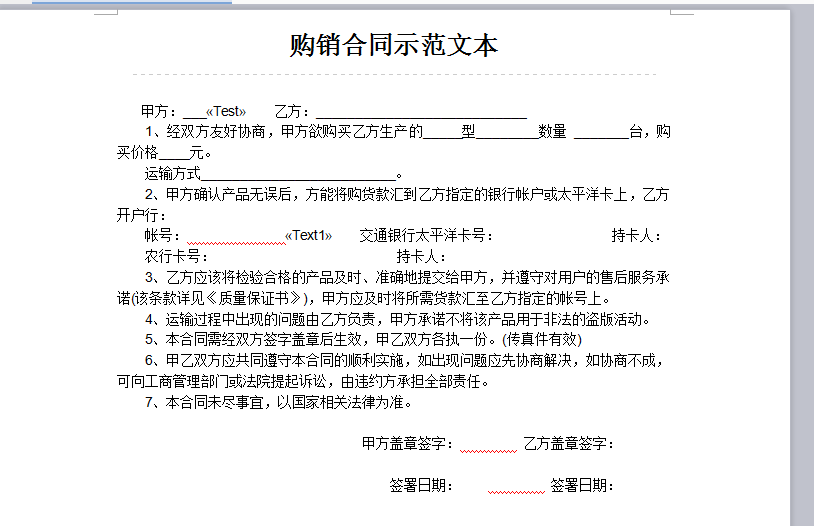
 #region 通过word域去插入相应的数据

        /// <summary>

        /// 通过word域去进行指定位置替换数据

        /// </summary>

        public void WordHelpers() {

       string filepath = FileHelper.GetDateDir();

       FileHelper.CreateDirectory(System.Web.HttpContext.Current.Server.MapPath("/Upload/" + filepath + ""));

       string pathsrc =System.Web.HttpContext.Current.Server.MapPath("~\\Content\\word.docx");//word文件路径

       string[] filedName = new string[] { "Test", "Text1" };//域名

       object[] values = new object[] {"2","2"};//相应数据

       Document dm = new Document(pathsrc);

       dm.MailMerge.Execute(filedName, values);

       dm.Save(System.Web.HttpContext.Current.Server.MapPath("~\\Upload\\" + filepath + "\\" + Guid.NewGuid() +".doc" + ""));

        }

        #endregion

对于上面这种既有要循环展示的数据又有固定展示的数据 循环列添加《TableStart:List》 《TableEnd:List》
    /// <summary>

    /// 订单打印

    /// </summary>

    /// <param name="sender"></param>

    /// <param name="e"></param>

    protected void BtnPrint_Click(object sender, EventArgs e)

    {

     string FilePath = FileHelper.GetDateDir();//根据时间得到目录名

     FileHelper.CreateDirectory(System.Web.HttpContext.Current.Server.MapPath("/upload-file/order/Orders/"+ FilePath));//创建一个目录

     string OrderTemp = System.Web.HttpContext.Current.Server.MapPath("~\\upload-file\\detail\\order\\ScHt.docx");//获取模板

     Document dm = new Document(OrderTemp);

     string[] filedName = new string[] { "Buyer", "orderId", "ForderId",

     "TotalPirce", "BackPirce", "YfPirce", "Payment", "Delivery", "Receive", "CName" , "DateTime","ChPrice" };//对应的域名

     HttpCookie userName = Request.Cookies[Cookie.UserNameCookieName];

     Member member = new MemberBusiness().GetEntityByUserName(userName.Value);

     OrderBusiness orderBusiness = new OrderBusiness();

     Order ordermodel=orderBusiness.GetEntity(lOrderNo.Text);

     object[] values = new object[] { member.CusName,ordermodel.GroupOrderId,lOrderNo.Text,ordermodel.TotalMoney,ordermodel.DiscountMoney, (ordermodel.TotalMoney - ordermodel.Disco      untMoney).ToString(),

     lPaymentMethod.Text, lShoppingMethod.Text, lShoppingDate.Text, lReceiver.Text,ordermodel.CreateDate,  MoneyConvertChinese.MoneyToChinese((ordermodel.TotalMoney - ordermodel.Dis      countMoney).ToString())};//相对应的值内容

     OrderItemBusiness orderItemBusiness = new OrderItemBusiness();

     string where = "order_id='" + lOrderNo.Text + "'";

     string fieldList = "afd_stkNo,product_id,price,quantity,total_money";

     DataTable table = orderItemBusiness.GetList(fieldList, "Id", false, 1, 20, where).Table;

     table.TableName = "List";//这边要注意的是datatable的名称一定要和域循环的名称相对应

     table.Columns.Add("ProName");

     com.eshop.www.BLL.ProductDetailBusiness bllProd = new ProductDetailBusiness();

     foreach (DataRow dr in table.Rows) {

     dr["ProName"]= bllProd.GetEntity(int.Parse(dr["product_id"].ToString())).ProductName;

     }

     dm.MailMerge.ExecuteWithRegions(table);//datatable列名要和循环内的域名称保持一致

     dm.MailMerge.Execute(filedName, values);

     string url = System.Web.HttpContext.Current.Server.MapPath("~\\upload-file\\order\\Orders\\" + FilePath + "\\" + Guid.NewGuid() + ".doc");

     dm.Save(url);

     Response.Clear();

     Response.Buffer = true;

     Response.Charset = "utf-8";

     Response.AppendHeader("Content-Disposition", "attachment;filename=" + HttpUtility.UrlEncode(url, System.Text.Encoding.UTF8));

     Response.ContentType = "application/octet-stream";

     Response.WriteFile(url);

     Response.Flush();

     Response.Close();

     Response.End();

     dm.Clone();

     JavascriptHelper.Alert("打印成功!");

    }
目前我只应用过这两种导出方式下面在添加一种方式只是简单测试一下
        public void WordHelpers(DataTable dt)

        {

    string filepath = FileHelper.GetDateDir();

    FileHelper.CreateDirectory(System.Web.HttpContext.Current.Server.MapPath("/Upload/" + filepath + ""));

    //创建字符输出流

    StreamWriter sw = new StreamWriter("~\\Upload\\" + filepath + "\\" + Guid.NewGuid() + ".doc" + "", true, System.Text.UnicodeEncoding.UTF8);

    //需要导出的内容

    string str = "";

    str += "<html><head><title>无标题文档</title></head><body>";

    str += "<div>部门表格</div>";

    str += "<table>  <thead>";

    str += "<tr> <th>部门名称</th> <th> 添加时间 </th> <th> 介绍 </th> </tr>";

    str += " <tbody>";

    foreach (DataRow dr in dt.Rows)

    {

    str += "<tr>";

    str += "<td>" + dr[""] + "</td>";

    str += "</tr>";

    }

    str += " </tbody>";

    str += "</table></body></html>";

    //写入

    sw.Write(str);

    sw.Close();

    //Response.Clear();

    //Response.Buffer = true;

    //// this.EnableViewState = false;

    //Response.Charset = "utf-8";

    //Response.AppendHeader("Content-Disposition", "attachment;filename=" + HttpUtility.UrlEncode(fileName, System.Text.Encoding.UTF8));

    //Response.ContentType = "application/octet-stream";

    //Response.WriteFile(dirpath + fileName);

    //Response.Flush();

    //Response.Close();

    //Response.End();

        }
Aspose.Words关于域的应用的更多相关文章
- .net MVC使用Aspose.Words 获取文本域获取文档
controller 1 using Aspose.Words; 2 using Aspose.Words.Saving; 3 using System.IO; 4 5 6 /// 7 /// 获取导 ...
- Aspose Word模板使用总结
Aspose Word模板使用总结 1.创建word模版,使用MergeFeild绑定数据 新建一个Word文档,命名为Template.doc 注意:这里并不是输入"< ...
- aspose输出表格
利用aspose在word中输出表格 序号 姓名 性别 <<TableStart:T>><<Index>> <<Name>> ...
- aspose.word使用简单方法
概念介绍 使用aspose生成word报表步骤: 加载word模板 提供数据源 填充 加载模板 提供了4种重载方法 public Document(); public Document(Stream ...
- Aspose.word总结
1.创建word模版,使用MergeFeild绑定数据 新建一个Word文档,命名为Template.doc 注意:这里并不是输入"<”和“>”就可以了,而是必须 ...
- Aspose.Words 总结
生成答题卡 try { string tempPath = @"D:\moban\ttt.doc"; //Open document and create Documentbuil ...
- 关于ASPOSE.WORD使用上的一个小问题
最近实习期间负责了公司某个项目的一个功能模块里面的word导出功能,使用的是ASPOSE.WORD类库,但是经常导出时候会遇到图中的问题,大概意思就是两个表格不能跨在一起,调试了好几次还是没发现具体的 ...
- Aspose.Words的Merge Field
今天应客户要求,修改导出word模板.使用的是Aspose.Words插件.这个程序原是同事所写,且自己对Aspose不是很了解.在替换模板上花费了一些时间. 先来一张图:下图是原来的模板.现在要求删 ...
- Aspose.Words五 MergeField
通过MegerField来循环,将数据保存到dataset的table中,dataset通过关联datarelation字段来指定主从表关系.模板中通过标签TableStart和TableEnd来框定 ...
随机推荐
- js调试模式控制台输出信息
js调试模式控制台输出信息.console.log
- hibernate sql查询转换成VO返回list
hibernate sql查询转换成VO @Override public List<FenxiVo> getTuanDuiFenxiList(FenxiVo FenxiVo,Intege ...
- 编写运行最简单的java程序——使用记事本编写java程序
第一个java程序--使用记事本编辑 经过上篇文章的java环境搭建成功的小伙伴们可以在自己的计算机上编写属于自己的java程序了yo~ 还没有搭建环境变量的小伙伴请转移到上一篇的随笔中去完成搭建. ...
- 页面刷新vuex数据消失问题解决方案
VBox持续进行中,哀家苦啊,有没有谁给个star. vuex是vue用于数据存储的,和redux充当同样的角色. 最近在VBox开发的时候遇到的问题,页面刷新或者关闭浏览器再次打开的时候数据归零.这 ...
- 配置SSH无秘钥登录
[hadoop@hadoop01 ~]$ cd .ssh [hadoop@hadoop01 .ssh]$ ls authorized_keys id_rsa id_rsa.pub known_host ...
- 第一个spark+scala程序
import org.apache.spark._import SparkContext._import java.util.{Calendar,Properties,Date,Locale}impo ...
- Hadoop生态系统图解
Hadoop生态架构图 参考文章: Hadoop生态系统介绍 HDFS架构 1.NaneDode:主节点,**存储文件的元数据**如文件名,文件目录结构,文件属性(生成时间,副本数量,文件权限),以及 ...
- 详解Linux chgrp和chown命令的用法
Linux chgrp和chown命令是管理员的常用命令,对于初学Linux系统管理的人来说,这对Linux chgrp和chown命令具体的用法这里做一介绍. Linux chgrp命令 功能:改变 ...
- linux实训
目 录 Unit 1 操作系统安装.... 3 1.1 多操作系统安装... 3 1.1.1 VMware简介... 3 1.1.2 VMWare基本使用... 4 1.2 安装Red Hat Li ...
- java 一款可以与ssm框架完美整合的web报表控件
硕正套件运行于客户端(浏览器),与应用服务器(Application Server)技术无关,所以能完全用于J2EE. ASP.Net.php等技术开发的Web应用产品中. 硕正套件部署于服务器,支持 ...