
lombok使用基础教程
前言
lombok是一个编译级别的插件,它可以在项目编译的时候生成一些代码。在很多工具类的项目中都有这个功能。比如dagger。
通俗的说,lombok可以通过注解来标示生成getter settter等代码。我们自然可以通过编译器比如IDEA的Generate生成,为啥要用这个?
在项目开发阶段,一个class的属性是一直变化的,今天可能增加一个字段,明天可能删除一个字段。每次变化都需要修改对应的模板代码。另外,有的class的字段超级多,多到一眼看不完。如果加上模板代码,更难一眼看出来。更有甚者,由于字段太多,想要使用builder来创建。手动创建builder和字段和原来的类夹杂在一起,看起来真的难受。lombok的@Builder即可解决这个问题。
引入
引入就是加入lombok的jar包。
在maven中
直接加入依赖
<dependency>

    <groupId>org.projectlombok</groupId>

    <artifactId>lombok</artifactId>

    <version>1.16.20</version>

</dependency>
在gradle中
这里比较麻烦,需要添加一个编译时生成代码的插件。gradle里有几个这样的插件。但为了简化过程,lombok提供了新插件。
首先,添加一个plugin
plugins {

    id 'io.franzbecker.gradle-lombok' version '1.11'

}
然后,就可以了。还可以配置lombok的版本:
lombok { // optional: values below are the defaults

    version = "1.16.20"

    sha256 = ""

}
IntelIJ IDEA 插件
在IDEA里使用需要添加一个插件。在插件里搜索lombok,安装,重启。

IDEA里需要在设置中启用annotation processors。
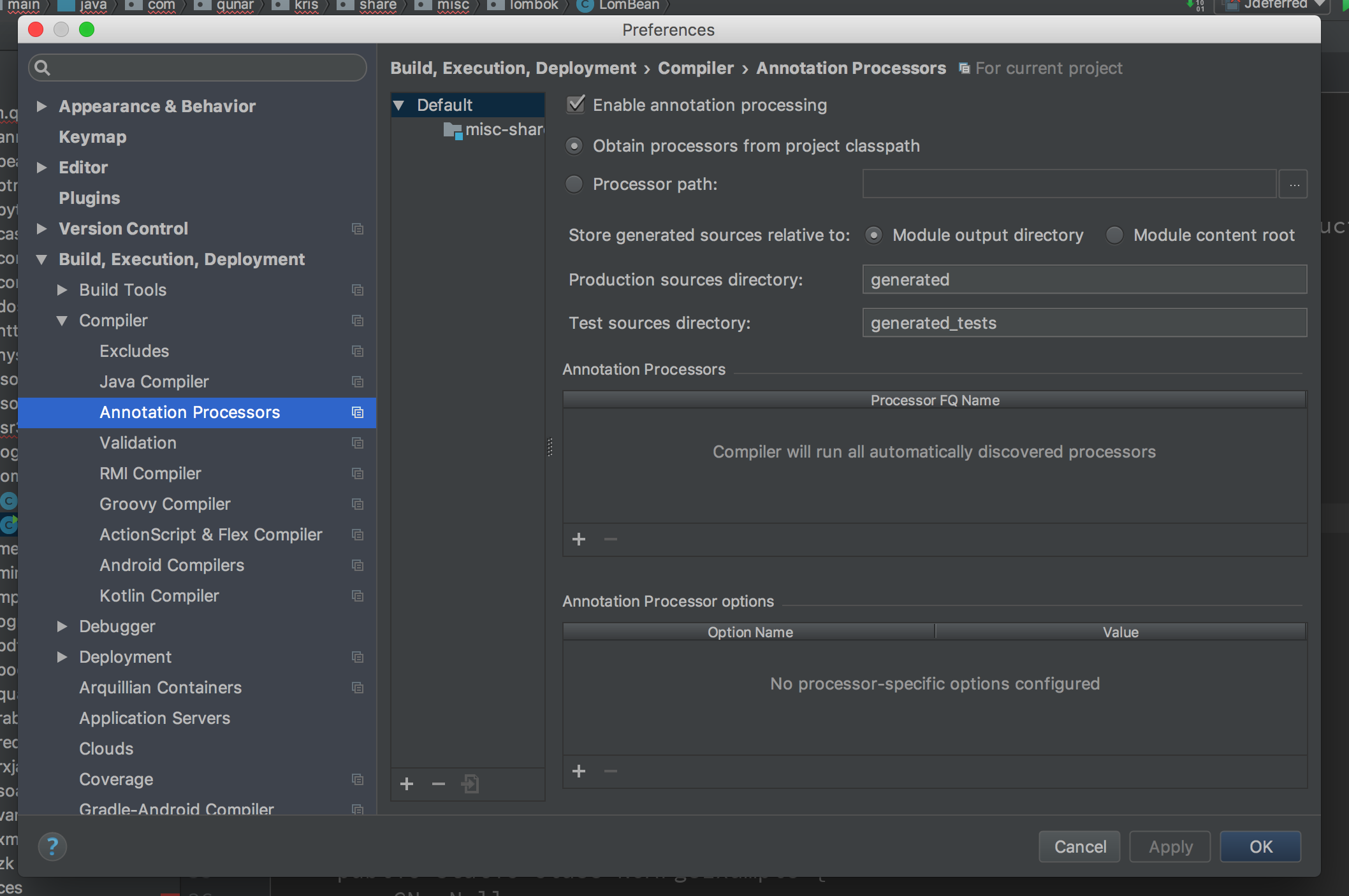
如果升级了InteliJ IDEA, 可能出现lombok不能用了,右键更新lombok plugin,重启即可。
基本用法
测试代码: https://github.com/Ryan-Miao/someTest/tree/master/src/main/java/com/test/lombok
Geter Setter
最简单的,最常用的,最直观的使用就是getter setter方法。
package com.test.lombok;

import lombok.AccessLevel;

import lombok.Getter;

import lombok.Setter;

import java.util.Date;

/**

 * Created by Ryan Miao on 1/18/18.

 */

public class GetterSetterExample {

    /**

     * Age of the person. Water is wet.

     *

     * @param age New value for this person's age. Sky is blue.

     * @return The current value of this person's age. Circles are round.

     */

    @Getter

    @Setter

    private int age = 10;

    @Getter

    @Setter

    private boolean active;

    @Getter

    @Setter

    private Boolean none;

    @Getter

    @Setter

    private Date date;

    /**

     * Name of the person.

     * -- SETTER --

     * Changes the name of this person.

     *

     * @param name The new value.

     */

    @Setter(AccessLevel.PROTECTED) private String name;

    @Override public String toString() {

        return String.format("%s (age: %d)", name, age);

    }

    public static void main(String[] args) {

        GetterSetterExample example = new GetterSetterExample();

        example.setActive(true);

        example.setAge(123);

        example.setDate(new Date());

        example.setName("abc");

        example.setNone(false);

        Date date = example.getDate();

        Boolean none = example.getNone();

        boolean active = example.isActive();

    }

}
简单使用没有问题,深入一点可以看到有些特殊设定。比如javadoc.
Getter声明创建getter方法;Setter声明创建setter方法;@Setter(AccessLevel.PROTECTED)可以添加参数,指定权限为私有;- Attention!关于
boolean的set前缀都是set,但getter不同,小写的boolean,即基本类型,前缀是is;Boolean,即包装类型,前缀是get;
编译后的结果如下:
//

// Source code recreated from a .class file by IntelliJ IDEA

// (powered by Fernflower decompiler)

//

package com.test.lombok;

import java.util.Date;

public class GetterSetterExample {

    private int age = 10;

    private boolean active;

    private Boolean none;

    private Date date;

    private String name;

    public GetterSetterExample() {

    }

    public String toString() {

        return String.format("%s (age: %d)", this.name, this.age);

    }

    public static void main(String[] args) {

        GetterSetterExample example = new GetterSetterExample();

        example.setActive(true);

        example.setAge(123);

        example.setDate(new Date());

        example.setName("abc");

        example.setNone(false);

        Date date = example.getDate();

        Boolean none = example.getNone();

        boolean active = example.isActive();

    }

    public int getAge() {

        return this.age;

    }

    public void setAge(int age) {

        this.age = age;

    }

    public boolean isActive() {

        return this.active;

    }

    public void setActive(boolean active) {

        this.active = active;

    }

    public Boolean getNone() {

        return this.none;

    }

    public void setNone(Boolean none) {

        this.none = none;

    }

    public Date getDate() {

        return this.date;

    }

    public void setDate(Date date) {

        this.date = date;

    }

    protected void setName(String name) {

        this.name = name;

    }

}
ToString
虽然ToString在生产环境貌似没什么卵用。但是,很多情况下,我们还是需要这个的。因为记log。不想每次看log的时候是一串@地址,那就好好把toString()加上。
package com.test.lombok;

import lombok.Setter;

import lombok.ToString;

/**

 * Created by Ryan Miao on 1/18/18.

 */

@Setter

@ToString(exclude="id")

public class ToStringExample {

    private static final int STATIC_VAR = 10;

    private String name;

    private Shape shape = new Square(5, 10);

    private String[] tags;

    private int id;

    @ToString(callSuper=true, includeFieldNames=true)

    public static class Square extends Shape {

        private final int width, height;

        public Square(int width, int height) {

            this.width = width;

            this.height = height;

        }

    }

    @ToString

    public static class Shape {

        private int color;

    }

    public static void main(String[] args) {

        final ToStringExample example = new ToStringExample();

        example.setId(1);

        example.setName("abc");

        example.setTags(new String[]{"a","b","c"});

        final Shape shape = new Square(1,2);

        example.setShape(shape);

        System.out.println(example.toString());

    }

}
1.@ToString最简单使用即可
打印结果如下:
ToStringExample(name=abc, shape=ToStringExample.Square(super=ToStringExample.Shape(color=0), width=1, height=2), tags=[a, b, c])
编译后的代码如下:
//

// Source code recreated from a .class file by IntelliJ IDEA

// (powered by Fernflower decompiler)

//

package com.test.lombok;

import java.util.Arrays;

public class ToStringExample {

    private static final int STATIC_VAR = 10;

    private String name;

    private ToStringExample.Shape shape = new ToStringExample.Square(5, 10);

    private String[] tags;

    private int id;

    public ToStringExample() {

    }

    public static void main(String[] args) {

        ToStringExample example = new ToStringExample();

        example.setId(1);

        example.setName("abc");

        example.setTags(new String[]{"a", "b", "c"});

        ToStringExample.Shape shape = new ToStringExample.Square(1, 2);

        example.setShape(shape);

        System.out.println(example.toString());

    }

    public void setName(String name) {

        this.name = name;

    }

    public void setShape(ToStringExample.Shape shape) {

        this.shape = shape;

    }

    public void setTags(String[] tags) {

        this.tags = tags;

    }

    public void setId(int id) {

        this.id = id;

    }

    public String toString() {

        return "ToStringExample(name=" + this.name + ", shape=" + this.shape + ", tags=" + Arrays.deepToString(this.tags) + ")";

    }

    public static class Shape {

        private int color;

        public Shape() {

        }

        public String toString() {

            return "ToStringExample.Shape(color=" + this.color + ")";

        }

    }

    public static class Square extends ToStringExample.Shape {

        private final int width;

        private final int height;

        public Square(int width, int height) {

            this.width = width;

            this.height = height;

        }

        public String toString() {

            return "ToStringExample.Square(super=" + super.toString() + ", width=" + this.width + ", height=" + this.height + ")";

        }

    }

}
@EqualsAndHashCode
equals()和hashCode()在Java中有着举足轻重的基地作用,虽然通常很少关注。但是,这个必须不可省。不知道有几个可以手写出来的。
package com.test.lombok;

import lombok.EqualsAndHashCode;

/**

 * Created by Ryan Miao on 1/18/18.

 */

@EqualsAndHashCode(exclude={"id", "shape"})

public class EqualsAndHashCodeExample {

    private transient int transientVar = 10;

    private String name;

    private double score;

    private ToStringExample.Shape shape = new Square(5, 10);

    private String[] tags;

    private int id;

    public String getName() {

        return this.name;

    }

    @EqualsAndHashCode(callSuper=true)

    public static class Square extends ToStringExample.Shape {

        private final int width, height;

        public Square(int width, int height) {

            this.width = width;

            this.height = height;

        }

    }

    public static void main(String[] args) {

        EqualsAndHashCodeExample example = new EqualsAndHashCodeExample();

        EqualsAndHashCodeExample example1 = new EqualsAndHashCodeExample();

        boolean equals = example.equals(example1);

        boolean b = example.canEqual(example);

        int i = example.hashCode();

    }

}
编译后的结果为:
//

// Source code recreated from a .class file by IntelliJ IDEA

// (powered by Fernflower decompiler)

//

package com.test.lombok;

import com.test.lombok.ToStringExample.Shape;

import java.util.Arrays;

public class EqualsAndHashCodeExample {

    private transient int transientVar = 10;

    private String name;

    private double score;

    private Shape shape = new EqualsAndHashCodeExample.Square(5, 10);

    private String[] tags;

    private int id;

    public EqualsAndHashCodeExample() {

    }

    public String getName() {

        return this.name;

    }

    public static void main(String[] args) {

        EqualsAndHashCodeExample example = new EqualsAndHashCodeExample();

        EqualsAndHashCodeExample example1 = new EqualsAndHashCodeExample();

        example.equals(example1);

        boolean b = example.canEqual(example);

        int i = example.hashCode();

    }

    public boolean equals(Object o) {

        if (o == this) {

            return true;

        } else if (!(o instanceof EqualsAndHashCodeExample)) {

            return false;

        } else {

            EqualsAndHashCodeExample other = (EqualsAndHashCodeExample)o;

            if (!other.canEqual(this)) {

                return false;

            } else {

                label31: {

                    Object this$name = this.getName();

                    Object other$name = other.getName();

                    if (this$name == null) {

                        if (other$name == null) {

                            break label31;

                        }

                    } else if (this$name.equals(other$name)) {

                        break label31;

                    }

                    return false;

                }

                if (Double.compare(this.score, other.score) != 0) {

                    return false;

                } else {

                    return Arrays.deepEquals(this.tags, other.tags);

                }

            }

        }

    }

    protected boolean canEqual(Object other) {

        return other instanceof EqualsAndHashCodeExample;

    }

    public int hashCode() {

        int PRIME = true;

        int result = 1;

        Object $name = this.getName();

        int result = result * 59 + ($name == null ? 43 : $name.hashCode());

        long $score = Double.doubleToLongBits(this.score);

        result = result * 59 + (int)($score >>> 32 ^ $score);

        result = result * 59 + Arrays.deepHashCode(this.tags);

        return result;

    }

    public static class Square extends Shape {

        private final int width;

        private final int height;

        public Square(int width, int height) {

            this.width = width;

            this.height = height;

        }

        public boolean equals(Object o) {

            if (o == this) {

                return true;

            } else if (!(o instanceof EqualsAndHashCodeExample.Square)) {

                return false;

            } else {

                EqualsAndHashCodeExample.Square other = (EqualsAndHashCodeExample.Square)o;

                if (!other.canEqual(this)) {

                    return false;

                } else if (!super.equals(o)) {

                    return false;

                } else if (this.width != other.width) {

                    return false;

                } else {

                    return this.height == other.height;

                }

            }

        }

        protected boolean canEqual(Object other) {

            return other instanceof EqualsAndHashCodeExample.Square;

        }

        public int hashCode() {

            int PRIME = true;

            int result = super.hashCode();

            result = result * 59 + this.width;

            result = result * 59 + this.height;

            return result;

        }

    }

}
构造函数@NoArgsConstructor, @RequiredArgsConstructor, @AllArgsConstructor
Java中class的一切起源于构造器。大家最喜欢的还是构造函数创建对象。这里有一点比较坑的是无参构造函数。当你自己添加一个带有参数的构造函数后,无参构造函数则别隐藏。通常也没啥问题,但当你使用jackson反序列化对象的时候就被恶心到了。jackson通过无参构造函数创建对象。因此,当你考虑这个class会用来序列化为json的时候,即必须手动添加一个无参数构造函数。
@NoArgsConstructor
当你想要创建一个valueobject,DDD中的值对象,要求实现Immutable,那么无参数构造器就不合适了。@NoArgsConstructor会生成一个空的构造器。如果你设置了final field,那么编译会报错。如果你强制执行创建无参数构造器。即,@NoArgsConstructor(force = true),那么final的field会初始化为0/false/null。通常适合与@Data集成。
@NoArgsConstructor

public static class NoArgsExample {

    @NonNull private String field;

}
NonNull被忽略了
最终生成代码如下:
public static class NoArgsExample {

    @NonNull

    private String field;

    public NoArgsExample() {

    }

}
对于final的字段,我认为我不会用空构造器来做这件事。所以,感觉这个参数force=true不要也罢,鸡肋。
@RequiredArgsConstructor
一个class可以有很多属性,但你可能只关心其中的几个字段,那么可以使用@RequiredArgsConstructor。@NonNull将标注这个字段不应为null,初始化的时候会检查是否为空,否则抛出NullPointException。在上面的无参构造函数中被忽略了。那么,对于关注的字段标注@NonNull, @RequiredArgsConstructor则会生成带有这些字段的构造器。
@RequiredArgsConstructor

public class RequiredArgsExample {

    @NonNull private String field;

    private Date date;

    private Integer integer;

    private int i;

    private boolean b;

    private Boolean aBoolean;

}
最终生成结果:
public class RequiredArgsExample {

    @NonNull

    private String field;

    private Date date;

    private Integer integer;

    private int i;

    private boolean b;

    private Boolean aBoolean;

    public RequiredArgsExample(@NonNull String field) {

        if (field == null) {

            throw new NullPointerException("field");

        } else {

            this.field = field;

        }

    }

}
只有@NonNull会生成构造器。其他默认,Java的class初始化默认为null.false,0.
lombok提供了另一种初始化做法,静态初始化。即私有构造器,使用静态方法创建对象。这种做法看起来简单,但通常用的不多。因为静态初始化的东西很难mock,对测试不够友好。
@RequiredArgsConstructor(staticName = "of")

public static class RequiredArgsStaticExample {

    @NonNull private String field;

    private Date date;

    private Integer integer;

    private int i;

    private boolean b;

    private Boolean aBoolean;

}
最终生成代码如下:
public class ConstructorExample<T> {

    private int x;

    private int y;

    @NonNull

    private T description;

    private ConstructorExample(@NonNull T description) {

        if (description == null) {

            throw new NullPointerException("description");

        } else {

            this.description = description;

        }

    }

    public static <T> ConstructorExample<T> of(@NonNull T description) {

        return new ConstructorExample(description);

    }

}
@AllArgsConstructor
想要初始化所有字段。
@AllArgsConstructor(access = AccessLevel.PROTECTED)

public class ConstructorExample<T> {

    private int x, y;

    @NonNull

    private T description;

}
最终生成代码如下:
public class ConstructorExample<T> {

    private int x;

    private int y;

    @NonNull

    private T description;

    protected ConstructorExample(int x, int y, @NonNull T description) {

        if (description == null) {

            throw new NullPointerException("description");

        } else {

            this.x = x;

            this.y = y;

            this.description = description;

        }

    }

}
必用项@Data
@Data是一个集合体。包含Getter,Setter,RequiredArgsConstructor,ToString,EqualsAndHashCode
不可变对象valueobject @Value
这个看起来很美好,就是可以帮忙生成一个不可变对象。对于所有的字段都将生成final的。但我感觉有点失控。注解的优势应该是所见即所得,可以通过字面量来传递消息。而@Value字段给字段加final会让人困惑,因为这更改了我们的定义。当我想声明一个Immutable对象的时候,我会显示的给字段加一个限定final。
同@Data, @Value是一个集合体。包含Getter,AllArgsConstructor,ToString,EqualsAndHashCode。
/**

 * Created by Ryan Miao on 1/18/18.

 */

@Value

public class Room {

    @NonNull

    private String id;

    private String name;

    private boolean active;

    private Date createTime;

}
编译后
public final class Room {

    @NonNull

    private final String id;

    private final String name;

    private final boolean active;

    private final Date createTime;

    public Room(@NonNull String id, String name, boolean active, Date createTime) {

        if (id == null) {

            throw new NullPointerException("id");

        } else {

            this.id = id;

            this.name = name;

            this.active = active;

            this.createTime = createTime;

        }

    }

    @NonNull

    public String getId() {

        return this.id;

    }

    public String getName() {

        return this.name;

    }

    public boolean isActive() {

        return this.active;

    }

    public Date getCreateTime() {

        return this.createTime;

    }

    public boolean equals(Object o) {

        if (o == this) {

            return true;

        } else if (!(o instanceof Room)) {

            return false;

        } else {

            Room other = (Room)o;

            Object this$id = this.getId();

            Object other$id = other.getId();

            if (this$id == null) {

                if (other$id != null) {

                    return false;

                }

            } else if (!this$id.equals(other$id)) {

                return false;

            }

            label41: {

                Object this$name = this.getName();

                Object other$name = other.getName();

                if (this$name == null) {

                    if (other$name == null) {

                        break label41;

                    }

                } else if (this$name.equals(other$name)) {

                    break label41;

                }

                return false;

            }

            if (this.isActive() != other.isActive()) {

                return false;

            } else {

                Object this$createTime = this.getCreateTime();

                Object other$createTime = other.getCreateTime();

                if (this$createTime == null) {

                    if (other$createTime != null) {

                        return false;

                    }

                } else if (!this$createTime.equals(other$createTime)) {

                    return false;

                }

                return true;

            }

        }

    }

    public int hashCode() {

        int PRIME = true;

        int result = 1;

        Object $id = this.getId();

        int result = result * 59 + ($id == null ? 43 : $id.hashCode());

        Object $name = this.getName();

        result = result * 59 + ($name == null ? 43 : $name.hashCode());

        result = result * 59 + (this.isActive() ? 79 : 97);

        Object $createTime = this.getCreateTime();

        result = result * 59 + ($createTime == null ? 43 : $createTime.hashCode());

        return result;

    }

    public String toString() {

        return "Room(id=" + this.getId() + ", name=" + this.getName() + ", active=" + this.isActive() + ", createTime=" + this.getCreateTime() + ")";

    }

}
最喜欢的项 @Builder
对于喜欢builder模式的人来说,声明式简化对象创建流程让一切看得美好。但是,手动复制字段,手动创建方法很让人不喜。@Builder解决了刚需。
/**

 * Created by Ryan Miao on 1/18/18.

 */

@Data

@Builder(toBuilder = true)

public class Room {

    @NonNull

    private String id;

    private String name;

    private boolean active;

    private Date createTime;

    @Singular

    private Set<String> occupations;

    public static void main(String[] args) {

        Room room = Room.builder().active(true)

                .name("name")

                .id("id")

                .createTime(new Date())

                .occupation("1")

                .occupation("2")

                .build();

        Assert.assertEquals(2, room.getOccupations().size());

    }

}
这才是我们想要的建造者。对应生成的代码为:
//

// Source code recreated from a .class file by IntelliJ IDEA

// (powered by Fernflower decompiler)

//

package com.test.lombok;

import java.util.ArrayList;

import java.util.Collection;

import java.util.Collections;

import java.util.Date;

import java.util.LinkedHashSet;

import java.util.Set;

import lombok.NonNull;

import org.junit.Assert;

public class Room {

    @NonNull

    private String id;

    private String name;

    private boolean active;

    private Date createTime;

    private Set<String> occupations;

    public static void main(String[] args) {

        Room room = builder().active(true).name("name").id("id").createTime(new Date()).occupation("1").occupation("2").build();

        Assert.assertEquals(2L, (long)room.getOccupations().size());

    }

    Room(@NonNull String id, String name, boolean active, Date createTime, Set<String> occupations) {

        if (id == null) {

            throw new NullPointerException("id");

        } else {

            this.id = id;

            this.name = name;

            this.active = active;

            this.createTime = createTime;

            this.occupations = occupations;

        }

    }

    public static Room.RoomBuilder builder() {

        return new Room.RoomBuilder();

    }

    public Room.RoomBuilder toBuilder() {

        return (new Room.RoomBuilder()).id(this.id).name(this.name).active(this.active).createTime(this.createTime).occupations(this.occupations);

    }

    @NonNull

    public String getId() {

        return this.id;

    }

    public String getName() {

        return this.name;

    }

    public boolean isActive() {

        return this.active;

    }

    public Date getCreateTime() {

        return this.createTime;

    }

    public Set<String> getOccupations() {

        return this.occupations;

    }

    public void setId(@NonNull String id) {

        if (id == null) {

            throw new NullPointerException("id");

        } else {

            this.id = id;

        }

    }

    public void setName(String name) {

        this.name = name;

    }

    public void setActive(boolean active) {

        this.active = active;

    }

    public void setCreateTime(Date createTime) {

        this.createTime = createTime;

    }

    public void setOccupations(Set<String> occupations) {

        this.occupations = occupations;

    }

    public boolean equals(Object o) {

        if (o == this) {

            return true;

        } else if (!(o instanceof Room)) {

            return false;

        } else {

            Room other = (Room)o;

            if (!other.canEqual(this)) {

                return false;

            } else {

                label63: {

                    Object this$id = this.getId();

                    Object other$id = other.getId();

                    if (this$id == null) {

                        if (other$id == null) {

                            break label63;

                        }

                    } else if (this$id.equals(other$id)) {

                        break label63;

                    }

                    return false;

                }

                Object this$name = this.getName();

                Object other$name = other.getName();

                if (this$name == null) {

                    if (other$name != null) {

                        return false;

                    }

                } else if (!this$name.equals(other$name)) {

                    return false;

                }

                if (this.isActive() != other.isActive()) {

                    return false;

                } else {

                    Object this$createTime = this.getCreateTime();

                    Object other$createTime = other.getCreateTime();

                    if (this$createTime == null) {

                        if (other$createTime != null) {

                            return false;

                        }

                    } else if (!this$createTime.equals(other$createTime)) {

                        return false;

                    }

                    Object this$occupations = this.getOccupations();

                    Object other$occupations = other.getOccupations();

                    if (this$occupations == null) {

                        if (other$occupations != null) {

                            return false;

                        }

                    } else if (!this$occupations.equals(other$occupations)) {

                        return false;

                    }

                    return true;

                }

            }

        }

    }

    protected boolean canEqual(Object other) {

        return other instanceof Room;

    }

    public int hashCode() {

        int PRIME = true;

        int result = 1;

        Object $id = this.getId();

        int result = result * 59 + ($id == null ? 43 : $id.hashCode());

        Object $name = this.getName();

        result = result * 59 + ($name == null ? 43 : $name.hashCode());

        result = result * 59 + (this.isActive() ? 79 : 97);

        Object $createTime = this.getCreateTime();

        result = result * 59 + ($createTime == null ? 43 : $createTime.hashCode());

        Object $occupations = this.getOccupations();

        result = result * 59 + ($occupations == null ? 43 : $occupations.hashCode());

        return result;

    }

    public String toString() {

        return "Room(id=" + this.getId() + ", name=" + this.getName() + ", active=" + this.isActive() + ", createTime=" + this.getCreateTime() + ", occupations=" + this.getOccupations() + ")";

    }

    public static class RoomBuilder {

        private String id;

        private String name;

        private boolean active;

        private Date createTime;

        private ArrayList<String> occupations;

        RoomBuilder() {

        }

        public Room.RoomBuilder id(String id) {

            this.id = id;

            return this;

        }

        public Room.RoomBuilder name(String name) {

            this.name = name;

            return this;

        }

        public Room.RoomBuilder active(boolean active) {

            this.active = active;

            return this;

        }

        public Room.RoomBuilder createTime(Date createTime) {

            this.createTime = createTime;

            return this;

        }

        public Room.RoomBuilder occupation(String occupation) {

            if (this.occupations == null) {

                this.occupations = new ArrayList();

            }

            this.occupations.add(occupation);

            return this;

        }

        public Room.RoomBuilder occupations(Collection<? extends String> occupations) {

            if (this.occupations == null) {

                this.occupations = new ArrayList();

            }

            this.occupations.addAll(occupations);

            return this;

        }

        public Room.RoomBuilder clearOccupations() {

            if (this.occupations != null) {

                this.occupations.clear();

            }

            return this;

        }

        public Room build() {

            Set occupations;

            switch(this.occupations == null ? 0 : this.occupations.size()) {

            case 0:

                occupations = Collections.emptySet();

                break;

            case 1:

                occupations = Collections.singleton(this.occupations.get(0));

                break;

            default:

                Set<String> occupations = new LinkedHashSet(this.occupations.size() < 1073741824 ? 1 + this.occupations.size() + (this.occupations.size() - 3) / 3 : 2147483647);

                occupations.addAll(this.occupations);

                occupations = Collections.unmodifiableSet(occupations);

            }

            return new Room(this.id, this.name, this.active, this.createTime, occupations);

        }

        public String toString() {

            return "Room.RoomBuilder(id=" + this.id + ", name=" + this.name + ", active=" + this.active + ", createTime=" + this.createTime + ", occupations=" + this.occupations + ")";

        }

    }

}
总结
lombok还提供了其他几个注解,以及还有好多内置的参数没有讲解。但是,根据2-8原理,我们根本不需要。上面这几个足够了。更多的注解只会增加理解阅读难度。
参考
https://projectlombok.org/features/all
lombok使用基础教程的更多相关文章
- Spring Cloud Alibaba基础教程:使用Sentinel实现接口限流
最近管点闲事浪费了不少时间,感谢网友libinwalan的留言提醒.及时纠正路线,继续跟大家一起学习Spring Cloud Alibaba. Nacos作为注册中心和配置中心的基础教程,到这里先告一 ...
- Spring Cloud Alibaba基础教程:使用Nacos作为配置中心
通过本教程的前两篇: <Spring Cloud Alibaba基础教程:使用Nacos实现服务注册与发现> <Spring Cloud Alibaba基础教程:支持的几种服务消费方 ...
- Spring Cloud Alibaba基础教程:使用Nacos实现服务注册与发现
自Spring Cloud Alibaba发布第一个Release以来,就备受国内开发者的高度关注.虽然Spring Cloud Alibaba还没能纳入Spring Cloud的主版本管理中,但是凭 ...
- Spring Boot 2.x基础教程:如何扩展XML格式的请求和响应
在之前的所有Spring Boot教程中,我们都只提到和用到了针对HTML和JSON格式的请求与响应处理.那么对于XML格式的请求要如何快速的在Controller中包装成对象,以及如何以XML的格式 ...
- Spring Boot 2.x基础教程:使用tinylog记录日志
tinylog简介 tinylog,与其他各种tiny开头的东西一样,是一个轻量级的开源日志解决方案.它本身只包含两个JAR文件(一个用于API,另一个用于实现),没有任何外部依赖关系.两个JAR文件 ...
- matlab基础教程——根据Andrew Ng的machine learning整理
matlab基础教程--根据Andrew Ng的machine learning整理 基本运算 算数运算 逻辑运算 格式化输出 小数位全局修改 向量和矩阵运算 矩阵操作 申明一个矩阵或向量 快速建立一 ...
- <<Bootstrap基础教程>> 新书出手,有心栽花花不开,无心插柳柳成荫
并非闲的蛋疼,做技术也经常喜欢蛋疼,纠结于各种技术,各种需求变更,还有一个很苦恼的就是UI总是那么不尽人意.前不久自己开源了自己做了多年的仓储项目(开源地址:https://github.com/he ...
- Memcache教程 Memcache零基础教程
Memcache是什么 Memcache是danga.com的一个项目,来分担数据库的压力. 它可以应对任意多个连接,使用非阻塞的网络IO.由于它的工作机制是在内存中开辟一块空间,然后建立一个Hash ...
- Selenium IDE 基础教程
Selenium IDE 基础教程 1.下载安装 a 在火狐浏览其中搜索附件组件,查找 Selenium IDE b 下载安装,然后重启firefox 2.界面讲解 在菜单- ...
随机推荐
- DeepLearning.ai学习笔记(一)神经网络和深度学习--Week4深层神经网络
一.深层神经网络 深层神经网络的符号与浅层的不同,记录如下: 用\(L\)表示层数,该神经网络\(L=4\) \(n^{[l]}\)表示第\(l\)层的神经元的数量,例如\(n^{[1]}=n^{[2 ...
- 怎么选择公司???MVC加jquery-easyui 后端工程师
代码管理 Git 架构 MVC 这样的项目扩展性强,维护性强!!! 别很老的asp.net 不用框架!!!
- K:java中序列化的两种方式—Serializable或Externalizable
在java中,对一个对象进行序列化操作,其有如下两种方式: 第一种: 通过实现java.io.Serializable接口,该接口是一个标志接口,其没有任何抽象方法需要进行重写,实现了Serializ ...
- MySQL如何找到表与表之间的关系?
如何找到两张表之间的关系? 先站在左表的角度上去找,如果可以找到左表的多个字段可以对应右表的一个字段,那么左表的一个字段foregin key右表的一个字段.一般情况下为id... 2.如果右表的多个 ...
- Travis CI实现持续部署
安装Ruby 2.0以上版本并安装travis的命令行工具 可以看出我的已经是安装好的(Ubuntu 16.04.3 LTS 系统) ruby -v ruby --) [x86_64-linux-gn ...
- EditTable可编辑的表格
EditTable可编辑的表格 EditTable基于tabel布局的表格,表格内容单击可以编辑,编辑完毕即可显示新的内容: ESC按键可以撤销编辑,返回原有内容. 点击"添加& ...
- UIViewController生命周期控制-开发规范
从网上各位iOS们收集并总结: 各方法使用: init 中初始化一些UI组件,比如UIButton,UILabel等 loadView 中 createFields 接受参数,初始化变量 create ...
- ASP.NET Core 一步步搭建个人网站(5)_Api模拟和网站分析
前言 经过前面几章,我们的网站已经最基本的功能,接下来就是继续拓展其他的功能,这期一起来实现一个该网站流量分析的工具,统计出这个网站每天用户相关数据,不仅要满足了我们对流量统计数字的基本要求,并且用更 ...
- Linux下用ls和du命令查看文件以及文件夹大小
ls的用法 ls -l |grep "^-"|wc -l或find ./company -type f | wc -l 查看某文件夹下文件的个数,包括子文件夹里的. ls -lR ...
- Mac安装Homebrew
Homebrew的安装,打开终端复制.粘贴以下命令,回车 ruby -e "$(curl -fsSL https://raw.githubusercontent.com/Homebrew/i ...