
asp.net web api客户端调用
可以使用HttpClient这个调用Web API,下面是HttpClient的定义,列举了一些常用的方法,其中还有一些没有列举,包括重载的方法。
public class HttpClient : HttpMessageInvoker

{

  public HttpClient();

  public HttpClient(HttpMessageHandler handler);

  //统一资源标识符 (URI) 的基地址

  public Uri BaseAddress { get; set; }

  //获取或设置请求超时前等待的毫秒数

  public TimeSpan Timeout { get; set; }

  //发送异步GET请求

  public Task<HttpResponseMessage> GetAsync(Uri requestUri);

  //发送异步POST请求

  public Task<HttpResponseMessage> PostAsync(Uri requestUri, HttpContent content);

  //发生异步请求,可以指定HTTP动作

  public Task<HttpResponseMessage> SendAsync(HttpRequestMessage request);

}
HttpClient的使用
上面几个方法GetAsync、PostAsync、SendAsync的返回值类型都是Task<HttpResponseMessage>,可以调用Task<TResult>.Result属性获得类型为HttpResponseMessage的实例。HttpResponseMessage的Content属性有一个异步方法ReadAsStringAsync可以获得响应消息体的内容(服务端传过来的字符串),使用ReadAsAsync<T>方法已获得反序列化后的CLR类型数据。
例:读取字符串。
为了看清返回类型,客户端每个方法的调用返回值赋给一个强类型的变量,方便观察返回值和理解,也可以将返回值变量赋给一个var类型的变量。
客户端:
        public static void TestClient()

        {

            string url = "http://localhost/webApi_test/api/testapi";

            using (HttpClient client = new HttpClient())

            {

                Task<HttpResponseMessage> taskResult = client.GetAsync(url);

                HttpResponseMessage responseMessage = taskResult.Result;

                Task<string> contentStr = responseMessage.Content.ReadAsStringAsync();

                contentStr.Wait();

                Console.WriteLine(contentStr.Result);

            }

            Console.ReadLine();

        }
服务端:
public class TestApiController : ApiController

{

        public IHttpActionResult Get()

        {

            return Ok("hello web api client");

        }

}
路由配置:
config.Routes.MapHttpRoute(

                name: "DefaultApi",

                routeTemplate: "api/{controller}/{id}",

                defaults: new { id = RouteParameter.Optional }

            );
例:获得实体,并序列化显示
调用响应的Content.ReadAsAsync<T>方法获得实体。
客户端:
        public static void TestClient()

        {

            string url = "http://localhost/webApi_test/api/testapi/1";

            using (HttpClient client = new HttpClient())

            {

                Task<HttpResponseMessage> taskResult = client.GetAsync(url);

                HttpResponseMessage responseMessage = taskResult.Result;

                Task<DataModel> model = responseMessage.Content.ReadAsAsync<DataModel>();

                model.Wait();

                Console.WriteLine(JsonConvert.SerializeObject(model.Result,Formatting.Indented));

            }

            Console.ReadLine();

        }
服务端(路由配置同上):
        public IHttpActionResult Get(int id = )

        {

            DataModel model = new DataModel { Id = id, Field1Name = "f1", Field2Name = "f2", DT = DateTime.Now };

            return Ok(model);

        }
返回结果:

例:客户端向服务端传递复杂数据。
使用SendAsync方法,但是注意无法发送GET和HEAD请求。下面的例子向服务端发送PUT请求,并且将发送给服务端的数据放入了请求消息的消息体中,为了让服务端获取消息体内容的格式信息以便其选择多媒体格式化器绑定模型,将HttpContent.Headers.ContentType设置为application/json类型,因为向请求消息体中写入的是JSON格式的字符串。
客户端:
public static void TestClient()

{

            string url = "http://localhost/webApi_test/api/testapi";

            var modelRequest = new { Id = , Field1Name = "1name", Field2Name = "2name", DT = DateTime.Now };

            using (HttpClient client = new HttpClient())

            {

                using (HttpContent content = new StringContent(JsonConvert.SerializeObject(modelRequest)))

                {

                    content.Headers.ContentType = new MediaTypeHeaderValue("application/json");

                    using (HttpRequestMessage request = new HttpRequestMessage(HttpMethod.Put, url))

                    {

                        request.Content = content;

                        Task<HttpResponseMessage> taskResult = client.SendAsync(request);

                        HttpResponseMessage responseMessage = taskResult.Result;

                        Task<DataModel> model = responseMessage.Content.ReadAsAsync<DataModel>();

                        model.Wait();

                        Console.WriteLine(JsonConvert.SerializeObject(model.Result, Formatting.Indented));

                    }

                }

            }

            Console.ReadLine();

        }
服务端:
public IHttpActionResult Put(DataModel model)

{

      return Ok(model);

}
路由:
config.Routes.MapHttpRoute(

                name: "DefaultApi",

                routeTemplate: "api/{controller}/{id}",

                defaults: new { id = RouteParameter.Optional }
例:将数据写入请求消息体的方式
有几种方式为HttpRequestMessage.Content属性赋值,可以使用FormUrlEncodedContent、StringContent,他们都派生自ByteArrayContent。FormUrlEncodedContent指定的多媒体格式为application/x-www-form-urlencoded,如果将写入请求消息体的内容格式设置为application/x-www-form-urlencoded,即HttpContent.Headers.ContentType = application/x-www-form-urlencoded,可以正常传递数据,不设置就默认指定为application/x-www-form-urlencoded类型。
客户端调用
            var list = new List<KeyValuePair<string, string>>

            {

                new KeyValuePair<string, string>("Field21", "f1"),

                new KeyValuePair<string, string>("Field22", "f2")

            };

            using (HttpClient client = new HttpClient())

            {

                using (HttpContent content = new FormUrlEncodedContent(list))

                {

                    content.Headers.ContentType = new MediaTypeHeaderValue("application/x-www-form-urlencoded");

                    using (HttpRequestMessage request = new HttpRequestMessage(HttpMethod.Post, url))

                    {

                        request.Content = content;

                        Task<HttpResponseMessage> taskResult = client.SendAsync(request);

                        HttpResponseMessage responseMessage = taskResult.Result;

                        Task<Model2> model = responseMessage.Content.ReadAsAsync<Model2>();

                        model.Wait();

                        Console.WriteLine(JsonConvert.SerializeObject(model.Result, Formatting.Indented));

                    }

                }

            }

            Console.ReadLine();
服务器:
        public IHttpActionResult Post(Model2 model)

        {

            return Ok(model);

        }

        public class Model2

        {

            public string Field21 { get; set; }

            public string Field22 { get; set; }

        }
运行结果:

如果将上述客户端代码的content.Headers.ContentType = new MediaTypeHeaderValue("application/x-www-form-urlencoded");
改为:content.Headers.ContentType = new MediaTypeHeaderValue("application/json"),则服务端无法正常为操作参数赋值:

此外FormUrlEncodedContent不适合传递集合或数据模型中属性为集合类型的实体。如下面的实体类型,若服务端接收的参数类型为Model1,则不适合使用FormUrlEncodedContent。而应使用StringContent
public class Model1

{

public List<Model2> List1 { get; set; }

public string Name { get; set; }

}

public class Model2

{

public string Field21{get;set;}

public string Field22{get;set;}

}
例:使用HttpClientExtensions
HttpClientExtensions提供了HttpClient的扩展方法,PostAsJsonAsync<T>可以将实体T序列化为JSON格式放入请求消息体中,同样地PutAsJsonAsync也如此,只不过前者发送POST请求后者发送PUT请求。另外,他们的重载方法可以指定多媒体格式化器。
客户端:
            string url = "http://localhost/webApi_test/api/testapi";

            List<Model2> model2List = new List<Model2> { new Model2 { Field21 = "f1", Field22 = "f2" }, new Model2 { Field21 = "f21", Field22 = "f22" } };

            Model1 model = new Model1 { Name = "集合", List1 = model2List };

            using (HttpClient client = new HttpClient())

            {

                Task<HttpResponseMessage> taskResult = client.PostAsJsonAsync(url,model);

                HttpResponseMessage responseMessage = taskResult.Result;

                Task<Model1> models = responseMessage.Content.ReadAsAsync<Model1>();

                models.Wait();

                Console.WriteLine(JsonConvert.SerializeObject(models.Result, Formatting.Indented));

            }

            Console.ReadLine();
服务端:
        public IHttpActionResult Post(Model1 model)

        {

            return Ok(model);

        }

        public class Model1

        {

            public List<Model2> List1 { get; set; }

            public string Name { get; set; }

        }

        public class Model2

        {

            public string Field21 { get; set; }

            public string Field22 { get; set; }

        }
结果:
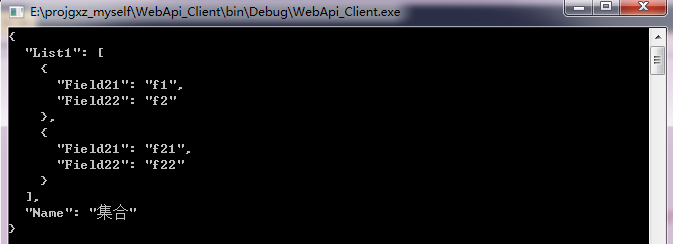
指定格式化器,下面例子指定了JSON格式化器,也可以指定BSON格式化器。
            string url = "http://localhost/webApi_test/api/testapi";

            List<Model2> model2List = new List<Model2> { new Model2 { Field21 = "f1", Field22 = "f2" }, new Model2 { Field21 = "f21", Field22 = "f22" } };

            Model1 model = new Model1 { Name = "集合", List1 = model2List };

            using (HttpClient client = new HttpClient())

            {

                Task<HttpResponseMessage> taskResult = client.PostAsync(url, model, new JsonMediaTypeFormatter());

                HttpResponseMessage responseMessage = taskResult.Result;

                Task<Model1> models = responseMessage.Content.ReadAsAsync<Model1>();

                models.Wait();

                Console.WriteLine(JsonConvert.SerializeObject(models.Result, Formatting.Indented));

            }

            Console.ReadLine();
指定BSON格式化器,并且解析响应时也要指定为BOSN格式化器,同时需要注意的是,Web API默认配置没有包含BSON格式化器,所以要在服务端添加BSON格式化器。
            string url = "http://localhost/webApi_test/api/testapi";

            List<Model2> model2List = new List<Model2> { new Model2 { Field21 = "f1", Field22 = "f2" }, new Model2 { Field21 = "f21", Field22 = "f22" } };

            Model1 model = new Model1 { Name = "集合", List1 = model2List };

            using (HttpClient client = new HttpClient())

            {

                Task<HttpResponseMessage> taskResult = client.PostAsync(url, model, new BsonMediaTypeFormatter());

                HttpResponseMessage responseMessage = taskResult.Result;

                Task<Model1> models = responseMessage.Content.ReadAsAsync<Model1>(new List<BsonMediaTypeFormatter> { new BsonMediaTypeFormatter() });

                models.Wait();

                Console.WriteLine(JsonConvert.SerializeObject(models.Result, Formatting.Indented));

            }

            Console.ReadLine();
---------------------------------------------------------------------
转载与引用请注明出处。
时间仓促,水平有限,如有不当之处,欢迎指正。
asp.net web api客户端调用的更多相关文章
- 关于ASP.NET Web API 客户端的请求报文中添加 Authorization
当你使用客户端发送请求 Web API 的时候,因为API 有验证,所以你的请求报文中必须有”Authorization“,那么就需要手动添加了! HttpClient client = new Ht ...
- ASP.NET Web API 2.0新特性:Attribute Routing1
ASP.NET Web API 2.0新特性:Attribute Routing[上篇] 对于一个针对ASP.NET Web API的调用请求来说,请求的URL和对应的HTTP方法的组合最终决定了目标 ...
- 【ASP.NET Web API教程】3.2 通过.NET客户端调用Web API(C#)
原文:[ASP.NET Web API教程]3.2 通过.NET客户端调用Web API(C#) 注:本文是[ASP.NET Web API系列教程]的一部分,如果您是第一次看本博客文章,请先看前面的 ...
- ASP.NET Web API与Owin OAuth:使用Access Toke调用受保护的API
在前一篇博文中,我们使用OAuth的Client Credential Grant授权方式,在服务端通过CNBlogsAuthorizationServerProvider(Authorization ...
- 如果调用ASP.NET Web API不能发送PUT/DELETE请求怎么办?
理想的RESTful Web API采用面向资源的架构,并使用请求的HTTP方法表示针对目标资源的操作类型.但是理想和现实是有距离的,虽然HTTP协议提供了一系列原生的HTTP方法,但是在具体的网络环 ...
- JavaScript跨域调用、JSONP、CORS与ASP.NET Web API[共8篇]
[第1篇] 同源策略与JSONP 浏览器是访问Internet的工具,也是客户端应用的宿主,它为客户端应用提供一个寄宿和运行的环境.而这里所说的应用,基本是指在浏览器中执行的客户端JavaScript ...
- 使用ASP.NET Web Api构建基于REST风格的服务实战系列教程【九】——API变了,客户端怎么办?
系列导航地址http://www.cnblogs.com/fzrain/p/3490137.html 前言 一旦我们将API发布之后,消费者就会开始使用并和其他的一些数据混在一起.然而,当新的需求出现 ...
- ASP.NET Web Api 服务器端变了,客户端该如何修改请求(转载)
转载地址:http://www.cnblogs.com/fzrain/p/3558765.html 前言 一旦我们将API发布之后,消费者就会开始使用并和其他的一些数据混在一起.然而,当新的需求出现时 ...
- MVC项目实践,在三层架构下实现SportsStore-09,ASP.NET MVC调用ASP.NET Web API的查询服务
ASP.NET Web API和WCF都体现了REST软件架构风格.在REST中,把一切数据视为资源,所以也是一种面向资源的架构风格.所有的资源都可以通过URI来唯一标识,通过对资源的HTTP操作(G ...
随机推荐
- Linux上的文件搜索
locate 基础了解 在centos7上默认没有locate命令,需要先手动安装.安装步骤:http://www.cnblogs.com/feanmy/p/7676717.html locate命令 ...
- 前端页面卡顿、也许是DOM操作惹的祸?
界面上UI的更改都是通过DOM操作实现的,并不是通过传统的刷新页面实现 的.尽管DOM提供了丰富接口供外部调用,但DOM操作的代价很高,页面前端代码的性能瓶颈也大多集中在DOM操作上,所以前端性能优化 ...
- web自动化测试从入门到持续集成(selenium webdriver)
在很多刚学习自动化的可能会认为我只需要会运用selenium,我只需要在一个编辑器中实用selenium +java编写了一些脚本那么就会自动化了,是真的吗?答案肯定是假的.自动化肯定是需要做到真的完 ...
- 浅谈python 复制(深拷贝,浅拷贝)
博客参考:点击这里 python中对象的复制以及浅拷贝,深拷贝是存在差异的,这儿我们主要以可变变量来演示,不可变变量则不存在赋值/拷贝上的问题(下文会有解释),具体差异如下文所示 1.赋值: a=[1 ...
- ubuntu下codeblocks安装与中文化
什么是Code::Blocks Code::Blocks是一个免费.开源.跨平台的集成开发环境,使用C++开发,并且使用wxWidgets做为GUI库.Code::Blocks使用了插件架构,其功能可 ...
- hibernate5使用注解遇到的问题
问题描述 出现MappingException:Unknown entity,看到这个我以为在cfg配置文件中没有配置,实际上我是配置了的,那么问题出在那里呢,既然找不到实体,那么会不会是注解类出现了 ...
- jfinal编码问题及解决
使用jfinal出现了常见的编码问题情况 public void test() { Random r = new Random(); try { Connection conn = createCon ...
- 聊聊Vue.js组件间通信的几种姿势
写在前面 因为对Vue.js很感兴趣,而且平时工作的技术栈也是Vue.js,这几个月花了些时间研究学习了一下Vue.js源码,并做了总结与输出. 文章的原地址:https://github.com/a ...
- session和cookie作用原理,区别
Cookie概念 在浏览某些 网站 时,这些网站会把 一些数据存在 客户端 , 用于使用网站 等跟踪用户,实现用户自定义 功能. 是否设置过期时间: 如果不设置 过期时间,则表示这个 Cookie生命 ...
- C++开发象棋一 绘制棋盘
这是我要和大家分享的基于C++和MFC开发的一个象棋程序,目的是练习编程实践和大家分享同时希望大家能给出指教. 进入主题 一.棋盘分析 这是我绘制的棋盘,棋盘的组成由9条竖线和10条横线构成.这儿我们 ...