
Chapter 1:Create You First 3D Scene With Three.js
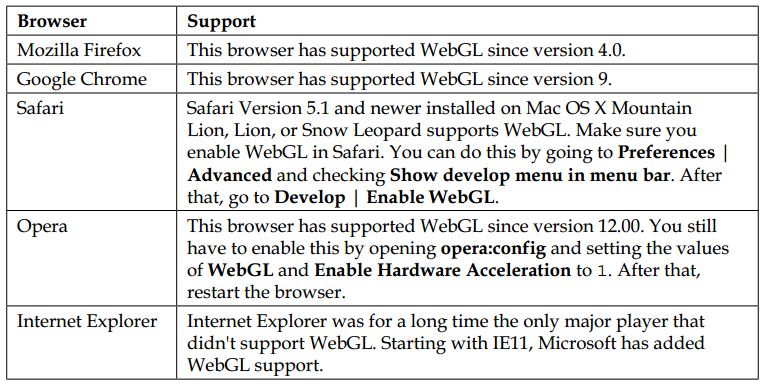
1,各浏览器对WebGL的支持
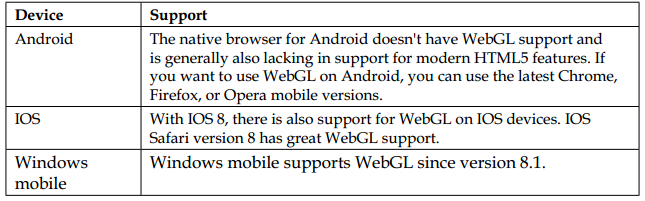
手机浏览器对WebGL的支持:
书的源码:https://github.com/josdirksen/learning-threejs
第一次用浏览器打开代码可能无法正常显示,好像要对浏览器做一些设置额。
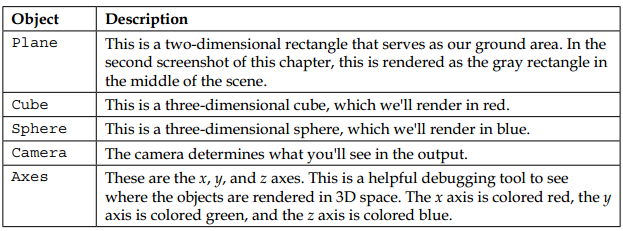
创建第一个3D场景包括这几样东西:
<!DOCTYPE html>

<html>

<head>

    <title>Example 01.06 - Screen size change</title>

    <script type="text/javascript" src="../libs/three.js"></script>

    <script type="text/javascript" src="../libs/stats.js"></script>//shows the frames per second(fps) for animation

    <script type="text/javascript" src="../libs/dat.gui.js"></script>//allows you to very easily create a simple user interface component that can change variables in your code

    <style>

        body {

            /* set margin to 0 and overflow to hidden, to go fullscreen */

            margin: 0;

            overflow: hidden;

        }

    </style>

</head>

<body>

<div id="Stats-output">

</div>

<!-- Div which will hold the Output -->

<div id="WebGL-output">

</div>

<!-- Javascript code that runs our Three.js examples -->

<script type="text/javascript">

    var camera;

    var scene;

    var renderer;

    // once everything is loaded, we run our Three.js stuff.

    function init() {


        var stats = initStats();

        // create a scene, that will hold all our elements such as objects, cameras and lights.

        scene = new THREE.Scene();

        // create a camera, which defines where we're looking at. 第一个参数是摄像机的角度,其他因素不变的情况下角度越大,看到的场景越小,第二个是场景的比例,第三个是near,第四个是far我们能看到的是near和far之间的内容

        camera = new THREE.PerspectiveCamera(45, window.innerWidth / window.innerHeight, 0.1, 1000);

        // create a render and set the size

        renderer = new THREE.WebGLRenderer();

        renderer.setClearColor(new THREE.Color(0xEEEEEE, 1.0));

        renderer.setSize(window.innerWidth, window.innerHeight);

        renderer.shadowMapEnabled = true;//默认是不开启阴影效果的,如果要显示阴影在这里要把它设为true;

        // create the ground plane

        var planeGeometry = new THREE.PlaneGeometry(60, 20, 1, 1);//创建一个长为60,宽为20的长方形,后面那两个参数是可选的,分别为widthsegements,heightsegements

        var planeMaterial = new THREE.MeshLambertMaterial({color: 0xffffff});//设置材质,并初始化材质颜色

        var plane = new THREE.Mesh(planeGeometry, planeMaterial); //把二者合并为一个mesh对象

        plane.receiveShadow = true;//接收阴影

        // rotate and position the plane

        plane.rotation.x = -0.5 * Math.PI;

        plane.position.x = 15;

        plane.position.y = 0;

        plane.position.z = 0;

        // add the plane to the scene

        scene.add(plane);

        // create a cube

        var cubeGeometry = new THREE.BoxGeometry(4, 4, 4);//新建一个立方体,参数为width,height,depth,后面还有三个可选参数,分别为widthsegments,heightsegments,depthsegments

        var cubeMaterial = new THREE.MeshLambertMaterial({color: 0xff0000});

        var cube = new THREE.Mesh(cubeGeometry, cubeMaterial);

        cube.castShadow = true;

        // position the cube

        cube.position.x = -4;

        cube.position.y = 3;

        cube.position.z = 0;

        // add the cube to the scene

        scene.add(cube);

        var sphereGeometry = new THREE.SphereGeometry(4, 20, 20);//SphereGeometry(radius, widthSegments, heightSegments, phiStart, phiLength, thetaStart, thetaLength)
var sphereMaterial = new THREE.MeshLambertMaterial({color: 0x7777ff});

        var sphere = new THREE.Mesh(sphereGeometry, sphereMaterial);

        // position the sphere

        sphere.position.x = 20;

        sphere.position.y = 0;

        sphere.position.z = 2;

        sphere.castShadow = true;

        // add the sphere to the scene

        scene.add(sphere);

        // position and point the camera to the center of the scene

        camera.position.x = -30;

        camera.position.y = 40;

        camera.position.z = 30;

        camera.lookAt(scene.position);

        // add subtle ambient lighting

        var ambientLight = new THREE.AmbientLight(0x0c0c0c);

        scene.add(ambientLight);

        // add spotlight for the shadows

        var spotLight = new THREE.SpotLight(0xffffff);

        spotLight.position.set(-40, 60, -10);

        spotLight.castShadow = true;

        scene.add(spotLight);

        // add the output of the renderer to the html element

        document.getElementById("WebGL-output").appendChild(renderer.domElement);

        // call the render function

        var step = 0;

        var controls = new function () {

            this.rotationSpeed = 0.02;

            this.bouncingSpeed = 0.03;

        };

        var gui = new dat.GUI();

        gui.add(controls, 'rotationSpeed', 0, 0.5);

        gui.add(controls, 'bouncingSpeed', 0, 0.5);

        render();

        function render() {

            stats.update();

            // rotate the cube around its axes

            cube.rotation.x += controls.rotationSpeed;

            cube.rotation.y += controls.rotationSpeed;

            cube.rotation.z += controls.rotationSpeed;

            // bounce the sphere up and down

            step += controls.bouncingSpeed;

            sphere.position.x = 20 + ( 10 * (Math.cos(step)));

            sphere.position.y = 2 + ( 10 * Math.abs(Math.sin(step)));

            // render using requestAnimationFrame

            requestAnimationFrame(render);

            renderer.render(scene, camera);

        }

        function initStats() {

            var stats = new Stats();

            stats.setMode(0); // 0: fps, 1: ms

            // Align top-left

            stats.domElement.style.position = 'absolute';

            stats.domElement.style.left = '0px';

            stats.domElement.style.top = '0px';

            document.getElementById("Stats-output").appendChild(stats.domElement);

            return stats;

        }

    }

    function onResize() {

        camera.aspect = window.innerWidth / window.innerHeight;

        camera.updateProjectionMatrix();

        renderer.setSize(window.innerWidth, window.innerHeight);

    }

    window.onload = init;

    // listen to the resize events

    window.addEventListener('resize', onResize, false);

</script>

</body>

</html>
Chapter 1:Create You First 3D Scene With Three.js的更多相关文章
- WPF: Creation of Text Labels for 3D Scene
原文:WPF: Creation of Text Labels for 3D Scene 转载:http://www.codeproject.com/KB/WPF/WPF_Text3D.aspx Do ...
- 泡泡一分钟:Project AutoVision - Localization and 3D Scene Perception for an Autonomous Vehicle with a Multi-Camera System
Project AutoVision - Localization and 3D Scene Perception for an Autonomous Vehicle with a Multi-Cam ...
- 网页3D效果库Three.js初窥
网页3D效果库Three.js初窥 背景 一直想研究下web页面的3D效果,最后选择了一个比较的成熟的框架Three.js下手 ThreeJs官网 ThreeJs-github; 接下来我会陆续翻译 ...
- 网页3D效果库Three.js学习[二]-了解照相机
camera 上篇大致了解了three.js ,并可以创建一个简单的可动的立方体.下来我们着重了解下camera (照相机),照相机其实就是视角,就像你的眼睛.Three.js有两种不同的相机模式:直 ...
- [Tools] Create a Simple CLI Tool in Node.js with CAC
Command-line tools can help you with all sorts of tasks. This lesson covers the very basics of setti ...
- javascript 3d网页 示例 ( three.js 初探 七)
1 完整代码下载 https://pan.baidu.com/s/1JJyVcP2KqXsd5G6eaYpgHQ 提取码 3fzt (压缩包名: 2020-4-5-demo.zip) 2 图片展示 3 ...
- 3D视觉差---原生js+css
<!doctype html> <html> <head> <meta http-equiv="Content-Type" content ...
- 3d标签云(JS版)
http://www.miaov.com/miaov_demo/3dLable/miaov_demo.html http://www.lijian.net/p/windstagball/index.h ...
- [Most.js] Create Streams From Single Values With Most.js
Most provides many means for creating streams, the simplest of which is the offunction. In this less ...
随机推荐
- 《HelloGitHub》第 66 期
兴趣是最好的老师,HelloGitHub 让你对编程感兴趣! 简介 分享 GitHub 上有趣.入门级的开源项目. 这里有实战项目.入门教程.黑科技.开源书籍.大厂开源项目等,涵盖多种编程语言 Pyt ...
- requests之POST请求
上一节我们讲了GET请求,今天我们来讲讲POST请求. 学习一个新的模块,其实不用去百度什么的,直接用 help 函数就能查看相关注释和案例内容.如图所示,就是我们今天需要学习的内容. 1.用上面给的 ...
- mybatis plus 一对多,多表联查的使用小记
阅读本博文需要有基础的mybatis以及mybatis plus知识,如果没有建议您了解相关的内容 本项目使用的是springboot构建的,数据库字段命名不严谨仅做演示测试使用,本文不做相关源码的解 ...
- Unity——基于UGUI的UI框架
基于UGUI的UI框架 一.Demo展示 二.关键类 MonoSingle 继承MonoBehaviour的单例基类:做了一些特殊处理: 保证场景中必须有GameInit名称的物体,所有单例管理器脚本 ...
- 题解 [POI2013]SPA-Walk
题目传送门 题目大意 给出两个长度为 \(n\) 的 \(01\) 串,问是否可以通过某一位把 \(s\) 变为 \(t\),但是中途不能变为 \(k\) 个 \(01\) 串中任意一个,问是否可行. ...
- bash手册
目录 bash手册 man命令 man man 分页程序(page) Linux手册页惯用的节名 Linux手册页的内容区域 查看命令在Linux手册页中的区域 info页面 help帮助 bash手 ...
- 双系统升win11(grub启动问题修复与讲解)?!?
起 最近win11不是出来了吗.(着急修复的可以直接跳到最后一步) 于是我就突发奇想给我半年没进去的windows升个级........ 于是我找到了我win11的升级包(从我一个同学哪儿) 工具都集 ...
- mysql update语句的执行流程是怎样的
update更新语句流程是怎么样的 update更新语句基本流程也会查询select流程一样,都会走一遍. update涉及更新数据,会对行加dml写锁,这个DML读锁是互斥的.其他dml写锁需要等待 ...
- css单位px,em,rem区别
在css中单位长度用的最多的是px.em.rem,这三个的区别是: px是固定的像素,一旦设置了就无法因为适应页面大小而改变. em和rem相对于px更具有灵活性,他们是相对长度单位,意思是长度不是定 ...
- (课内)信安数基RSA-level3-5
emmmm感觉其实自己对这个的理解完全不够,原理只能写出这么个东西(悲) 代码完全是 攻击方式中(1)(2)内容的实现. lambda是一种可以理解为匿名函数的写法:写在这里看起来很酷炫(bushi) ...