
torch.nn.functional中softmax的作用及其参数说明
参考:https://pytorch-cn.readthedocs.io/zh/latest/package_references/functional/#_1
class torch.nn.Softmax(input, dim)
或:
torch.nn.functional.softmax(input, dim)
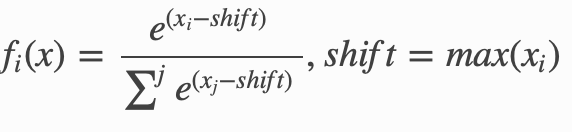
对n维输入张量运用Softmax函数,将张量的每个元素缩放到(0,1)区间且和为1。Softmax函数定义如下:
参数:
dim:指明维度,dim=0表示按列计算;dim=1表示按行计算。默认dim的方法已经弃用了,最好声明dim,否则会警告:
UserWarning: Implicit dimension choice for softmax has been deprecated. Change the call to include dim=X as an argument.
shape:
- 输入:(N, L)
- 输出:(N, L)
返回结果是一个与输入维度dim相同的张量,每个元素的取值范围在(0,1)区间。
例子:
import torch

from torch import nn

from torch import autograd

m = nn.Softmax()

input = autograd.Variable(torch.randn(, ))

print(input)

print(m(input))
返回:
(deeplearning) userdeMBP:pytorch user$ python test.py

tensor([[ 0.2854,  0.1708,  0.4308],

        [-0.1983,  2.0705,  0.1549]])

test.py:: UserWarning: Implicit dimension choice for softmax has been deprecated. Change the call to include dim=X as an argument.

  print(m(input))

tensor([[0.3281, 0.2926, 0.3794],

        [0.0827, 0.7996, 0.1177]])
可见默认按行计算,即dim=1
更明显的例子:
import torch

import torch.nn.functional as F

x= torch.Tensor( [ [,,,],[,,,],[,,,]])

y1= F.softmax(x, dim = ) #对每一列进行softmax

print(y1)

y2 = F.softmax(x,dim =) #对每一行进行softmax

print(y2)

x1 = torch.Tensor([,,,])

print(x1)

y3 = F.softmax(x1,dim=) #一维时使用dim=,使用dim=1报错

print(y3)
返回:
(deeplearning) userdeMBP:pytorch user$ python test.py

tensor([[0.3333, 0.3333, 0.3333, 0.3333],

        [0.3333, 0.3333, 0.3333, 0.3333],

        [0.3333, 0.3333, 0.3333, 0.3333]])

tensor([[0.0321, 0.0871, 0.2369, 0.6439],

        [0.0321, 0.0871, 0.2369, 0.6439],

        [0.0321, 0.0871, 0.2369, 0.6439]])

tensor([., ., ., .])

tensor([0.0321, 0.0871, 0.2369, 0.6439])
因为列的值相同,所以按列计算时每一个所占的比重都是0.3333;行都是[1,2,3,4],所以按行计算,比重结果都为[0.0321, 0.0871, 0.2369, 0.6439]
一维使用dim=1报错:
RuntimeError: Dimension out of range (expected to be in range of [-, ], but got )
torch.nn.functional中softmax的作用及其参数说明的更多相关文章
- 从 relu 的多种实现来看 torch.nn 与 torch.nn.functional 的区别与联系
从 relu 的多种实现来看 torch.nn 与 torch.nn.functional 的区别与联系 relu多种实现之间的关系 relu 函数在 pytorch 中总共有 3 次出现: torc ...
- PyTorch : torch.nn.xxx 和 torch.nn.functional.xxx
PyTorch : torch.nn.xxx 和 torch.nn.functional.xxx 在写 PyTorch 代码时,我们会发现一些功能重复的操作,比如卷积.激活.池化等操作.这些操作分别可 ...
- [pytorch笔记] torch.nn vs torch.nn.functional; model.eval() vs torch.no_grad(); nn.Sequential() vs nn.moduleList
1. torch.nn与torch.nn.functional之间的区别和联系 https://blog.csdn.net/GZHermit/article/details/78730856 nn和n ...
- Pytorch本人疑问(1) torch.nn和torch.nn.functional之间的区别
在写代码时发现我们在定义Model时,有两种定义方法: torch.nn.Conv2d()和torch.nn.functional.conv2d() 那么这两种方法到底有什么区别呢,我们通过下述代码看 ...
- pytorch torch.nn.functional实现插值和上采样
interpolate torch.nn.functional.interpolate(input, size=None, scale_factor=None, mode='nearest', ali ...
- PyTorch官方中文文档:torch.nn
torch.nn Parameters class torch.nn.Parameter() 艾伯特(http://www.aibbt.com/)国内第一家人工智能门户,微信公众号:aibbtcom ...
- Pytorch中pad函数toch.nn.functional.pad()的用法
padding操作是给图像外围加像素点. 为了实际说明操作过程,这里我们使用一张实际的图片来做一下处理. 这张图片是大小是(256,256),使用pad来给它加上一个黑色的边框.具体代码如下: 1 2 ...
- torch.nn 的本质
torch.nn 的本质 PyTorch 提供了各种优雅设计的 modules 和类 torch.nn,torch.optim,Dataset 和 DataLoader 来帮助你创建并训练神经网络.为 ...
- 到底什么是TORCH.NN?
该教程是在notebook上运行的,而不是脚本,下载notebook文件. PyTorch提供了设计优雅的模块和类:torch.nn, torch.optim, Dataset, DataLoader ...
随机推荐
- bat文件传递参数
%*是表示命令行传过来的参数,%1表示第一个参数,%2表示第二个参数,以此类推.如执行C:/>hello.bat hello world, %1取出来就是hello %2取出来就是world h ...
- Linux配置防火墙端口 8080端口
1.查看防火墙状态,哪些端口开放了 /etc/init.d/iptables status 2.配置防火墙 vi /etc/sysconfig/iptables ################# ...
- SAP WM 有无保存WM Level历史库存的Table?
SAP WM 有无保存WM Level历史库存的Table? 前日下班回家的路上,收到一个前客户内部顾问同行发过来的微信,问我在SAP系统里哪个表是用来存储WM Level历史库存的. 这个问题问住了 ...
- Android星球效果实现
在项目中看着这个旋转效果挺炫的,就抽取出来做个记录.主要是使用CarrouselLayout 稍微修改 CarrouselLayout代码Demo下载z地址:GitHub https://github ...
- leetcode-83.删除排序链表中的重复元素
leetcode-83.删除排序链表中的重复元素 Points 链表 题意 给定一个排序链表,删除所有重复的元素,使得每个元素只出现一次. 示例 1: 输入: 1->1->2 输出: 1- ...
- OSWatcher使用过程中小问题解决方法
本文介绍一下在使用OSWatcher过程当中遇到的两个问题的解决方法.如有更好的方法,敬请留言. 1:OSWatcher在配置文件里面设置了参数OSW_COMPRESSION为gzip后,OSWatc ...
- [20181130]如何猜测那些值存在hash冲突.txt
[20181130]如何猜测那些值存在hash冲突.txt --//今年6月份开始kerrycode的1个帖子提到子查询结果缓存在哈希表中情况:--//链接:http://www.cnblogs.co ...
- 前后端分离djangorestframework——解析渲染组件
解析器 解析器的作用就是服务端接收客户端传过来的数据,把数据解析成自己想要的数据类型的过程,本质就是对请求体中的数据进行解析 Accept是告诉对方我能解析什么样的数据,通常也可以表示我想要什么样的数 ...
- 关于SqlServer数据表操作
--修改表字段长度alter table Tbl_Count_User_Ref ALTER COLUMN CountName nvarchar(500);新增字段alter table 表名 add ...
- mysql 数据库 命令行的操作——对表和字段的操作
一.对表的操作 1.查看所有表 show tables: 2.创建表 create table 表名(字段1 类型1 约束1 ,字段2 类型2 约束2): 3.修改表的名字 rename table ...