
mybatis百科-列映射类ResultMapping
@
ResultMapping 对象是 mybatis 的 <resultMap> 节点在 ResultMap 对象中基础组成部分.
ResultMapping 对象记录了结果集中一列与队友JavaBean中一个属性的对应关系。
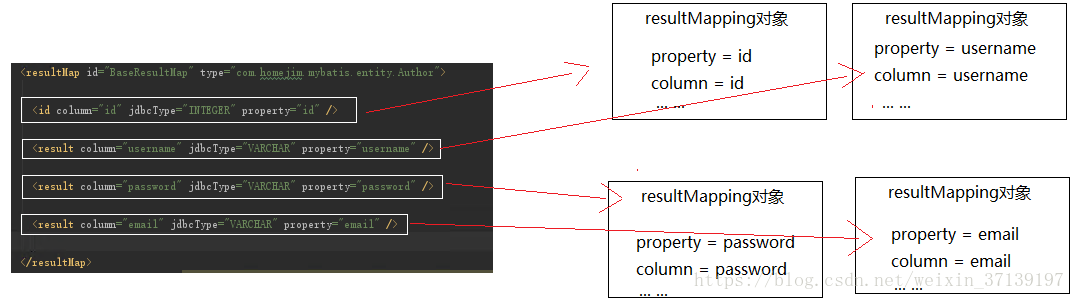
1 成员变量
// Configuration 对象, 看过前面源码的应该知道这个对象的含义

private Configuration configuration;

// 对应相应 JavaBean 中的成员变量

private String property;

// 对应节点的 column 属性, 对应检索出来的列名(别名)

private String column;

// 对应节点的 javaType 属性

private Class<?> javaType;

// 对应节点的 jdbcType 属性, 表示映射列的JDBC属性

private JdbcType jdbcType;

// 类型处理器

private TypeHandler<?> typeHandler;

// 对应另一个 resultMap 的 id, 负责将结果集中的一部分映射成其他对象。

private String nestedResultMapId;

//

private String nestedQueryId;

// 对应节点的 notNullColumns 属性拆分后的结果

private Set<String> notNullColumns;

// 对应节点的 columnPrefix 属性

private String columnPrefix;

// 处理后的标记, 有两种:id和constructor

private List<ResultFlag> flags;

//

private List<ResultMapping> composites;

// 对应节点的 resultSet 属性

private String resultSet;

// 对应节点的 foreignColumn 属性

private String foreignColumn;

// 是否延迟加载, 对应节点的 fetchType 属性

private boolean lazy;
2 构造函数
  ResultMapping() {

  }
就是一个空的构造函数
3 其他函数
3.1 setter 和 getter 函数
ResultMapping 对象创建使用的是建造者模式, 因此,只有部分成员变量含有 setter 函数。而除了 Configuration 对象, 其他都含有 getter 函数。
3.2 equals 和 hashCode 函数
该函数重写了 equals 方法。
  @Override

  public boolean equals(Object o) {

    if (this == o) {

      return true;

    }

    if (o == null || getClass() != o.getClass()) {

      return false;

    }

    ResultMapping that = (ResultMapping) o;

    if (property == null || !property.equals(that.property)) {

      return false;

    }

    return true;

  }
而 equals 重写, 则基本上 hashCode 也要重写。 以 property 或 column 的 hashCode 作为其 hashCode
  @Override

  public int hashCode() {

    if (property != null) {

      return property.hashCode();

    } else if (column != null) {

      return column.hashCode();

    } else {

      return 0;

    }

  }
3.3 toString 函数
  @Override

  public String toString() {

    final StringBuilder sb = new StringBuilder("ResultMapping{");

    //sb.append("configuration=").append(configuration); // configuration doesn't have a useful .toString()

    sb.append("property='").append(property).append('\'');

    sb.append(", column='").append(column).append('\'');

    sb.append(", javaType=").append(javaType);

    sb.append(", jdbcType=").append(jdbcType);

    //sb.append(", typeHandler=").append(typeHandler); // typeHandler also doesn't have a useful .toString()

    sb.append(", nestedResultMapId='").append(nestedResultMapId).append('\'');

    sb.append(", nestedQueryId='").append(nestedQueryId).append('\'');

    sb.append(", notNullColumns=").append(notNullColumns);

    sb.append(", columnPrefix='").append(columnPrefix).append('\'');

    sb.append(", flags=").append(flags);

    sb.append(", composites=").append(composites);

    sb.append(", resultSet='").append(resultSet).append('\'');

    sb.append(", foreignColumn='").append(foreignColumn).append('\'');

    sb.append(", lazy=").append(lazy);

    sb.append('}');

    return sb.toString();

  }
恨我们平常写的基本差不多。
4 内部类 Builder
ResultMapping 是使用建造者模式来进行创建的。
4.1 成员变量
private ResultMapping resultMapping = new ResultMapping();
4.2 构造函数
就是给部分属性赋值。
 public Builder(Configuration configuration, String property, String column, TypeHandler<?> typeHandler) {

      this(configuration, property);

      resultMapping.column = column;

      resultMapping.typeHandler = typeHandler;

    }

    public Builder(Configuration configuration, String property, String column, Class<?> javaType) {

      this(configuration, property);

      resultMapping.column = column;

      resultMapping.javaType = javaType;

    }

    public Builder(Configuration configuration, String property) {

      resultMapping.configuration = configuration;

      resultMapping.property = property;

      resultMapping.flags = new ArrayList<ResultFlag>();

      resultMapping.composites = new ArrayList<ResultMapping>();

      resultMapping.lazy = configuration.isLazyLoadingEnabled();

    }
4.3 建造者模式相关函数
除了 configuration, property, column, 其他成员变量都有类似如下的函数:
赋值后返回 Builder 对象本身。
public Builder javaType(Class<?> javaType) {

  resultMapping.javaType = javaType;

  return this;

}
建造对象的函数
public ResultMapping build() {

  // 返回不可更改的 List

  resultMapping.flags = Collections.unmodifiableList(resultMapping.flags);

  // 返回不可更改的 List

  resultMapping.composites = Collections.unmodifiableList(resultMapping.composites);

  resolveTypeHandler();

  // 校验

  validate();

  return resultMapping;

}
校验
// 对我们写的配置进行校验

private void validate() {

  // 不可同时定义 nestedQueryId 和 nestedResultMapId

  if (resultMapping.nestedQueryId != null && resultMapping.nestedResultMapId != null) {

    throw new IllegalStateException("Cannot define both nestedQueryId and nestedResultMapId in property " + resultMapping.property);

  }

  // nestedQueryId 、 nestedResultMapId 和 typeHandler 不能同时为 null

  if (resultMapping.nestedQueryId == null && resultMapping.nestedResultMapId == null && resultMapping.typeHandler == null) {

    throw new IllegalStateException("No typehandler found for property " + resultMapping.property);

  }

  // Issue #4 and GH #39: column is optional only in nested resultmaps but not in the rest

  if (resultMapping.nestedResultMapId == null && resultMapping.column == null && resultMapping.composites.isEmpty()) {

    throw new IllegalStateException("Mapping is missing column attribute for property " + resultMapping.property);

  }

  if (resultMapping.getResultSet() != null) {

    int numColumns = 0;

    if (resultMapping.column != null) {

      numColumns = resultMapping.column.split(",").length;

    }

    int numForeignColumns = 0;

    if (resultMapping.foreignColumn != null) {

      numForeignColumns = resultMapping.foreignColumn.split(",").length;

    }

    if (numColumns != numForeignColumns) {

      throw new IllegalStateException("There should be the same number of columns and foreignColumns in property " + resultMapping.property);

    }

  }

}
一起学 mybatis
你想不想来学习 mybatis? 学习其使用和源码呢?那么, 在博客园关注我吧!!
我自己打算把这个源码系列更新完毕, 同时会更新相应的注释。快去 star 吧!!
mybatis百科-列映射类ResultMapping的更多相关文章
- mybatis百科-结果集映射类ResultMap
目录 1 成员变量 2 构造函数 3 其他函数 3.1 setter 和 getter 函数 4 静态内部类 4.1 成员变量 4.2 构造函数 4.3 建造者相关的函数 4.4 获取配置的构造方法参 ...
- Mybatis自动生成实体类和实体映射工具
Mybatis Mysql生成实体类 用到的Lib包: mybatis-generator-core-1.3.2.jarmysql-connector-java-5.1.30.jar 1. 创建一个文 ...
- Mybatis 高级结果映射 ResultMap Association Collection
在阅读本文章时,先说几个mybatis中容易混淆的地方: 1. mybatis中的列不是数据库里的列而是查询里的列,可以是别名(如 select user_name as userName,这时col ...
- 5.Mybatis的输出映射(就是对查询的结果集的映射)
Mybatis的输出映射,也就是对查询结果集的一个映射,主要有两种: 1.resultType(不需要配置,可以直接用) 一般是实体类 基本类型也可以 2.resultMap(需要配置resultMa ...
- Mybatis学习记录(六)----Mybatis的高级映射
1.一对多查询 1.1 需求 查询订单及订单明细的信息. 1.2 sql语句 确定主查询表:订单表 确定关联查询表:订单明细表 在一对一查询基础上添加订单明细表关联即可. SELECT orders. ...
- MyBatis 的 XML 映射文件使用说明
简介 文档参考地址:http://www.mybatis.org/mybatis-3/zh/index.html MyBatis 的真正强大在于它的映射语句,也是它的魔力所在.由于它的异常强大,映射器 ...
- Mybatis学习—XML映射文件
总结自 Mybatis官方中文文档 Mapper XML 文件 MyBatis 的真正强大在于它的映射语句,也是它的魔力所在.由于它的异常强大,映射器的 XML 文件就显得相对简单.如果拿它跟具有相同 ...
- MyBatis多表映射demo
三个实体类,作者.文章和评论. public class Author { private int id; private String username; private String nickna ...
- 转:mybatis 高级结果映射(http://blog.csdn.net/ilovejava_2010/article/details/8180521)
高级结果映射 MyBatis的创建基于这样一个思想:数据库并不是您想怎样就怎样的.虽然我们希望所有的数据库遵守第三范式或BCNF(修正的第三范式),但它们不是.如果有一个数据库能够完美映射到所有应用程 ...
随机推荐
- <自动化测试方案_5>第五章、代码单元自动化测试
第五章.代码单元自动化测试 代码单元测试需要根据编程语言,选择单元测试框架,然后访问类方法,函数.代码单元测试做自动化,相比API.UI自动化做起来更加麻烦,建议放到待API自动化测试.UI自动化测试 ...
- Testlink1.9.17使用方法(第十一章 其他易用性功能)
第十一章 其他易用性功能 QQ交流群:585499566 一. 自定义 一). 自定义字段管理 在主页点击[自定义字段管理]按钮-->进入自定义字段管理页面,点击[创建]按钮,可以创建一个字段, ...
- RTP 流媒体
RTMP协议是Adobe的私有协议,未完全公开,RTSP协议和HTTP协议是共有协议,并有专门机构做维护. RTMP协议一般传输的是flv,f4v格式流,RTSP协议一般传输的是ts,mp4格式的流. ...
- java垃圾回收机制GC
记得第一次总结java 的GC的时候,是刚开始在课堂上学习GC的时候,那时候许老师第一节java课 课后老师说同学们可以去深入理解一下java的GC机制: 但是是花费了三四个小时,翻看了<Thi ...
- MongoDB 安装与配置
MongoDB下载 官方下载链接:https://www.mongodb.com/download-center/community MongoDB安装 简单,按提示安装即可.安装方式: 1. Com ...
- return ||和return && 区别
return a && b 如果a是true的话,返回b,否则返回a return a || b 如果a是true的话,返回a,否则返回b
- Jenkins的构建编号和一个有趣的bug
什么是构建编号 jenkins每个job的每一次构建都有一个属于自己独立的构建编号,每一次的构建结果(成功或失败)所使用的编号都是不相同的. 正确的构建编号:每个job的每次构建结果使用不相同的构建编 ...
- redis常用命令及结构
##常用结构及命令: keys * #查询所有key randomkey #随机返回key type key #返回key的类型 exists key #判断key是否存在 del key1 key2 ...
- Beta阶段 - 博客链接合集
Beta阶段 - 博客链接合集 项目Github地址 安卓端(Stardust):https://github.com/StardustProject/Stardust 服务器端(Gravel):ht ...
- Spring的jdbc模板3:完成CURD操作
测试类代码如下 package zcc.spring_jdbc.demo2; import java.sql.ResultSet; import java.sql.SQLException; impo ...