
IOS项目之弹出动画一
小区宝首页导航栏左边有一个物业按钮,点击时会出现一个视图动画,之前用的是一个POP第三方,想着几个POP动画就要引用一堆的第三方有点麻烦,就试着自己写了一下,功能实现了,下一步就是优化将其封装一下。下面我用DatePicker做的主要是想着再做出点击弹出按钮在底部出现DatePicker选择器。


#import "ViewController.h"
#import "PageViewController.h"
#import "myView.h"

@interface ViewController ()
@property(nonatomic,strong) myView *myview;
@property(nonatomic,strong) UIDatePicker *dataPicker;
@end

@implementation ViewController

- (void)viewDidLoad {
    [super viewDidLoad];
//    self.navigationItem.rightBarButtonItem=[[UIBarButtonItem alloc]initWithTitle:@"预览" style:UIBarButtonItemStyleDone target:self action:@selector(rightClick)];
    self.navigationItem.leftBarButtonItem=[[UIBarButtonItem alloc]initWithTitle:@"弹出" style:UIBarButtonItemStyleDone target:self action:@selector(leftClick)];

    //遮罩层
    _myview=[[myView alloc]initWithFrame:CGRectMake(,-self.view.bounds.size.height, self.view.bounds.size.width, self.view.bounds.size.height)];
    _myview.backgroundColor = [UIColor colorWithWhite:0.5 alpha:0.1f];
    //为遮罩层添加手势识别 可以点击遮罩层空白处隐藏视图
    UIGestureRecognizer *tapgesture=[[UITapGestureRecognizer alloc]initWithTarget:self action:@selector(tapclick)];
    _myview.userInteractionEnabled=YES;
    [_myview addGestureRecognizer:tapgesture];

    //设置DatePicker
    _dataPicker=[[UIDatePicker alloc]init];
    _dataPicker.frame=CGRectMake(, , , );
//    datepicker.backgroundColor=[UIColor grayColor];
    [_myview addSubview:_dataPicker];

    //设置DatePicker上面的视图
    UIView *view=[[UIView alloc]initWithFrame:CGRectMake(, , self.view.bounds.size.width, )];
    view.backgroundColor=[UIColor blueColor];
    UIButton *btnright=[UIButton buttonWithType:UIButtonTypeSystem];
    [btnright setTitle:@"确定" forState:UIControlStateNormal];
    [btnright addTarget:self action:@selector(btnrightClick:) forControlEvents:UIControlEventTouchUpInside];
    btnright.frame=CGRectMake(self.view.bounds.size.width-, , , );
    [view addSubview:btnright];
    [_myview addSubview:view];
    [self.view addSubview:_myview];
}
-(void)leftClick
{
    //下落动画 时间短一些
   [UIView beginAnimations:@"text" context:nil];
    [UIView setAnimationDelay:];
    [UIView setAnimationCurve:UIViewAnimationCurveEaseInOut];
    [UIView setAnimationDuration:0.3];
    _myview.frame=CGRectMake(,, self.view.bounds.size.width, self.view.bounds.size.height);
    [UIView commitAnimations];

    //恢复动画 时间长一些
    [UIView beginAnimations:@"text" context:nil];
    [UIView setAnimationDelay:];
    [UIView setAnimationCurve:UIViewAnimationCurveEaseIn];
    [UIView setAnimationDuration:0.5];
    _myview.frame=CGRectMake(,, self.view.bounds.size.width, self.view.bounds.size.height);
    [UIView commitAnimations];

}
-(void)tapclick
{
    [UIView beginAnimations:@"text" context:nil];
    [UIView setAnimationDelay:];
    [UIView setAnimationCurve:UIViewAnimationCurveEaseOut];
    [UIView setAnimationDuration:0.3];
    _myview.frame=CGRectMake(, -self.view.bounds.size.height, self.view.bounds.size.width, self.view.bounds.size.height);
    [UIView commitAnimations];
}
-(void)btnrightClick:(id)sender
{
    NSLog(@"%@",_dataPicker.date);
    [self tapclick];
}
- (void)didReceiveMemoryWarning {
    [super didReceiveMemoryWarning];
    // Dispose of any resources that can be recreated.
}

@end
我们稍加改动就可以变成从底部弹出视图 这样就完成了闪购模块 宝贝详情中的选择规格的功能
#import "ViewController.h"
#import "PageViewController.h"
#import "myView.h"

@interface ViewController ()
@property(nonatomic,strong) myView *myview;
@property(nonatomic,strong) UIDatePicker *dataPicker;
@end

@implementation ViewController

- (void)viewDidLoad {
    [super viewDidLoad];
//    self.navigationItem.rightBarButtonItem=[[UIBarButtonItem alloc]initWithTitle:@"预览" style:UIBarButtonItemStyleDone target:self action:@selector(rightClick)];
    self.navigationItem.leftBarButtonItem=[[UIBarButtonItem alloc]initWithTitle:@"弹出" style:UIBarButtonItemStyleDone target:self action:@selector(leftClick)];

    //遮罩层
    _myview=[[myView alloc]initWithFrame:CGRectMake(,self.view.bounds.size.height, self.view.bounds.size.width, self.view.bounds.size.height)];
    _myview.backgroundColor = [UIColor colorWithWhite:0.5 alpha:0.1f];
    //为遮罩层添加手势识别 可以点击遮罩层空白处隐藏视图
    UIGestureRecognizer *tapgesture=[[UITapGestureRecognizer alloc]initWithTarget:self action:@selector(tapclick)];
    _myview.userInteractionEnabled=YES;
    [_myview addGestureRecognizer:tapgesture];

    //设置DatePicker
    _dataPicker=[[UIDatePicker alloc]init];
    _dataPicker.frame=CGRectMake(, self.view.bounds.size.height-, , );
//    datepicker.backgroundColor=[UIColor grayColor];
    [_myview addSubview:_dataPicker];

    //设置DatePicker上面的视图
    UIView *view=[[UIView alloc]initWithFrame:CGRectMake(, self.view.bounds.size.height-, self.view.bounds.size.width, )];
    view.backgroundColor=[UIColor blueColor];
    UIButton *btnright=[UIButton buttonWithType:UIButtonTypeSystem];
    [btnright setTitle:@"确定" forState:UIControlStateNormal];
    [btnright addTarget:self action:@selector(btnrightClick:) forControlEvents:UIControlEventTouchUpInside];
    btnright.frame=CGRectMake(self.view.bounds.size.width-, , , );
    [view addSubview:btnright];
    [_myview addSubview:view];
    [self.view addSubview:_myview];
}
-(void)leftClick
{
    //下落动画 时间短一些
   [UIView beginAnimations:@"text" context:nil];
    [UIView setAnimationDelay:];
    [UIView setAnimationCurve:UIViewAnimationCurveEaseInOut];
    [UIView setAnimationDuration:0.3];
    _myview.frame=CGRectMake(,, self.view.bounds.size.width, self.view.bounds.size.height);
    [UIView commitAnimations];

//    //恢复动画 时间长一些
//    [UIView beginAnimations:@"text" context:nil];
//    [UIView setAnimationDelay:0];
//    [UIView setAnimationCurve:UIViewAnimationCurveEaseIn];
//    [UIView setAnimationDuration:0.5];
//    _myview.frame=CGRectMake(0,0, self.view.bounds.size.width, self.view.bounds.size.height);
//    [UIView commitAnimations];

}
-(void)tapclick
{
    [UIView beginAnimations:@"text" context:nil];
    [UIView setAnimationDelay:];
    [UIView setAnimationCurve:UIViewAnimationCurveEaseOut];
    [UIView setAnimationDuration:0.3];
    _myview.frame=CGRectMake(, self.view.bounds.size.height, self.view.bounds.size.width, self.view.bounds.size.height);
    [UIView commitAnimations];
}
-(void)btnrightClick:(id)sender
{
    NSLog(@"%@",_dataPicker.date);
    [self tapclick];
}
- (void)didReceiveMemoryWarning {
    [super didReceiveMemoryWarning];
    // Dispose of any resources that can be recreated.
}

@end
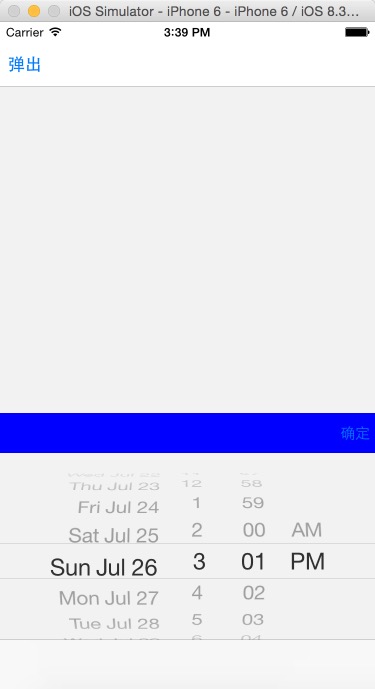
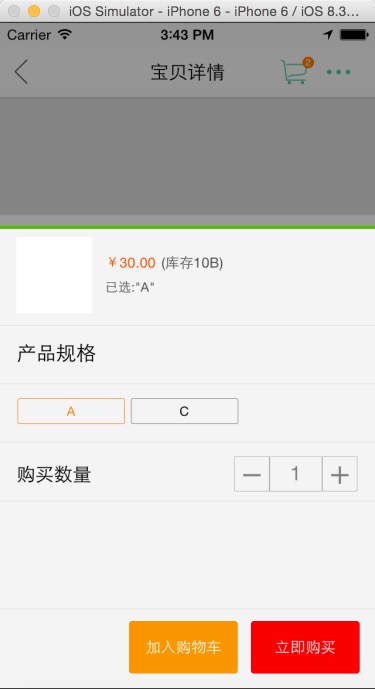
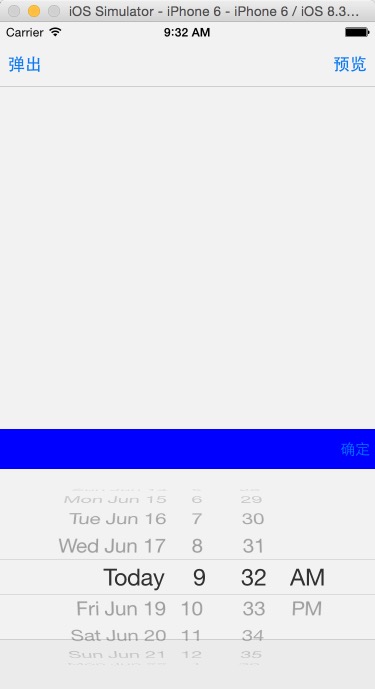
上面的导航控制器并未被遮罩 ,这样添加时才能使导航控制器遮罩[[UIApplication sharedApplication].keyWindow addSubview:_myview];
//
//  ViewController.m
//  PhotoBrower
//
//  Created by City--Online on 15/6/16.
//  Copyright (c) 2015年 City--Online. All rights reserved.
//
#define WIDTH self.view.bounds.size.width
#define HEIGHT self.view.bounds.size.height
#define SCREENWIDTH  [UIScreen mainScreen].bounds.size.width
#define SCREENHEIGHT [UIScreen mainScreen].bounds.size.height

#import "ViewController.h"
#import "PageViewController.h"
#import "ImageViewController.h"
#import "myView.h"

@interface ViewController ()
@property(nonatomic,strong) myView *myview;
@property(nonatomic,strong) UIDatePicker *dataPicker;
@end

@implementation ViewController

- (void)viewDidLoad {
    [super viewDidLoad];

//    self.navigationItem.rightBarButtonItem=[[UIBarButtonItem alloc]initWithTitle:@"预览" style:UIBarButtonItemStyleDone target:self action:@selector(rightClick)];
    self.navigationItem.leftBarButtonItem=[[UIBarButtonItem alloc]initWithTitle:@"弹出" style:UIBarButtonItemStyleDone target:self action:@selector(leftClick)];

    //遮罩层
    _myview=[[myView alloc]initWithFrame:CGRectMake(,SCREENHEIGHT, WIDTH, SCREENHEIGHT)];
    _myview.backgroundColor = [UIColor colorWithWhite:0.5 alpha:0.1f];
    //为遮罩层添加手势识别 可以点击遮罩层空白处隐藏视图
    UIGestureRecognizer *tapgesture=[[UITapGestureRecognizer alloc]initWithTarget:self action:@selector(tapclick)];
    _myview.userInteractionEnabled=YES;
    [_myview addGestureRecognizer:tapgesture];

    //设置DatePicker
    _dataPicker=[[UIDatePicker alloc]init];
    _dataPicker.frame=CGRectMake(, SCREENHEIGHT-, , );
    //    datepicker.backgroundColor=[UIColor grayColor];
    [_myview addSubview:_dataPicker];

    //设置DatePicker上面的视图
    UIView *view=[[UIView alloc]initWithFrame:CGRectMake(, SCREENHEIGHT-, WIDTH, )];
    view.backgroundColor=[UIColor blueColor];
    UIButton *btnright=[UIButton buttonWithType:UIButtonTypeSystem];
    [btnright setTitle:@"确定" forState:UIControlStateNormal];
    [btnright addTarget:self action:@selector(btnrightClick:) forControlEvents:UIControlEventTouchUpInside];
    btnright.frame=CGRectMake(self.view.bounds.size.width-, , , );
    [view addSubview:btnright];
    [_myview addSubview:view];
    [[UIApplication sharedApplication].keyWindow  addSubview:_myview];
//    [self.view addSubview:_myview];
//    [[UIApplication sharedApplication].delegate.window addSubview:_myview];
}
-(void)leftClick
{
    //下落动画 时间短一些
    [UIView beginAnimations:@"text" context:nil];
    [UIView setAnimationDelay:];
    [UIView setAnimationCurve:UIViewAnimationCurveEaseInOut];
    [UIView setAnimationDuration:0.3];
    _myview.frame=CGRectMake(,, self.view.bounds.size.width, SCREENHEIGHT);
    [UIView commitAnimations];

    //恢复动画 时间长一些
//    [UIView beginAnimations:@"text" context:nil];
//    [UIView setAnimationDelay:0];
//    [UIView setAnimationCurve:UIViewAnimationCurveEaseIn];
//    [UIView setAnimationDuration:0.5];
//    _myview.frame=CGRectMake(0,0, self.view.bounds.size.width, self.view.bounds.size.height);
//    [UIView commitAnimations];

//    PageViewController *pageVc=[[PageViewController alloc]init];
//    pageVc.hidesBottomBarWhenPushed=YES;
////    [self presentViewController:pageVc animated:YES completion:nil];
//    [self.navigationController pushViewController:pageVc animated:YES];

}
-(void)tapclick
{
    [UIView beginAnimations:@"text" context:nil];
    [UIView setAnimationDelay:];
    [UIView setAnimationCurve:UIViewAnimationCurveEaseOut];
    [UIView setAnimationDuration:0.3];
    _myview.frame=CGRectMake(, SCREENHEIGHT, self.view.bounds.size.width, SCREENHEIGHT);
    [UIView commitAnimations];
}
-(void)btnrightClick:(id)sender
{
    NSLog(@"%@",_dataPicker.date);
    [self tapclick];
}
- (void)didReceiveMemoryWarning {
    [super didReceiveMemoryWarning];
    // Dispose of any resources that can be recreated.
}
@end
IOS项目之弹出动画一的更多相关文章
- IOS项目之弹出动画终结篇
在之前写过IOS项目之弹出动画一.IOS项目之弹出动画二.IOS项目之弹出动画三,今天来一个终极封装已经上传到Github上弹出动画总结篇UIPopoverTableView. UIPopoverTa ...
- IOS项目之弹出动画二
在IOS项目之弹出动画一中只是实现也功能,并没有体现面向对象的思想 ,今天就试着把它封装了一下,弹出视图的内容可以根据自定义,此处只是用UIDatePicker来演示 我把它传到了GitHub上 ...
- IOS项目之弹出动画三
前面写了弹出动画两个,今天做商城时又用到了,看着这个用着蛮普遍的,所以记了下来 // // mallMoreView.h // XQB // // Created by City--Online on ...
- ios等待ualertview弹出动画完成后再跳转至其他页面
[self performSelector:@selector(popView:) withObject:nil afterDelay:2.0];
- 阶段一:为View设置阴影和弹出动画(天气应用)
“阶段一”是指我第一次系统地学习Android开发.这主要是对我的学习过程作个记录. 上一篇阶段一:通过网络请求,获得并解析JSON数据(天气应用)完成了应用的核心功能,接下来就要对它进行优化.今天我 ...
- mac关闭渐隐和弹出动画效果
苹果系统应用程序的窗口和对话框每次使用的时候都有华丽的特效,但是如果你感觉这种特效显得有点慢(MacGG闲的蛋疼),那该如何取消掉他呢? 方法很简单,打开"终端"(Finder-& ...
- 清除ios系统alert弹出框的域名
清除ios系统alert弹出框的域名 <script> window.alert = function(name) { var iframe = document.createElemen ...
- iOS 15 无法弹出授权弹框之解决方案---Your app uses the AppTrackingTransparency framework, but we are unable to locate the App Tracking Transparency permission request when reviewed on iOS 15.0
2021年9月30日下午:我正愉快的期盼着即将到来的国庆假期,时不时刷新下appstoreconnect的网址,28号就提上去的包,今天还在审核中....由于这个版本刚升级的xcode系统和新出的iO ...
- WPF制作子窗体的弹出动画效果
创建一个WPF应用程序WpfApplication1,新建个窗体DialogWin <Windowx:Class="WpfApplication1.DialogWin" xm ...
随机推荐
- RabbitMQ 消息队列 DEMO
1. 引用 RabbitMQ.Client.5.1.0 2. http://localhost:15672/ public class TestController : ApiController { ...
- Cesium简介 [转]
http://www.cnblogs.com/laixiangran/p/4984522.html 一.Cesium介绍 Cesium是国外一个基于JavaScript编写的使用WebGL的地图引擎. ...
- sql-省市区
insert into Area (codeid,parentid,cityName) values(11,0,'北京');insert into Area (codeid,parentid,city ...
- f.lux在linux下的安装和使用
安装还是蛮容易的~只是装完后在白天色温没什么变化就一直以为没有装成功 https://justgetflux.com/linux.html 这里下载,解压后 安装好以后xflux -l (经纬度) 就 ...
- JQuery Mobile - 为什么绑定事件后会被多次执行?
JQuery Mobile 在绑定事件时候,发现会被多次执行,为什么啊? 原来,jquery click 不是替换原有的function ,而是接着添加,所以才会执行次数越来越多,怎么办才能按需实现 ...
- 【算法】Matrix - Tree 矩阵树定理 & 题目总结
最近集中学习了一下矩阵树定理,自己其实还是没有太明白原理(证明)类的东西,但想在这里总结一下应用中的一些细节,矩阵树定理的一些引申等等. 首先,矩阵树定理用于求解一个图上的生成树个数.实现方式是:\( ...
- Nginx + uWSGI 部署Django 项目,并实现负载均衡
一.uWSGI服务器 uWSGI是一个Web服务器,它实现了WSGI协议.uwsgi.http等协议.Nginx中HttpUwsgiModule的作用是与uWSGI服务器进行交换. 要注意 WSGI ...
- Mutual Training for Wannafly Union #6 E - Summer Trip(并查集)
题目链接:http://www.spoj.com/problems/IAPCR2F/en/ 题目大意: 给m个数字代表的大小,之后n组数据,两两关联,关联后的所有数字为一组,从小到大输出组数以及对应的 ...
- 【wireshark】插件开发(四):Lua插件Post-dissector和Listener
1. Post-dissector post-dissector和dissector不同,它会在所有dissectors都执行过后再被执行,这也就post前缀的由来.post-dissector的构建 ...
- leetcode-179-Largest Number(理解规则,自定义cmp函数进行排序)
题目描述: 给定一组非负整数,重新排列它们的顺序使之组成一个最大的整数. 示例 1: 输入: [10,2] 输出: 210 示例 2: 输入: [3,30,34,5,9] 输出: 9534330 说明 ...